A fresh Laravel install is tidy: a few controllers, a handful of models, one routes file. Two years and forty features later, the same project can have 300-line controllers, a Helpers.php nobody wants to touch, and models that know about email, PDFs, payments and queues. Laravel did not cause that. The default skeleton is a great starting point, but it was never meant to be the final shape of a large application.
This guide walks through a structure that holds up when an app grows into an ERP-style system with many modules, many developers and years of new requirements. It stays close to Laravel conventions, so new team members are not fighting a custom framework.
Start With the Problem, Not the Folder Tree
Structure exists to answer three questions quickly:
- Where does this code live? A new developer should guess the right folder on the first try.
- What can change without breaking something else? Boundaries should make the blast radius of a change obvious.
- Where does business logic go? Not in controllers, not in Blade or React components, not scattered across model events.
If your current structure answers these well, you do not need to reorganize. If it does not, the steps below help, and you can adopt them one module at a time.
Step 1: Group by Business Domain, Not by Technical Type
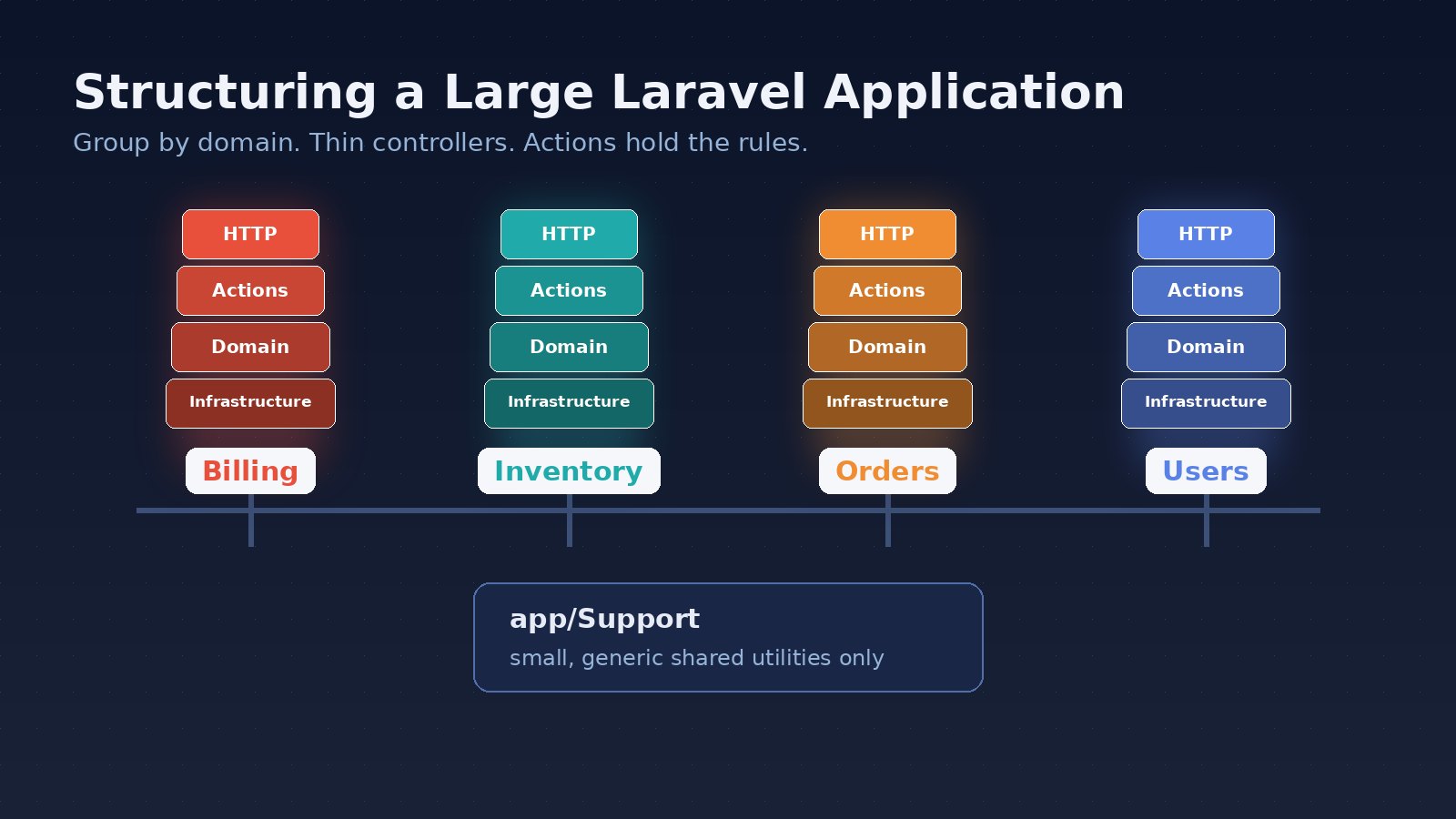
The default layout groups by type: all controllers together, all models together, all jobs together. That works for small apps. In a large app, a single feature such as "approve a purchase order" ends up spread across eight folders, and every folder holds files from twenty unrelated features.
Grouping by domain keeps related code together:
app/
  Domain/
    Billing/
      Actions/
      Models/
      Events/
      Jobs/
      Policies/
      Data/
    Inventory/
      Actions/
      Models/
      ...
    Orders/
      ...
  Http/
    Controllers/
      Billing/
      Inventory/
    Requests/
      Billing/
  Support/        # small, genuinely shared utilities
Keep app/Http as the delivery layer and put business code under app/Domain. Composer's PSR-4 autoloading already maps App\ to app/, so a namespace like App\Domain\Billing\Actions works without extra configuration.
Name domains after how the business talks: Billing, Inventory, Payroll, Leasing. Avoid technical names like "Core" or "Common" for anything that contains real business rules, because those folders turn into dumping grounds.
Step 2: Keep Controllers Thin
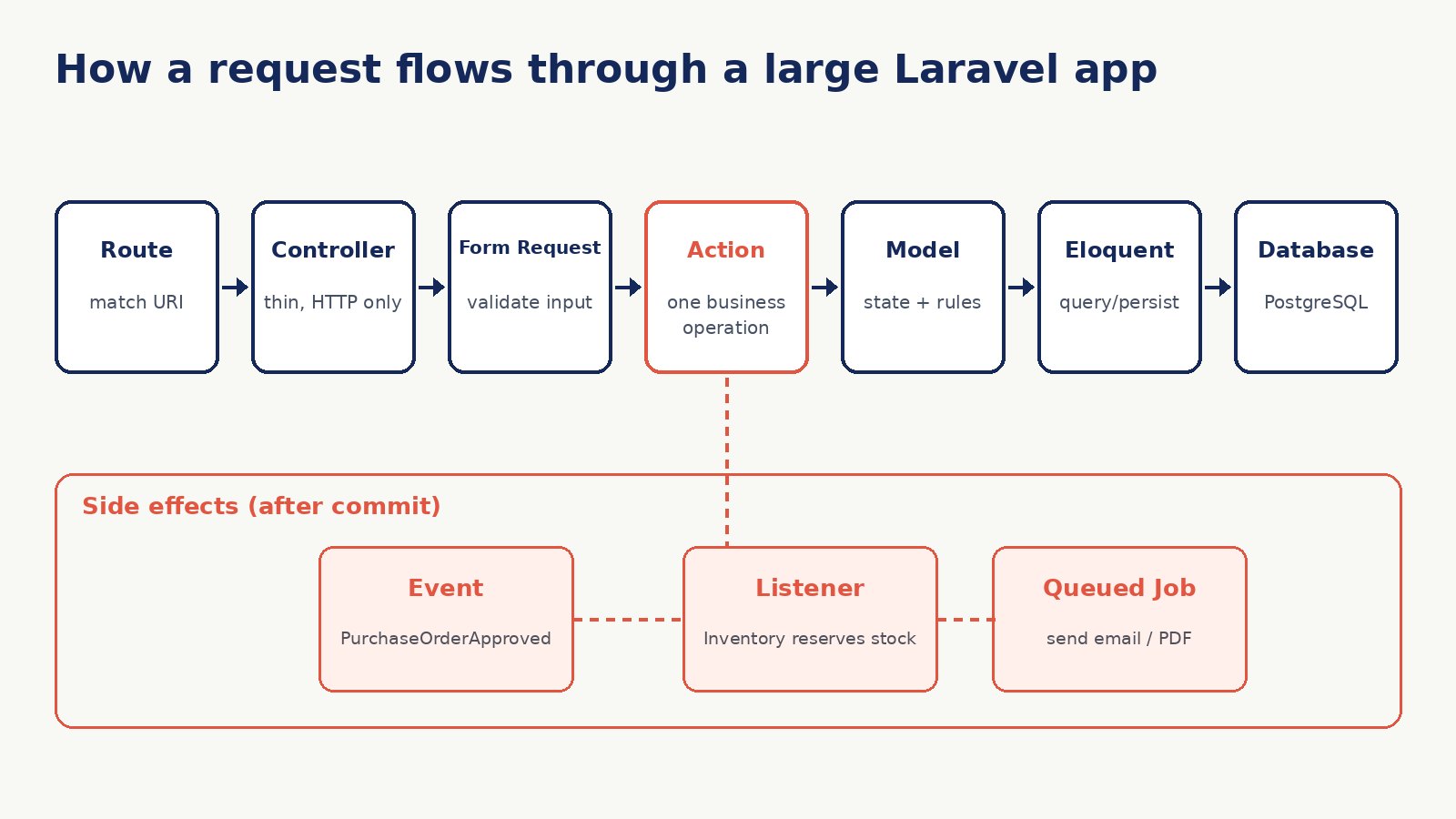
A controller should translate HTTP into a call to your application and translate the result back into a response. Validation goes into a Form Request, authorization goes into a Policy, and the actual work goes into an Action or service class.
class ApprovePurchaseOrderController extends Controller
{
    public function __invoke(
        ApprovePurchaseOrderRequest $request,
        PurchaseOrder $order,
        ApprovePurchaseOrder $approve,
    ) {
        $this->authorize('approve', $order);

        $approve->execute($order, $request->user(), $request->validated('note'));

        return to_route('orders.show', $order)->with('status', 'Order approved');
    }
}
Single-action invokable controllers like this one keep files small and make routes easy to scan. You do not have to use them everywhere, but they are a good fit for operations that are not plain CRUD.
Step 3: Put Business Operations in Action Classes
An Action is a small class with one public method that performs one business operation. It is reusable from a controller, an Artisan command, a queued job, or a test, which is exactly what you need when the same rule must run from the web UI, an API and a nightly import.
namespace App\Domain\Orders\Actions;

class ApprovePurchaseOrder
{
    public function execute(PurchaseOrder $order, User $approver, ?string $note): PurchaseOrder
    {
        if (! $order->isPendingApproval()) {
            throw new OrderCannotBeApproved($order);
        }

        return DB::transaction(function () use ($order, $approver, $note) {
            $order->markApproved($approver, $note);

            PurchaseOrderApproved::dispatch($order);

            return $order;
        });
    }
}
Notice what is not here: no request object, no redirect, no session. That separation is what lets you call the same Action from anywhere.
If an Action dispatches events or queued jobs inside a transaction, make sure they only run after the commit. Laravel supports this through the ShouldDispatchAfterCommit interface on events and the after_commit option or afterCommit() on queued jobs, depending on your version. Otherwise a listener may read data that was rolled back.
Step 4: Decide What Models Are Allowed to Know
Eloquent models are convenient, so they tend to absorb everything. A healthy rule of thumb for large projects:
- Belongs in the model: relationships, casts, query scopes, and small state checks such as
isPendingApproval(). - Belongs elsewhere: sending email, calling external APIs, generating documents, multi-model workflows. Move these into Actions, listeners or jobs.
Be careful with model observers and boot hooks for important business behavior. They are invisible from the calling code, so a developer saving a model in a seeder or import can trigger side effects they never expected. An explicit Action is easier to read and test.
Step 5: Use Data Objects at the Boundaries
Passing raw arrays between layers works until someone renames a key. Simple typed data objects make the contract explicit:
final class CreateInvoiceData
{
    public function __construct(
        public readonly int $customerId,
        public readonly string $currency,
        /** @var InvoiceLineData[] */
        public readonly array $lines,
    ) {}

    public static function fromRequest(StoreInvoiceRequest $request): self
    {
        return new self(
            customerId: $request->integer('customer_id'),
            currency: $request->string('currency')->toString(),
            lines: array_map(InvoiceLineData::fromArray(...), $request->validated('lines')),
        );
    }
}
Plain PHP readonly classes are enough. Packages such as spatie/laravel-data add conveniences, but they are optional.
Step 6: Draw Boundaries Between Domains
Domain folders only help if modules do not reach freely into each other's internals. A few practical rules:
- Other domains call a module through its Actions or a small public service, not by querying its tables directly.
- Cross-domain reactions use events. When an order is approved, Inventory listens for
PurchaseOrderApprovedand reserves stock; Orders does not call Inventory's internals. - Shared code in
app/Supportstays generic: money formatting, date helpers, base classes. If it contains a business rule, it belongs to a domain.
You can enforce some of this automatically. Architecture tests in Pest (its arch() expectations) or static analysis rules can fail the build when, for example, a controller uses the DB facade directly or one domain imports another domain's models.
arch('controllers stay thin')
    ->expect('App\Http\Controllers')
    ->not->toUse('Illuminate\Support\Facades\DB');
Step 7: Organize Routes, Config and Tests the Same Way
Large projects often keep a clean app/ folder and a 2,000-line routes/web.php. Split routes per domain, for example routes/billing.php, and load them from your bootstrap or a route service provider. Mirror the domain structure in tests/ so the tests for Billing are as easy to find as the code.
For a React or Next.js frontend talking to a Laravel API, use API Resources per domain to control the response shape. That gives the frontend a stable contract even when the database schema changes underneath.
Common Mistakes to Avoid
- Reorganizing everything at once. Move one domain at a time, ideally when you are already changing it for a feature.
- Adding a repository for every model by default. Eloquent already abstracts the database. Add repositories where they earn their keep, such as complex reporting queries or swappable data sources.
- Too many layers for simple CRUD. A settings screen does not need an Action, a DTO and a repository. Use the full structure where business rules are real.
- Vague names.
OrderServicewith forty methods is a new god class. Prefer specific Actions such asCancelOrderandRefundOrder. - Fighting the framework. Keep Laravel conventions for migrations, config, policies and service providers so documentation and packages still apply.
When to Go Further: Modules and Packages
If teams own separate parts of the system, or you plan to split services later, you can promote domains into modules with their own service providers, routes, migrations and tests, either with a package such as nwidart/laravel-modules or with local Composer packages. This is the modular monolith approach: one deployment, strong internal boundaries. Get the domain folders and boundaries right first; modules are much easier to extract once the code is already grouped by business area.
Conclusion
A large Laravel project stays maintainable when the folder tree reflects the business, controllers only handle HTTP, Actions hold the rules, models stay focused, and domains talk through clear contracts and events. None of this requires abandoning Laravel conventions. Start with the module that hurts the most, apply these steps there, and let the structure spread as the code changes.