Sooner or later every application needs work that doesn't happen inside a normal request: sending emails, generating reports, syncing with a payment provider, cleaning old data, or updating search indexes. Developers usually reach for one of three tools: a queue, a cron job, or an event. They overlap, and picking the wrong one leads to slow pages, duplicated work, missed tasks, or a tangle of hidden dependencies. The right choice depends mostly on one question: what triggers the work?
The Short Answer
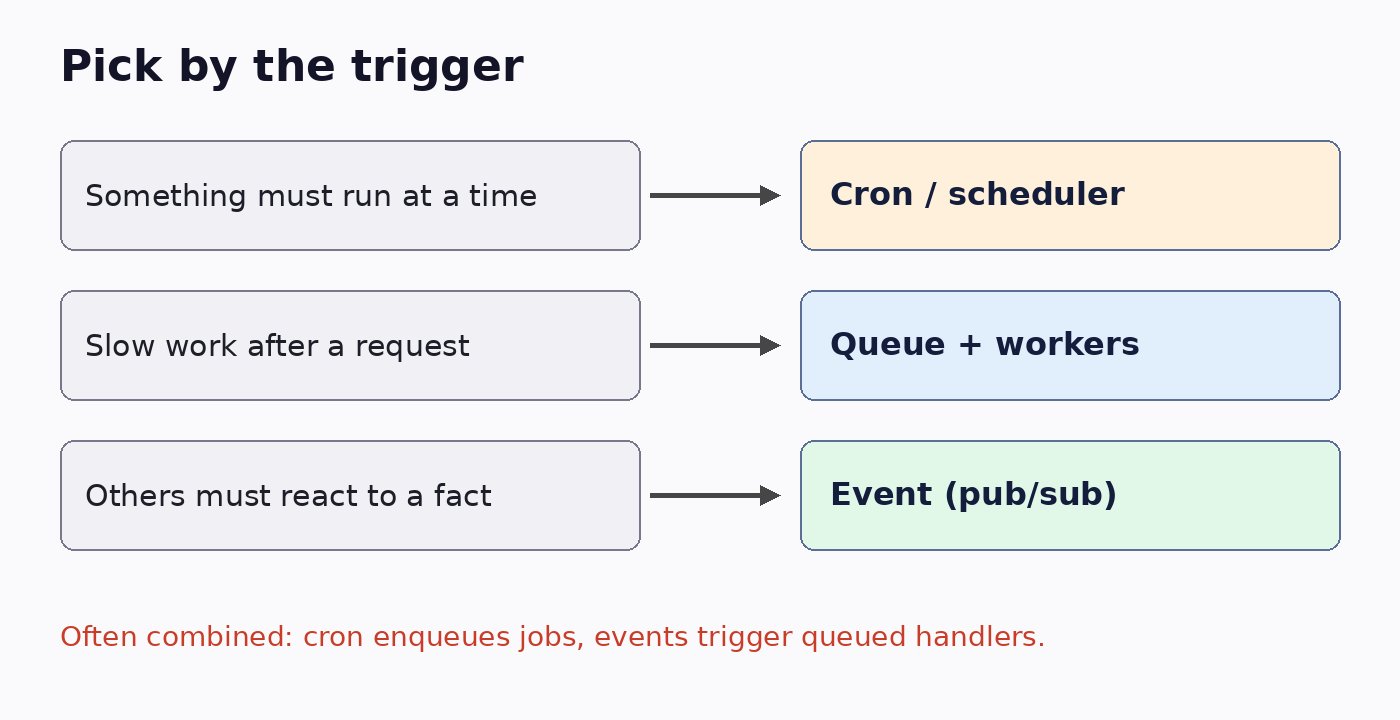
- Cron job: the work must run at a certain time or interval, whether or not anything happened.
- Queue: something happened and slow or unreliable work needs to be done later, outside the request, with retries.
- Event: something happened and one or more other parts of the system need to react, without the sender knowing who they are.
Cron Jobs: Time-Based Work
A cron job (or any scheduler, such as Laravel's scheduler, Kubernetes CronJobs, or cloud schedulers) runs a task on a timetable: every night at 2 AM, every five minutes, on the first of each month.
Use cron when
- The trigger is the clock: daily reports, monthly invoices, nightly backups.
- You need periodic cleanup, such as deleting expired sessions or archiving old logs.
- You reconcile data with an external system that has no webhooks.
Watch out for
- Polling disguised as cron. Checking a table every minute for "new orders to process" adds delay and load; a queue or event is usually better.
- Overlapping runs. If a job takes longer than its interval, two copies run at once. Use locks or "without overlapping" options.
- Multiple servers. With several app servers, the same cron can run on each one. Run the scheduler on one instance or use a distributed lock.
- Silent failure. Nobody notices a nightly job that stopped. Monitor that it ran and succeeded, not just that it didn't error.
- Time zones. Be explicit about which zone the schedule uses, especially around daylight saving changes.
Queues: Deferred, Reliable Work
A queue (Redis-based queues, RabbitMQ, Amazon SQS, BullMQ, Laravel Queues, Sidekiq, Celery) stores jobs that workers process in the background. The request adds a job and returns immediately; workers pick it up, retry on failure, and scale independently.
Use a queue when
- Work is slow: generating PDFs, resizing images, calling AI or third-party APIs.
- Work can fail temporarily and should be retried, like sending email or webhooks.
- You need to smooth traffic spikes, for example processing 50,000 imports without overloading the database.
- You need rate control, such as respecting an external API's limits.
Watch out for
- Non-idempotent jobs. Queues deliver at least once, so a job can run twice. Make jobs safe to repeat, for example by checking whether the email was already sent. The same principle applies to APIs, as covered in the most common API design mistakes.
- No dead-letter handling. Jobs that fail every retry need a place to go and an alert, not silent disappearance.
- Huge payloads. Pass IDs, not entire objects, and load fresh data in the worker.
- Using the queue as a database. Business state belongs in your database, with the queue only carrying work.
Events: Decoupled Reactions
An event announces that something happened: OrderPlaced, UserRegistered, PaymentFailed. The publisher doesn't know or care who listens. Subscribers react independently: one sends a receipt, another updates inventory, a third notifies analytics. Events can be in-process (framework event dispatchers) or distributed (Kafka, SNS, Google Pub/Sub, EventBridge).
Use events when
- Several parts of the system need to react to the same fact.
- You want modules or services to stay decoupled, so adding a new reaction doesn't mean editing the original code.
- You need an audit trail or the ability to replay history.
Watch out for
- Invisible flows. When everything is an event, nobody can see what happens after an order is placed. Document events and their subscribers.
- Ordering and duplicates. Distributed events can arrive late, twice, or out of order; handlers must cope.
- Lost events. Publishing after a database commit can fail between the two steps. The outbox pattern, writing the event to a table in the same transaction and publishing from there, prevents this.
- Overkill. A small app doesn't need Kafka. In-process events plus a queue are often enough. The same "right size" thinking applies to architecture in general, as discussed in Monolith vs Modular Monolith vs Microservices.
They Work Best Together
In real systems these tools combine naturally:
- A cron job runs at 1 AM and enqueues one job per customer to generate monthly statements.
- Workers process those jobs in parallel with retries.
- When an order is placed, an
OrderPlacedevent fires, and each listener pushes its own job onto a queue, so a slow email provider can't delay the inventory update.
Caching often sits alongside these patterns too, for example warming a cache from a scheduled job; see when you should and shouldn't use Redis caching.
Quick Decision Checklist
- Is the trigger time? Use a scheduler.
- Is the trigger a user action, with slow or retryable work? Use a queue.
- Do multiple independent parts need to react to the same fact? Publish an event.
- Are jobs and handlers idempotent?
- Do failures alert someone, and do scheduled jobs prove they ran?
- Can a new developer see the whole flow in documentation?
Conclusion
Cron, queues, and events aren't competitors; they answer different questions. Use cron for time-based work, queues for slow or unreliable work that must not block users, and events to let parts of the system react without being tightly coupled. Make every job idempotent and observable, and your background processing will stay fast, reliable, and easy to reason about.