Open a React component that has grown over a few sprints and you will often find five, six, or ten useEffect calls stacked at the top. Each one looked reasonable when it was added. Together they create a component that re-renders unpredictably, fetches twice, flickers, and breaks whenever someone touches a dependency array. Too many useEffect hooks rarely means the component is complex. It usually means logic has been placed in the wrong spot.
What useEffect Is Actually For
useEffect is an escape hatch for synchronizing a component with something outside React: a browser API, a WebSocket, a third-party widget, a timer, or a subscription. If no external system is involved, you probably don't need an effect. The React team says this directly in the "You Might Not Need an Effect" guide, and most effect bugs in production come from ignoring it.
Why Effect-Heavy Components Are a Smell
- Extra render cycles. Setting state inside an effect renders once with stale values, then again with the right ones. Users see the flicker.
- Hidden data flow. When effect A sets state that triggers effect B, which sets state that triggers effect C, nobody can read the component top to bottom any more.
- Dependency array traps. Each effect is another place to miss a dependency, cause an infinite loop, or silence the lint rule "just this once".
- Race conditions. Fetching in effects without cleanup lets an old response overwrite a newer one.
- Hard testing. Logic buried in effects can only be tested by rendering and waiting, instead of calling a plain function.
Common Misuses and What to Do Instead
1. Deriving state from props or other state
A classic pattern is copying a computed value into state:
const [fullName, setFullName] = useState('');
useEffect(() => {
  setFullName(first + ' ' + last);
}, [first, last]);
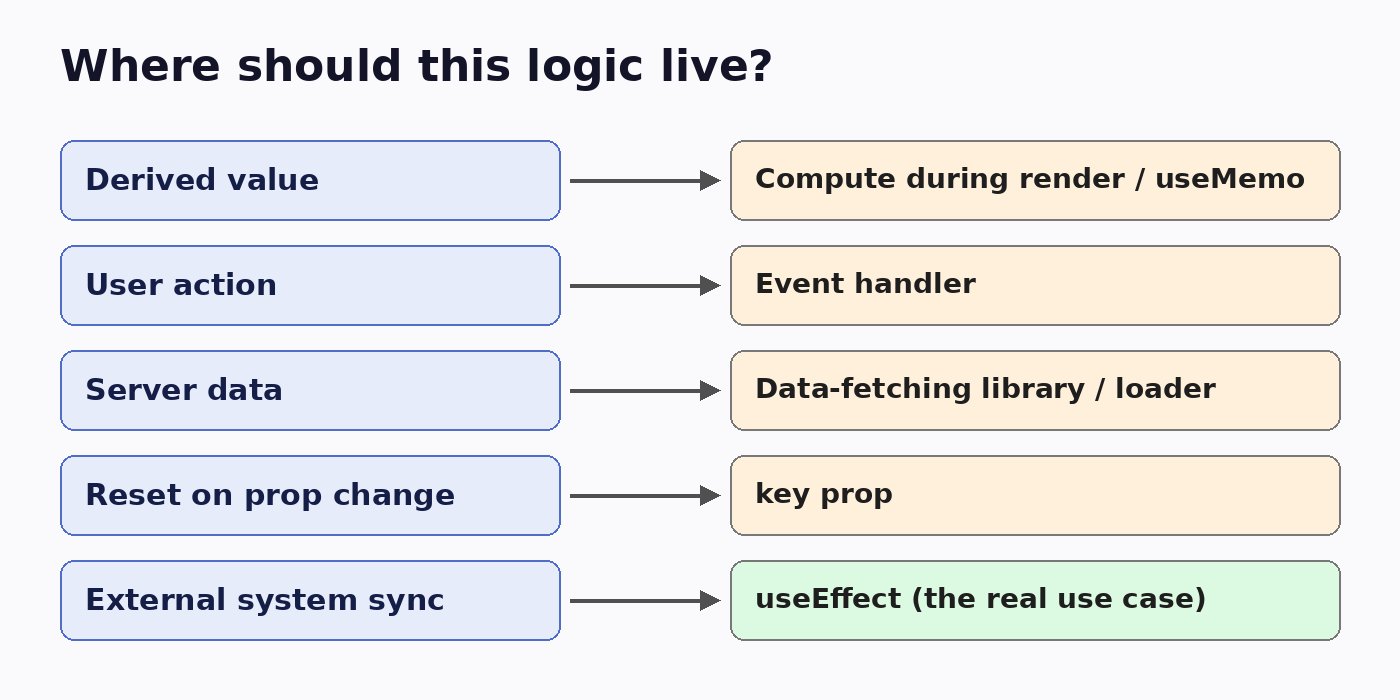
Just compute it during render: const fullName = first + ' ' + last;. If it is expensive, wrap it in useMemo. No effect, no extra render, no stale frame.
2. Responding to user events
Setting a flag like submitted and then watching it in an effect to send a request is indirect. Put the request in the onSubmit handler. Events belong in event handlers, because you know exactly why the code is running.
3. Fetching server data by hand
Hand-written fetch effects need loading state, error state, cancellation, caching, and deduplication. Use your framework's data loading (Next.js server components or route loaders) or a library such as TanStack Query or SWR. One line replaces thirty, and race conditions are handled for you.
4. Resetting state when a prop changes
Instead of an effect that clears a form when userId changes, render the component with key={userId}. React throws away the old state and starts fresh.
5. Chaining effects to keep state in sync
If several effects update each other, the state is probably duplicated. Keep one source of truth, derive the rest, or move related transitions into a useReducer so they happen together in one place.
6. Notifying a parent about changes
Calling onChange(value) from an effect after local state updates causes an extra pass and ordering bugs. Call the parent's callback in the same event handler that updates local state, or lift the state up.
When useEffect Is the Right Tool
Effects are correct when you genuinely sync with the outside world:
- Subscribing to a WebSocket, event source, or
windowevent, with cleanup that unsubscribes. - Integrating a non-React widget such as a map, chart, or video player.
- Starting and clearing timers or intervals.
- Sending analytics when a screen is actually shown.
Even then, wrap them in a well-named custom hook like useOnlineStatus() or useWindowSize(). The component reads as intent, and the effect is isolated and testable.
A Quick Review Checklist
- Does this effect talk to something outside React? If not, it probably shouldn't be an effect.
- Does it only call
setStatewith values computed from props or state? Derive it during render. - Is it reacting to something the user did? Move it to the event handler.
- Is it fetching data? Use a data library or the framework loader.
- Does it have a cleanup function where one is needed?
- Is the dependency array honest, with no disabled lint rule?
- Could it live in a named custom hook instead of the component body?
Refactoring an Effect-Heavy Component
Don't rewrite it all at once. Remove one effect at a time, starting with the ones that only derive state, since those are the safest. Then move event-driven effects into handlers, swap manual fetching for a data library, and finally pull the remaining true synchronization effects into custom hooks. After each step, run your tests and check the React DevTools profiler. You will usually see fewer renders and simpler code.
Conclusion
A component full of useEffect hooks is telling you that derived values, event logic, and data fetching have leaked into the synchronization layer. Keep effects for the outside world, compute what you can during render, handle events in handlers, and let proper tools fetch your data. Your components will be shorter, faster, and much easier for the next developer to trust.