"What rent should I ask for this apartment?" is one of the first questions every landlord asks, and agents often answer it from memory and a quick portal search. Price too high and the unit sits empty for weeks; price too low and the owner loses money every month. An AI rent estimator can give a fast, consistent, data-backed answer for every listing. Built carelessly, it gives confident numbers that are simply wrong. Here is how to build one that agents and owners can trust.
What a Rent Estimator Should Actually Do
A useful estimator doesn't just print a number. For a given property, it should return a likely monthly rent range, a confidence level, and the similar recent rentals (comparables) that support it. That combination lets an agent explain the price to an owner and spot when the model is off. For investors, the estimate also feeds yield calculations, like the ones in our guide on how to analyze a rental property before you buy.
Step 1: Get Clean Rental Data
The model is only as good as its data. Most agencies have more than they think: past leases in the CRM, listing history, portal feeds, and sometimes public registration data. The hard part is cleaning it:
- Use agreed rents where possible, not asking prices, which are often inflated.
- Remove duplicates of the same unit listed by several agents.
- Normalize units, for example square feet versus square meters, and monthly versus yearly rent.
- Drop obvious errors such as a three-bedroom villa listed at one tenth of the market.
- Keep the date of each record, because rents move over time.
Watch for fake or scam listings in portal data too; they distort prices. We covered detecting them in using AI to detect rental listing fraud.
Step 2: Choose Features That Drive Rent
Start with what tenants actually pay for: location (area, building, and coordinates), size, bedrooms and bathrooms, property type, floor, furnishing, parking, building age, amenities like a gym or pool, and distance to metro, schools, or business districts. Add time features such as month and recent area price trends. Avoid any feature that encodes protected characteristics of residents or neighborhoods, both for fairness and compliance.
Step 3: Start With a Simple, Strong Model
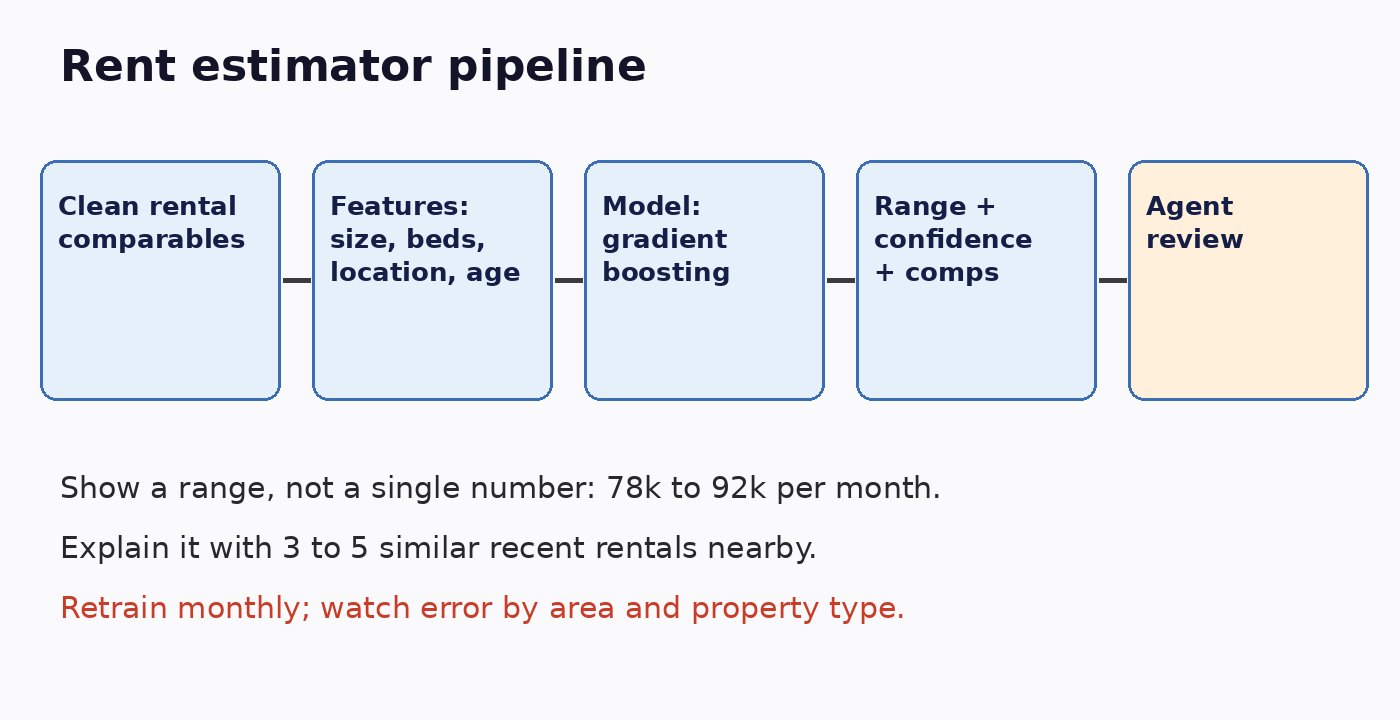
You don't need a deep neural network. Gradient boosting models such as LightGBM or XGBoost work very well on tabular property data, train quickly, and handle missing values. Predict the logarithm of rent to reduce the effect of very expensive units, and use quantile regression or prediction intervals to produce a range instead of a single value. Always compare against a simple baseline, like the median rent per square foot in the same area; if your model can't beat that, something is wrong.
Step 4: Show Comparables, Not Just a Number
Agents trust what they can verify. Alongside the estimate, retrieve three to five recent rentals that are most similar in location, size, and features. Semantic and vector search can help find listings that are similar in description and amenities, the technique we described in semantic property search with PostgreSQL and embeddings. If the comparables disagree strongly with the estimate, lower the confidence and flag it for manual review.
Step 5: Evaluate the Right Way
Random train-test splits flatter rent models because similar units leak between sets. Instead, test on the most recent months, training on older data and predicting newer leases, which mirrors real use. Track median absolute percentage error overall and by area, property type, and price band. A model that is great in central apartments but 30 percent off for villas needs to say so.
Step 6: Where Generative AI Fits
Large language models aren't the right tool to predict the rent itself; they are not reliable calculators. They are useful around the model: extracting structured features from messy listing text, writing a short explanation for the owner based on the model output and comparables, or answering agent questions about the estimate. Keep the number coming from the trained model and the language model strictly grounded in that output.
Step 7: Keep a Human in the Loop
An estimator supports agents, it doesn't replace them. Agents know about the noisy construction next door or the newly renovated kitchen. Let them adjust the price, record why, and feed those adjustments back as training signals. Make it clear to owners that the figure is an estimate with a range.
Step 8: Monitor and Retrain
Rental markets change with seasons, new supply, and the economy. Retrain at least monthly, compare predictions with the rents actually agreed, and alert when error rises in any area. Log model versions so you can explain any past estimate.
Launch Checklist
- Training data uses cleaned, deduplicated agreed rents with dates.
- No features based on protected characteristics.
- The model beats a simple area-median baseline on recent data.
- Output includes a range, confidence, and comparables.
- Agents can override with a recorded reason.
- Error is monitored by area and property type, with monthly retraining.
Conclusion
A good AI rent estimator combines clean local data, a solid tabular model, honest ranges, and real comparables, with agents making the final call. Build it that way and you give landlords faster, fairer pricing and give your team a tool they actually trust.