Writing listing descriptions is one of the most repetitive jobs in real estate. An agency with hundreds of active properties needs fresh, readable copy for every portal, often in more than one language, and agents rarely have time to write it well. Generative AI can draft a good description in seconds. It can also invent a sea view, double the floor area, or describe a neighborhood in ways that create legal risk. The goal is to get the speed without losing accuracy or trust.
Why AI Listing Descriptions Go Wrong
Large language models are trained to write fluent, persuasive text, not to tell the truth about one specific apartment. When you give a model a photo and a vague prompt like "write an attractive description", it fills gaps with plausible details. Common failures include:
- Invented features such as a balcony, parking, or a renovated kitchen that don't exist.
- Wrong numbers for size, bedrooms, service charges, or distance to landmarks.
- Risky claims about safety, schools, or the "type of people" in an area, which can breach fair housing and advertising rules.
- Generic copy full of "stunning" and "luxurious" that reads the same for every property and hurts portal search ranking.
The Grounded Workflow
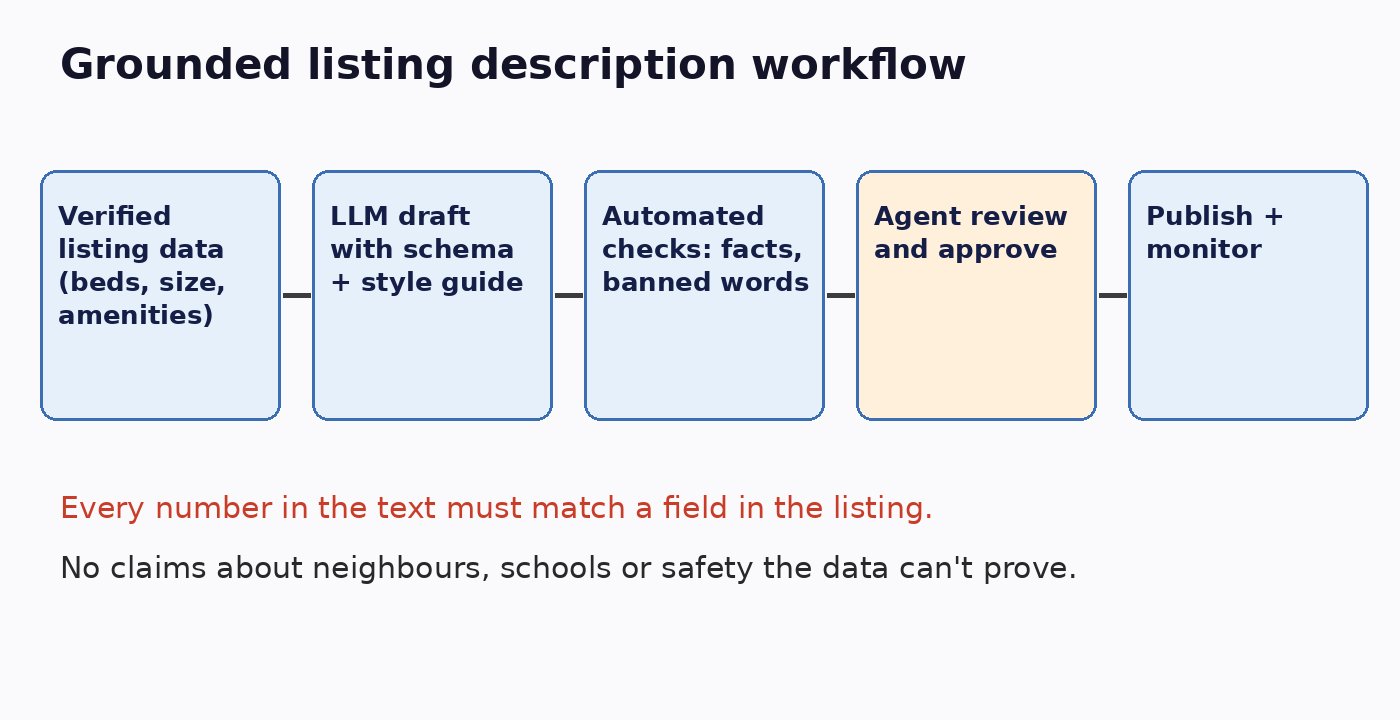
The fix is to treat the listing database as the single source of truth and the model as a writer that can only use those facts. This is the same principle we described in grounding real estate AI answers in your listing database.
Step 1: Start From Structured, Verified Data
Before generating anything, make sure the listing record is complete: type, bedrooms, bathrooms, size with units, floor, furnishing, parking, amenities, price, fees, handover date, and permit or registration number where required. Missing data is the main cause of hallucination. If a field is unknown, pass it explicitly as unknown so the model doesn't guess.
Step 2: Use a Tight Prompt and a Style Guide
Give the model the listing fields as JSON, your brand's tone, length limits for each portal, and clear rules: use only the facts provided, never mention features that aren't listed, never describe residents or neighbors, and avoid superlatives you can't prove. Ask for structured output, for example a headline, a short summary, a full description, and a bullet list of key features, so each portal gets the right format.
Step 3: Check Facts Automatically
Don't rely on reading every draft by eye. Run automated checks before an agent sees it:
- Extract every number in the text and confirm it matches a listing field.
- Compare mentioned amenities against the amenity list and flag anything extra.
- Block banned or risky phrases related to protected characteristics, guarantees, or investment returns.
- Check length and required fields such as the permit number for each portal.
A cheaper second model call can act as a reviewer that lists claims not supported by the data. Failed drafts are regenerated or sent for manual writing. We cover evaluation patterns like this in how to test LLM features before they reach production.
Step 4: Keep an Agent in the Loop
The listing agent knows things no database captures, like morning light in the living room or a quiet street. Show the draft next to the source data, let the agent edit, and require approval before publishing. Track how much agents change each draft; heavy edits are a signal to improve the prompt or the data.
Step 5: Publish, Monitor, and Learn
Log which version of the prompt and model produced each description. Measure portal views, inquiry rates, and time to publish. When prices or details change, regenerate the description from the updated record instead of patching text by hand, so copy never drifts from the facts.
Using Photos Carefully
Vision models can describe photos, which helps with details like flooring or kitchen style. But photos can be old, staged, or from another unit. Use image analysis to suggest features for the agent to confirm, not to write claims directly. Matching descriptions to the right photos also helps detect duplicated or suspicious listings, a topic we explored in using AI to detect rental listing fraud.
Multilingual Listings
Many markets need descriptions in English plus Arabic, Urdu, or other languages. Generate each language from the same structured data rather than translating the English text, which avoids compounding errors. Have native speakers review templates and a sample of outputs, especially for legal terms and units.
Compliance and Trust Checklist
- Every fact in the description traces back to a listing field.
- No statements about residents, religion, ethnicity, family status, or other protected characteristics.
- No promises of returns, appreciation, or guaranteed rental income.
- Required regulatory fields such as permit numbers are present.
- An agent approved the final text.
- Prompt, model version, and approver are logged for audit.
Conclusion
AI can cut listing description time from twenty minutes to two, but only if it writes from verified data, passes automated fact checks, and gets a human sign-off. Build the workflow around your listing database, not around the model, and you get faster, more consistent copy that buyers and regulators can trust.