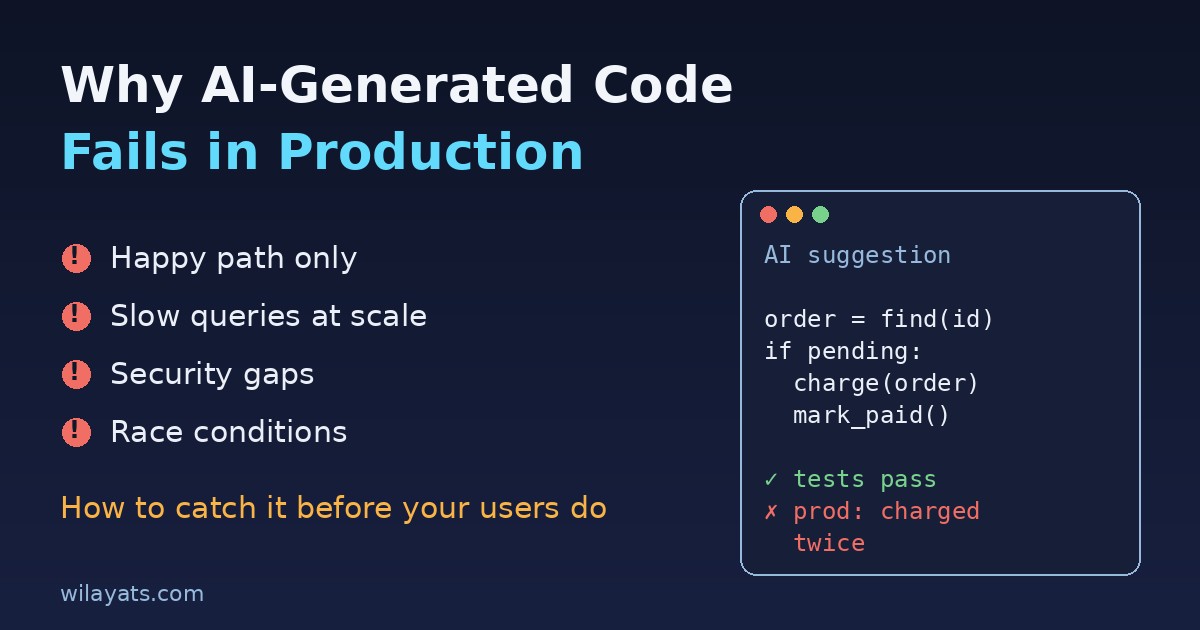
The pull request looked great. The tests passed, the code was tidy, and the feature took an afternoon instead of a week. Two days after release, the database CPU hit 100%, a background job charged a few customers twice, and nobody on the team could explain one of the helper functions because nobody had really written it. If that sounds familiar, you are not alone. AI generated code problems rarely show up in the editor. They show up in production, under real data, real traffic and real users. This guide explains why AI-written code fails after it ships and gives you a practical checklist to catch those failures before your users do.
Why AI-generated code looks right but fails in production
AI coding assistants are trained to produce code that is plausible. Plausible code compiles, reads well and matches common patterns. Production needs code that is correct for your system: your schema, your traffic, your failure modes and your security rules. The model usually can't see most of that context, so it fills the gaps with the most common answer from its training data. When the common answer doesn't match your reality, you get a bug that looks perfectly reasonable in review.
There is also a human side. Because AI code looks clean and confident, reviewers relax. A messy diff gets questioned; a polished one gets approved. That is the real reason AI code reliability drops: not that the code is worse on average, but that it gets less scrutiny than it deserves.
The 7 most common AI coding mistakes
1. It only handles the happy path
Ask for "a function that fetches the user's orders" and you get code that works when the API answers quickly with valid JSON. What happens on a timeout, a 500, an empty list, or a null field? Often nothing good. Generated code tends to skip retries, timeouts and clear error messages unless you ask for them.
2. Invented APIs and outdated libraries
Models sometimes call methods that don't exist, mix up two versions of a library, or use options that were removed years ago. TypeScript or a linter catches some of this. In dynamic languages like PHP, Python or JavaScript, the bad call may sit in a rarely used branch and only fail in production when that branch finally runs.
3. Queries that work on 50 rows and die on 5 million
AI loves loops that query the database inside them (the classic N+1 problem), SELECT * on wide tables, and filters on columns with no index. On your laptop with seed data it's instant. In production it becomes a slow page, a locked table, or a connection pool that runs dry.
4. Security gaps that look like normal code
Generated endpoints often check that a user is logged in but not that they own the record they are asking for. You also see string-built SQL, missing input validation, secrets hard-coded "for now", and permissive CORS settings copied from a tutorial. None of these break a demo. All of them break trust.
5. No idea about concurrency
Code that reads a value, changes it and writes it back works perfectly with one user. With two workers or two clicks it creates race conditions: double charges, duplicate records and stock counts that go negative. Models rarely add locks, unique constraints or idempotency keys unless you specifically ask.
6. Tests that test nothing
When the same tool writes both the code and the tests, the tests often mirror the implementation instead of the requirement. They mock the exact thing that would fail, assert that a function was called rather than what it returned, or simply restate the code. Coverage looks high; confidence is fake.
7. Code nobody on the team understands
The most expensive failure is slow. Clever one-liners, an extra abstraction layer, or a pattern your team doesn't use make the next bug fix harder. When something breaks at 2 AM, "the AI wrote it" is not a debugging strategy.
A real-world example: the double charge
Here is a pattern assistants produce all the time:
// Looks fine, fails under load
$order = Order::find($id);
if ($order->status === 'pending') {
    $payments->charge($order);
    $order->update(['status' => 'paid']);
}
If a queue retries the job, or the user clicks "Pay" twice, two workers can both read pending before either one writes paid. The customer gets charged twice. A production-ready version locks the row, makes the state change atomic, and passes an idempotency key to the payment provider:
DB::transaction(function () use ($id, $payments) {
    $order = Order::whereKey($id)->lockForUpdate()->firstOrFail();
    if ($order->status !== 'pending') {
        return; // already handled
    }
    $payments->charge($order, idempotencyKey: "order-{$order->id}");
    $order->update(['status' => 'paid']);
});
The AI didn't do anything "wrong" in the first version. It just didn't know that retries and double clicks exist in your system. That's your job to tell it, and your job to check.
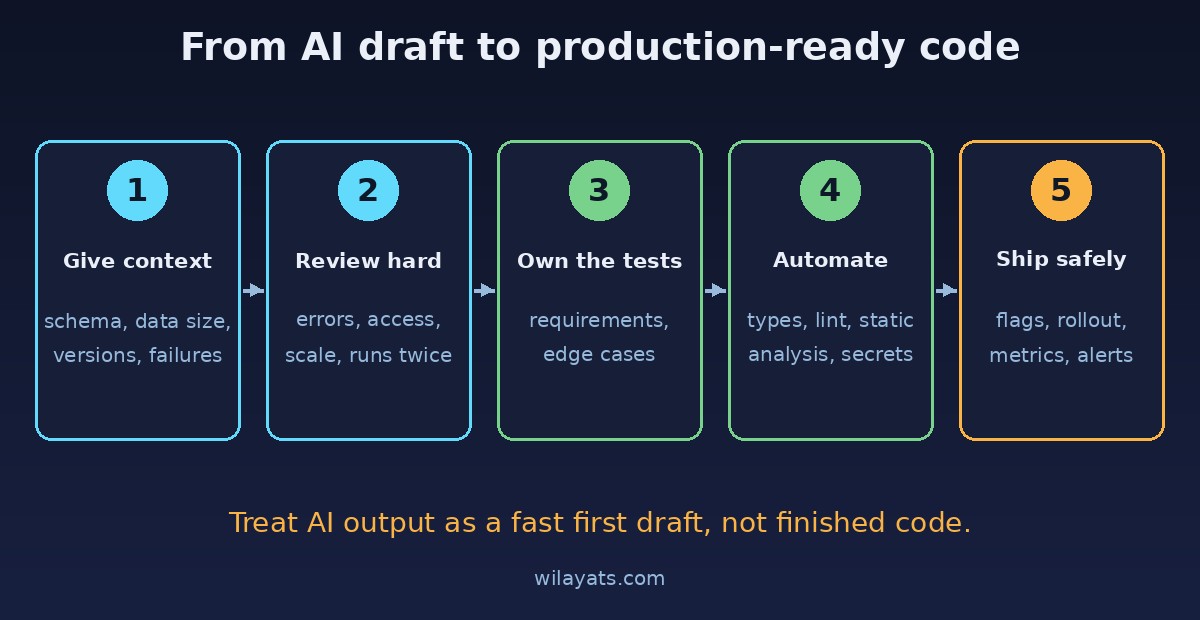
How to make AI-generated code production-ready
Give the model your context, not just the task
Include the table schema, expected data size, the framework and library versions, and the failure cases you care about. "Write a job that charges an order; it may run twice; the orders table has 5M rows; we use Laravel 11 and Stripe" gets a far better first draft than "write a payment job".
Review AI code harder, not softer
Treat every AI-written diff as code from a talented new hire who has never seen your system. Read every line. Ask the same questions every time: what happens when this fails, who is allowed to call it, how does it behave with a million rows, and what if it runs twice?
Write the important tests yourself
Let the assistant draft boilerplate tests, but write the tests that define correct behavior yourself: permission checks, edge cases, and "run it twice" tests for anything involving money or stock. A good test should fail if the requirement is broken, not just if the code changes.
Let tools do the boring checks
Turn on strict types, linters and static analysis (PHPStan, ESLint, TypeScript strict mode), dependency audits and secret scanning in CI. These catch invented methods, unsafe patterns and leaked keys before a human has to.
Test with production-like data
Run new queries against a realistic data volume and check the plan with EXPLAIN ANALYZE. Load test any endpoint that will see real traffic. Many AI coding mistakes only appear at scale.
Ship behind a safety net
Use feature flags, gradual rollouts and good logging so you can turn a feature off quickly. Add metrics for errors and latency on new code paths, and set alerts before launch, not after the first incident.
A quick pre-merge checklist for AI-written code
I can explain every line of this change without asking the AI.
Errors, timeouts and empty or null data are handled on purpose.
Every library call and option exists in the version we actually use.
Queries are indexed and checked against realistic data volume.
Access is checked for the specific record, not just "is logged in".
Anything that can run twice is safe to run twice.
Tests describe the requirement and would fail if it broke.
No secrets, debug output or overly open settings were added.
Should you stop using AI to write code?
No. Used well, AI assistants save hours on boilerplate, tests, migrations and first drafts, and they're great for exploring an unfamiliar library. The teams that get burned are the ones that treat generated code as finished code. The teams that win treat it as a fast first draft and keep the same engineering standards they would apply to any human-written change: context in, careful review, real tests, and safe rollouts.
AI changes how fast you can write code. It doesn't change what production demands. Keep that line clear and you get the speed without the 2 AM surprises.
Comments
Join the discussion. Replies load on demand, up to 5 levels.
0 threads
No comments yet
Be the first to start the conversation.