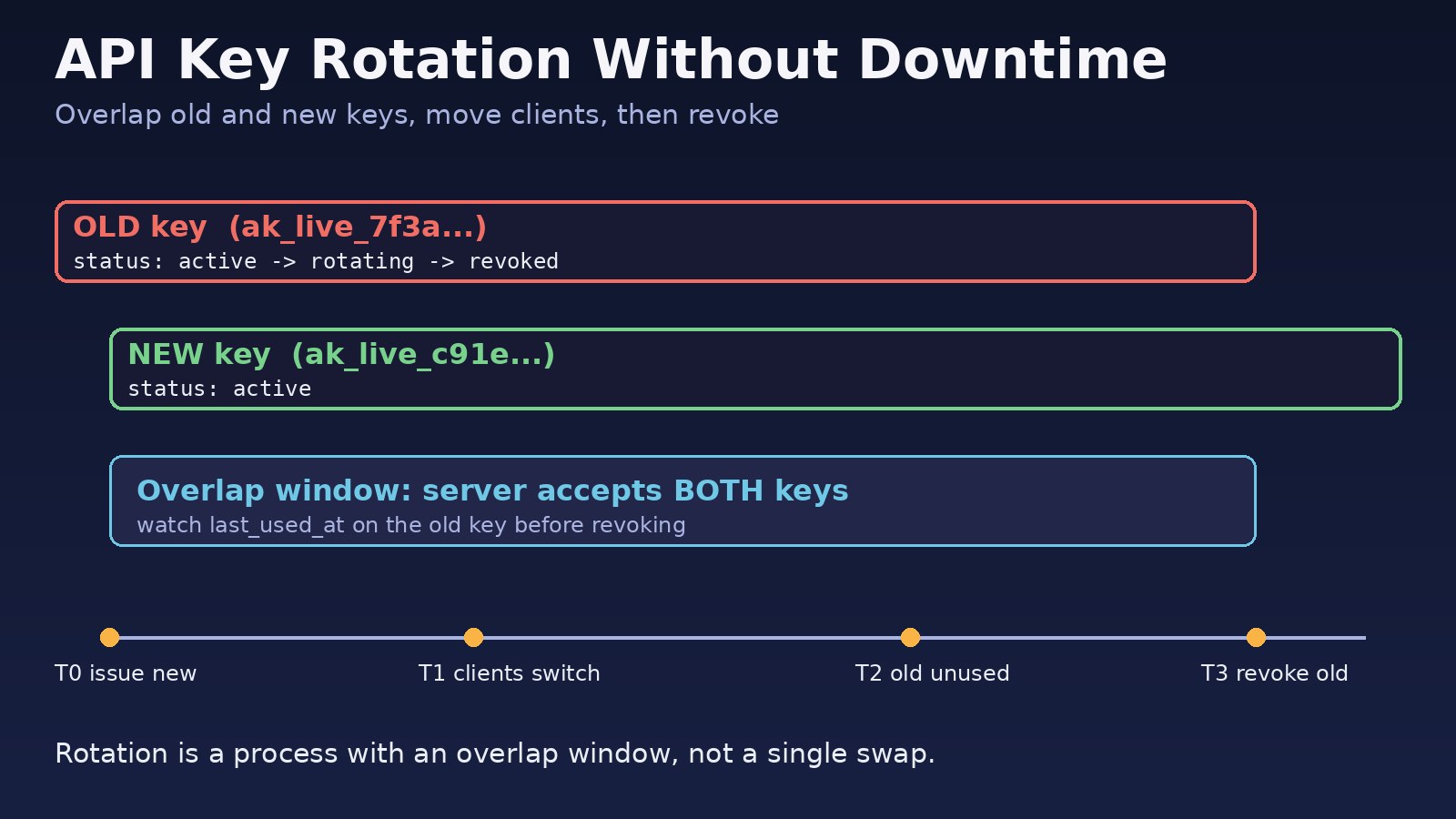
Most teams only think about api key rotation when something forces it: a key shows up in a Git commit, a developer leaves, or a provider emails a security notice. Then the rotation itself causes an outage, because the old key is revoked before every client, queue worker and cron job has the new one. The fix is not a faster swap. It is a design where two keys can be valid at the same time, clients move over during an overlap window, and the old key is revoked only after you can prove nothing still uses it. This guide shows that pattern for keys you issue to clients and for third-party credentials your own app uses, with PostgreSQL, Laravel, Redis, Docker and Nginx examples.
Problem: Rotating a Key Breaks Production
The usual setup is one key per client stored in a single column, or one provider secret stored in a single environment variable. Rotation then means "replace the value". The moment you replace it, every request signed with the old value fails, and every process that loaded the old value at startup keeps failing until it is restarted. Because the rotation is painful, it gets postponed, and keys stay valid for years. That is the real security risk: a leaked key that never expires.
Symptoms
- Right after rotating, clients get
401 Unauthorized, and a Laravel API returns{"message":"Unauthenticated."}. - Calls to a provider fail with messages such as
Invalid API Key provided(Stripe) orThe security token included in the request is invalid(AWS). - The web app works with the new key, but Laravel queue workers or scheduled jobs still use the old one.
- One container works and another does not, because only one was restarted.
- Nobody knows which clients use a given key, so nobody dares to revoke it.
- API keys appear in Nginx access logs because clients send them in the query string.
Root Cause: One Valid Key at a Time
Downtime during rotation almost always comes from one of these design gaps:
- No overlap. The data model allows exactly one key per client, so issuing a new key destroys the old one.
- Secrets are cached in long-running processes.
php artisan config:cache, queue workers, Node.js servers and containers read environment variables once at boot. Changing.envdoes nothing until they reload. - Key validation results are cached (for example in Redis) without invalidation, so a revoked key keeps working, or a new key is rejected until the cache expires.
- No usage data. Without a
last_used_atper key, you cannot tell when it is safe to revoke. - Keys are stored in plain text, which makes leaks worse and rotation more urgent. Good API credential security means storing only a hash, the same way you store passwords.
Authentication is only half of access control; once a key is valid you still need object-level checks, as covered in IDOR vulnerability prevention.
Step-by-Step Solution: API Key Rotation Without Downtime
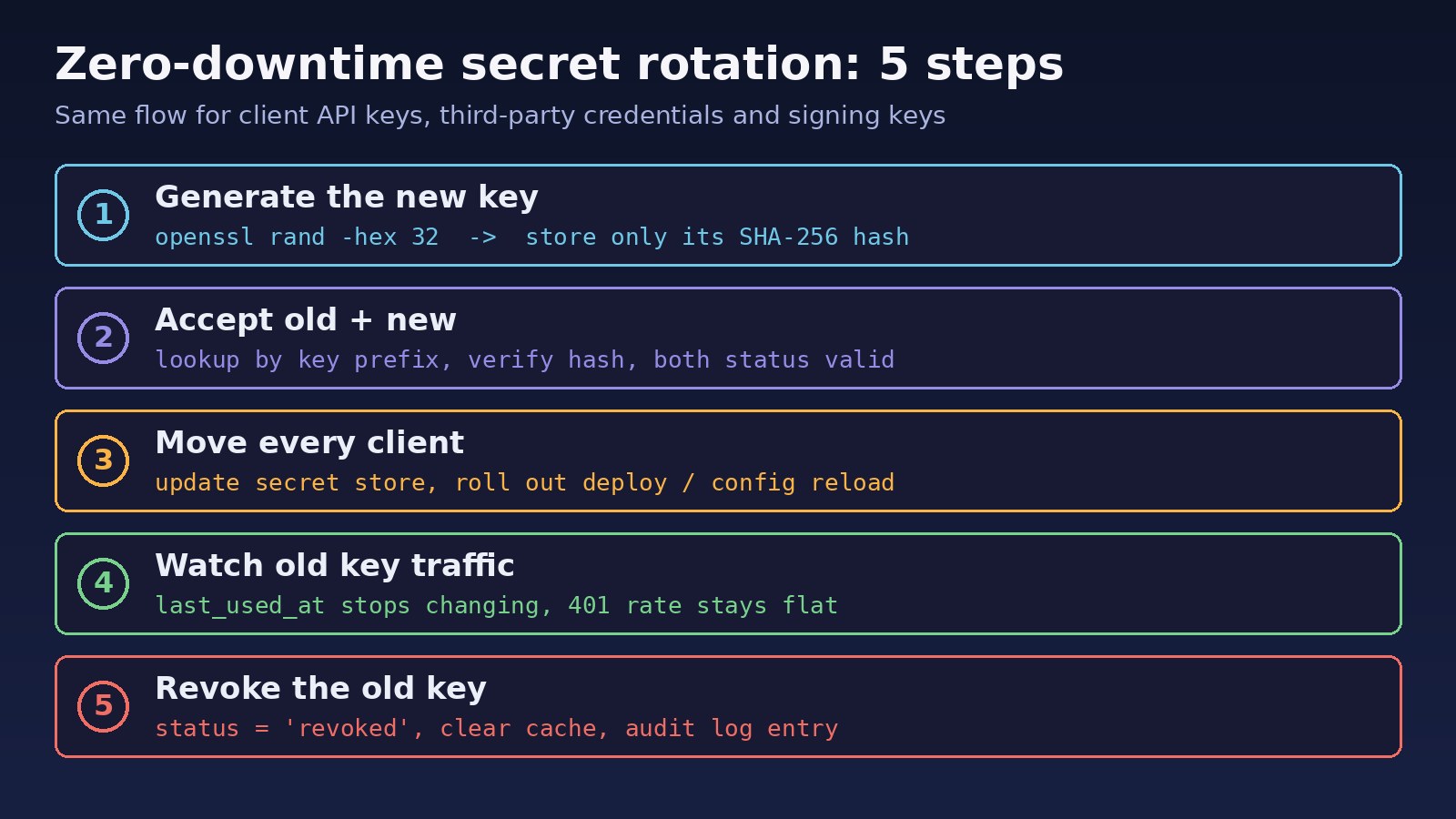
Step 1: Allow multiple keys per client
Move keys into their own table with a status (active, rotating, revoked), an optional expiry, and last_used_at. A client can now hold an old and a new key at the same time.
Step 2: Store a prefix and a hash, never the key
Generate keys with a short public prefix plus a long random secret. The prefix lets you find the row quickly and identify the key in dashboards and logs; the full key is shown to the client once and stored only as a SHA-256 hash. API keys are long random values, so a fast hash is fine here, unlike user passwords.
Step 3: Validate against every non-revoked key
Your middleware looks up the prefix, compares hashes with a constant-time comparison, and accepts the key if its status is active or rotating and it has not expired.
Step 4: Rotate with an overlap window
Issue the new key, mark the old one rotating with an expires_at (for example 7 or 30 days, agreed with the client), and let the client deploy the new key at their own pace.
Step 5: Watch usage, then revoke
When last_used_at on the old key stops moving, set it to revoked, clear any cached lookup, and write an audit entry. If the key leaked, skip the waiting and revoke immediately; a short outage for one client is better than an attacker with access.
Step 6: Apply the same secret rotation to outbound credentials
For provider keys your app uses (payment gateways, AWS, email, LLM APIs), create a second key at the provider, roll it out to every process, confirm traffic has moved, then disable and delete the old one. Most providers allow at least two active keys for exactly this reason.
Code/Commands Examples
PostgreSQL table for API key management
CREATE TABLE api_keys (
  id            bigint GENERATED ALWAYS AS IDENTITY PRIMARY KEY,
  client_id     bigint NOT NULL REFERENCES clients(id),
  prefix        text   NOT NULL UNIQUE,          -- e.g. '3f9a1c2b', safe to show
  key_hash      text   NOT NULL,                 -- sha256 of the full key
  status        text   NOT NULL DEFAULT 'active'
                CHECK (status IN ('active','rotating','revoked')),
  expires_at    timestamptz,
  last_used_at  timestamptz,
  created_at    timestamptz NOT NULL DEFAULT now(),
  revoked_at    timestamptz
);

CREATE INDEX api_keys_client_idx ON api_keys (client_id, status);
Generate a new key
# 8 hex chars of prefix + 64 hex chars of secret
PREFIX=$(openssl rand -hex 4)
SECRET=$(openssl rand -hex 32)
KEY="ak_live_${PREFIX}_${SECRET}"
echo "Give this to the client once: $KEY"
printf '%s' "$KEY" | sha256sum | cut -d' ' -f1   # store this hash
Laravel middleware that accepts old and new keys
// app/Http/Middleware/AuthenticateApiKey.php
public function handle(Request $request, Closure $next)
{
    $key = (string) $request->header('X-Api-Key', '');
    if (!preg_match('/^ak_live_([0-9a-f]{8})_[0-9a-f]{64}$/', $key, $m)) {
        abort(401, 'Invalid API key');
    }

    $row = Cache::remember("apikey:{$m[1]}", 60, fn () =>
        DB::table('api_keys')->where('prefix', $m[1])->first()
    );

    $valid = $row
        && in_array($row->status, ['active', 'rotating'], true)
        && (!$row->expires_at || now()->lt($row->expires_at))
        && hash_equals($row->key_hash, hash('sha256', $key));

    if (!$valid) {
        abort(401, 'Invalid API key');
    }

    // throttle writes: update last_used_at at most every 5 minutes
    DB::table('api_keys')->where('id', $row->id)
        ->where(fn ($q) => $q->whereNull('last_used_at')
            ->orWhere('last_used_at', '<', now()->subMinutes(5)))
        ->update(['last_used_at' => now()]);

    $request->attributes->set('client_id', $row->client_id);
    return $next($request);
}
The 60-second cache keeps the key lookup off the database on busy APIs. The trade-off is that a revoked key can work for up to 60 seconds unless you delete the cache entry on revoke, which the next step does. For more on when caching helps and hurts, see Redis caching: when you should and shouldn't use it.
Start the rotation and revoke later
-- 1. after inserting the new key row for client 42:
UPDATE api_keys
   SET status = 'rotating', expires_at = now() + interval '14 days'
 WHERE client_id = 42 AND prefix = '3f9a1c2b';

-- 2. check whether the old key is still in use
SELECT prefix, status, last_used_at, expires_at
  FROM api_keys
 WHERE client_id = 42
 ORDER BY created_at;

-- 3. when last_used_at has stopped moving:
UPDATE api_keys
   SET status = 'revoked', revoked_at = now()
WHERE prefix = '3f9a1c2b';# drop the cached lookup so revocation is immediate
# (adjust for your Laravel cache prefix, or call Cache::forget('apikey:3f9a1c2b'))
redis-cli DEL "laravel_cache:apikey:3f9a1c2b"Rotate an outbound AWS access key
IAM allows two access keys per user, which is what makes zero-downtime rotation possible:
aws iam create-access-key --user-name app-backend
# put the new key in your secret store / .env and roll out (see below)

aws iam get-access-key-last-used --access-key-id AKIAOLDKEYEXAMPLE
aws iam update-access-key --user-name app-backend \
    --access-key-id AKIAOLDKEYEXAMPLE --status Inactive
# wait and watch for errors; reactivate if something breaks, otherwise:
aws iam delete-access-key --user-name app-backend --access-key-id AKIAOLDKEYEXAMPLE
Reload every process that holds the secret
# Laravel: rebuild cached config and restart long-running workers
php artisan config:cache
php artisan queue:restart        # workers exit after their current job
sudo supervisorctl status        # confirm workers came back

# Docker Compose: recreate the service so it reads the new env/secret
docker compose up -d --no-deps --force-recreate app worker
docker compose exec app printenv | grep -c PAYMENT_API_KEY
With a single app container, recreating it causes a short gap. Run at least two replicas behind Nginx and restart them one at a time; Nginx's default proxy_next_upstream error timeout sends a request to the other upstream if one is unreachable. Better still, read secrets from a mounted file such as /run/secrets/payment_api_key at request time or on a reload signal, so no restart is needed.
Keep keys out of Nginx logs
# reject keys sent in the query string; they end up in access logs
if ($arg_api_key) {
    return 400;
}
Accept keys only in a header such as X-Api-Key or Authorization. The default combined log format records the request line, including the query string, but not request headers. This is one of the API design mistakes listed in the most common mistakes developers make when designing APIs.
Verification
- During the overlap, call the API with both keys and confirm both return 200:
curl -s -o /dev/null -w '%{http_code}\n' -H "X-Api-Key: $NEW_KEY" https://api.example.com/v1/ping - After revoking, the old key must return 401 immediately, not after the cache TTL.
- Run the
last_used_atquery and confirm the new key is being used by the client. - Watch the 401 rate in your logs or monitoring for an hour after each step; a jump means some process still has the old value.
- For outbound credentials, check provider dashboards or
aws iam get-access-key-last-usedto confirm the old key has stopped receiving traffic before deleting it. - Confirm with
git log -p | grep -n ak_live_or a secret scanner such as gitleaks that no key is committed to the repository.
Prevention: API Credential Security Habits
- Rotate on a schedule (for example every 90 days) so the process stays practiced, and immediately after any suspected leak or staff change.
- Give every client and every service its own key; never share one key between environments.
- Store secrets in a secret manager or Docker/Kubernetes secrets, not in the repository. Add a pre-commit secret scan.
- Store only hashes of keys you issue, and show the full key once at creation.
- Add expiry dates to keys and alert clients before a rotating key expires.
- Log the key prefix, never the full key, and keep an audit trail of who created and revoked each key.
- Scope keys to the minimum permissions they need, so a leak has limited impact.
FAQs
How often should API key rotation happen?
There is no single rule. Many teams rotate every 60 to 90 days and immediately after a leak or when someone with access leaves. If rotation is automated and uses an overlap window, rotating more often costs little.
What is the difference between api key rotation and secret rotation?
API key rotation usually refers to keys clients use to call your API. Secret rotation is broader: database passwords, provider credentials, webhook signing secrets and JWT signing keys. The same overlap-then-revoke pattern applies to all of them.
Should I hash API keys with bcrypt?
Not usually. Bcrypt is slow on purpose to protect low-entropy passwords. A randomly generated 256-bit key cannot be guessed, so SHA-256 with a constant-time comparison is enough and keeps every request fast.
How do I rotate JWT or webhook signing keys without downtime?
Include a key id (kid) in each token or signature header, publish both the old and new public keys, sign new tokens with the new key, and remove the old key after the longest token lifetime has passed.
What if a key leaked publicly?
Revoke it first, then issue a replacement and contact the client. Check access logs for requests made with that key prefix to understand what was accessed.
Why do Laravel queue workers keep using the old key?
Workers are long-running PHP processes that load configuration once. Run php artisan config:cache and php artisan queue:restart after changing secrets.



Comments
Join the discussion. Replies load on demand, up to 5 levels.
0 threads
No comments yet
Be the first to start the conversation.