
When an application grows from thousands of users to millions, the painful truth appears quickly: a single application server and a single database will not survive peak hours. Scalable system design is how engineering teams keep latency predictable by measuring bottlenecks and adding capacity in the cheapest correct place—bigger machines, more instances, caches, asynchronous jobs and only then heavier database topologies.
This guide turns the familiar \"millions of users\" interview prompt into a practical sequence you can apply to Laravel, Node.js and PostgreSQL systems, including the ERP-style backends many product teams run in production.
Why Peak Traffic Beats Daily Averages
Imagine one million daily active users each generating about twenty API requests. That is roughly twenty million calls per day. Spread evenly, the fleet sees a little over two hundred requests per second. Real products are not even. Logins cluster in the morning, campaigns spike at lunch and mobile clients retry after brief outages. A peak ten times the average pushes the same product past two thousand requests per second.
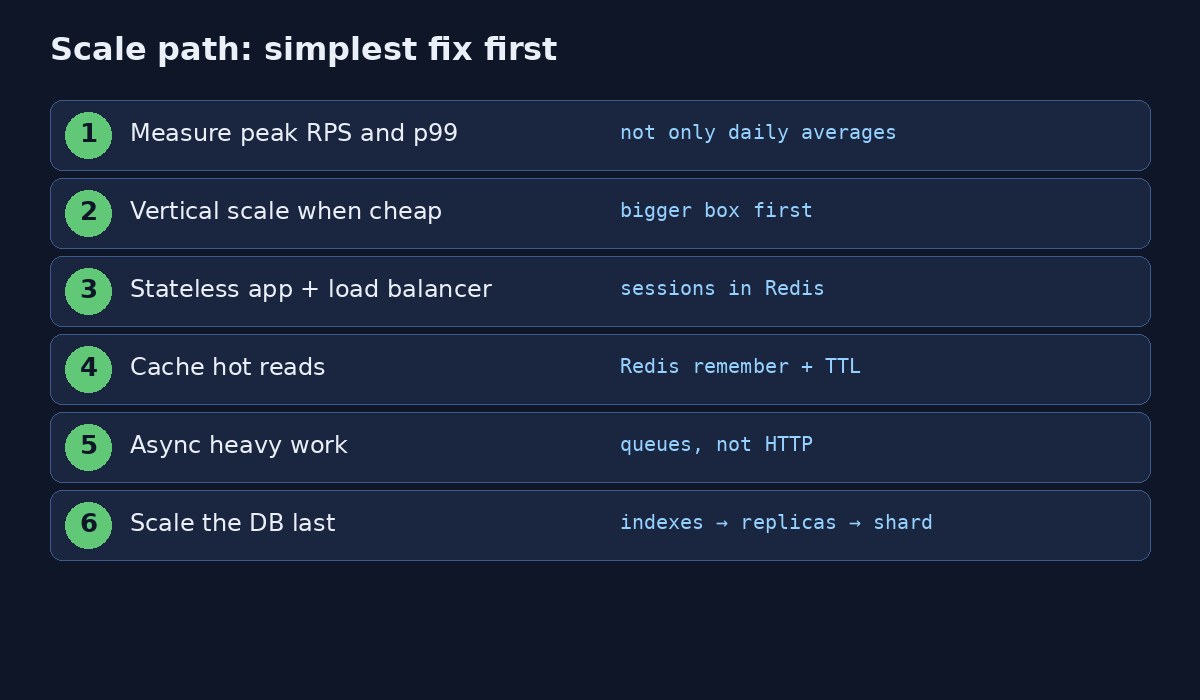
Average RPS therefore underestimates hardware needs. Design for concurrency and for p95/p99 latency. Customers experience the slow tail, not the mean. Before redrawing architecture diagrams, write measurable goals: peak RPS, latency budgets, availability targets and how stale each class of read may be.
Vertical Scaling: Still a Valid First Gear
Vertical scaling upgrades the box you already have—more vCPU, more RAM, faster disks. An API that struggled on four cores and eight gigabytes of memory may breathe on sixteen cores, sixty-four gigabytes and NVMe storage without a rewrite. For early products this is often the fastest mitigation when profiles show honest CPU or memory saturation rather than lock storms or pathological SQL.
Strengths: minimal code change and quick delivery. Limits: price ceilings, a remaining single point of failure, and zero help for N+1 queries, blocking outbound HTTP or full disks. Vertical scaling buys time and headroom; it is not a substitute for fixing wasteful work.
Horizontal Scaling With Stateless Application Servers
Horizontal scaling places many identical instances behind a load balancer. The balancer spreads requests; failed instances leave the pool; healthy ones continue serving. The hard requirement is statelessness. If Laravel stores sessions on local disk, the next request can hit another node and log the user out. Move sessions to Redis. Store uploads in object storage. Treat container filesystems as ephemeral.
Users → Load balancer → App A / App B / App C
                      ↘ Redis (sessions, cache, queues)
                      ↘ PostgreSQL (+ read replicas later)
                      ↘ Object storage + CDN for media
Orchestrators such as Kubernetes can add Pods from CPU, RPS or queue depth. Extra Pods help only when the database, cache and downstream APIs still have spare capacity. Scaling the wrong tier wastes money and hides the real bottleneck.
Introduce Redis for Hot Reads
Identical public reads crush primary databases. Cache-aside checks Redis first, loads PostgreSQL on miss, then writes the value back with a TTL:
Cache::remember("listing:{$id}", 600, fn () => Listing::findOrFail($id));Six hundred seconds is a starting point, not a religion. Invalidate on writes when correctness matters, and never trust a cache alone for booking confirmation or payment capture. Stampede defenses—singleflight locks, jittered TTLs and stale-while-revalidate—belong in every serious design; they are covered in depth in the companion article in this batch. On wilayats.com, also read Redis caching: when you should and shouldn't use it.
Scale PostgreSQL in a Deliberate Order
- Indexes and
EXPLAIN ANALYZEon the slow statements. - Connection pooling so apps do not open thousands of direct sessions.
- Read replicas for read-heavy SELECT traffic that tolerates lag controls.
- Table partitioning for huge append-only or time-series tables.
- Sharding only when write volume or data size overwhelms one primary.
Useful deep dives already on this site: how to optimize a slow PostgreSQL query, PgBouncer with PostgreSQL and too many connections.
Move Expensive Work Off the Request Path
Rendering thousands of PDFs, sending bulk mail or resizing media inside the HTTP request pin PHP-FPM or Node workers and destroy p99 latency. Accept the command quickly, persist a job, and let Redis-backed workers process it with retries and idempotency. See Laravel queue with Redis and queue vs cron vs event.
CDN and Object Storage
Images, scripts and documents should not transit application Pods on every view. Object storage plus a CDN keeps bytes near users and leaves application CPU for business rules. Many \"we need more app servers\" incidents are actually \"we are shipping megabytes through the API tier.\"
A Concrete Reference Architecture
A durable pattern for large Laravel APIs looks like this: React or Next.js clients; load-balanced API instances; Redis for cache, sessions and queues; PostgreSQL primary for writes; read replicas for eligible reporting; Kubernetes for rolling deploys; object storage for media; centralized logs and metrics. When traffic rises, add API replicas first only if the database and Redis still have headroom. When replicas do not help, revisit queries and cache policy before inventing a shard map.
Production Metrics That Drive Decisions
- Requests per second and concurrent requests
- p95 and p99 latency by endpoint
- Error and timeout rates
- CPU, memory and saturation
- Database connections, lock waits and slow queries
- Redis hit ratio, evictions and memory
- Queue depth and job age
These signals tell you whether to buy CPU, add instances, fix SQL or redesign data ownership.
FAQs
What does scalable system design mean day to day?
It means an evidence loop: define service objectives, locate the bottleneck, apply the smallest fix that removes it, and postpone irreversible choices such as sharding until metrics demand them.
Is vertical scaling a weak interview answer?
Only if it is the entire answer. Strong candidates vertically scale early, keep apps stateless and describe the horizontal and data-layer steps that follow.
When is Kubernetes justified?
When rolling updates, probes and horizontal Pod autoscaling solve real operational pain. Load-balanced VMs remain valid for substantial traffic.
Will caching fix a slow database?
Caching reduces repeated reads. It will not repair missing indexes, bad transactions or write amplification. Use both.
Putting It Into Practice
Teams that succeed treat architecture as a sequence of bets backed by measurements. They keep a short written playbook: which metrics page to open during an incident, which cache keys are sacred, which database roles exist for read traffic, and which deploy strategy applies to API versus workers. They load-test the paths that matter—login, search, checkout—before marketing campaigns, and they refuse to "just shard" because a dashboard looked busy for an hour.
Documentation should capture the failure modes you already paid for: a session store that was local, a migration that dropped a column too early, a cache TTL that stampeded PostgreSQL, a retry loop without jitter. New engineers should be able to replay those lessons without repeating the outage. Pair this article with the sibling write-ups in this batch on zero-downtime releases, cache stampede control, Bloom filters, exponential backoff and read replicas versus sharding so the whole toolkit sits in one place.
Finally, remember that customer interest keywords—faster checkout, fewer timeouts, safer deploys, quicker username checks—map directly to these engineering choices. Marketing language and system design meet where latency and reliability become features users can feel.
Operational Checklist Teams Actually Use
Write the runbook while the system is healthy. Name the dashboards that show latency, error rate, saturation and dependency health. Record which alerts page which engineers, and which feature flags disable expensive paths when a dependency falters. After every incident, add one concrete prevention item—an index, a probe, a lock, a backoff—and assign an owner with a date.
Load-test the golden journeys before campaigns: authentication, search, write paths and payment or booking confirmation. Synthetic traffic that only hits health endpoints will not reveal stampede, lock or migration bugs. Prefer realistic payloads and concurrency patterns captured from production anonymized traces.
Keep environment parity honest. Staging should exercise the same session store, cache backend, queue driver and migration path as production, even at smaller scale. Many \"works on my machine\" deploy failures are really \"staging used the file session driver.\" Align configuration templates and fail CI when critical env keys diverge.
Security and reliability meet in the same releases. Rotate credentials when workers or containers may have logged them, limit debug endpoints and ensure readiness checks never expose secrets. Customer-facing promises—fast pages, safe checkout, always-on apps—depend on these unglamorous controls as much as on clever algorithms.
How This Fits Customer-Facing Messaging
Engineering topics translate cleanly into buyer language when you stay specific. Faster page loads come from caching and query work. Fewer failed checkouts come from idempotent retries and primary reads after writes. Continuous releases without maintenance banners come from zero-downtime deployment discipline. Instant \"username taken\" feedback comes from probabilistic filters backed by real constraints. Use those outcomes in titles and meta descriptions so searchers who care about reliability find the technical depth behind the promise.


Comments
Join the discussion. Replies load on demand, up to 5 levels.
0 threads
No comments yet
Be the first to start the conversation.