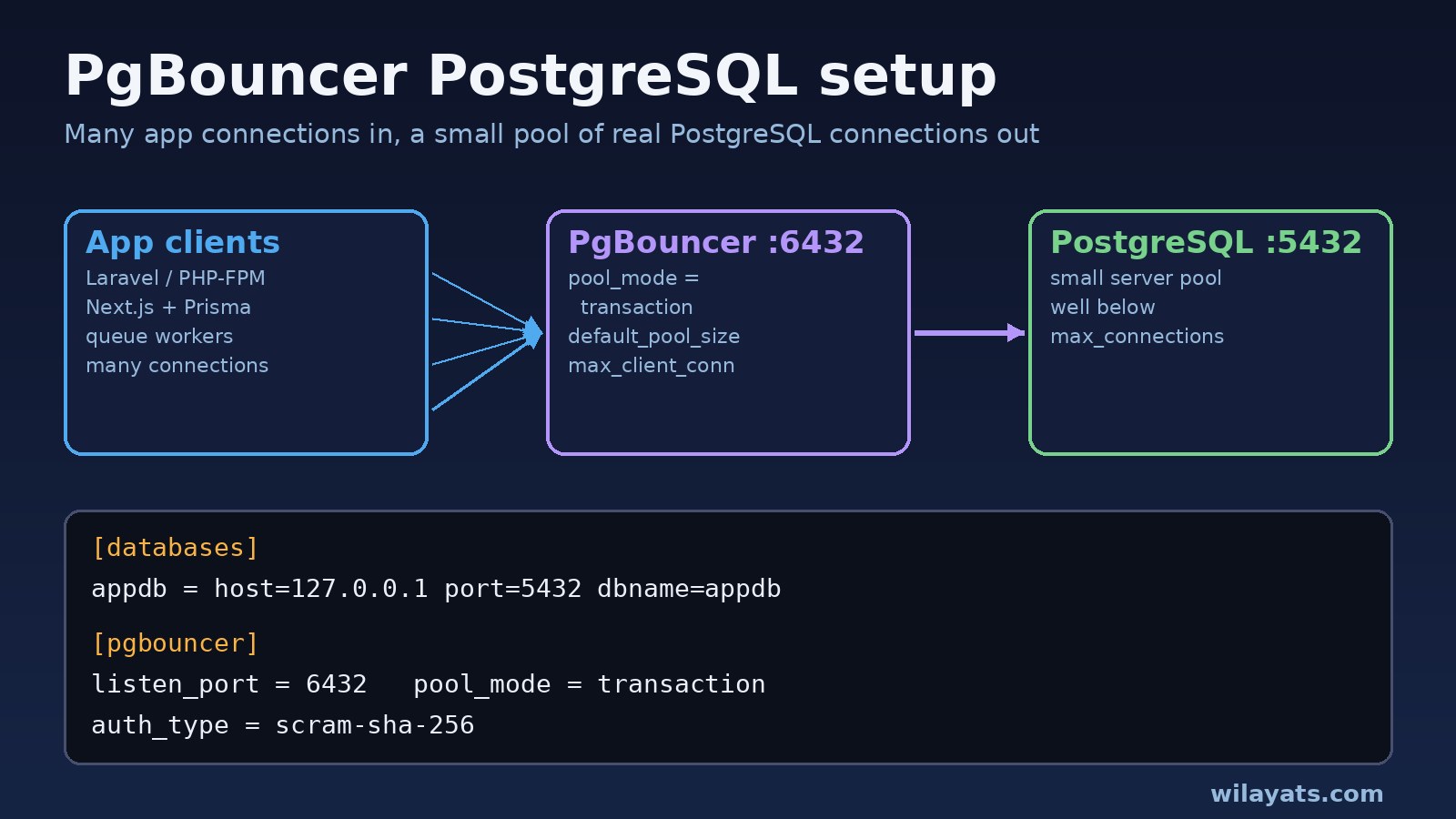
Every PHP-FPM worker, Node.js process, queue worker and serverless function opens its own PostgreSQL connection, and each connection is a separate server process with its own memory. Put a pgbouncer postgresql setup in front of the database and those hundreds of client connections share a small pool of real server connections instead.
This guide walks through a working PgBouncer setup on Ubuntu and Docker, shows how to point Laravel, Prisma and Node.js at it, and fixes the errors people hit first: no more connections allowed (max_client_conn), password authentication failed, prepared statement "pdo_stmt_00000001" already exists and unsupported startup parameter. If you are still fighting sorry, too many clients already, start with PostgreSQL too many connections: causes and fixes, then come back here to add the pooler.
Problem: Too Many Direct Connections to PostgreSQL
Application-side pools only help inside one process. A Laravel app with several servers, each running many PHP-FPM children, plus Horizon workers and cron jobs, can easily need more connections than max_connections allows. Raising max_connections costs memory and often makes the database slower, not faster.
PgBouncer is a lightweight connection pooler. Clients connect to PgBouncer (usually on port 6432) as if it were PostgreSQL. PgBouncer keeps a limited number of server connections open to PostgreSQL (port 5432) and hands them to clients only while they need them.
Symptoms: Errors You See During PgBouncer Setup
These messages come from PgBouncer itself, or from PostgreSQL when the pool mode does not fit your app:
ERROR:  no more connections allowed (max_client_conn)
FATAL:  password authentication failed for user "app"
ERROR:  server login has been failing, try again later (server_login_retry)
ERROR:  unsupported startup parameter: extra_float_digits
ERROR:  prepared statement "pdo_stmt_00000001" already exists
ERROR: prepared statement "s0" does not exist- Requests hang under load, then fail with a timeout while
SHOW POOLSshows a highcl_waitingcount. - Settings applied with
SET search_pathorSET TIME ZONEseem to randomly disappear between queries. - Migrations that rely on advisory locks behave strangely when run through the pooler.
Root Cause: Why PgBouncer Connection Pooling Breaks
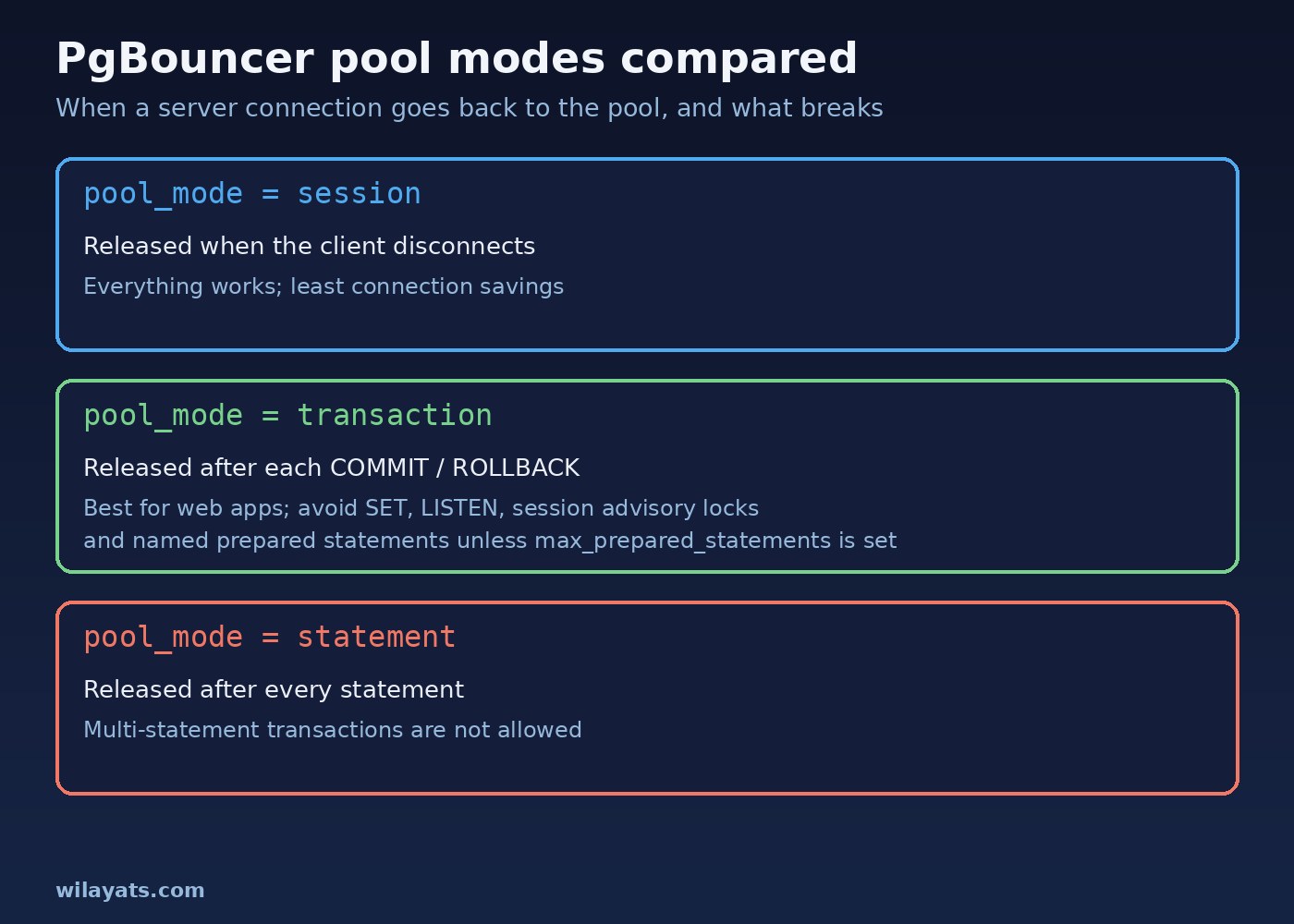
- Pool mode does not match the app. In transaction pooling a client keeps a server connection only for one transaction. Anything that depends on session state (session
SET,LISTEN, session advisory locks, temporary tables, named prepared statements) can land on a different server connection next time. - Auth mismatch.
auth_typein PgBouncer, the entries inuserlist.txtand the password method inpg_hba.confmust agree. A wrong or missing userlist entry givespassword authentication failed; repeated failures toward the server triggerserver_login_retry. - Limits set too low or too high.
max_client_conncaps client connections to PgBouncer.default_pool_sizecaps server connections per database and user pair. If the sum of all pools is abovemax_connections, you just move the old error to a new place. - Driver sends options PgBouncer does not know. Some clients (JDBC is the common one) send startup parameters such as
extra_float_digits, which PgBouncer rejects unless they are listed inignore_startup_parameters.
Step-by-Step: PgBouncer PostgreSQL Setup
1. Install PgBouncer
On Ubuntu or Debian the package is in the default repositories (the PostgreSQL apt repository usually has a newer version):
sudo apt update
sudo apt install pgbouncer
pgbouncer --version
The config files live in /etc/pgbouncer/. Check the version: support for prepared statements in transaction mode (max_prepared_statements) arrived in PgBouncer 1.21.
2. Configure pgbouncer.ini
; /etc/pgbouncer/pgbouncer.ini
[databases]
appdb = host=127.0.0.1 port=5432 dbname=appdb

[pgbouncer]
listen_addr = 127.0.0.1
listen_port = 6432
auth_type = scram-sha-256
auth_file = /etc/pgbouncer/userlist.txt

pool_mode = transaction
max_client_conn = 1000
default_pool_size = 20
reserve_pool_size = 5
max_db_connections = 50

; PgBouncer 1.21+: track protocol-level prepared statements in transaction mode
max_prepared_statements = 100

ignore_startup_parameters = extra_float_digits
server_reset_query = DISCARD ALL

admin_users = pgbouncer_admin
stats_users = pgbouncer_admin
Pick numbers from your own connection budget, not from this example. A useful rule: the total of all server pools (max_db_connections, or pools × default_pool_size) must stay comfortably below PostgreSQL's max_connections, leaving room for admin tools and replication. In transaction mode server_reset_query is not used by default; it matters for session pooling.
3. Create userlist.txt with SCRAM secrets
Copy the stored SCRAM hash from PostgreSQL so PgBouncer can check client passwords and log in to the server. This needs a superuser:
sudo -u postgres psql -Atc "SELECT '\"' || rolname || '\" \"' || rolpassword || '\"' FROM pg_authid WHERE rolname = 'app';"; /etc/pgbouncer/userlist.txt
"app" "SCRAM-SHA-256$4096:...:..."
"pgbouncer_admin" "a-strong-password"sudo chown postgres:postgres /etc/pgbouncer/userlist.txt
sudo chmod 600 /etc/pgbouncer/userlist.txtMake sure pg_hba.conf allows the PgBouncer host with scram-sha-256. For many users, look at auth_query with a dedicated auth_user instead of maintaining the file by hand.
4. Start PgBouncer and connect
sudo systemctl enable --now pgbouncer
sudo systemctl status pgbouncer
psql "host=127.0.0.1 port=6432 dbname=appdb user=app" -c "select 1;"
After changing pgbouncer.ini, apply it with sudo systemctl reload pgbouncer or the RELOAD; admin command. Some settings such as listen_port need a restart.
Code and Commands: Connecting Your Stack to PgBouncer
PgBouncer in Docker Compose
Run PgBouncer next to your app containers and mount your own config files. Image names and entrypoints differ, so check the docs of the image you choose for where it reads pgbouncer.ini.
services:
  postgres:
    image: postgres:16
    environment:
      POSTGRES_PASSWORD: change-me
  pgbouncer:
    image: edoburu/pgbouncer:latest
    depends_on:
      - postgres
    ports:
      - "6432:6432"
    volumes:
      - ./pgbouncer/pgbouncer.ini:/etc/pgbouncer/pgbouncer.ini:ro
      - ./pgbouncer/userlist.txt:/etc/pgbouncer/userlist.txt:ro
Inside Compose, set host=postgres in the [databases] section and listen_addr = 0.0.0.0, and point apps at pgbouncer:6432. If the container keeps exiting, its logs usually show a config or auth error; see why a Docker container keeps restarting.
Laravel: fix prepared statement errors
PDO pgsql uses named server-side prepared statements. In transaction mode on PgBouncer older than 1.21 (or without max_prepared_statements) this causes prepared statement "pdo_stmt_..." already exists. Either upgrade PgBouncer and set max_prepared_statements, or let PDO emulate prepares:
DB_CONNECTION=pgsql
DB_HOST=127.0.0.1
DB_PORT=6432
DB_DATABASE=appdb// config/database.php -> connections.pgsql
'options' => extension_loaded('pdo_pgsql') ? [
PDO::ATTR_EMULATE_PREPARES => true,
] : [],Run php artisan config:clear after the change. Long-running queue workers also need a restart; see the Laravel queue Redis guide for managing workers with Supervisor.
Prisma and Next.js
Prisma has a pgbouncer=true flag for transaction mode. Run migrations over a direct connection with directUrl:
# .env
DATABASE_URL="postgresql://app:secret@pgbouncer:6432/appdb?pgbouncer=true&connection_limit=5"
DIRECT_URL="postgresql://app:secret@postgres:5432/appdb"datasource db {
provider = "postgresql"
url = env("DATABASE_URL")
directUrl = env("DIRECT_URL")
}Node.js with pg
The pg driver uses unnamed statements unless you give a query a name, so it works with transaction pooling. Keep the app pool small, because PgBouncer does the real pooling:
import pg from "pg";

export const pool = new pg.Pool({
  host: process.env.PGHOST,      // pgbouncer host
  port: 6432,
  database: "appdb",
  user: "app",
  password: process.env.PGPASSWORD,
  max: 10,
  application_name: "orders-api",
});
Verification: Check PgBouncer Pools and PostgreSQL
Connect to the PgBouncer admin console (the special database pgbouncer) as a user listed in admin_users:
psql "host=127.0.0.1 port=6432 dbname=pgbouncer user=pgbouncer_admin"

SHOW POOLS;
SHOW STATS;
SHOW CLIENTS;
SHOW SERVERS;
SHOW CONFIG;- In
SHOW POOLS,cl_waitingshould be zero or near zero most of the time, andmaxwaitshould stay low. sv_activeplussv_idleshould stay within your pool size.- On PostgreSQL, the connection count should now be small and stable:
SELECT usename, application_name, client_addr, state, count(*)
FROM pg_stat_activity
GROUP BY 1, 2, 3, 4
ORDER BY 5 DESC;
Then run your app's test suite and a short load test against staging through port 6432, and watch the PgBouncer log (on Ubuntu, usually /var/log/postgresql/pgbouncer.log) for auth or prepared statement errors.
Prevention: Keep PostgreSQL Connection Pooling Healthy
- Write down a connection budget and check it whenever you add app servers, workers or a new service.
- Use transaction pooling for web traffic and a separate session-mode database entry, or a direct connection, for jobs that need session features.
- Run migrations directly against PostgreSQL, not through a transaction-mode pool.
- Avoid session state in app code. Use
SET LOCALinside a transaction, or set options per role withALTER ROLE ... SET. - Keep PgBouncer updated so you get prepared statement support and security fixes.
- Monitor
SHOW POOLSand alert when clients start waiting. Waiting often means slow queries; see how to optimize a slow PostgreSQL query. - Protect userlist.txt with strict file permissions and keep PgBouncer off the public internet.
FAQs
What is the difference between session and transaction pooling in PgBouncer?
Session pooling gives a client one server connection until it disconnects, so everything works but you save few connections. Transaction pooling returns the server connection after each transaction, which saves the most connections but breaks features that depend on session state.
Does PgBouncer support prepared statements?
Yes, from version 1.21 PgBouncer can track protocol-level prepared statements in transaction mode when max_prepared_statements is set above zero. SQL-level PREPARE commands are still not supported in transaction mode.
What port does PgBouncer use?
By default PgBouncer listens on port 6432, while PostgreSQL stays on 5432. Your apps connect to 6432 and PgBouncer connects to 5432.
How do I choose default_pool_size?
Start small, measure, and adjust. A pool exists per database and user pair, so multiply by the number of pairs and keep the total below max_connections. If clients wait while PostgreSQL CPU is low, raise it a little; if CPU is saturated, fix queries first.
Is PgBouncer the same as Pgpool-II?
No. PgBouncer focuses only on connection pooling and is very light. Pgpool-II also offers load balancing and other features, with more configuration to manage.
Should I use PgBouncer with Laravel?
Yes, especially with many PHP-FPM workers or several app servers. Use transaction pooling, handle prepared statements as shown above, and keep migrations on a direct connection.
Conclusion
A good pgbouncer postgresql setup is a small config file and a few app changes: transaction pooling, SCRAM auth that matches PostgreSQL, pool sizes that fit your connection budget, and a plan for prepared statements. Verify with SHOW POOLS and pg_stat_activity, keep migrations on a direct connection, and your Laravel, Next.js and Node.js services can scale out without hitting connection limits again.
Comments
Join the discussion. Replies load on demand, up to 5 levels.
1 thread
thanks man you have solve my problem
Showing 1–1 of 1 threads