You switched Laravel to Redis, dispatched a job, and nothing happened. Or the job ran twice, or it sits in Redis while the worker prints nothing. A Laravel queue Redis setup has only a few moving parts: the .env connection, the Redis client, config/queue.php, and a long-running worker process. When jobs misbehave, one of those parts is almost always wrong.
This guide walks through a working setup, the real error messages you will see when it breaks, and how to fix each one. It applies to Laravel 9, 10 and 11 on a VPS with Nginx or in Docker.
The Problem: When Laravel Queue Redis Jobs Don't Run
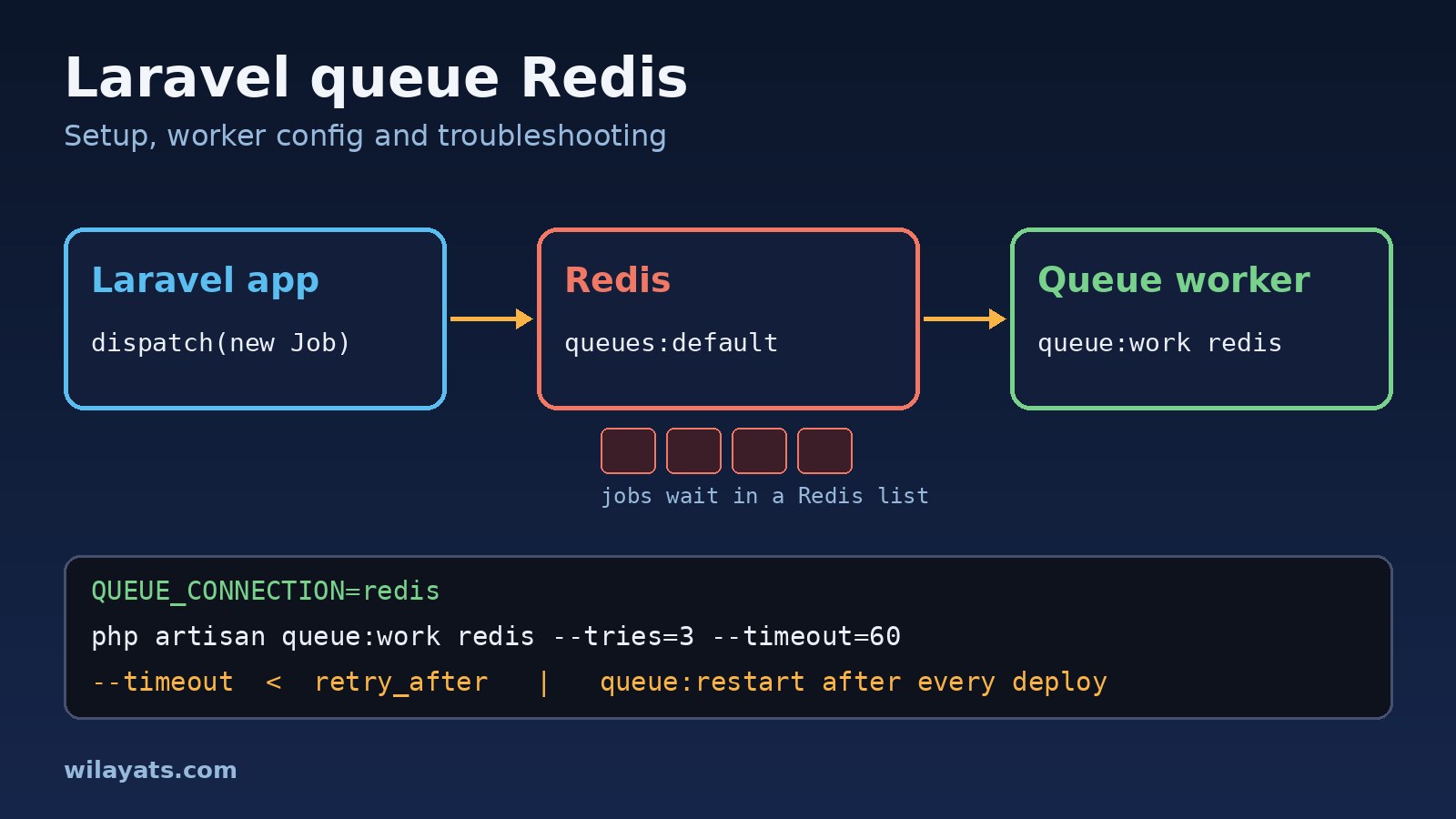
Queues move slow work out of the HTTP request. The application pushes a serialized job onto a Redis list, and a separate Laravel queue worker process pops it off and runs it. If you are still deciding whether a job should be queued, scheduled or event-driven, see queue vs cron job vs event first.
Because the producer and the worker are separate processes, a mistake on either side fails quietly: the request succeeds and the export never arrives.
Symptoms
- Jobs are dispatched but never processed, and
php artisan queue:workshows no output. - Jobs run instantly inside the request, so the page is still slow. The connection is still
sync. - The worker crashes on start with
Class "Redis" not foundorConnection refused. - A long job runs twice, or fails with
MaxAttemptsExceededExceptioneven though it never threw an error. - You deployed a fix, but the queue keeps running the old code.
- Jobs dispatched with
->onQueue('emails')pile up while thedefaultqueue drains fine.
Root Cause
Most Redis queue Laravel failures come from one of six causes:
- Wrong connection.
QUEUE_CONNECTIONis stillsyncordatabase(the Laravel 11 default), or the config is cached with old values. - Missing Redis client. Laravel defaults to the
phpredisPHP extension. If it is not installed and you have not switched topredis, the worker cannot connect. - Wrong host. Inside Docker,
127.0.0.1points at the PHP container itself, not the Redis container. - Timeouts out of order. When a job runs longer than
retry_after, Redis hands the same job to another worker while the first is still running it. - Queue name mismatch. A worker only processes the queues it is told about.
- Stale workers.
queue:workboots the framework once and keeps it in memory, so code and config changes are invisible until the worker restarts.
Step-by-Step Fix
1. Point the queue at Redis
Set the connection in .env, then clear any cached config so Laravel actually reads it:
QUEUE_CONNECTION=redis
REDIS_CLIENT=phpredis
REDIS_HOST=127.0.0.1
REDIS_PASSWORD=null
REDIS_PORT=6379php artisan config:clear
php artisan config:show queue.default # Laravel 10.x and newer; prints "redis"2. Choose phpredis or predis
phpredis is a compiled extension and Laravel's default. Check that it is loaded for the same PHP binary that runs your worker, because CLI and PHP-FPM can use different php.ini files:
php -m | grep -i redis
# Ubuntu/Debian with the ondrej PPA
sudo apt install php8.3-redis
# Docker (official php image)
pecl install redis && docker-php-ext-enable redis
If you cannot install extensions, for example on some shared hosting, use the pure-PHP predis package instead:
composer require predis/predis
# .env
REDIS_CLIENT=predis
3. Get the timeouts in the right order
Open config/queue.php and look at the redis connection:
'redis' => [
    'driver' => 'redis',
    'connection' => env('REDIS_QUEUE_CONNECTION', 'default'),
    'queue' => env('REDIS_QUEUE', 'default'),
    'retry_after' => (int) env('REDIS_QUEUE_RETRY_AFTER', 90),
    'block_for' => null,
    'after_commit' => false,
],
retry_after is how many seconds Redis waits before it treats a reserved job as lost and releases it to another worker. The worker's --timeout is how long a single job may run before the worker kills it. The --timeout value must always be several seconds shorter than retry_after. If it is longer, a slow job is still running when the job is released again, so it runs twice.
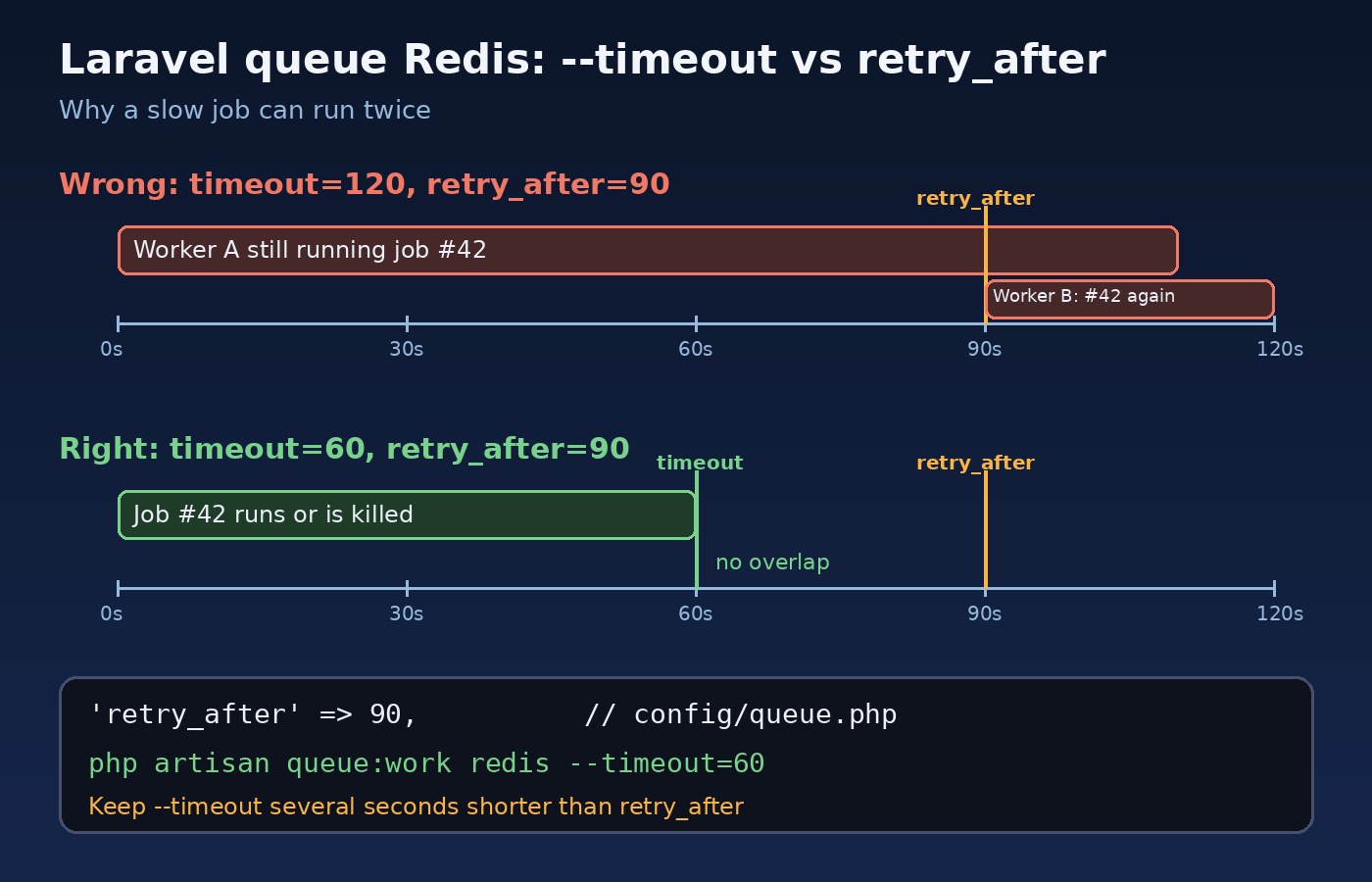
For genuinely long jobs such as a large report export, raise both values together, or put those jobs on their own connection with a larger retry_after. The pcntl PHP extension must be installed for --timeout to be enforced.
4. Run the worker on the right queues
Without --queue, the worker only processes the connection's default queue. List every queue you dispatch to, in priority order:
php artisan queue:work redis --queue=high,emails,default --tries=3 --timeout=60 --sleep=35. Keep the Laravel queue worker alive with Supervisor
A worker started in an SSH session dies when you log out. On a server, let Supervisor start it, restart it if it crashes, and run several processes:
; /etc/supervisor/conf.d/laravel-worker.conf
[program:laravel-worker]
process_name=%(program_name)s_%(process_num)02d
command=php /var/www/app/artisan queue:work redis --queue=high,emails,default --sleep=3 --tries=3 --timeout=60 --max-time=3600
autostart=true
autorestart=true
stopasgroup=true
killasgroup=true
user=www-data
numprocs=2
redirect_stderr=true
stdout_logfile=/var/www/app/storage/logs/worker.log
stopwaitsecs=3600sudo supervisorctl reread
sudo supervisorctl update
sudo supervisorctl start "laravel-worker:*"
sudo supervisorctl statusSet stopwaitsecs higher than your longest job so Supervisor does not kill it mid-restart. --max-time recycles each worker hourly to contain memory leaks.
6. Restart workers on every deploy
Add this to the end of your deploy script:
php artisan config:cache
php artisan queue:restart
queue:restart stores a restart signal in the cache. Each worker finishes its current job, then exits, and Supervisor starts a fresh one with the new code. If your cache store is array, the signal is never shared between processes, so use Redis or the database for the cache.
Code and Commands for Common Errors
Class "Redis" not found
Error: Class "Redis" not foundThe phpredis extension is missing for the CLI PHP. Install it as shown in step 2, or set REDIS_CLIENT=predis.
Connection refused
Predis\Connection\ConnectionException: Connection refused [tcp://127.0.0.1:6379]
RedisException: Connection refused
Check that Redis is running and reachable from the machine or container that runs the worker. In Docker Compose, use the service name as the host and run the worker as its own service from the same image:
# .env inside the container
REDIS_HOST=redis

# docker-compose.yml
services:
  redis:
    image: redis:7-alpine
  queue:
    build: .
    command: php artisan queue:work redis --tries=3 --timeout=60
    restart: unless-stopped
    depends_on:
      - redis
If you see NOAUTH Authentication required., Redis has a password and REDIS_PASSWORD is empty or wrong.
MaxAttemptsExceededException and TimeoutExceededException
Illuminate\Queue\MaxAttemptsExceededException: App\Jobs\SyncInvoice has been attempted too many times.
Illuminate\Queue\TimeoutExceededException: App\Jobs\SyncInvoice has timed out.
The exact wording differs slightly between Laravel versions. Both usually mean the job ran longer than --timeout or retry_after. Fix the timeout order from step 3, then find out why the job is slow. Queued jobs often hide the same query problems as web requests, so check for N+1 query problems inside the handle() method. You can also set limits on the job class itself:
class SyncInvoice implements ShouldQueue
{
    use Dispatchable, InteractsWithQueue, Queueable, SerializesModels;

    public $tries = 3;
    public $timeout = 60;
    public $backoff = [10, 30, 60];

    public function failed(\Throwable $e): void
    {
        logger()->error('SyncInvoice failed', ['error' => $e->getMessage()]);
    }
}
ModelNotFoundException right after dispatch
If you dispatch inside a database transaction, the worker can pick up the job before the transaction commits, so the new row does not exist yet. Dispatch with ->afterCommit() or set 'after_commit' => true on the redis connection.
Inspect what is actually in Redis
Queue keys carry the Redis prefix from config/database.php, for example laravel_database_queues:default. Pending jobs sit in a list; reserved and delayed jobs sit in sorted sets:
redis-cli ping                                   # PONG
redis-cli --scan --pattern '*queues:*'
redis-cli LLEN laravel_database_queues:default   # waiting jobs
redis-cli ZCARD laravel_database_queues:default:reserved
redis-cli ZCARD laravel_database_queues:default:delayed
Work with failed_jobs
Jobs that use up their attempts are written to the failed_jobs table. Laravel 11 includes its migration by default; on older versions run php artisan queue:failed-table and migrate.
php artisan queue:failed            # list failed jobs
php artisan queue:retry all         # push them back onto the queue
php artisan queue:retry 5a1c...     # retry one by UUID
php artisan queue:forget 5a1c...    # delete one
php artisan queue:flush             # delete all failed jobs
Verification
Confirm the whole path works before you trust it in production:
- Dispatch a test job from
php artisan tinkerwithApp\Jobs\SyncInvoice::dispatch($invoice);. - Run
redis-cli LLEN laravel_database_queues:defaultand check that the count went up. - Run
php artisan queue:work redis --once -vand watch the job show as running, then done. - Check
sudo supervisorctl statusshows every worker asRUNNING, and thatphp artisan queue:failedis empty. - Deploy a small change, run
php artisan queue:restart, and confirm the worker log shows the new behaviour.
Prevention
- Keep queue data and cache data in separate Redis databases or instances. With Laravel's default config the cache uses its own database, and keeping it that way stops a cache flush from wiping queued jobs.
- Use
maxmemory-policy noevictionon the Redis instance that holds queues, so Redis never evicts jobs under memory pressure. The trade-offs are covered in Redis caching: when you should and shouldn't use it. - Always pair
--timeoutwith a largerretry_after, and review both when you add a slow job. - Make jobs idempotent, so a job that runs twice does no harm. Check a status column or use a unique key before you send an email or charge a payment.
- Alert on backlog with
php artisan queue:monitor redis:default,redis:emails --max=100, which fires aQueueBusyevent you can route to Slack or email. - Keep jobs in a predictable place, such as
app/Jobsgrouped by domain, so the team can find them. See how to structure a Laravel project for large applications. - Consider Laravel Horizon once you run several queues. It only supports Redis, gives you a dashboard of throughput and failures, and replaces
queue:workin Supervisor withphp artisan horizon. On deploy, runphp artisan horizon:terminateinstead ofqueue:restart.
FAQs
How do I set up a Laravel queue with Redis?
Set QUEUE_CONNECTION=redis in .env, install the phpredis extension or predis/predis, point REDIS_HOST at your Redis server, and run php artisan queue:work redis. In production, run the worker under Supervisor or as a Docker service, and run queue:restart after each deploy.
Why is my Laravel queue worker not processing jobs?
Usually the job went to a different connection or queue than the worker is reading. Check that config('queue.default') returns redis, clear cached config, and make sure --queue lists every queue name you dispatch to. Then check that Redis is reachable from the worker.
Should I use phpredis or predis?
Use phpredis when you can install PHP extensions. It is Laravel's default and is implemented in C. Use predis when you cannot install extensions. Both work with the same Laravel queue configuration.
What is the difference between queue:work and queue:listen?
queue:work boots the application once and keeps it in memory, which is faster but needs a restart to pick up new code. queue:listen reloads the application for every job, which is handy during local development and too slow for production.
Conclusion
A reliable Laravel queue Redis setup comes down to a few rules: the correct connection and client, --timeout below retry_after, workers that know every queue, Supervisor to keep them alive, and a restart on every deploy. When something breaks, the error message, the Redis keys and failed_jobs show which rule was missed.