The page works fine on your laptop. Ten test orders, a quick response, nothing to worry about. Then it reaches production with a few thousand rows and the same endpoint takes seconds. The code didn't change and the database isn't overloaded. Very often the cause is an N+1 query problem.
N+1 queries are one of the most common performance bugs in applications built on an ORM such as Laravel's Eloquent or Prisma. They are easy to write, invisible in small test data and expensive at scale. This guide explains what they are, how to spot them and how to fix them in Laravel, Next.js and React applications backed by PostgreSQL.
What an N+1 Query Problem Is
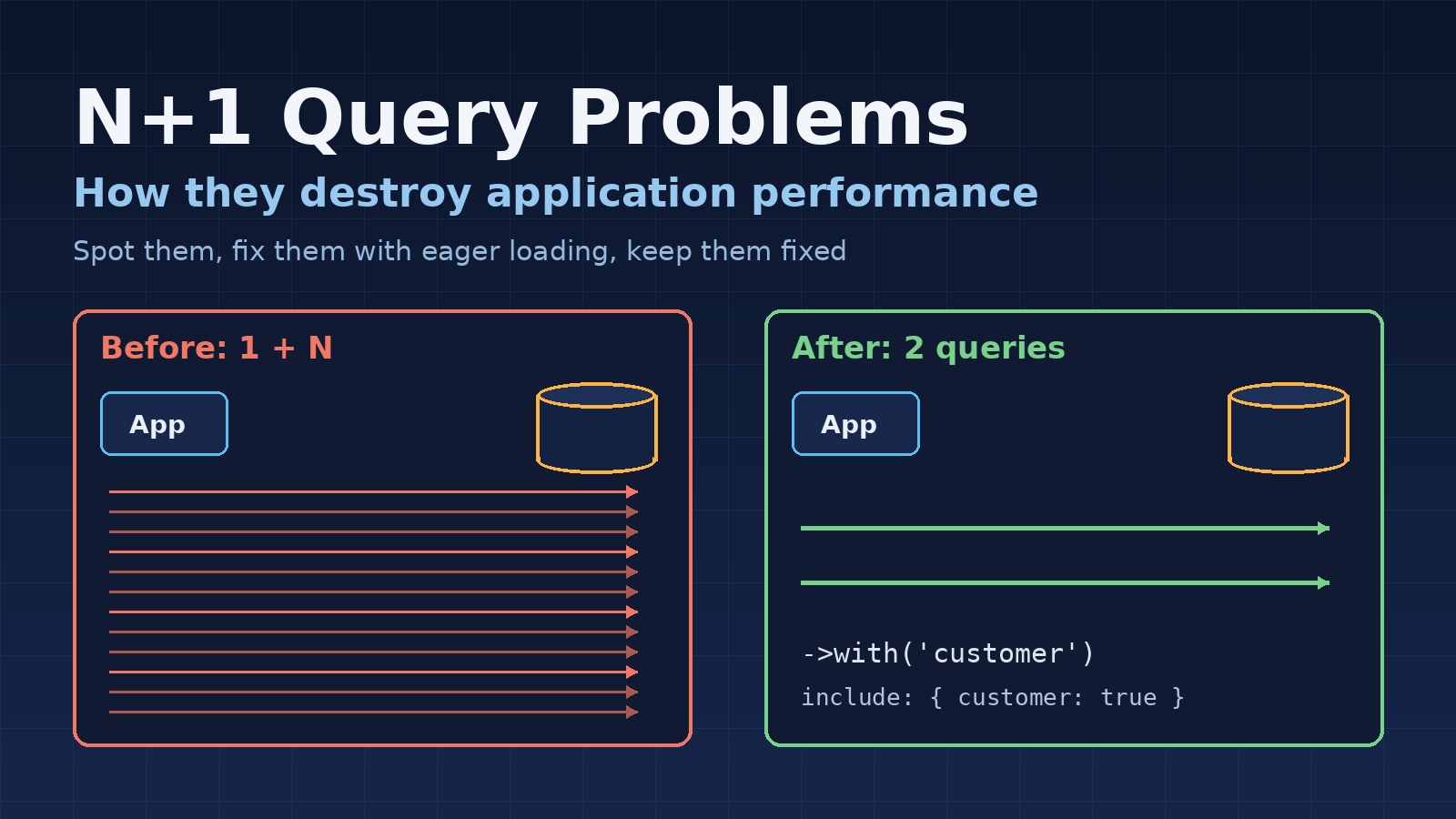
An N+1 problem happens when your code runs one query to load a list, then one more query for each item in that list. One query for the list plus N queries for the items gives you N+1 in total.
Here is the classic Laravel example. You want to show orders with the customer's name:
$orders = Order::latest()->take(50)->get();   // 1 query

foreach ($orders as $order) {
    echo $order->customer->name;              // 1 query per order
}
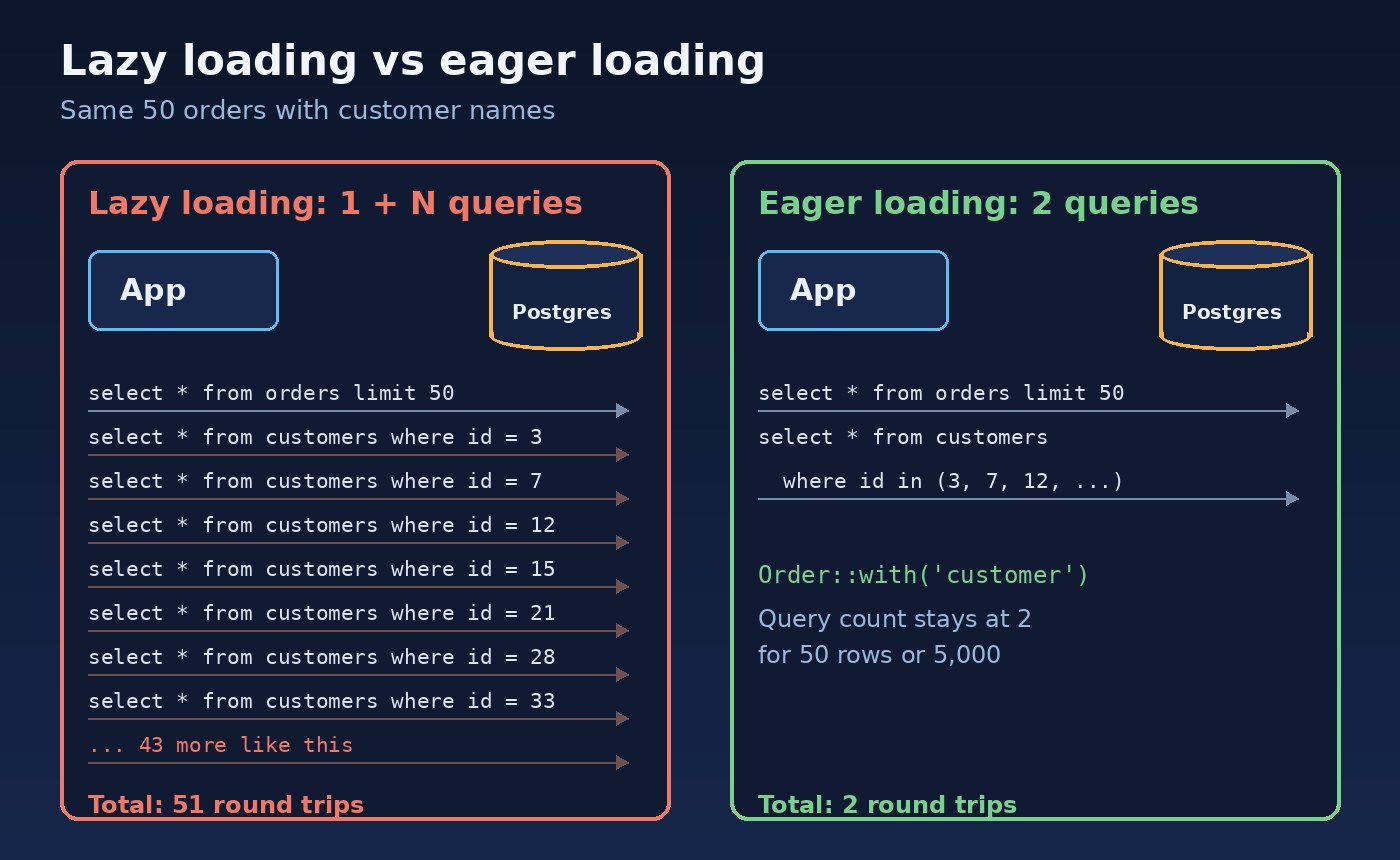
Eloquent loads relationships lazily by default. The first time you touch $order->customer, it runs a separate select * from customers where id = ?. Fifty orders means 51 queries. Five hundred orders means 501.
Why It Hurts More Than You Expect
Each of those small queries is usually fast on its own. The problem is the fixed cost every query pays: a network round trip to the database, parsing, planning and returning a result to your application. That cost doesn't shrink because the query is simple.
As an illustration, if one round trip takes 2 ms, 500 extra queries add a full second to the request before any real work happens. Your real numbers will differ, but the shape is the same: the cost grows in a straight line with the number of rows. That is why N+1 problems hide in development, where lists are short, and appear in production, where they are not.
They also hurt the rest of the system. Every extra query holds a database connection a little longer, so under load you can run out of connections in the pool even though no single query is slow.
How to Spot N+1 Queries
You rarely notice N+1 by reading code, because the extra queries sit behind innocent property access. Make the query count visible instead.
Log or count queries during development
Tools such as Laravel Debugbar and Laravel Telescope show every query a request runs. The pattern is easy to recognise: the same query repeated many times with only the ID changing. In Prisma you can enable query logging on the client with log: ['query'] and look for the same repetition.
Make lazy loading fail in development
Laravel can throw an exception whenever a relationship is lazy loaded. Turn it on outside production so N+1 bugs surface while you build the feature, not after it ships:
// app/Providers/AppServiceProvider.php
use Illuminate\Database\Eloquent\Model;

public function boot(): void
{
    Model::preventLazyLoading(! $this->app->isProduction());
}
Watch for it in production
In PostgreSQL, the pg_stat_statements extension records how often each normalised query runs. A cheap query with a huge call count is a strong hint that some code is running it inside a loop. Application monitoring tools that trace requests will show the same thing as a long list of near-identical database spans.
Fixing N+1 in Laravel
Eager load relationships with with()
Tell Eloquent which relationships you need before you loop. It then loads them in one extra query using where id in (...):
$orders = Order::with('customer')->latest()->take(50)->get();
// select * from orders order by created_at desc limit 50
// select * from customers where id in (3, 7, 12, ...)

foreach ($orders as $order) {
    echo $order->customer->name;   // no extra query
}
Fifty orders or five thousand, it is two queries. A few useful variations:
- Nested relationships:
Order::with('items.product')loads items and their products without a query per item. - Only the columns you need:
with('customer:id,name'). Always include the key column, or Eloquent can't match the rows. - Already have the models? Use
$orders->load('customer')to eager load after the fact.
Use aggregates instead of loading whole collections
Another common N+1 hides in counts and totals, such as $customer->orders->count() inside a loop. Let the database do it in the main query:
$customers = Customer::withCount('orders')
    ->withSum('orders', 'total')
    ->get();

// $customer->orders_count and $customer->orders_sum_total are now attributes
Watch API resources and accessors
N+1 queries often hide in API resources, model accessors and Blade partials, far from the controller that loaded the data. In API resources, use whenLoaded() so a relationship is only included when the controller eager loaded it, rather than silently triggering a query per item. Keeping data loading in one predictable layer helps here; the post on structuring a Laravel project for large applications covers where that logic should live.
Fixing N+1 in Next.js and Node.js Backends
The same mistake appears with any ORM. In Prisma, loading a list and then calling findUnique for each item inside a loop or Promise.all is still N+1, even if the queries run in parallel. Ask for the relation up front instead:
const orders = await prisma.order.findMany({
  take: 50,
  orderBy: { createdAt: 'desc' },
  include: { customer: { select: { id: true, name: true } } },
});
GraphQL APIs are especially prone to N+1 because each field resolver runs per item. The standard fix is a batching layer such as DataLoader, which collects all the IDs requested during one request and loads them in a single query. Create the loaders per request so cached results never leak between users.
The Frontend Version: N+1 API Calls in React
N+1 isn't only a database problem. A React list where each row component fetches its own details creates one HTTP request for the list plus one per row:
function OrderRow({ order }) {
  // runs once per row: 50 rows, 50 extra requests
  const { data: customer } = useQuery({
    queryKey: ['customer', order.customerId],
    queryFn: () => fetch(`/api/customers/${order.customerId}`).then(r => r.json()),
  });
  return <tr><td>{order.number}</td><td>{customer?.name}</td></tr>;
}
HTTP requests cost far more than database queries, so this gets slow quickly, especially on mobile networks. Fix it on the server side: have the list endpoint return the fields the screen needs, such as the customer name, or add a batch endpoint that accepts many IDs at once. With Next.js server components, load the list and its related data together on the server instead of fetching per row.
Don't Swing Too Far the Other Way
Eager loading everything "just in case" creates the opposite problem: large queries and memory use for data nobody displays. Load the relationships each screen or endpoint actually uses, select only needed columns and paginate long lists. Caching can help with repeated reads, but it shouldn't be the fix for N+1. Caching a page that runs 500 queries just hides the problem until the cache expires; see when you should and shouldn't use Redis caching. And when the remaining queries are slow on their own, optimizing a slow PostgreSQL query step by step is the next tool to reach for.
Guard Against It With Tests
Once you fix an N+1 problem, keep it fixed. A simple test that counts queries for an endpoint will fail the moment someone adds a lazy-loaded relationship to a loop:
public function test_order_list_uses_a_fixed_number_of_queries(): void
{
    Order::factory()->count(30)->create();

    DB::enableQueryLog();
    $this->getJson('/api/orders')->assertOk();

    // the count should not grow with the number of orders
    $this->assertLessThanOrEqual(5, count(DB::getQueryLog()));
}
Seed more rows than you think you need. A test with two records won't reveal a problem that only shows up with fifty.
Conclusion
N+1 queries come from a simple mismatch: code that looks like it reads a property is really making a database call or HTTP request, once per row. Make queries visible with logging and Laravel's lazy loading protection, fix them with eager loading, aggregates, batching and better API responses, and protect the fix with a query count test. The result is a page that takes about the same number of queries whether it shows ten rows or ten thousand.