Many backends start the same way: someone opens the design file, looks at the screens and creates a table for each one. A dashboard_data table here, a checkout_form table there. It works for the first demo. Months later the reports are slow and totals don't match.
Your tables will outlive your controllers, your React components and probably your framework, so a few hours on the schema first is cheap insurance. This guide walks through a practical process for PostgreSQL with Laravel, and it applies just as well to Next.js APIs and ERP-style systems.
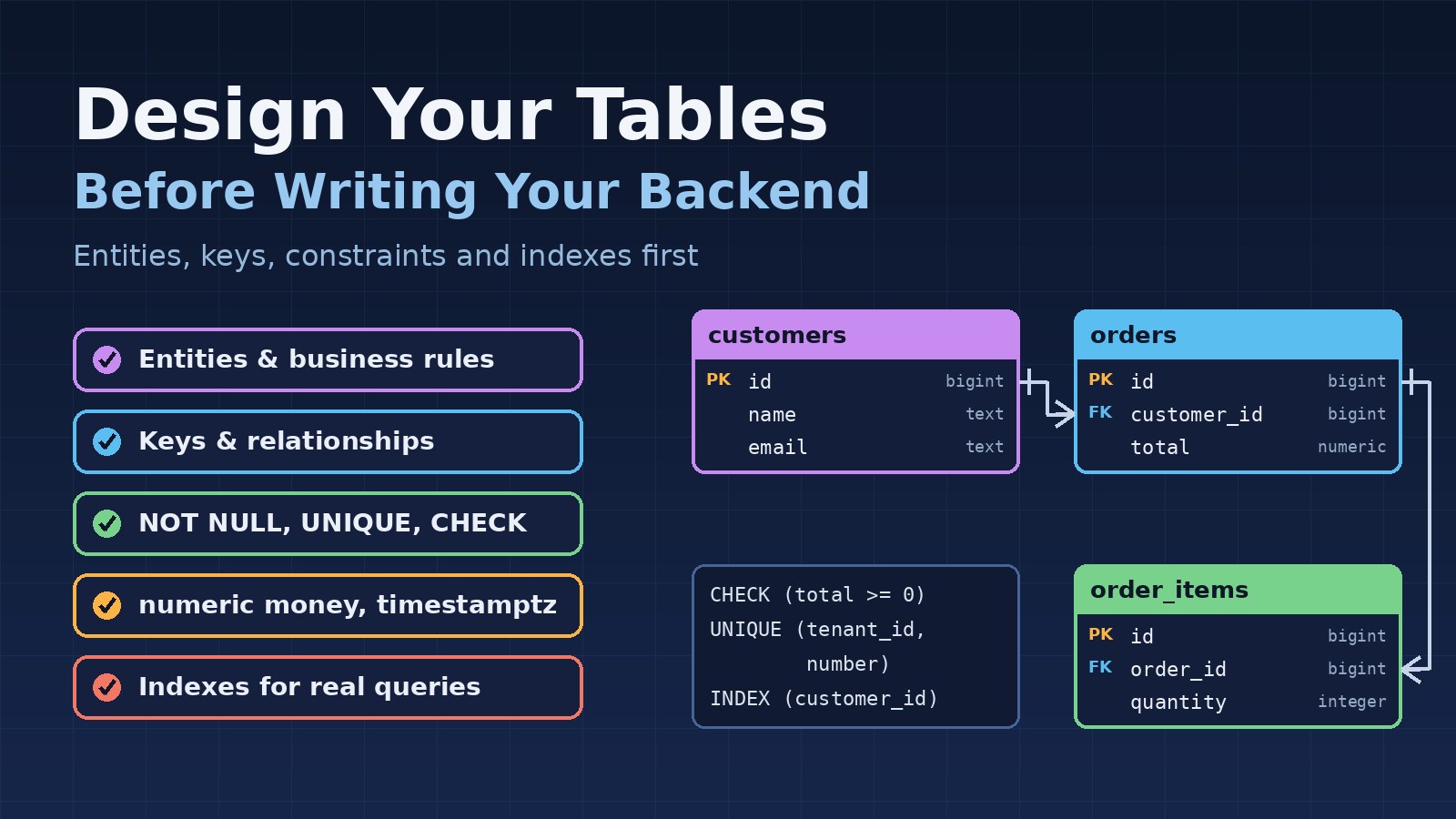
Start From Entities and Business Rules, Not Screens
Screens change every sprint. The business they describe changes much more slowly. Before you think about columns, write down the nouns of the domain and the rules that connect them, in plain sentences:
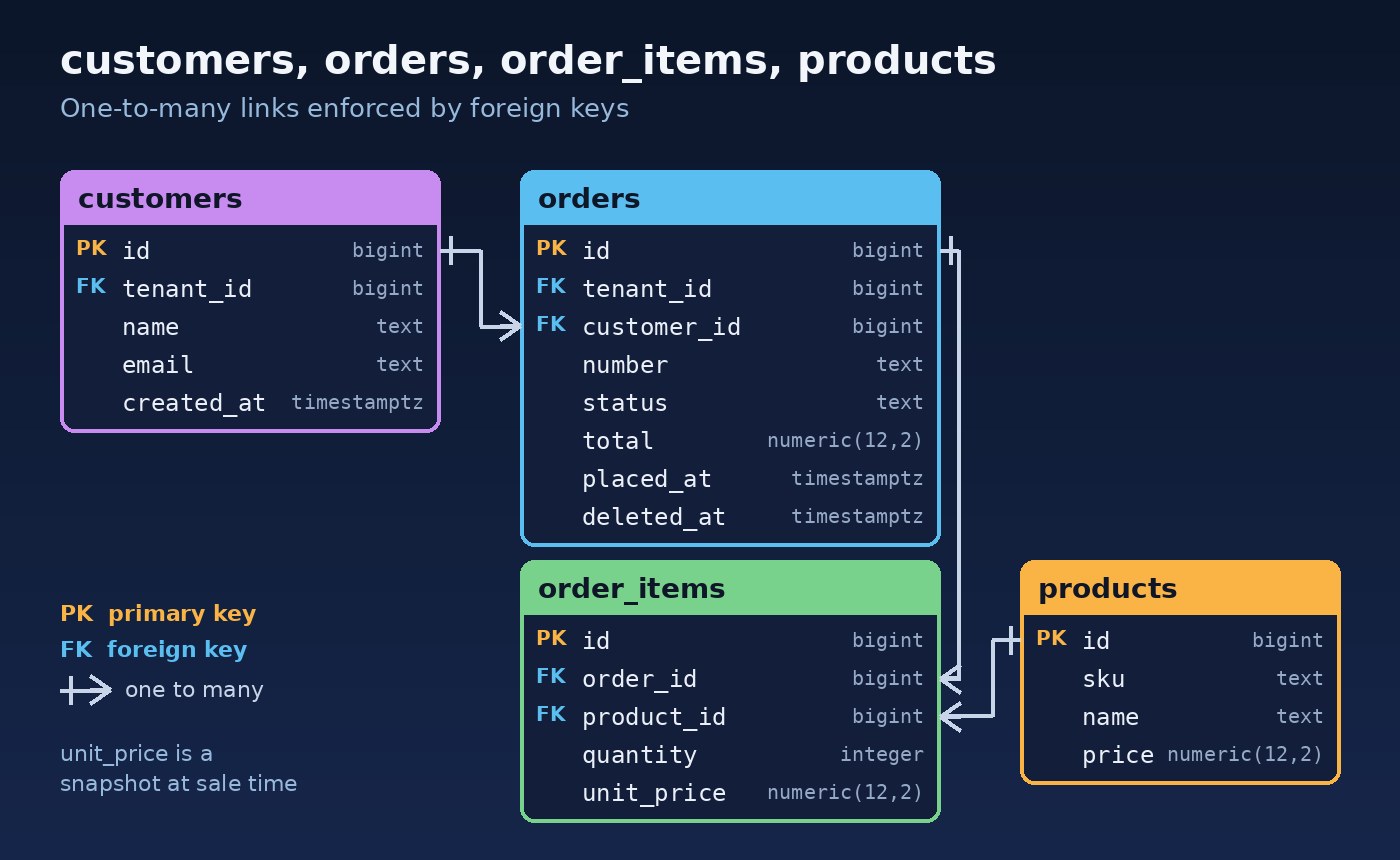
- A customer can place many orders.
- An order has one or more order items, and each item points to one product.
- An order number must be unique within a company.
- Once an order is invoiced, its items cannot change.
Each noun is a candidate table, each "has many" is a relationship, and each "must" or "cannot" is a constraint you can enforce in the database. One screen often reads from five tables, which is why screens make a poor starting point.
List the Queries You Already Know About
Next, list the questions the system must answer. "Show a customer's last 20 orders." "Total sales per product this month." "Find unpaid invoices older than 30 days." You don't need every query, just the important ones. They show which columns you filter and sort on, which tables you join and, later, which indexes you need.
Naming and Primary Keys
Pick conventions once and apply them everywhere. A common and Laravel-friendly set is:
- Plural, snake_case table names:
customers,order_items. - A primary key called
id, and foreign keys named<singular>_id, such ascustomer_id. - Booleans that read as questions (
is_active) and timestamps that end in_at(paid_at).
For primary keys, a bigint identity column is a sensible default: small, fast to index and easy to read in logs. UUIDs help when IDs are created outside the database or must not be guessable in URLs. Whichever you pick, don't use business values such as an email address or invoice number as the primary key. Business values change; keys should not. Give them their own column with a unique constraint.
Normalize First, Denormalize on Purpose
Normalization means storing each fact in one place. A customer's phone number lives in customers, not copied into every order, so it cannot drift apart. As a working rule, aim for third normal form: every column describes the row's key and nothing else.
Denormalization is fine when it is a deliberate decision with a reason. Two common, sensible cases:
- Historical snapshots. An order item should store the
unit_priceat the time of sale. If you only read the price fromproducts, old invoices change when the price list does. That is a business rule, not duplication. - Read performance. A cached
orders_counton customers or a reporting table can save heavy aggregates, as long as you know exactly what keeps it up to date.
Redis fits the same idea. It is a great place for cached, derived data, but the source of truth should be your tables, designed so any cache can be rebuilt from them.
Relationships, Foreign Keys and Constraints
Application validation matters, but queue workers, scripts and data imports all write to the same tables. Database constraints protect the data no matter which code path writes it:
- Foreign keys stop orphaned rows. Decide the delete behaviour on purpose:
RESTRICTfor business records such as orders,CASCADEfor pure children such as order items. - NOT NULL on every column that must have a value. Allowing NULL should be a decision, not the default.
- UNIQUE for business identifiers such as an email or an order number.
- CHECK for simple rules: quantity greater than zero, status from a known list.
Many-to-many relationships get their own table, such as product_categories with two foreign keys and a unique pair.
Choose Types for Money, Time and Status
Types are constraints too. Two mistakes are common:
- Money: never store amounts in
floatorreal, because binary floating point cannot represent many decimal values exactly. Usenumeric(12,2), or an integer amount in the smallest currency unit, plus a currency column if you handle more than one. - Time: use
timestamptzin PostgreSQL. It stores an absolute moment and converts on display, which avoids confusion across time zones. Usedatewhen you really mean a calendar date, such as a due date.
For status, a text column with a CHECK constraint is easy to read and easy to extend. Add audit columns to every important table: created_at, updated_at and, where accountability matters, created_by. For soft deletes, a nullable deleted_at works, but remember that unique rules then usually apply only to rows that are not deleted.
Putting it together in PostgreSQL:
CREATE TABLE orders (
    id           bigint GENERATED ALWAYS AS IDENTITY PRIMARY KEY,
    tenant_id    bigint NOT NULL REFERENCES tenants(id),
    customer_id  bigint NOT NULL REFERENCES customers(id) ON DELETE RESTRICT,
    number       text NOT NULL,
    status       text NOT NULL DEFAULT 'draft'
                 CHECK (status IN ('draft', 'confirmed', 'invoiced', 'cancelled')),
    total        numeric(12,2) NOT NULL DEFAULT 0 CHECK (total >= 0),
    placed_at    timestamptz,
    created_at   timestamptz NOT NULL DEFAULT now(),
    updated_at   timestamptz NOT NULL DEFAULT now(),
    deleted_at   timestamptz
);

-- Order numbers are unique per tenant, ignoring soft-deleted rows
CREATE UNIQUE INDEX orders_tenant_number_unique
    ON orders (tenant_id, number) WHERE deleted_at IS NULL;

-- Known access pattern: a customer's latest orders
CREATE INDEX orders_customer_placed_idx ON orders (customer_id, placed_at DESC);
Index for Known Access Patterns
Go back to your query list and add indexes for the filters and sorts you actually use. Composite indexes follow the query: columns used for equality first, then the column you sort or filter by range. PostgreSQL creates indexes for primary keys and unique constraints automatically, but not for foreign key columns, so index those that you join or filter on. Don't index every column, though; each index slows down writes. When a query is still slow later, the guide on optimizing a slow PostgreSQL query step by step shows how to use EXPLAIN ANALYZE to find out why.
Plan for Multiple Tenants and Branches
ERP-style systems often serve several companies, branches or warehouses from one database. If that is likely, add a tenant_id (or company_id) to every business table from day one and include it in unique rules and the leading columns of indexes. Adding it to a large live system later is painful. This is one of the decisions covered in designing a scalable backend from day one, and it starts in the schema.
The Same Table as a Laravel Migration
Laravel's schema builder covers most of this. CHECK constraints can be added with a raw statement:
Schema::create('orders', function (Blueprint $table) {
    $table->id();
    $table->foreignId('tenant_id')->constrained();
    $table->foreignId('customer_id')->constrained()->restrictOnDelete();
    $table->string('number');
    $table->string('status')->default('draft');
    $table->decimal('total', 12, 2)->default(0);
    $table->timestampTz('placed_at')->nullable();
    $table->timestampsTz();
    $table->softDeletesTz();

    $table->index(['customer_id', 'placed_at']);
});

DB::statement("ALTER TABLE orders ADD CONSTRAINT orders_status_check
    CHECK (status IN ('draft', 'confirmed', 'invoiced', 'cancelled'))");
DB::statement("CREATE UNIQUE INDEX orders_tenant_number_unique
    ON orders (tenant_id, number) WHERE deleted_at IS NULL");
For where models, services and migrations should live as the project grows, see how to structure a Laravel project for large applications.
Review the Schema Before Writing Code
Before the first controller, walk through the design with someone who knows the business and check:
- Can every known query be answered without awkward workarounds?
- Does every business rule have a constraint, or a clear reason why it lives in code?
- Are money, time and status columns using the right types?
- Is every copy of data a deliberate snapshot or cache?
- Do important tables have audit columns, and is the tenant column everywhere it needs to be?
Seed realistic data and write the main queries by hand in SQL. A problem found now costs a quick migration edit; in production it costs a data migration and a lot of nervous testing.
Conclusion
Good backend code is much easier to write on top of a good schema. Start from entities, business rules and the queries you know you will need, not from screens. Use consistent names and stable keys, normalize first and denormalize only on purpose, and let foreign keys and constraints guard the data. Choose the right types for money and time, plan for tenants early, index for real access patterns and review it all before writing code. Every developer who joins the project later will feel the difference.