Your end-to-end suite passes on your laptop, then fails in CI with a red line that says Timeout 30000ms exceeded. Run it again and it passes. A Playwright timeout error almost never means Playwright is too slow. It means Playwright waited for something that was never going to happen: an element that doesn't match your locator, a button that is covered or disabled, a page that never finished navigating, or an assertion that expects the wrong state.
This guide shows how to read the error, find which of those causes you have, and fix it properly instead of raising timeouts until the test goes green. The examples use TypeScript with @playwright/test, and the same ideas apply to React, Next.js and Laravel front ends.
The Problem: What a Playwright Timeout Error Looks Like
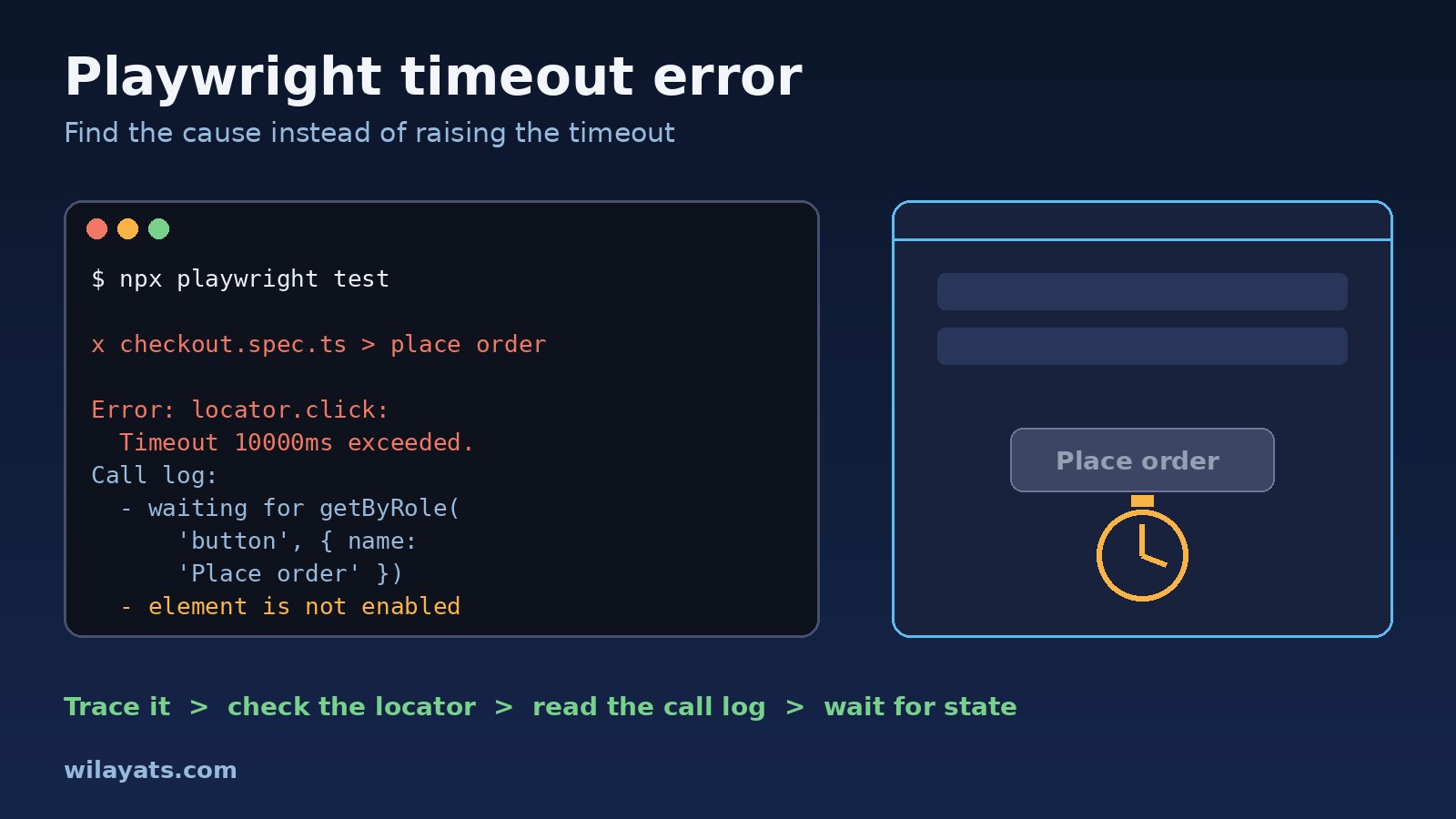
Playwright waits automatically. Every action such as click() or fill() first waits for the element to exist and be actionable, and web-first assertions like toBeVisible() keep retrying until they pass. A timeout is what you see when that waiting runs out. The exact wording changes a little between Playwright versions, but you will usually meet one of these:
Error: locator.click: Test timeout of 30000ms exceeded.
Call log:
- waiting for getByRole('button', { name: 'Place order' })Error: locator.click: Timeout 10000ms exceeded.
Call log:
- waiting for locator('#submit')
- locator resolved to <button id="submit" disabled>Submit</button>
- attempting click action
- waiting for element to be visible, enabled and stable
- element is not enabled
- retrying click actionError: Timed out 5000ms waiting for expect(locator).toBeVisible()
Locator: getByText('Order confirmed')
Expected: visible
Received: <element(s) not found>Error: page.goto: Timeout 30000ms exceeded.
Call log:
- navigating to "http://localhost:3000/checkout", waiting until "load"Symptoms
- A test fails on one step with a locator timeout, but the element is clearly on the page when you look at the screenshot.
- The suite passes locally and fails in CI, or passes on retry. This is a flaky test, not a slow one.
page.waitForSelectororlocator.waitFor()hangs for the full timeout while waiting for selector matches.- The call log repeats lines like
element is not visible,element is not enabledor<div class="overlay"> intercepts pointer events. - The whole test dies with
Test timeout of 30000ms exceededwhile the browser sits on a loading page.
Root Cause: Which Timeout Fired and Why
Playwright has several separate timeouts, and knowing which one fired tells you where to look. With default settings, a test has 30 seconds in total, each expect assertion retries for 5 seconds, and actions and navigations have no limit of their own, so they run until the test timeout ends them. That is why so many errors say "Test timeout of 30000ms exceeded" even though the real problem is one click.
Behind the timeout there are usually only five causes:
- The locator matches nothing. The text changed, the selector is tied to a CSS class that a build tool renamed, or the element is inside an iframe.
- The locator matches the wrong thing or too many things. Playwright locators are strict, so two matches cause a
strict mode violationerror, while a hidden duplicate can leave the action waiting for visibility. - The element exists but isn't actionable. It is disabled, hidden, still animating, or covered by a modal, cookie banner, toast or loading overlay.
- The app isn't in the state the test expects. An API call failed, test data is missing, the user isn't logged in, or a Next.js page hasn't hydrated yet, so the click did nothing and the next step waits forever.
- The environment is slower or different. A cold dev server, a CI runner with fewer CPUs, too many parallel workers, or a third-party script that blocks the
loadevent.
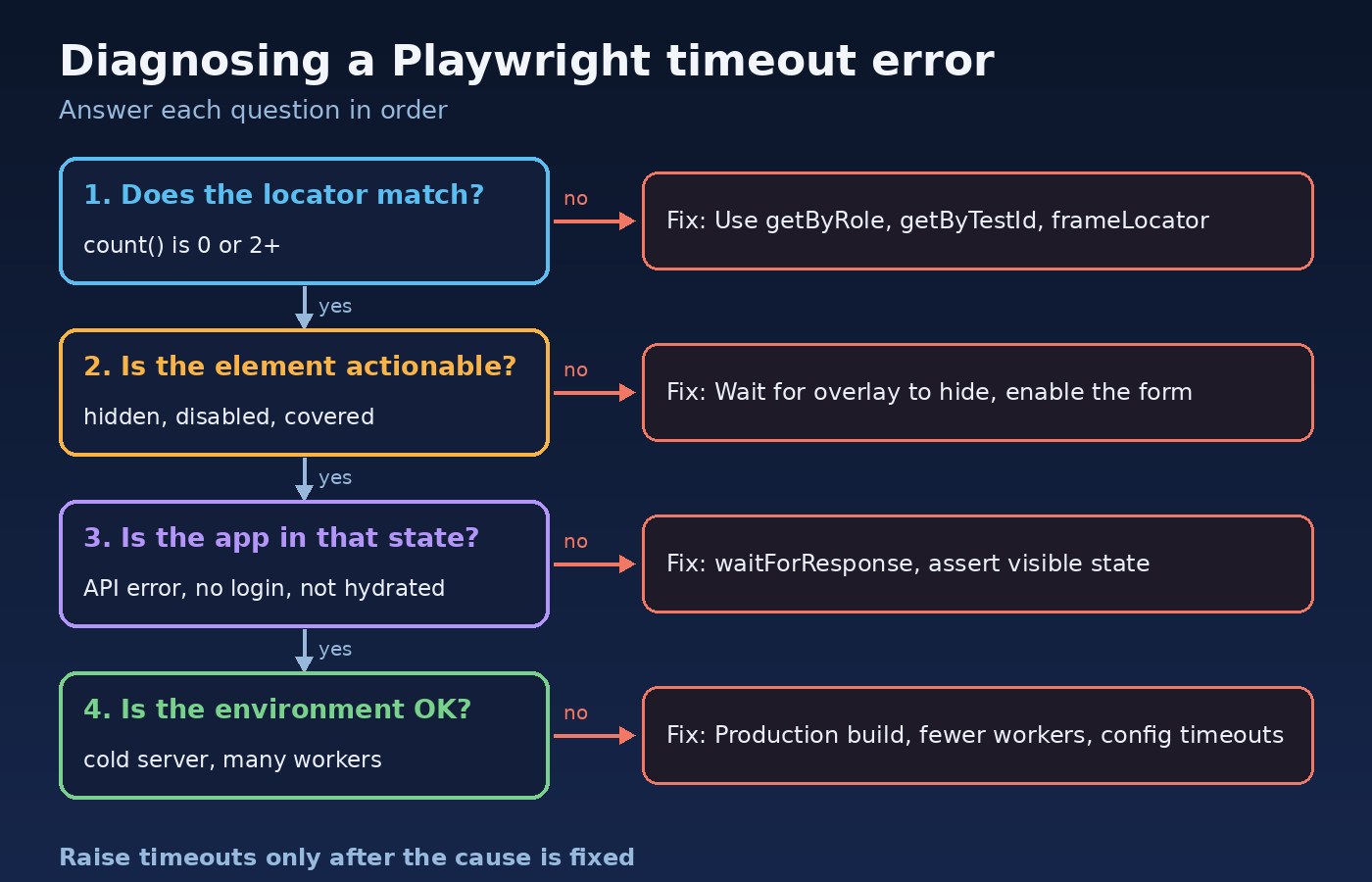
Step-by-Step Fix for a Playwright Timeout Error
Step 1: Reproduce it with a trace
Don't guess from the error line. Record a trace, which captures every action, a DOM snapshot before and after it, network requests and console output:
# record a trace for every test in this run
npx playwright test tests/checkout.spec.ts --trace on

# open the HTML report, then click the trace for the failed test
npx playwright show-report

# or open a trace file directly
npx playwright show-trace test-results/checkout-place-order/trace.zip
In the trace viewer, select the failing step and look at the DOM snapshot. You will usually see the cause straight away: a spinner over the button, an error message from the API, a login page, or a button whose text is slightly different from your locator.
For interactive debugging, npx playwright test --debug opens the Playwright Inspector and pauses before each action, and npx playwright test --ui lets you rerun one test and watch it step by step. In CI, set trace: 'on-first-retry' so failures leave a trace without slowing every run.
Step 2: Check what the locator actually matches
A locator timeout is most often a locator that matches zero elements. Check it in isolation:
const button = page.getByRole('button', { name: 'Place order' });
console.log(await button.count());   // 0 = no match, 2+ = ambiguous
await button.highlight();            // outlines it in a headed or debug run
If the count is zero, open the page in the Inspector and use the "Pick locator" button, or run npx playwright codegen http://localhost:3000 and click the element to see the locator Playwright suggests. Then replace brittle selectors with user-facing ones:
// Brittle: tied to markup and generated class names
await page.locator('div.sc-1x7k2 > button:nth-child(2)').click();

// Stable: what the user sees, or an explicit test id
await page.getByRole('button', { name: 'Place order' }).click();
await page.getByLabel('Email').fill('[email protected]');
await page.getByTestId('checkout-submit').click();

// Narrow down when the same text appears in several places
await page
  .getByRole('listitem')
  .filter({ hasText: 'DHA Phase 6' })
  .getByRole('button', { name: 'View' })
  .click();
If the count is two or more, don't reach for .first() by default. It hides the ambiguity and can click the wrong element when the order changes. Scope the locator to the right section or list item instead. If the element is inside an iframe, such as a payment form, a regular page locator won't find it. Go through the frame:
const card = page.frameLocator('iframe[title="Secure payment"]');
await card.getByLabel('Card number').fill('4242 4242 4242 4242');
Step 3: Read the call log for actionability problems
If the call log says the locator resolved to an element, the locator is fine and the element isn't ready. The line after it tells you why:
- element is not visible: it may be inside a closed menu or a collapsed accordion. Open it first, the way a user would.
- element is not enabled: a form validation rule or an unfinished request is keeping the button disabled. Assert the condition that enables it, such as a filled field.
- intercepts pointer events: something sits on top of it. Wait for the overlay to go away, or dismiss the cookie banner in a setup step.
- element is not stable: it is still animating. Waiting usually resolves this on its own, and reduced motion in the test environment helps.
// wait for the loading overlay to disappear before clicking
await expect(page.getByTestId('page-loader')).toBeHidden();
await page.getByRole('button', { name: 'Save' }).click();
Avoid click({ force: true }) as a fix. It skips the actionability checks, so the test can pass while a real user still can't click the button.
Step 4: Wait for state, not time
Replace fixed sleeps and "wait until the page is quiet" with waits for the thing that actually matters. page.waitForTimeout() is slow when the app is fast and still flaky when it is slow, and Playwright's own docs discourage relying on networkidle.
// Bad: guesses how long the API takes
await page.waitForTimeout(3000);

// Good: wait for the response that drives the UI
const saved = page.waitForResponse(
  (res) => res.url().includes('/api/orders') && res.request().method() === 'POST'
);
await page.getByRole('button', { name: 'Place order' }).click();
expect((await saved).status()).toBe(201);

// Good: assert on what the user should see next
await expect(page.getByText('Order confirmed')).toBeVisible();
If waitForResponse shows a 401 or 500, you have found the real bug: the test is timing out because the backend failed, not because the UI is slow. For Next.js apps, a click that lands before hydration may do nothing. Assert on something that only appears once the page is interactive, rather than adding a delay.
Step 5: Tune timeouts deliberately
Only once the cause is fixed should you adjust timeouts, and then in config, not scattered through tests. Setting an action timeout makes failures point at the slow step instead of the whole test:
// playwright.config.ts
import { defineConfig } from '@playwright/test';

export default defineConfig({
  timeout: 30_000,                 // whole test
  expect: { timeout: 5_000 },      // each web-first assertion
  retries: process.env.CI ? 2 : 0,
  workers: process.env.CI ? 2 : undefined,
  use: {
    baseURL: 'http://localhost:3000',
    actionTimeout: 10_000,         // each click, fill, etc.
    navigationTimeout: 15_000,     // goto, waitForURL
    trace: 'on-first-retry',
  },
  webServer: {
    command: 'npm run build && npm run start',
    url: 'http://localhost:3000',
    reuseExistingServer: !process.env.CI,
    timeout: 120_000,
  },
});
For a single test that is genuinely long, such as a full import flow, use test.slow(), which triples its timeout, or test.setTimeout(60_000) inside that test. Running against a production build in CI, as the webServer block above does, avoids the slow first compile of a dev server, which is a common cause of page.goto timeouts.
Verification
A single green run proves little for a flaky test. Repeat it and make sure it holds under CI-like conditions:
# run the fixed test 20 times; any failure means it is still flaky
npx playwright test tests/checkout.spec.ts --repeat-each=20

# simulate a busier CI runner
npx playwright test --workers=4 --repeat-each=5

# fail the run if a test only passed on retry
npx playwright test --fail-on-flaky-tests
The --fail-on-flaky-tests flag is available in recent Playwright versions, so check npx playwright test --help if yours doesn't recognise it. Also confirm the test still fails when it should: break the feature on purpose, such as by renaming the button, and check that the test catches it with a clear message.
Prevention
- Prefer
getByRole,getByLabelandgetByTestId, and agree on a test id convention with the front-end team. You can rename the attribute withtestIdAttributein config if your app already usesdata-qa. - Use web-first assertions like
await expect(locator).toBeVisible()instead of reading values once withisVisible()ortextContent(), which don't retry. - Keep tests isolated. Each test should create its own data or use a seeded fixture, and log in through saved storage state instead of depending on an earlier test.
- Ban
waitForTimeoutandforce: truein code review, or with a lint rule such as those ineslint-plugin-playwright. - Keep traces on first retry in CI and track which tests pass only on retry. The checklist in how to debug flaky CI pipelines covers the pipeline side of the same problem.
- Treat a timeout like any other bug: reproduce, narrow down, then fix the cause. The habits in how experienced developers debug problems faster apply directly to test failures.
Stable selectors are much easier when components are organised consistently, which is one more reason to follow a clear structure like the one in how to structure a large React project.
FAQs
How do I fix a Playwright locator timeout?
First check whether the locator matches anything with await locator.count() or the Inspector's "Pick locator" tool. If it matches nothing, switch to a role, label or test id locator, or go through frameLocator if the element is in an iframe. If it matches, read the call log to see whether the element is hidden, disabled or covered, and wait for that condition to change.
Why does Playwright say "waiting for selector" even though the element is on the page?
Usually the element you see isn't the one your selector describes. The text may differ in case or spacing, the element may be in an iframe or a closed shadow root, or there may be a hidden copy, such as a mobile menu, that matches first. With waitForSelector, the default state is visible, so a hidden match keeps it waiting. The trace's DOM snapshot shows exactly what was there.
Should I just increase the Playwright timeout?
Only when the operation is genuinely slow and the slowness is expected, such as a large file upload. If a step normally takes one second and sometimes times out at thirty, a longer timeout only makes the failure take longer. Fix the locator or wait for the right state instead.
What is the difference between actionTimeout and the test timeout?
The test timeout limits the entire test, including hooks and fixtures, and defaults to 30 seconds. actionTimeout limits each individual action like a click or fill and has no limit by default. Setting it makes errors name the exact step that got stuck.
Why do Playwright tests time out only in CI?
CI runners often have fewer CPUs, run more workers in parallel, start from a cold server and use different data. Check the trace from CI, reduce workers to see whether resource pressure is the cause, run against a production build, and make sure tests don't depend on data that only exists on your machine.
Conclusion
A Playwright timeout error is a symptom. Record a trace, check what the locator matches, read the call log, and wait for real application state instead of time. Once tests use stable locators and web-first assertions, timeouts stop being random and start pointing straight at real bugs.