Your app has been inserting rows into PostgreSQL for months without a problem. Then, right after a data import, a restore from another environment or a seeder run, every new insert fails with the same error: duplicate key value violates unique constraint "users_pkey". Nothing in your code changed. The cause is almost always a PostgreSQL sequence that is out of sync with the data in its table.
This guide explains why that happens, how to confirm it in under a minute, and how to fix PostgreSQL auto-increment sequence errors safely, for one table or a whole database. It also covers the fixes in Laravel, Django and Rails, and the habits that stop the problem from coming back.
What the Error Looks Like
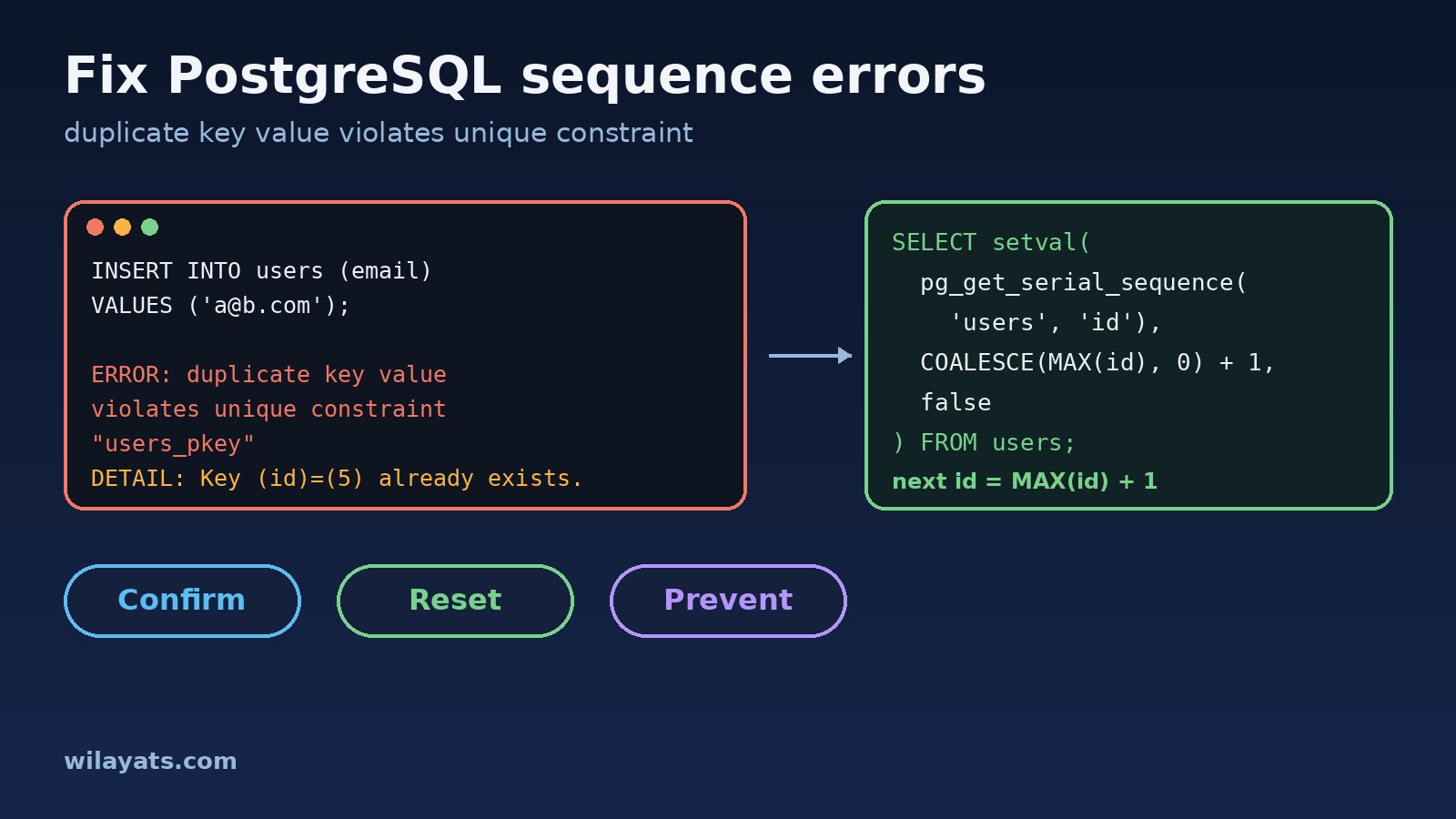
The full message usually tells you exactly which value collided:
ERROR:  duplicate key value violates unique constraint "users_pkey"
DETAIL:  Key (id)=(5) already exists.
If you run the same insert again, the failing id goes up by one: 6, then 7, then 8. That pattern is the giveaway. The database is handing out ids that already exist, one by one, and each failed attempt still uses up a number.
How Auto-Increment Works in PostgreSQL
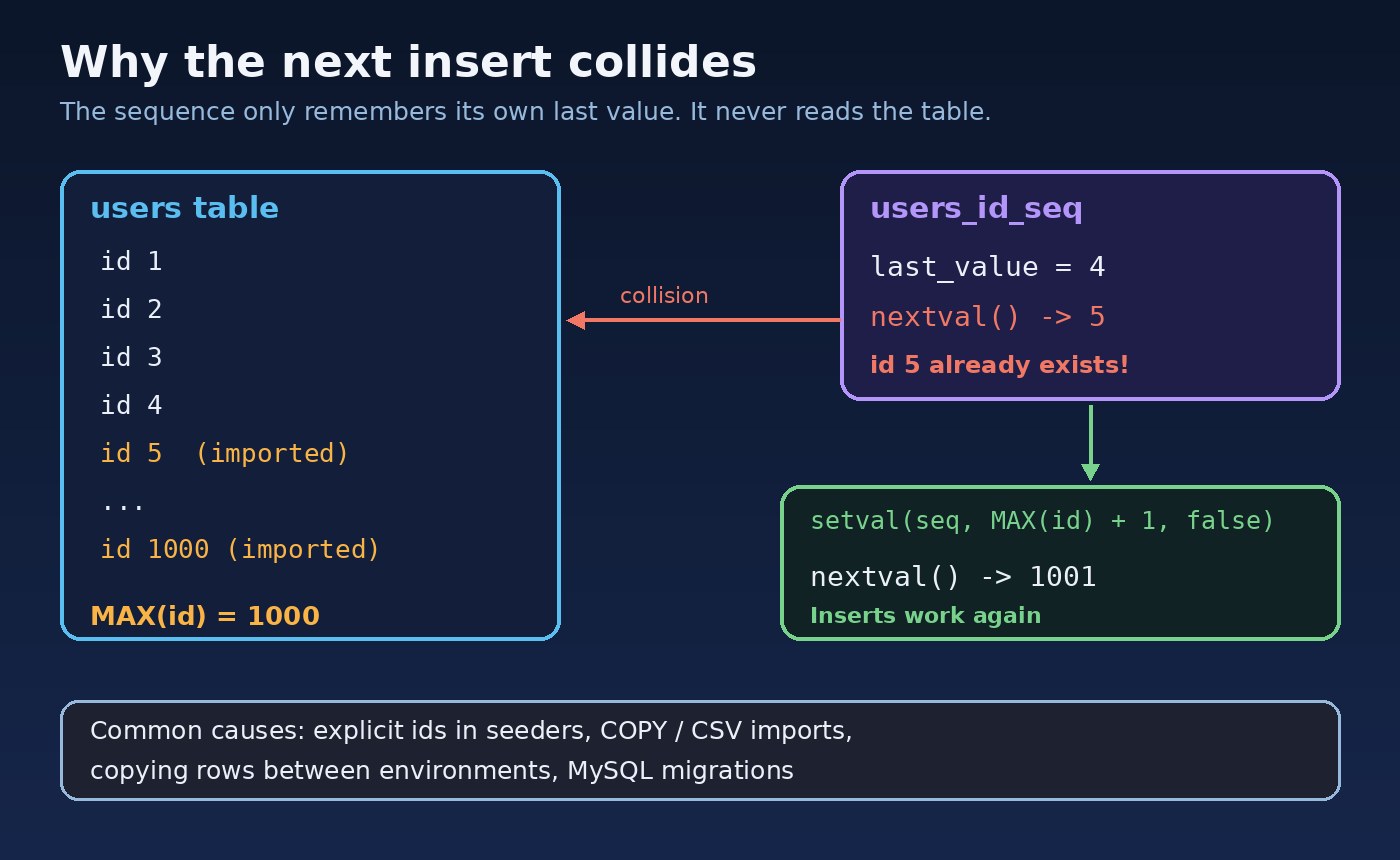
PostgreSQL has no auto-increment flag on the column itself. When you declare a column as serial, bigserial or GENERATED ... AS IDENTITY, PostgreSQL creates a separate object called a sequence, and the column's default value calls nextval() on it. The sequence only remembers the last number it gave out. It never looks at the table.
So if rows arrive with ids that did not come from the sequence, the sequence has no idea. It keeps counting from where it was, and sooner or later it hands out an id that is already taken.
Common Causes of an Out-of-Sync Sequence
Inserting explicit ids. A script, seeder or admin tool writes
INSERT INTO users (id, ...) VALUES (5, ...). The row is saved, but the sequence is not advanced.Bulk imports with
COPYor CSV tools that include the id column.Copying tables between environments, for example loading production rows into staging, or restoring a data-only dump of selected tables.
Migrating from MySQL or another database, where migration tools copy the rows but not the counter.
Test fixtures and factories that hardcode primary keys.
Note what is not a problem: gaps. A rolled-back transaction or a failed insert still consumes a sequence value, so ids like 41, 42, 45 are normal. Gaps are harmless. You only need to fix the sequence when it falls behind the data.
Step 1: Confirm the Sequence Is Out of Sync
First, find the sequence behind the column. pg_get_serial_sequence works for both serial and identity columns:
SELECT pg_get_serial_sequence('users', 'id');
-- public.users_id_seq
Then compare the sequence's position with the highest id in the table:
SELECT last_value, is_called FROM public.users_id_seq;
SELECT MAX(id) FROM users;
If MAX(id) is larger than last_value, you have found the problem. In the example from the diagram, the table holds ids up to 1000 while the sequence sits at 4, so the next 996 inserts would all fail.
Step 2: Reset the Sequence for One Table
Use setval to move the sequence just past the current maximum:
BEGIN;
LOCK TABLE users IN EXCLUSIVE MODE;

SELECT setval(
  pg_get_serial_sequence('users', 'id'),
  COALESCE((SELECT MAX(id) FROM users), 0) + 1,
  false
);

COMMIT;
A few details make this version safe:
The third argument,
false, means "the next call tonextval()should return exactly this value". So the next insert getsMAX(id) + 1.COALESCE(..., 0) + 1handles an empty table. Callingsetvalwith 0 would fail, because a normal sequence starts at 1.The lock stops other sessions from inserting between reading
MAX(id)and moving the sequence.EXCLUSIVEmode still allows reads, but blocks writes until the transaction commits, so run this when traffic is low.
For identity columns you can also use the table syntax, which reads more clearly in a migration: ALTER TABLE users ALTER COLUMN id RESTART WITH 1001;. The catch is that you have to work out the number yourself.
Step 3: Fix Every Sequence in the Database
After a full import or restore, it is rarely just one table. This block loops through every serial and identity column in the public schema and resets each sequence to match its table:
DO $$
DECLARE
  r   record;
  seq text;
BEGIN
  FOR r IN
    SELECT table_schema, table_name, column_name
    FROM information_schema.columns
    WHERE table_schema = 'public'
      AND (column_default LIKE 'nextval(%' OR is_identity = 'YES')
  LOOP
    seq := pg_get_serial_sequence(
             format('%I.%I', r.table_schema, r.table_name), r.column_name);
    IF seq IS NOT NULL THEN
      EXECUTE format(
        'SELECT setval(%L, COALESCE((SELECT MAX(%I) FROM %I.%I), 0) + 1, false)',
        seq, r.column_name, r.table_schema, r.table_name);
    END IF;
  END LOOP;
END $$;
The format() calls with %I and %L quote names and values properly, so mixed-case table names do not break the script. Run it right after the import finishes and before the application starts writing again. Test it on a staging copy first, as you would any script that touches every table.
How to Fix It in Laravel, Django and Rails
Most frameworks give you a way to run the same fix without opening psql.
Laravel: run the statement from a migration, a seeder's final step or php artisan tinker:
DB::statement("
    SELECT setval(
        pg_get_serial_sequence('users', 'id'),
        COALESCE(MAX(id), 0) + 1,
        false
    ) FROM users
");
Django: the built-in sqlsequencereset command prints the reset SQL for an app, and you can pipe it straight into the database shell:
python manage.py sqlsequencereset myapp | python manage.py dbshellRails: the PostgreSQL adapter has a helper for exactly this:
ActiveRecord::Base.connection.reset_pk_sequence!('users')A Related Error: Sequence Reached Its Maximum Value
Sometimes the message is different: nextval: reached maximum value of sequence "events_id_seq" (2147483647). This is not a sync problem. The table has used every value a 32-bit integer can hold. The fix is to widen the column to bigint with ALTER TABLE events ALTER COLUMN id TYPE bigint;, and for a serial column also run ALTER SEQUENCE events_id_seq AS bigint;. Changing the column type rewrites the table and locks it while it runs, so plan it for a maintenance window on large tables. For new tables with lots of writes, start with bigint; it is one of the easiest decisions covered in how to design database tables before writing your backend.
How to Stop It From Happening Again
Let the database assign ids. Seeders, scripts and fixtures should leave the id column out of the insert.
Prefer
GENERATED ALWAYS AS IDENTITYfor new tables. PostgreSQL then rejects explicit ids unless the insert saysOVERRIDING SYSTEM VALUE, so accidental collisions become loud errors at the source.Make the reset part of every import. If a process must copy ids, for example a migration from MySQL, add the reset script as its last step instead of relying on someone to remember it.
Restore whole databases with
pg_dumpandpg_restorewhen you can. A normal dump includes thesetvalcalls that put each sequence back where it was.Check after deploys and restores. A quick query comparing
MAX(id)with each sequence'slast_valuecatches the problem before your users do.
If the error keeps returning after you fix it, look for the process that writes explicit ids rather than resetting again and again. Fixing the source is the lesson from why bugs keep coming back after you fix them, and the same tracing approach from finding the root cause of a production bug applies here.
Conclusion
A PostgreSQL duplicate key error on the primary key, right after an import or restore, almost always means the sequence has fallen behind the table. Confirm it by comparing MAX(id) with the sequence's last_value, move the sequence forward with setval inside a short locked transaction, and use the loop above when many tables are affected. Then remove the cause: let the database assign ids, prefer identity columns, and make the reset a built-in step of any process that copies data. Once that is in place, this error stops being a recurring fire drill.