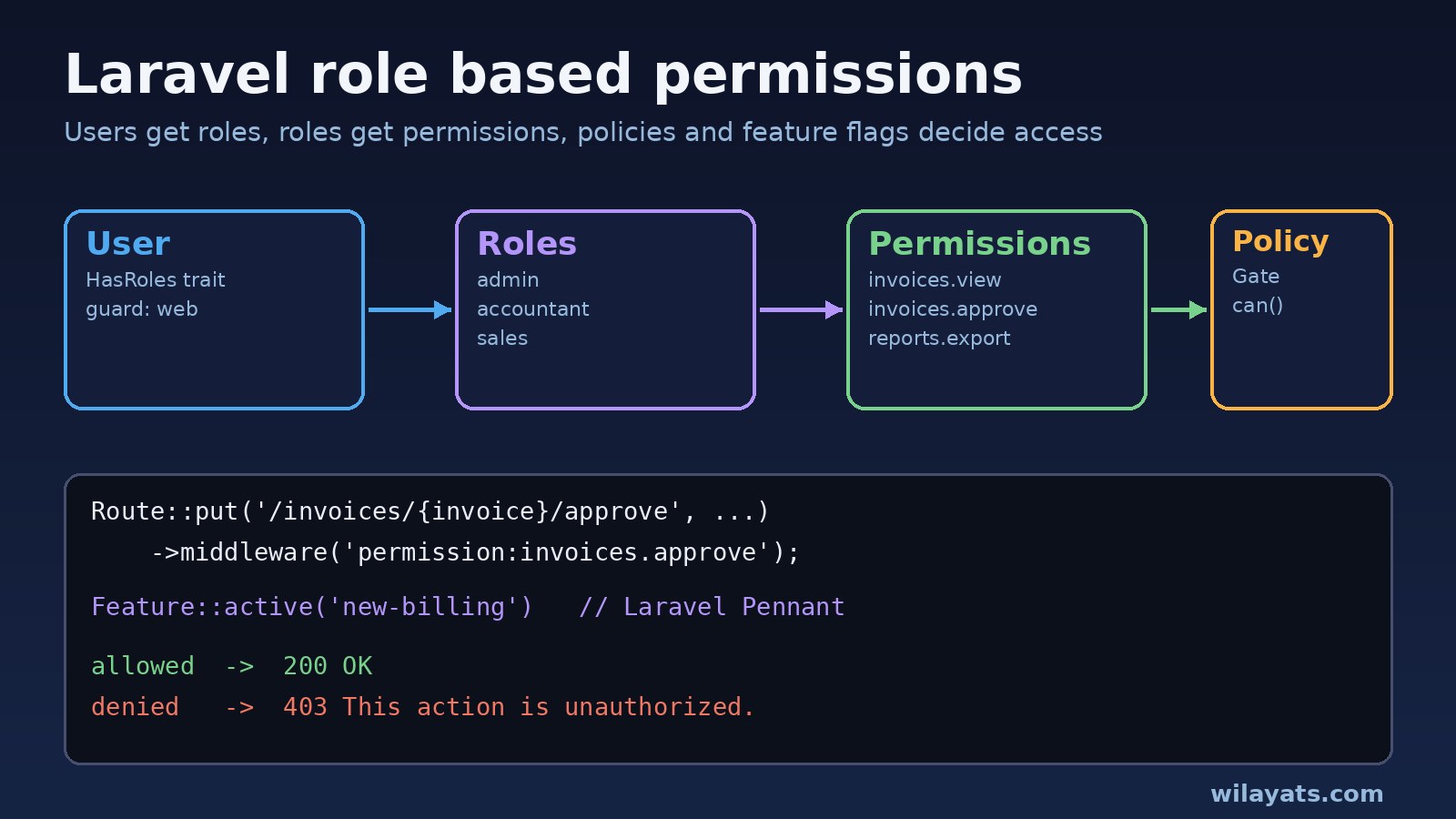
Most Laravel apps start with a single is_admin column. Then the business asks for accountants who can approve invoices but not delete them, sales staff who only see their own leads, and a new billing module that only some customers should get. That is when you need proper laravel role based permissions: users get roles, roles get permissions, and every route, controller and screen checks the permission instead of the role name.
This guide shows how to build Laravel RBAC with Gates, Policies and the spatie/laravel-permission package, how to add feature permissions with Laravel Pennant, and how to fix the errors you will hit on the way, such as 403 This action is unauthorized. and There is no permission named ... for guard ....
Problem: Authorization That Does Not Scale
Hardcoded checks like if ($user->role === 'admin') work for a week. In an ERP-style system with finance, HR, inventory and reporting modules, they turn into dozens of slightly different conditions spread across controllers, Blade views and React components. Nobody can answer a simple question like "who can export payroll?" without reading the code.
A clean Laravel authorization setup separates three ideas:
- Roles are job titles: admin, accountant, sales, warehouse.
- Permissions are actions:
invoices.view,invoices.approve,reports.export. - Feature permissions decide whether a module exists at all for a user, team or tenant, such as a new billing screen in beta.
Your code should ask about permissions and features, never about role names.
Symptoms of a Broken Permission Setup
These are the signs that your roles and permissions need work:
- Users with the right role still get Laravel's 403 page or this JSON response:
{
    "message": "This action is unauthorized."
}- Seeding or assigning permissions throws a Spatie exception:
Spatie\Permission\Exceptions\PermissionDoesNotExist
There is no permission named `invoices.approve` for guard `web`.

Spatie\Permission\Exceptions\RoleDoesNotExist
There is no role named `accountant` for guard `api`.- Routes protected with Spatie middleware return
403 User does not have the right permissions.orUser does not have the right roles. - A permission you just added in the database is ignored until someone clears the cache.
- The React or Next.js frontend hides a button, but the API endpoint behind it still accepts the request.
- Super admins get blocked by a policy method that nobody updated.
Root Cause: Why Laravel Authorization Fails
Almost every problem comes from one of these causes:
- Checking roles instead of permissions. Code like
hasRole('admin')breaks as soon as a second role needs the same access. - Guard mismatch. Spatie stores a
guard_nameon every role and permission. If permissions were created forwebbut the request is authenticated with anapiguard, the lookup fails. - Stale permission cache. Spatie caches permissions for performance. Changes made directly in the database or in a seeder without resetting the cache are not visible.
- No policy registered or found. If Laravel cannot find a policy method for the model and ability, the check returns false and you get a 403.
- Authorization only in the UI. Hiding buttons is not security. The server must check every request.
- Feature rollouts mixed with permissions. Using permissions as on/off switches for beta modules makes the permission list grow with temporary entries that never get removed.
Step-by-Step: Laravel Role Based Permissions With Spatie
1. Install spatie/laravel-permission
composer require spatie/laravel-permission
php artisan vendor:publish --provider="Spatie\Permission\PermissionServiceProvider"
php artisan optimize:clear
php artisan migrate
This creates the roles, permissions, model_has_roles, model_has_permissions and role_has_permissions tables, plus config/permission.php.
2. Add the HasRoles trait to the User model
<?php

namespace App\Models;

use Illuminate\Foundation\Auth\User as Authenticatable;
use Spatie\Permission\Traits\HasRoles;

class User extends Authenticatable
{
    use HasRoles;

    // Optional: force one guard if you mix session and token auth
    // protected $guard_name = 'web';
}
3. Seed roles and permissions in code
Keep permissions in a seeder that is committed to Git, so every environment (local Docker, staging, production) has the same list. Use firstOrCreate so the seeder can run more than once.
<?php

namespace Database\Seeders;

use Illuminate\Database\Seeder;
use Spatie\Permission\Models\Permission;
use Spatie\Permission\Models\Role;
use Spatie\Permission\PermissionRegistrar;

class RolesAndPermissionsSeeder extends Seeder
{
    public function run(): void
    {
        app()[PermissionRegistrar::class]->forgetCachedPermissions();

        $permissions = [
            'invoices.view', 'invoices.create', 'invoices.approve', 'invoices.delete',
            'reports.export', 'users.manage',
        ];

        foreach ($permissions as $name) {
            Permission::firstOrCreate(['name' => $name, 'guard_name' => 'web']);
        }

        Role::firstOrCreate(['name' => 'accountant', 'guard_name' => 'web'])
            ->syncPermissions(['invoices.view', 'invoices.create', 'invoices.approve']);

        Role::firstOrCreate(['name' => 'sales', 'guard_name' => 'web'])
            ->syncPermissions(['invoices.view', 'invoices.create']);

        Role::firstOrCreate(['name' => 'super-admin', 'guard_name' => 'web']);
    }
}php artisan db:seed --class=RolesAndPermissionsSeeder4. Give super admins access through Gate::before
Instead of giving the super admin role every permission, add a single rule in AppServiceProvider::boot(). Return null (not false) for everyone else so normal checks still run.
use Illuminate\Support\Facades\Gate;

public function boot(): void
{
    Gate::before(function ($user, $ability) {
        return $user->hasRole('super-admin') ? true : null;
    });
}
5. Register the Spatie middleware
In Laravel 11 and later, add aliases in bootstrap/app.php. In version 6 of the package the namespace is Middleware (singular).
->withMiddleware(function (Middleware $middleware) {
    $middleware->alias([
        'role' => \Spatie\Permission\Middleware\RoleMiddleware::class,
        'permission' => \Spatie\Permission\Middleware\PermissionMiddleware::class,
        'role_or_permission' => \Spatie\Permission\Middleware\RoleOrPermissionMiddleware::class,
    ]);
})
6. Use a Policy for record-level rules
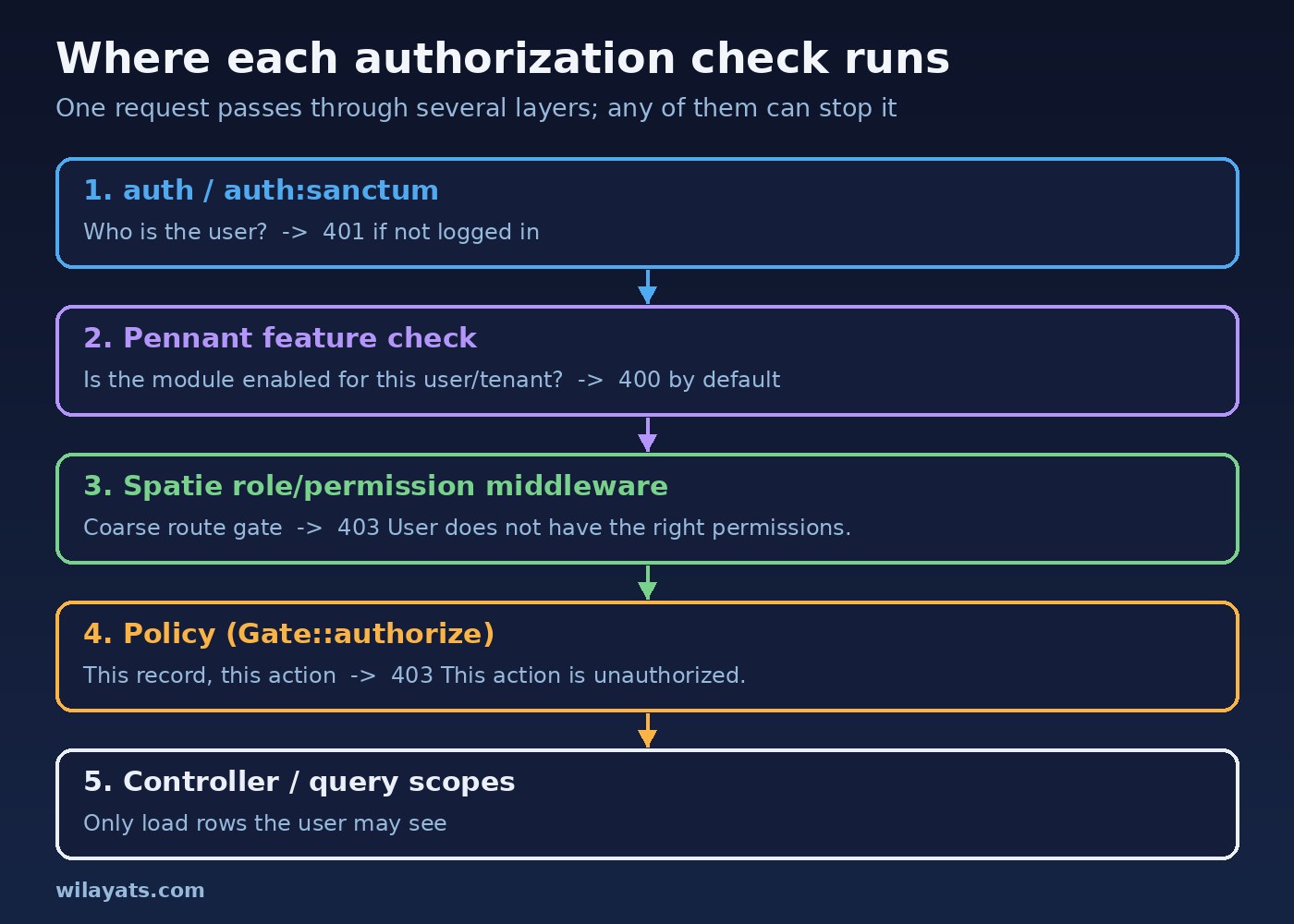
Middleware answers "can this user approve invoices at all?". A policy answers "can this user approve this invoice?", for example only invoices from their own branch and not ones they created themselves.
php artisan make:policy InvoicePolicy --model=Invoice<?php
namespace App\Policies;
use App\Models\Invoice;
use App\Models\User;
class InvoicePolicy
{
public function view(User $user, Invoice $invoice): bool
{
return $user->can('invoices.view') && $user->branch_id === $invoice->branch_id;
}
public function approve(User $user, Invoice $invoice): bool
{
return $user->can('invoices.approve')
&& $invoice->status === 'pending'
&& $invoice->created_by !== $user->id;
}
}Laravel discovers App\Policies\InvoicePolicy for App\Models\Invoice automatically when you follow the naming convention. Otherwise register it with Gate::policy(Invoice::class, InvoicePolicy::class).
Code and Commands: Routes, Controllers and Feature Permissions
Protecting routes
use App\Http\Controllers\InvoiceController;

Route::middleware(['auth:sanctum', 'permission:invoices.view'])->group(function () {
    Route::get('/invoices', [InvoiceController::class, 'index']);
    Route::get('/invoices/{invoice}', [InvoiceController::class, 'show'])
        ->can('view', 'invoice');
    Route::put('/invoices/{invoice}/approve', [InvoiceController::class, 'approve'])
        ->can('approve', 'invoice');
});
Checking in the controller
use Illuminate\Support\Facades\Gate;

public function approve(Invoice $invoice)
{
    Gate::authorize('approve', $invoice); // throws AuthorizationException -> 403

    $invoice->update(['status' => 'approved', 'approved_by' => auth()->id()]);

    return response()->json($invoice);
}
If you need a clearer message than the default This action is unauthorized., return Response::deny('Only pending invoices can be approved.') from the policy method, using Illuminate\Auth\Access\Response.
Sending permissions to React or Next.js
The frontend only needs a list of permission names to show or hide UI. With Inertia, share them from HandleInertiaRequests; with a separate SPA, return them from your /api/user endpoint.
// HandleInertiaRequests::share()
'auth' => [
    'user' => $request->user(),
    'permissions' => $request->user()?->getAllPermissions()->pluck('name') ?? [],
],// React
const can = (permission) => auth.permissions.includes(permission);
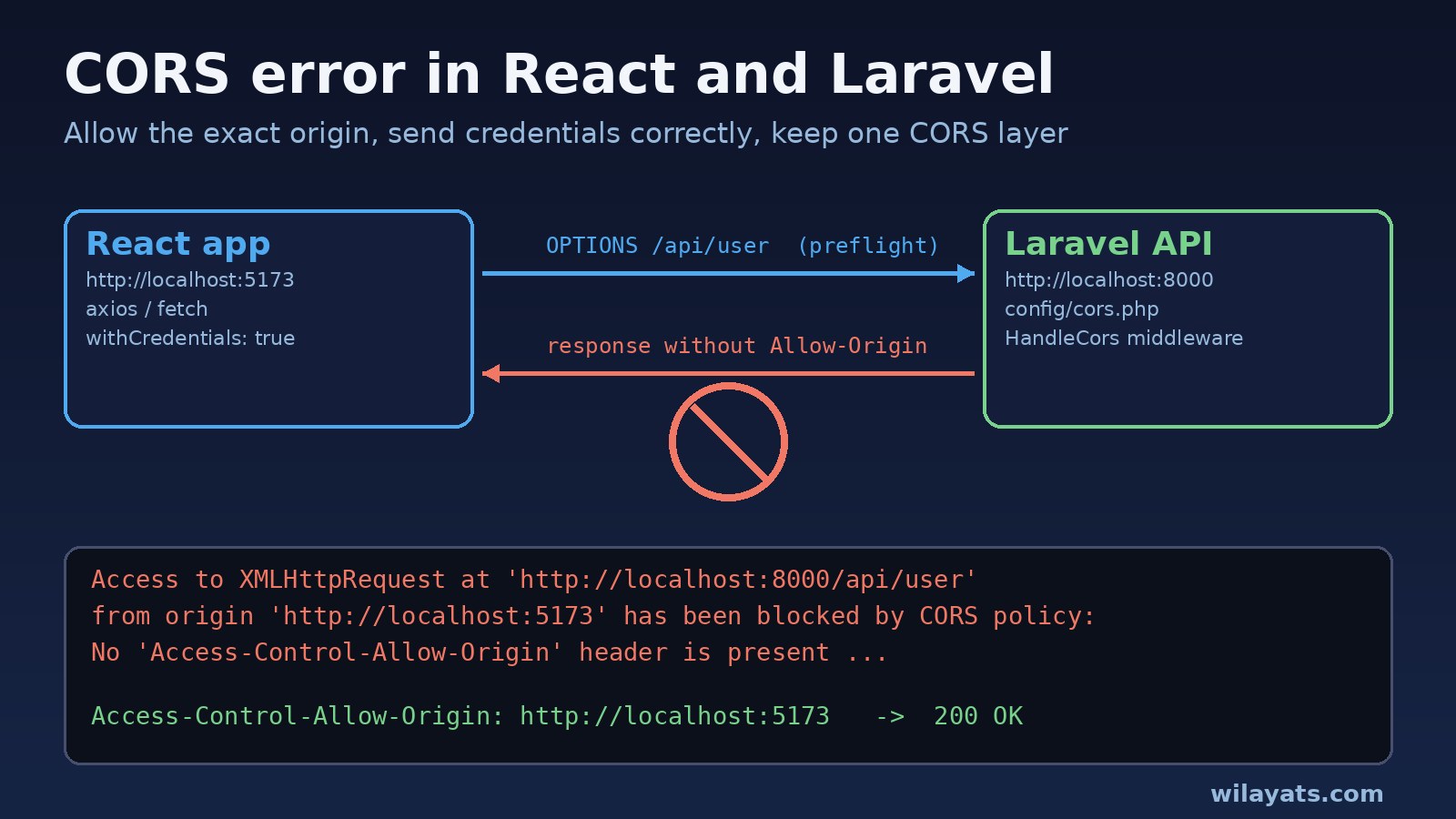
{can('invoices.approve') && <button onClick={approve}>Approve</button>}Remember that this is only for display. The API must still run the middleware and policy on every request. If you are calling a Laravel API from a separate React app, make sure cross-origin requests are set up correctly first; see how to fix a CORS error between React and Laravel.
Feature permissions with Laravel Pennant
Use Pennant for modules that are switched on per user, team or tenant, and keep Spatie for actions. This keeps temporary rollout flags out of your permission table.
composer require laravel/pennant
php artisan vendor:publish --provider="Laravel\Pennant\PennantServiceProvider"
php artisan migrateuse App\Models\User;
use Laravel\Pennant\Feature;
// AppServiceProvider::boot()
Feature::define('new-billing', fn (User $user) => $user->team?->plan === 'enterprise');
// In code
if (Feature::active('new-billing')) {
// show the new billing module
}
// On routes
use Laravel\Pennant\Middleware\EnsureFeaturesAreActive;
Route::get('/billing/v2', BillingController::class)
->middleware(['permission:invoices.view', EnsureFeaturesAreActive::using('new-billing')]);By default, EnsureFeaturesAreActive returns a 400 Bad Request when the feature is inactive. You can customise that response with EnsureFeaturesAreActive::whenInactive(). In Blade, use the @feature('new-billing') directive.
Fixing "There is no permission named ... for guard ..."
- Run the seeder in the environment that throws the error. The permission may simply not exist there.
- Check the guard:
php artisan permission:showlists roles and permissions per guard. If your API uses a different guard, create the permissions for that guard or setprotected $guard_name = 'web';on the User model. - Reset the cache:
php artisan permission:cache-reset. If the cache store is Redis and you run several app containers in Docker, all of them share the reset because they share the store.
Verification
Check permissions from the command line before testing in the browser:
php artisan permission:show
php artisan route:list --path=invoices
php artisan tinker
>>> $u = App\Models\User::find(5);
>>> $u->getRoleNames();
>>> $u->can('invoices.approve');
Then lock the behaviour in with feature tests, so a refactor cannot silently open an endpoint:
public function test_sales_user_cannot_approve_invoices(): void
{
    $this->seed(RolesAndPermissionsSeeder::class);
    $user = User::factory()->create()->assignRole('sales');
    $invoice = Invoice::factory()->create(['status' => 'pending']);

    $this->actingAs($user)
        ->putJson("/invoices/{$invoice->id}/approve")
        ->assertForbidden();
}

public function test_accountant_can_approve_pending_invoice(): void
{
    $this->seed(RolesAndPermissionsSeeder::class);
    $user = User::factory()->create()->assignRole('accountant');
    $invoice = Invoice::factory()->create(['status' => 'pending', 'branch_id' => $user->branch_id]);

    $this->actingAs($user)
        ->putJson("/invoices/{$invoice->id}/approve")
        ->assertOk();
}
Prevention: Keep Laravel RBAC Maintainable
- Name permissions as resource.action (
invoices.approve) and never check role names in business logic. - Keep the seeder as the source of truth and run it on every deploy, followed by
php artisan permission:cache-reset. - Use policies for anything record-specific, such as ownership, branch, tenant or status. For SaaS apps, combine this with tenant scoping; see multi-tenant data isolation in Laravel.
- Keep feature flags in Pennant and delete them once a rollout is finished.
- Group authorization code in one place (policies, a seeder, one service provider) as part of a clear structure; see how to structure a Laravel project for large applications.
- Write a forbidden test and an allowed test for every sensitive endpoint.
- Log denied actions on admin endpoints so you can spot both attacks and misconfigured roles.
FAQs
Should I use Gates, Policies or spatie/laravel-permission?
Use all three for different jobs. Spatie stores roles and permissions in the database so admins can manage them. Policies hold record-level rules. Gates are good for simple checks that are not tied to a model, such as viewing a dashboard. Spatie permissions work with $user->can() and @can because the package registers them with Laravel's Gate.
Why does my user get 403 even though they have the role?
Usually the code checks a permission the role does not have, the role was created for a different guard, or the permission cache is stale. Run php artisan permission:show, compare guards, and reset the cache.
Can a user have more than one role?
Yes. Spatie supports multiple roles per user and direct permissions on a user. The user's effective permissions are the union of all of them.
What is the difference between feature permissions and role permissions?
Role permissions answer "is this person allowed to do this action?". Feature permissions answer "does this module exist for this user or tenant right now?". Laravel Pennant handles the second question well and keeps rollout logic out of your RBAC tables.
Is hiding buttons in React enough?
No. Anyone can call your API directly with curl or the browser console. Always enforce permissions on the server with middleware and policies.
Conclusion
Good laravel role based permissions come from a simple rule: roles group permissions, code checks permissions, policies handle individual records, and Pennant handles feature rollouts. Seed everything from code, keep guards consistent, reset the permission cache on deploy, and back every sensitive endpoint with a forbidden test. That gives you an authorization layer that still makes sense when your app grows into a full ERP. If your app also processes approvals or notifications in the background, check that queued jobs re-check permissions too; see Laravel queues with Redis.
Comments
Join the discussion. Replies load on demand, up to 5 levels.
2 threads
Great explanation of Laravel RBAC! One of the biggest challenges in large ERP applications is managing permissions at both the route and feature levels. I really liked how this article separates roles, permissions, policies, and feature flags. Using Spatie for access control and Laravel Policies for record-level authorization is a practical approach.
One question: What's the best way to manage dynamic feature-level permissions, such as allowing users to view a page but restricting specific actions like exporting, editing, or approving records?
Really helpful and well-explained article! I like how you’ve covered roles, permissions, policies, and feature flags with practical examples. The troubleshooting tips for 403 errors and guard mismatches are especially useful for real-world Laravel projects. Great work!
Showing 1–2 of 2 threads