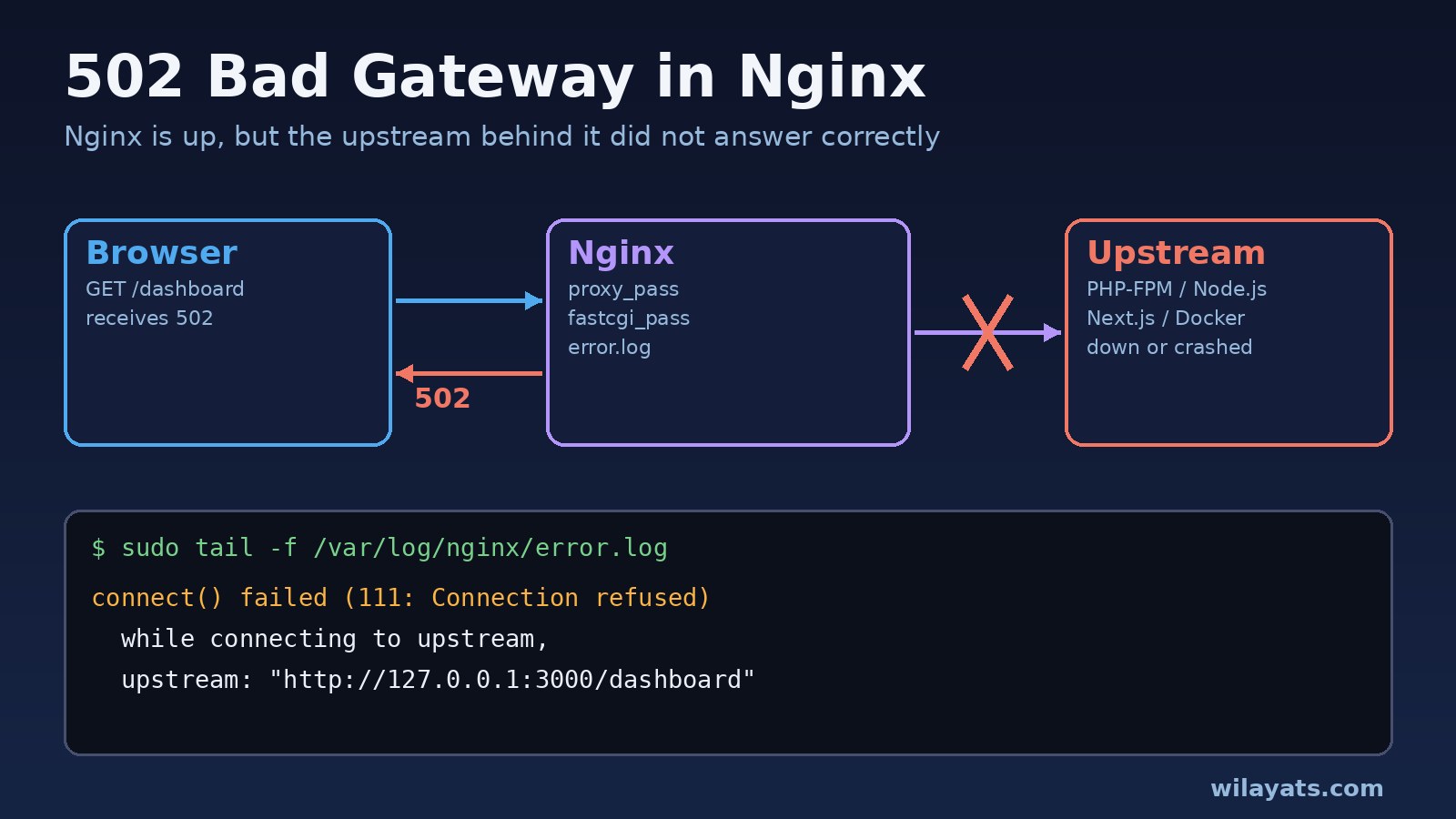
A 502 bad gateway nginx page means Nginx itself is running, but the service it forwards requests to (PHP-FPM, a Node.js or Next.js server, a Docker container, Gunicorn) refused the connection, crashed, or sent back something Nginx could not use. The browser only sees 502 Bad Gateway; the real reason is almost always written in the Nginx error log.
This guide shows how to read that log, maps each common nginx 502 error message to its cause, and gives the exact fixes for Laravel with PHP-FPM, Node.js and Next.js, and Docker Compose setups.
Problem: Nginx Returns 502 Bad Gateway
When Nginx works as a reverse proxy it is a gateway between the client and an upstream server. A 502 status tells you the gateway received an invalid response, or no response, from that upstream. It is different from these nearby errors:
- 502 Bad Gateway: the upstream refused the connection, closed it early, or returned an invalid response.
- 503 Service Unavailable: often returned on purpose, for example by maintenance mode or rate limiting.
- 504 Gateway Timeout: the upstream accepted the connection but did not answer within the timeout (
upstream timed out (110: Connection timed out)in the log).
So for a 502 the question is always: what happened to the upstream?
Symptoms of an Nginx 502 Error
- The whole site shows the default Nginx
502 Bad Gatewaypage right after a deploy, reboot or PHP upgrade. - Only some requests fail, usually under load, while the rest work.
- Static files load but every PHP or API route fails.
- A Docker setup works for a while, then returns 502 after the app container restarts.
- One specific page fails, often after login, because it sets large cookies or headers.
Start by reading the log on the Nginx server:
sudo tail -n 50 /var/log/nginx/error.log
sudo tail -f /var/log/nginx/error.log   # then reload the failing page
Typical upstream error lines look like this:
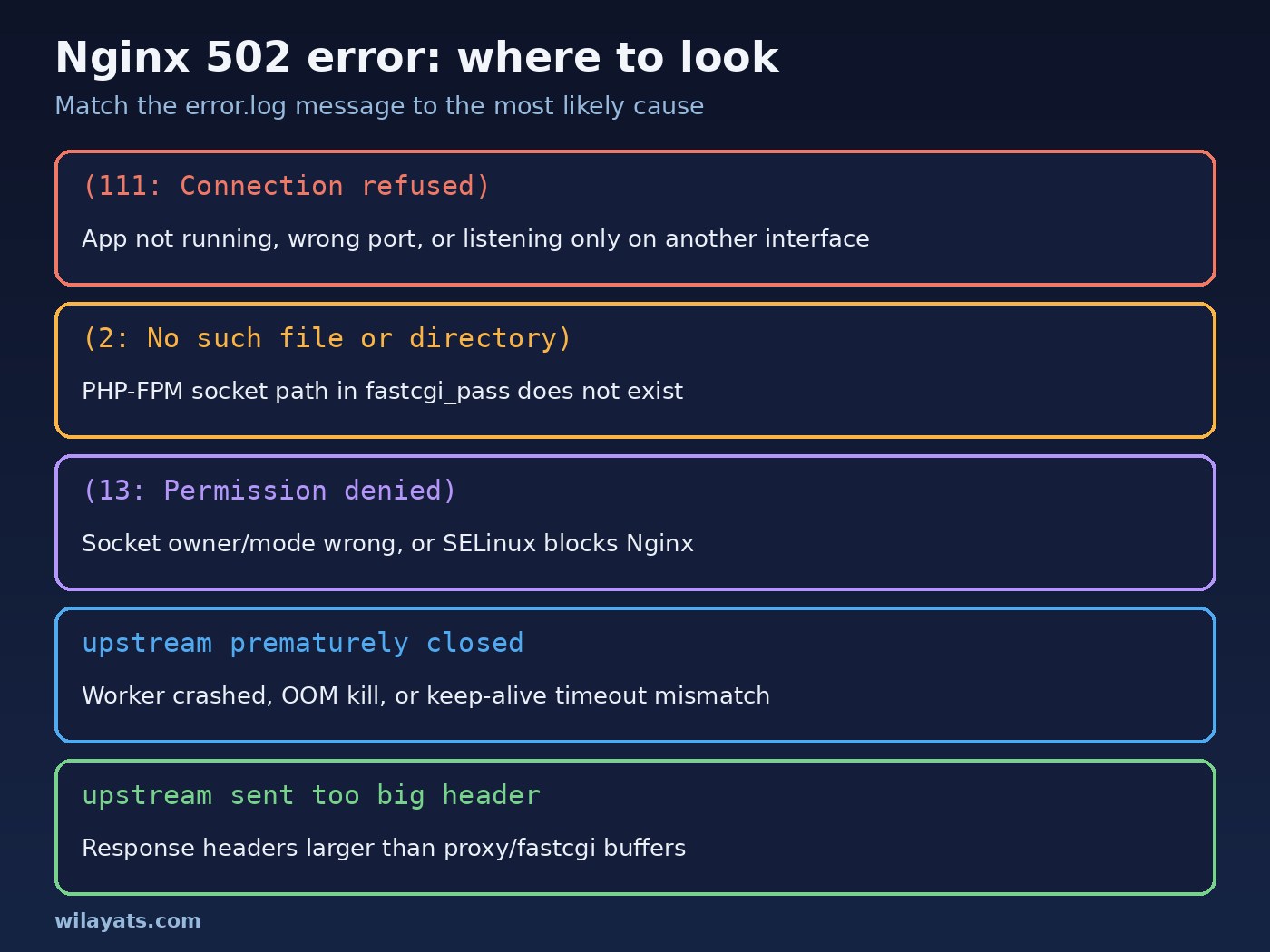
connect() failed (111: Connection refused) while connecting to upstream, client: 203.0.113.10, server: example.com, request: "GET /dashboard HTTP/1.1", upstream: "http://127.0.0.1:3000/dashboard"
connect() to unix:/run/php/php8.3-fpm.sock failed (2: No such file or directory) while connecting to upstream
connect() to unix:/run/php/php8.3-fpm.sock failed (13: Permission denied) while connecting to upstream
upstream prematurely closed connection while reading response header from upstream
recv() failed (104: Connection reset by peer) while reading response header from upstream
upstream sent too big header while reading response header from upstream
no live upstreams while connecting to upstream
Root Cause: Why Nginx Shows an Upstream Error
- The upstream is not running. PHP-FPM stopped, the Node.js process crashed, or the container exited. Nginx gets
Connection refused. - Wrong address, port or socket.
proxy_passpoints to port 3000 but the app listens on 8080, orfastcgi_passnamesphp8.1-fpm.sockafter the server moved to PHP 8.3. - The app listens on the wrong interface. A Node app bound to
127.0.0.1inside a container cannot be reached from the Nginx container. - Socket permissions or SELinux. The Nginx user cannot open the PHP-FPM socket, or SELinux blocks Nginx from making network connections.
- The worker dies mid-request. A PHP fatal error, a segfault, or the kernel OOM killer ends the process, so Nginx sees the connection close before headers arrive.
- Too few workers. PHP-FPM hits
pm.max_childrenand new requests queue or fail under load. - Headers bigger than the buffers. Large cookies or many
Set-Cookieheaders overflowproxy_buffer_sizeorfastcgi_buffer_size. - Stale upstream IP in Docker. Nginx resolves a hostname once at startup; if the container comes back with a new IP, Nginx keeps using the old one.
Step-by-Step Solution: Fix 502 Bad Gateway Nginx
1. Test the Nginx configuration
sudo nginx -t
sudo systemctl reload nginx
A syntax error keeps the old config in place, so a fix you think you deployed may not be active yet.
2. Check that the upstream is running and listening
# PHP-FPM (service name depends on your PHP version)
sudo systemctl status php8.3-fpm
ls -l /run/php/

# Node.js / Next.js / any TCP upstream
sudo ss -ltnp | grep -E ':3000|:8000|:9000'
curl -I http://127.0.0.1:3000
If curl to the upstream fails from the Nginx machine, the problem is not Nginx. Restart the service and look at its own logs: journalctl -u php8.3-fpm -n 100, pm2 logs, or docker compose logs app.
3. Match proxy_pass or fastcgi_pass to the real address
For Laravel with PHP-FPM, the socket in Nginx must match the listen line in the pool file:
grep -E '^listen' /etc/php/8.3/fpm/pool.d/www.conf
# listen = /run/php/php8.3-fpm.socklocation ~ \.php$ {
include snippets/fastcgi-php.conf;
fastcgi_pass unix:/run/php/php8.3-fpm.sock;
fastcgi_param SCRIPT_FILENAME $realpath_root$fastcgi_script_name;
}For a Node.js or Next.js app, point proxy_pass at the port the app prints on startup. next start uses port 3000 unless you pass -p.
4. Fix PHP-FPM socket permissions
For (13: Permission denied) on a socket, make the socket readable by the user Nginx runs as (www-data on Debian and Ubuntu, nginx on RHEL-based systems):
; /etc/php/8.3/fpm/pool.d/www.conf
listen.owner = www-data
listen.group = www-data
listen.mode = 0660sudo systemctl restart php8.3-fpmOn CentOS, Rocky or AlmaLinux with SELinux enforcing, a TCP upstream can also fail with permission denied. Check sudo ausearch -m avc -ts recent and, if Nginx is being blocked from connecting, allow it with sudo setsebool -P httpd_can_network_connect 1.
5. Find crashes and OOM kills
For upstream prematurely closed connection or Connection reset by peer, the worker probably died during the request:
sudo journalctl -u php8.3-fpm --since "15 min ago"
sudo dmesg -T | grep -i -E 'killed process|out of memory'
tail -n 100 storage/logs/laravel.log
Fix the fatal error in the app, or give the process enough memory. Look for child exited on signal 11 (SIGSEGV) or exited on signal 9 lines in the PHP-FPM log.
6. Raise PHP-FPM worker limits carefully
If the PHP-FPM log shows WARNING: [pool www] server reached pm.max_children setting (5), consider raising it, increase the pool size based on available RAM divided by the memory one worker uses:
; /etc/php/8.3/fpm/pool.d/www.conf
pm = dynamic
pm.max_children = 20
pm.start_servers = 4
pm.min_spare_servers = 2
pm.max_spare_servers = 6
pm.max_requests = 500
More workers mean more database connections too. If raising pm.max_children moves the failure to PostgreSQL, read PostgreSQL too many connections: causes and fixes.
Code and Commands: Nginx Troubleshooting Configs
Reverse proxy for Node.js or Next.js
upstream app_upstream {
    server 127.0.0.1:3000;
    keepalive 16;
}

server {
    listen 80;
    server_name example.com;

    location / {
        proxy_pass http://app_upstream;
        proxy_http_version 1.1;
        proxy_set_header Connection "";
        proxy_set_header Host $host;
        proxy_set_header X-Real-IP $remote_addr;
        proxy_set_header X-Forwarded-For $proxy_add_x_forwarded_for;
        proxy_set_header X-Forwarded-Proto $scheme;
        proxy_connect_timeout 5s;
        proxy_read_timeout 60s;
    }
}
With upstream keep-alive enabled, an occasional 502 can appear when the Node.js server closes an idle connection at the same moment Nginx reuses it. Node's server.keepAliveTimeout defaults to 5 seconds; keeping it longer than the idle time Nginx holds upstream connections (keepalive_timeout inside the upstream block, 60 seconds by default) avoids that race:
const server = app.listen(3000, '0.0.0.0');
server.keepAliveTimeout = 65000;
server.headersTimeout = 66000;
Fix "upstream sent too big header"
# reverse proxy
proxy_buffer_size 16k;
proxy_buffers 8 16k;
proxy_busy_buffers_size 32k;

# PHP-FPM
fastcgi_buffer_size 32k;
fastcgi_buffers 16 16k;
Bigger buffers fix the symptom; also check why the response headers are so large, such as huge session cookies.
Nginx 502 in Docker Compose
Inside the Nginx container, 127.0.0.1 is the Nginx container itself, not your app. Use the Compose service name, and make the app listen on 0.0.0.0:
services:
  app:
    build: .
    environment:
      HOSTNAME: 0.0.0.0   # Next.js standalone server reads this
      PORT: 3000
  nginx:
    image: nginx:stable
    ports:
      - "80:80"
    depends_on:
      - app
    volumes:
- ./nginx.conf:/etc/nginx/conf.d/default.conf:rolocation / {
resolver 127.0.0.11 valid=10s;
set $app http://app:3000;
proxy_pass $app;
}Using a variable with Docker's internal DNS resolver (127.0.0.11) makes Nginx look up app again instead of keeping a stale IP after the container restarts. Test the path from inside the Nginx container:
docker compose exec nginx sh -c "wget -qO- http://app:3000 | head -n 5"
docker compose logs --tail=100 app
If the app container is the one restarting, fix that first with why Docker containers keep restarting. Also note that an Nginx 502 page has no CORS headers, so a React frontend may report it as a CORS error; see CORS error in React and Laravel if that is what you are seeing.
Verification: Confirm the 502 Is Gone
sudo nginx -t && sudo systemctl reload nginx
curl -sS -o /dev/null -w '%{http_code}\n' https://example.com/
curl -sS -o /dev/null -w '%{http_code}\n' https://example.com/api/health
sudo tail -f /var/log/nginx/error.log- The
curlchecks should print200, or the status your route normally returns. - The error log should stay quiet while you click through the site.
- For load-related 502s, repeat a short load test and watch the PHP-FPM log for
pm.max_childrenwarnings. - In Docker, restart the app container and confirm Nginx still reaches it without a reload.
Prevention: Avoid Future Upstream Errors
- Run app processes under a supervisor (systemd, Supervisor, PM2 or a Docker restart policy) so a crash restarts them.
- Add a health check endpoint and monitor it, not just the home page.
- Update fastcgi_pass when you upgrade PHP; the socket name includes the version.
- Size PHP-FPM and Node memory to the server, and alert on OOM kills.
- Use the service name and a resolver in Docker, never
127.0.0.1for another container. - Deploy with zero downtime (reload PHP-FPM gracefully, start the new Node process before stopping the old one).
- Keep error.log and access.log with request times so you can link a 502 to the deploy or traffic spike that caused it.
FAQs
What does 502 Bad Gateway mean in Nginx?
Nginx could not get a valid response from the upstream server it proxies to. Nginx is working; the app server behind it is down, unreachable or crashed while handling the request.
How do I fix an nginx 502 error with PHP-FPM?
Check that PHP-FPM is running, that fastcgi_pass uses the same socket as the pool's listen setting, that the socket is owned by the Nginx user, and that the PHP-FPM log does not show crashes or pm.max_children warnings.
What is an upstream error in Nginx?
Any error Nginx logs while talking to the backend defined in proxy_pass, fastcgi_pass or an upstream block, such as connection refused, connection reset, or headers too big.
Why do I get 502 Bad Gateway only sometimes?
Intermittent 502s usually come from worker limits under load, processes being killed or restarted, keep-alive timeout mismatches, or a deploy that briefly stops the app.
Is 502 Bad Gateway a client or server problem?
It is a server-side problem. Clearing the browser cache rarely helps; the fix is on the Nginx server or the upstream app.
What is the difference between 502 and 504 in Nginx?
502 means the upstream refused, closed or broke the connection. 504 means it accepted the connection but did not respond before proxy_read_timeout or fastcgi_read_timeout.
Conclusion
Fixing a 502 bad gateway nginx error is mostly detective work: read /var/log/nginx/error.log, match the message to the cause, then fix the upstream. Make sure the app is running, the port or socket matches, permissions allow Nginx in, workers are sized for the load, and Docker setups use service names. With a health check and a process supervisor in place, most 502s never reach your users.
Comments
Join the discussion. Replies load on demand, up to 5 levels.
0 threads
No comments yet
Be the first to start the conversation.