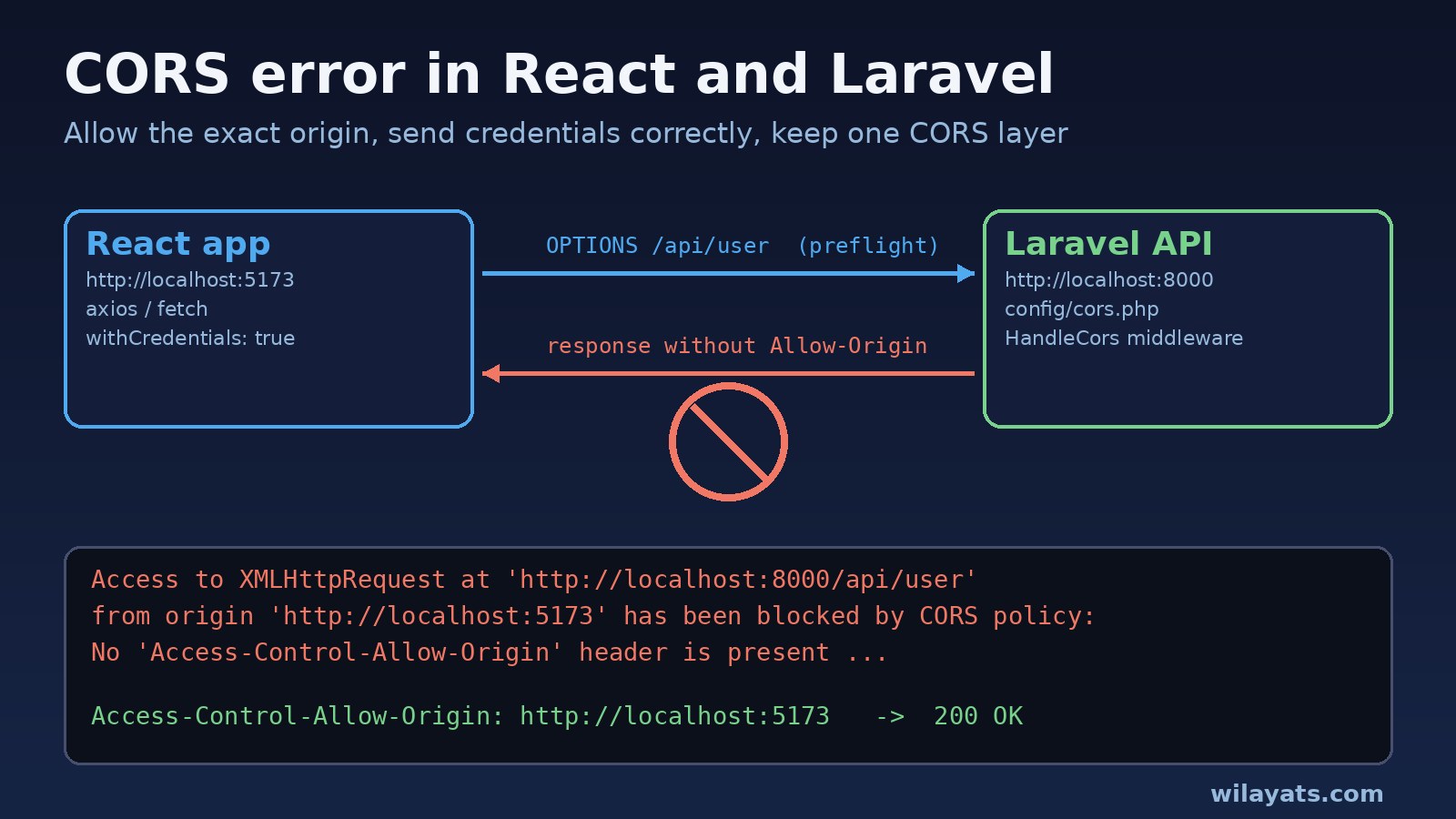
Your React app runs on http://localhost:5173, your Laravel API runs on http://localhost:8000, and every request fails in the browser even though the same URL works in Postman. That is the classic CORS error React Laravel developers run into: the browser blocks the response because the API did not send the right Access-Control-Allow-Origin header for your frontend's origin.
The good news is that Laravel 10 and 11 already ship with CORS support built in. In most cases the fix is a few lines in config/cors.php, the right credentials setting in axios or fetch, and making sure Nginx is not getting in the way. This guide walks through each cause, with commands you can use to prove the fix works.
Problem: The CORS Error React Laravel Apps Hit
CORS (Cross-Origin Resource Sharing) is a browser rule. A page loaded from one origin (scheme + host + port) can only read responses from another origin if that server explicitly allows it with response headers. http://localhost:5173 and http://localhost:8000 are different origins because the port differs, and so are http://localhost:5173 and http://127.0.0.1:5173.
Two points save a lot of time:
- CORS is enforced by the browser, not by the server. Postman, curl and server-to-server calls never show a CORS error, so "it works in Postman" proves nothing about CORS.
- The fix is always on the server's response. Adding
Access-Control-Allow-Originto the request headers in React does nothing. The API (Laravel, or whatever proxy sits in front of it) must send the header.
Symptoms: Access Control Allow Origin Errors in the Console
The most common message in Chrome's console looks like this:
Access to XMLHttpRequest at 'http://localhost:8000/api/user' from origin 'http://localhost:5173' has been blocked by CORS policy: No 'Access-Control-Allow-Origin' header is present on the requested resource.When the request needs a preflight (more on that below), the message changes slightly:
Access to XMLHttpRequest at 'http://localhost:8000/api/orders' from origin 'http://localhost:5173' has been blocked by CORS policy: Response to preflight request doesn't pass access control check: No 'Access-Control-Allow-Origin' header is present on the requested resource.If you send cookies (for example with Laravel Sanctum) while the server answers with a wildcard, you get the wildcard-with-credentials error:
Access to XMLHttpRequest at 'http://localhost:8000/api/user' from origin 'http://localhost:5173' has been blocked by CORS policy: The value of the 'Access-Control-Allow-Origin' header in the response must not be the wildcard '*' when the request's credentials mode is 'include'. The credentials mode of requests initiated by the XMLHttpRequest is controlled by the withCredentials attribute.Other variants you may see:
The value of the 'Access-Control-Allow-Credentials' header in the response is '' which must be 'true' when the request's credentials mode is 'include'.The 'Access-Control-Allow-Origin' header contains multiple values 'http://localhost:5173, http://localhost:5173', but only one is allowed.- In axios, the error object only says
Network Errorwith no response status, because the browser hides the blocked response from JavaScript. - In the DevTools Network tab, the request shows
CORS errorin the Status column, or anOPTIONSrequest appears with a 404, 405 or 500 status.
Root Cause: Why Laravel Does Not Send the Header
Before a "non-simple" request, the browser sends a preflight OPTIONS request. Requests with an Authorization header, Content-Type: application/json, or methods like PUT, PATCH and DELETE all trigger one. The browser only sends the real request if the preflight response allows the origin, method and headers.
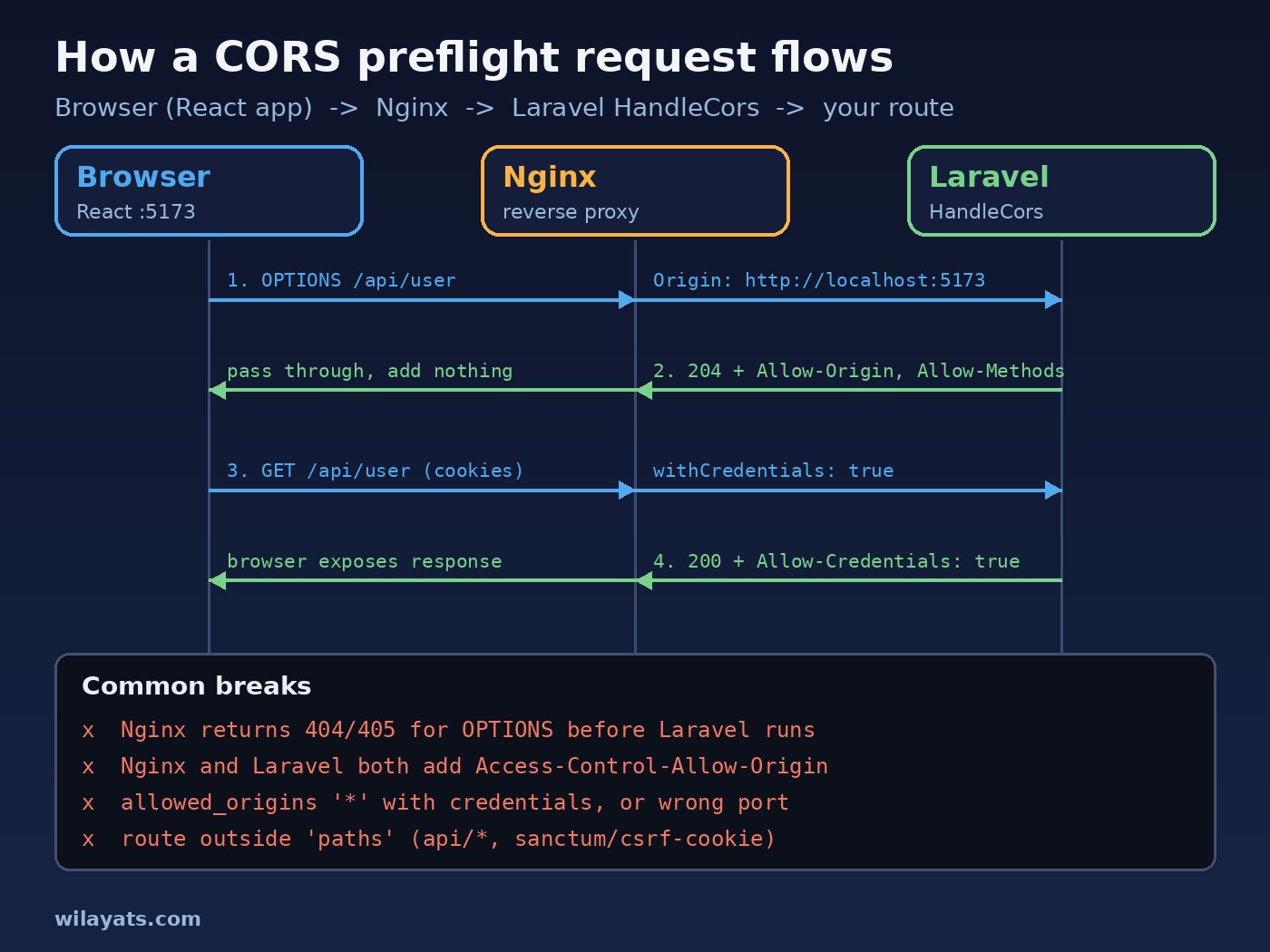
The usual reasons the header is missing or wrong:
- The origin is not allowed.
allowed_originsinconfig/cors.phpdoes not contain the exact origin, including the port and without a trailing slash. - The route is outside
paths. Laravel's built-inHandleCorsmiddleware only adds headers to paths listed in the config. The default is['api/*', 'sanctum/csrf-cookie'], so routes like/login,/logoutor/broadcasting/authget no CORS headers. - Credentials are misconfigured. The frontend sends cookies but
supports_credentialsisfalse, or a header somewhere is hardcoded to*. - Old config is cached. You edited
config/cors.phpbut production still runs the cached config. - Nginx answers first. Nginx returns 404 or 405 for the OPTIONS request, or adds its own CORS headers on top of Laravel's, which creates duplicate values.
- The real error is a server error. A 502 or 504 from Nginx or PHP-FPM, or code that stops with
exitordd(), can return a response without CORS headers. The browser then reports CORS, hiding the real problem. - Two CORS layers. An old
fruitcake/laravel-corsor a custom middleware still runs alongside the built-inHandleCors.
Step-by-Step Laravel CORS Fix
1. Find the failing request in DevTools
Open the Network tab, reload, and click the red request. If there is an OPTIONS request, check it first. Look at its status code and the response headers. A 404, 405 or 500 on OPTIONS points to routing or Nginx. A 200 or 204 without Access-Control-Allow-Origin points to the Laravel config.
2. Publish and edit config/cors.php
In Laravel 10 the file exists by default. In Laravel 11 it is not published by default, so run:
php artisan config:publish corsThen set the exact origins your React app uses. Avoid * if you send cookies.
3. Confirm HandleCors is registered once
In Laravel 11, Illuminate\Http\Middleware\HandleCors is part of the default global middleware, so you do not register anything in bootstrap/app.php. In Laravel 10 check that \Illuminate\Http\Middleware\HandleCors::class is in the $middleware array of app/Http/Kernel.php. Remove any older CORS package or hand-written CORS middleware so only one layer sets the headers.
4. Configure credentials if you use Sanctum cookies
For SPA authentication with Sanctum, set supports_credentials to true, add your frontend to SANCTUM_STATEFUL_DOMAINS, set SESSION_DOMAIN, and make the frontend send credentials. If you use bearer tokens in the Authorization header instead of cookies, you do not need credentials mode, but the header still triggers a preflight.
5. Use a Vite proxy in development (optional)
A dev proxy makes the browser talk to the Vite server only, so the request is same-origin and CORS never applies. It does not fix production, so you still need correct server config before you deploy.
6. Fix Nginx
Let OPTIONS requests reach PHP through the normal try_files rule and do not add CORS headers in Nginx when Laravel already does.
7. Clear config cache and redeploy
php artisan config:clear
php artisan config:cache   # in production, after the .env is correct
Code and Commands
config/cors.php for a React SPA
<?php

return [
    'paths' => ['api/*', 'sanctum/csrf-cookie', 'login', 'logout'],

    'allowed_methods' => ['*'],

    'allowed_origins' => explode(',', env('CORS_ALLOWED_ORIGINS', 'http://localhost:5173')),

    'allowed_origins_patterns' => [
        // '#^https://([a-z0-9-]+\.)?example\.com$#',
    ],

    'allowed_headers' => ['*'],

    'exposed_headers' => [],

    'max_age' => 0,

    'supports_credentials' => true,
];
In .env, list every frontend origin with scheme and port, separated by commas:
CORS_ALLOWED_ORIGINS=http://localhost:5173,https://app.example.com
SANCTUM_STATEFUL_DOMAINS=localhost:5173,app.example.com
SESSION_DOMAIN=localhost
# production on subdomains: SESSION_DOMAIN=.example.com
For Sanctum SPA auth in Laravel 11, run php artisan install:api if you have not already, and enable stateful API requests in bootstrap/app.php:
->withMiddleware(function (Middleware $middleware) {
    $middleware->statefulApi();
})
In Laravel 10, the same job is done by \Laravel\Sanctum\Http\Middleware\EnsureFrontendRequestsAreStateful::class in the api middleware group of app/Http/Kernel.php.
React with axios (withCredentials)
// src/lib/api.js
import axios from "axios";

export const api = axios.create({
  baseURL: import.meta.env.VITE_API_URL, // e.g. http://localhost:8000
  withCredentials: true,   // send and receive cookies cross-origin
  withXSRFToken: true,     // axios 1.6.2+: attach X-XSRF-TOKEN cross-origin
  headers: { Accept: "application/json" },
});

export async function login(email, password) {
  await api.get("/sanctum/csrf-cookie"); // sets the XSRF-TOKEN cookie
  await api.post("/login", { email, password });
  return api.get("/api/user");
}
React with fetch (credentials: 'include')
const res = await fetch(`${import.meta.env.VITE_API_URL}/api/user`, {
  credentials: "include",
  headers: { Accept: "application/json" },
});
if (!res.ok) throw new Error(`HTTP ${res.status}`);
const user = await res.json();
With plain fetch you must read the XSRF-TOKEN cookie yourself and send it as the X-XSRF-TOKEN header on POST, PUT and DELETE requests, or Laravel will answer with a 419 CSRF token mismatch.
Vite dev proxy
// vite.config.js
import { defineConfig } from "vite";
import react from "@vitejs/plugin-react";

export default defineConfig({
  plugins: [react()],
  server: {
    proxy: {
      "/api": { target: "http://localhost:8000", changeOrigin: true },
      "/sanctum": { target: "http://localhost:8000", changeOrigin: true },
    },
  },
});
With the proxy in place, call relative URLs like /api/user from React during development.
Nginx: avoid duplicate headers
If your Nginx config has lines like these and Laravel's HandleCors is also active, the browser receives two Access-Control-Allow-Origin values and rejects the response:
# Remove these when Laravel handles CORS
add_header Access-Control-Allow-Origin *;
add_header Access-Control-Allow-Methods "GET, POST, OPTIONS";
A standard Laravel server block lets every method, including OPTIONS, reach index.php:
location / {
    try_files $uri $uri/ /index.php?$query_string;
}

location ~ \.php$ {
    include fastcgi_params;
    fastcgi_pass unix:/run/php/php8.3-fpm.sock;
    fastcgi_param SCRIPT_FILENAME $realpath_root$fastcgi_script_name;
}
Adjust the PHP-FPM socket to your version. If you really must handle CORS in Nginx (for example for static files), do it in one place only, and remember that add_header without always is not applied to 4xx and 5xx responses.
Verification
Test the preflight with curl, sending the same Origin the browser sends:
curl -i -X OPTIONS http://localhost:8000/api/user \
  -H "Origin: http://localhost:5173" \
  -H "Access-Control-Request-Method: GET" \
  -H "Access-Control-Request-Headers: content-type, x-xsrf-token"
A healthy response includes headers like these:
HTTP/1.1 204 No Content
Access-Control-Allow-Origin: http://localhost:5173
Access-Control-Allow-Credentials: true
Access-Control-Allow-Methods: GET
Access-Control-Allow-Headers: content-type, x-xsrf-token
Then check the actual request headers only (-I sends a HEAD request, which Laravel answers for GET routes):
curl -sI http://localhost:8000/api/user -H "Origin: http://localhost:5173" | grep -i access-controlFinally, in the browser:
- The Network tab shows the
OPTIONSrequest with 204 and the real request with its normal status. - The response has exactly one
Access-Control-Allow-Originvalue, equal to your frontend origin. - After login, the Application tab shows the
laravel_sessionandXSRF-TOKENcookies, and/api/userreturns your user instead of 401. - Repeat the curl test against staging and production with the real domain, through Nginx, not just against
php artisan serve.
Prevention
- Keep one CORS layer. Let Laravel's
HandleCorsown the headers and keep Nginx, CDNs and custom middleware out of it. - Drive origins from .env so each environment lists its own frontend URLs instead of falling back to
*. - Use the same host naming everywhere. Pick
localhostor127.0.0.1and stick to it, because cookies and origins treat them as different. - Add new route groups to
pathswhen you expose them to the SPA. - Run the curl preflight check in your deploy checklist or a smoke test after each release.
- Document the setup next to your other API conventions; the common API design mistakes guide covers similar contract issues, and structuring a large Laravel project shows where such config belongs.
If your React frontend is built with Next.js, the Next.js hydration error guide covers another browser-only error that often shows up in the same projects.
FAQs
Why does my Laravel API work in Postman but not in React?
Postman is not a browser and does not enforce CORS. The browser blocks the response when the API does not return a matching Access-Control-Allow-Origin header, so you need to fix the API's CORS config.
Where is config/cors.php in Laravel 11?
It is not published by default. Run php artisan config:publish cors to create it. The HandleCors middleware is already active in the default global middleware.
Can I use allowed_origins '*' with Sanctum?
Not safely. Cookie-based requests need a specific origin and Access-Control-Allow-Credentials: true, and browsers reject a literal * in credentials mode. List the exact origins instead.
Why do I get a 419 error after fixing CORS?
419 is a CSRF token mismatch, not a CORS problem. Call /sanctum/csrf-cookie first, send credentials, make sure the X-XSRF-TOKEN header is sent, and check SESSION_DOMAIN and SANCTUM_STATEFUL_DOMAINS.
Should I set Access-Control-Allow-Origin in my React code?
No. It is a response header and has no effect when the client sends it. Adding custom headers can even trigger an extra preflight.
Why is the header present twice?
Two layers are adding it, usually Nginx plus Laravel, or an old CORS package plus the built-in middleware. Remove one so only a single value is returned.
Conclusion
A CORS error in a React and Laravel project almost always comes down to the API response: the wrong origin, a route outside paths, credentials settings that do not match, or Nginx interfering with the preflight. Configure config/cors.php with exact origins, keep HandleCors as the only CORS layer, send credentials correctly from axios or fetch, and confirm the fix with a curl OPTIONS request before you ship.