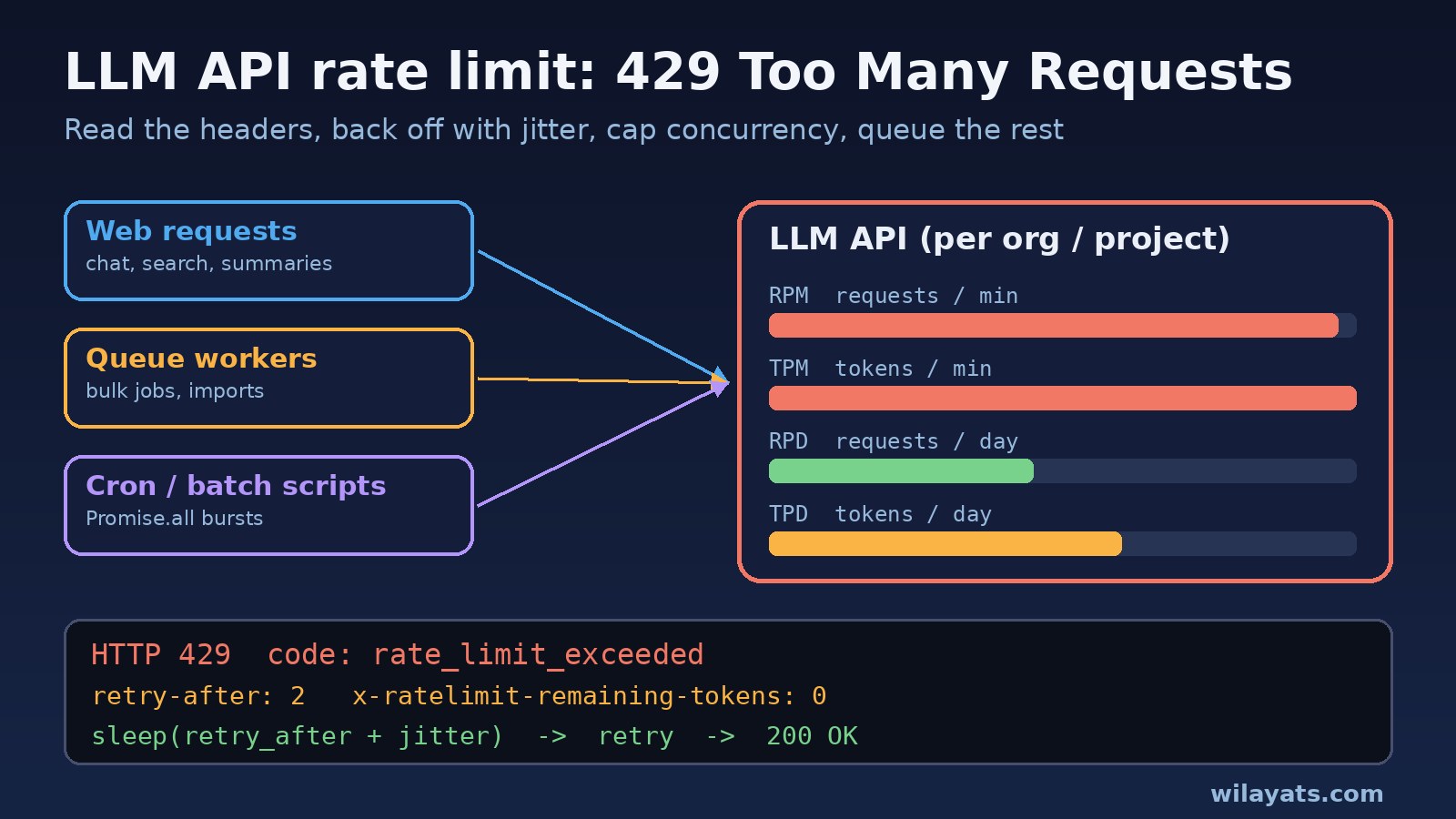
Your AI feature works perfectly in development. Then real users arrive, a bulk import starts, and the logs fill up with 429 Too Many Requests. An LLM API rate limit error means the provider refused your request because your organization or project sent too many requests or too many tokens in a short window. The request was fine. The pace was not.
Most teams react by adding a retry loop, and that often makes things worse. This guide shows how to read an OpenAI rate limit error 429, tell a temporary limit apart from a billing problem, retry with exponential backoff and jitter, and move heavy work into a queue so your Laravel, Node.js or Python app keeps working under load.
The Problem: LLM API Rate Limit Errors (HTTP 429)
Every hosted LLM API limits how fast you can call it. OpenAI measures several things at once: requests per minute (RPM), tokens per minute (TPM), and on some tiers and models requests per day (RPD) and tokens per day (TPD). You hit the limit as soon as any one of them runs out, whichever comes first. Twenty tiny requests can exhaust a 20 RPM limit while your token budget is almost untouched, and one huge prompt can trip the tokens per minute limit on its own.
Two details catch teams out. First, limits apply to the organization and the project, not to each API key or each developer, so a colleague's batch job can use up the budget your web app depends on. Second, the same HTTP 429 status is also used for quota and billing errors, and those never go away by retrying.
Symptoms: What a 429 Too Many Requests Error Looks Like
With the official Python SDK, a tokens-per-minute limit looks like this (organization ID shortened):
openai.RateLimitError: Error code: 429 - {'error': {'message': 'Rate limit reached for gpt-5.4-mini in organization org-xxxx on tokens per min (TPM): Limit 200000, Used 192160, Requested 13370. Please try again in 1.659s. Visit https://platform.openai.com/account/rate-limits to learn more.', 'type': 'tokens', 'param': None, 'code': 'rate_limit_exceeded'}}Read the numbers: Used plus Requested is more than Limit, so this one request would have pushed the minute over budget. The words in brackets tell you which bucket ran out, for example (TPM) or (RPM).
A quota or billing problem looks similar but has a different code:
Error code: 429 - {'error': {'message': 'You exceeded your current quota, please check your plan and billing details. ...', 'type': 'insufficient_quota', 'param': None, 'code': 'insufficient_quota'}}OpenAI's error code guide also lists 429 codes such as credit_balance_exhausted, organization_spend_limit_exceeded, project_spend_limit_exceeded and organization_usage_limit_exceeded, plus a slow_down code (type rate_limit_error) when your traffic grows too quickly. A related 503 with code server_is_overloaded means the model itself is busy. Other providers behave the same way: Anthropic returns a 429 with error type rate_limit_error and a retry-after header.
In your app you will typically see slow pages that end in errors, queue jobs failing in bursts, and failures that cluster right after a deploy, a cron run or a large import.
Root Cause: Why You Hit the LLM API Rate Limit
- Uncontrolled concurrency. A
Promise.all()over 500 documents, or 20 queue workers all calling the API at once, sends a burst far above your RPM. - Oversized requests. Long system prompts, full chat history and big retrieved documents use up the tokens per minute limit quickly. OpenAI's rate limit guide notes that the token count used for limiting takes the larger of your
max_tokenssetting and the estimated prompt size, so a very high output cap "just to be safe" counts against TPM too. - Retry storms. Instant retries with no delay, or several retry layers stacked together (your loop plus the SDK's built-in retries plus the queue's retries), multiply traffic exactly when you are already over the limit. Failed requests still count toward your per-minute limit.
- Shared limits. Staging, production, cron scripts and teammates all drawing from one organization or project budget.
- Sudden traffic ramps. The
slow_downcode can appear even when you are inside your RPM and TPM limits, because traffic grew too fast. - It is not a rate limit at all.
insufficient_quotaand the spend or credit codes mean money or an account limit, not speed.
Step-by-Step Fix for an OpenAI Rate Limit Error 429
1. Read error.code before you retry anything
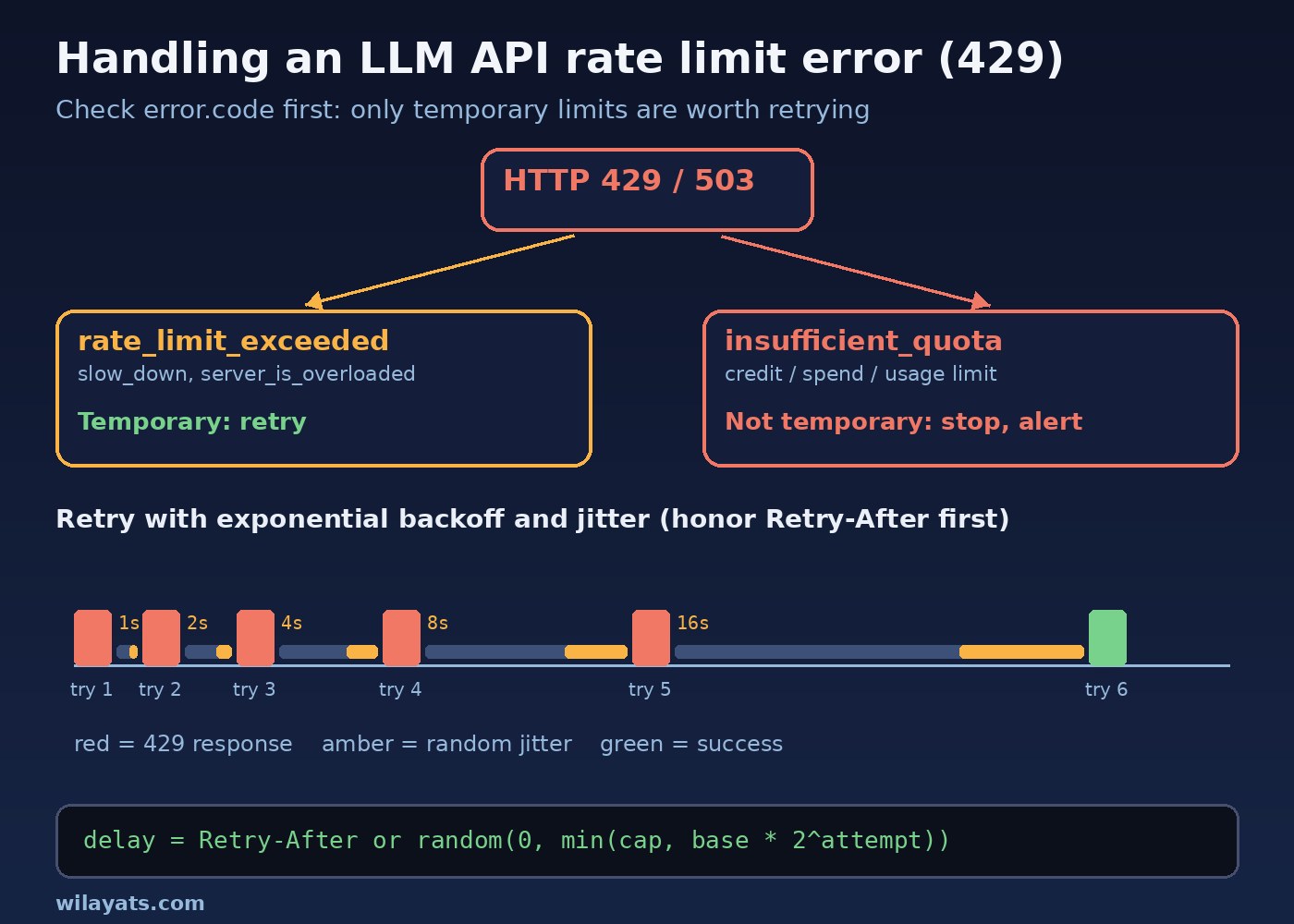
Log the HTTP status, error.type, error.code and the message. Retry only rate_limit_exceeded, slow_down and 503 server_is_overloaded. For insufficient_quota, credit, spend or usage limit codes, stop immediately, mark the job as failed and alert someone. No amount of retrying fixes billing.
2. Check the rate limit headers
Send one small request and look at the response headers. This tells you your real limits and how close you are:
curl -sS -i https://api.openai.com/v1/responses \
  -H "Authorization: Bearer $OPENAI_API_KEY" \
  -H "Content-Type: application/json" \
  -d '{"model": "gpt-5.4-mini", "input": "ping", "max_output_tokens": 16}' \
  | grep -i -E '^(HTTP|retry-after|x-ratelimit)'
Use whichever model your app actually calls. You should see headers like these:
x-ratelimit-limit-requests: 5000
x-ratelimit-remaining-requests: 4999
x-ratelimit-limit-tokens: 2000000
x-ratelimit-remaining-tokens: 1999984
x-ratelimit-reset-requests: 12ms
x-ratelimit-reset-tokens: 0s
On a temporary 429 the response may also include Retry-After, the minimum number of seconds to wait. The same limits are visible in the dashboard under the organization's Limits settings.
3. Retry with exponential backoff and jitter
If Retry-After is present, wait at least that long. If not, wait a random time that doubles with each attempt, up to a cap. The random part (jitter) stops all your workers from retrying at the same moment. Limit both the number of attempts and the total wait. The official OpenAI SDKs already retry some 429 and 503 responses (2 retries by default), so either rely on them or turn them off and use your own logic, never both. The code is in the next section.
4. Cap concurrency
Run a fixed number of LLM calls at a time, for example 4 to 10 per process, instead of firing everything at once. Then make sure processes × concurrency stays inside your RPM.
5. Reduce tokens per request
For a tokens per minute limit, shrink the request: trim chat history, send only the relevant chunks, shorten the system prompt, and set max_output_tokens close to what you really need. The guide to keeping LLM API costs under control covers token trimming in more depth, and the same changes lower both cost and rate limit pressure.
6. Move bulk work to a queue
User-facing calls should stay synchronous. Everything else, such as summarizing imports, tagging documents or generating descriptions, belongs in a background queue with its own rate limiter. For non-urgent jobs, OpenAI's Batch API runs large sets of requests without using your synchronous rate limits.
7. Raise the limit only after the code is right
Limits increase with your usage tier, and you can check them on the Limits page. Raising them helps real growth, but a retry storm will eat any limit you are given.
Code and Commands: Retry With Exponential Backoff
Python: honor Retry-After, then back off with jitter
import random
import time

import openai
from openai import OpenAI

client = OpenAI(max_retries=0)  # we handle retries here, so turn off SDK retries

DO_NOT_RETRY = {
    "insufficient_quota", "credit_balance_exhausted",
    "organization_spend_limit_exceeded", "project_spend_limit_exceeded",
    "organization_usage_limit_exceeded",
}

def retry_after_seconds(err):
    headers = getattr(err, "response", None) and err.response.headers or {}
    try:
        if headers.get("retry-after-ms"):
            return float(headers["retry-after-ms"]) / 1000
        if headers.get("retry-after"):
            return float(headers["retry-after"])
    except ValueError:
        pass
    return None

def create_with_backoff(max_attempts=6, base=1.0, cap=60.0, **kwargs):
    for attempt in range(max_attempts):
        try:
            return client.responses.create(**kwargs)
        except (openai.RateLimitError, openai.InternalServerError) as err:
            if getattr(err, "code", None) in DO_NOT_RETRY:
                raise  # billing or quota: retrying will not help
            if attempt == max_attempts - 1:
                raise
            wait = retry_after_seconds(err)
            if wait is None:
                wait = random.uniform(0, min(cap, base * 2 ** attempt))
            elif wait > cap:
                raise  # server asked for a long pause: defer the job instead
            else:
                wait += random.uniform(0, 1)
            time.sleep(wait)

response = create_with_backoff(model="gpt-5.4-mini", input="Summarize this ticket ...",
                               max_output_tokens=300)
print(response.output_text)
Node.js / TypeScript: backoff plus a concurrency limit
import OpenAI from "openai";
import pLimit from "p-limit";

const client = new OpenAI({ maxRetries: 0 });
const DO_NOT_RETRY = new Set([
  "insufficient_quota", "credit_balance_exhausted",
  "organization_spend_limit_exceeded", "project_spend_limit_exceeded",
  "organization_usage_limit_exceeded",
]);
const sleep = (ms: number) => new Promise((r) => setTimeout(r, ms));

function header(err: any, name: string): string | undefined {
  const h = err?.headers;
  if (!h) return undefined;
  return typeof h.get === "function" ? h.get(name) ?? undefined : h[name];
}

export async function createWithBackoff(
  params: OpenAI.Responses.ResponseCreateParamsNonStreaming,
  maxAttempts = 6, baseMs = 1000, capMs = 60_000,
) {
  for (let attempt = 0; ; attempt++) {
    try {
      return await client.responses.create(params);
    } catch (err) {
      if (!(err instanceof OpenAI.APIError)) throw err;
      const retryable = err.status === 429 || err.status === 503;
      if (!retryable || DO_NOT_RETRY.has(String(err.code)) || attempt >= maxAttempts - 1) throw err;
      const ra = Number(header(err, "retry-after"));
      let waitMs = Number.isFinite(ra) && ra > 0
        ? ra * 1000 + Math.random() * 1000
        : Math.random() * Math.min(capMs, baseMs * 2 ** attempt);
      if (waitMs > capMs) throw err; // defer instead of hammering the API
      await sleep(waitMs);
    }
  }
}

// Never run hundreds of calls at once: 5 in flight per process
const limit = pLimit(5);
const results = await Promise.all(
  documents.map((doc) => limit(() => createWithBackoff({
    model: "gpt-5.4-mini",
    input: `Summarize:\n${doc.text}`,
    max_output_tokens: 300,
  }))),
);
Laravel: rate-limited queue jobs with Redis
Define a named limiter once, then attach it to every job that calls the LLM API. RateLimitedWithRedis shares the limit across all workers on all servers:
// app/Providers/AppServiceProvider.php
use Illuminate\Cache\RateLimiting\Limit;
use Illuminate\Support\Facades\RateLimiter;

public function boot(): void
{
    RateLimiter::for('llm-api', fn (object $job) => Limit::perMinute(300));
}// app/Jobs/SummarizeDocument.php
use Illuminate\Queue\Middleware\RateLimitedWithRedis;
use Illuminate\Support\Facades\Http;
public function middleware(): array
{
return [new RateLimitedWithRedis('llm-api')];
}
public function retryUntil(): \DateTime
{
return now()->addMinutes(30);
}
public function handle(): void
{
$response = Http::withToken(config('services.openai.key'))
->timeout(60)
->post('https://api.openai.com/v1/responses', [
'model' => 'gpt-5.4-mini',
'input' => 'Summarize: ' . $this->document->text,
'max_output_tokens' => 300,
]);
if (in_array($response->status(), [429, 503])) {
$code = $response->json('error.code');
if (in_array($code, ['insufficient_quota', 'credit_balance_exhausted'])) {
$this->fail(new \RuntimeException("LLM API quota error: {$code}"));
return;
}
$wait = (int) ($response->header('Retry-After') ?: 10);
$this->release($wait + random_int(1, 5));
return;
}
$response->throw();
// save $response->json() ...
}Set the limiter a bit below your real RPM so web traffic still has room. For queue setup, Supervisor and Horizon, see the Laravel queue Redis guide.
Token budgeting before you send
import tiktoken

enc = tiktoken.get_encoding("o200k_base")
prompt_tokens = len(enc.encode(system_prompt + user_input))
if prompt_tokens + max_output_tokens > PER_REQUEST_BUDGET:
    user_input = trim_to_budget(user_input)  # drop old history or low-ranked chunks
Counting tokens before you call lets you trim large inputs and spread work across minutes instead of discovering the limit through 429s.
Verification
- Run a small load test against staging (for example 200 calls with your concurrency limit) and confirm there are few or no 429 responses and no job ends up permanently failed.
- Log
x-ratelimit-remaining-requestsandx-ratelimit-remaining-tokensper response and check they no longer hit zero during normal traffic. - Check that each failed request is retried a limited number of times with growing delays, not instantly.
- Force a quota-style error in a test (mock a 429 with
insufficient_quota) and confirm the job fails at once and raises an alert instead of looping. - Watch the usage page in your provider dashboard after the next bulk job to confirm traffic is spread out.
Prevention: Stay Under the Tokens Per Minute Limit
- One retry layer only. Either the SDK's retries or yours, with a cap on attempts and total time.
- Global concurrency and rate limits for every worker, enforced in Redis so they hold across servers.
- Separate projects or keys for production, staging and batch work, so a test script cannot starve real users.
- Small, focused prompts with realistic
max_output_tokens. - Cache repeated answers, such as the same document summarized twice.
- Ramp traffic gradually after launches and imports instead of switching everything on at once.
- Test failure paths before release. Mock 429 and 503 responses in your test suite, as described in how to test LLM features before production.
- Alert on 429 rate and quota codes so you know before users do.
FAQs
What does 429 Too Many Requests mean in the OpenAI API?
It means your organization or project went over a rate limit (requests or tokens per minute or per day), or hit a quota or spend limit. Check error.code: rate_limit_exceeded is temporary, insufficient_quota is not.
How long should I wait after an LLM API rate limit error?
Wait at least the Retry-After value if the response has one. Otherwise use exponential backoff with jitter, for example a random delay up to 1, 2, 4, 8 seconds, capped at a maximum, and stop after a few attempts.
Why do I get a 429 error when I have credits left?
Credits and rate limits are separate. You can have money in the account and still exceed RPM or TPM because of bursts, big prompts or other services sharing the same organization.
What is the tokens per minute limit?
It is the maximum number of tokens your organization or project can use with a model in one minute. Large inputs and high max_tokens values use it up faster, so trimming prompts often fixes TPM errors.
Does the OpenAI SDK retry with exponential backoff automatically?
Yes, the official Python and Node SDKs retry some errors, including 429 and 5xx, twice by default with backoff. You can change this with max_retries in Python or maxRetries in Node. Avoid stacking your own retry loop on top without accounting for them.
How do I fix HTTP 429 errors from AI APIs in a queue?
Rate-limit the jobs (for example with Laravel's RateLimitedWithRedis middleware), release the job with a delay on 429, fail it on quota errors, and set retryUntil() so jobs do not run out of attempts during long throttling periods.
Conclusion
An LLM API rate limit error is a pacing problem, not a broken request. Read error.code, respect Retry-After, retry with exponential backoff and jitter, cap concurrency, trim tokens and push bulk work into a rate-limited queue. Treat quota and billing 429s as hard failures. With those pieces in place, a 429 becomes a short delay your users never notice.