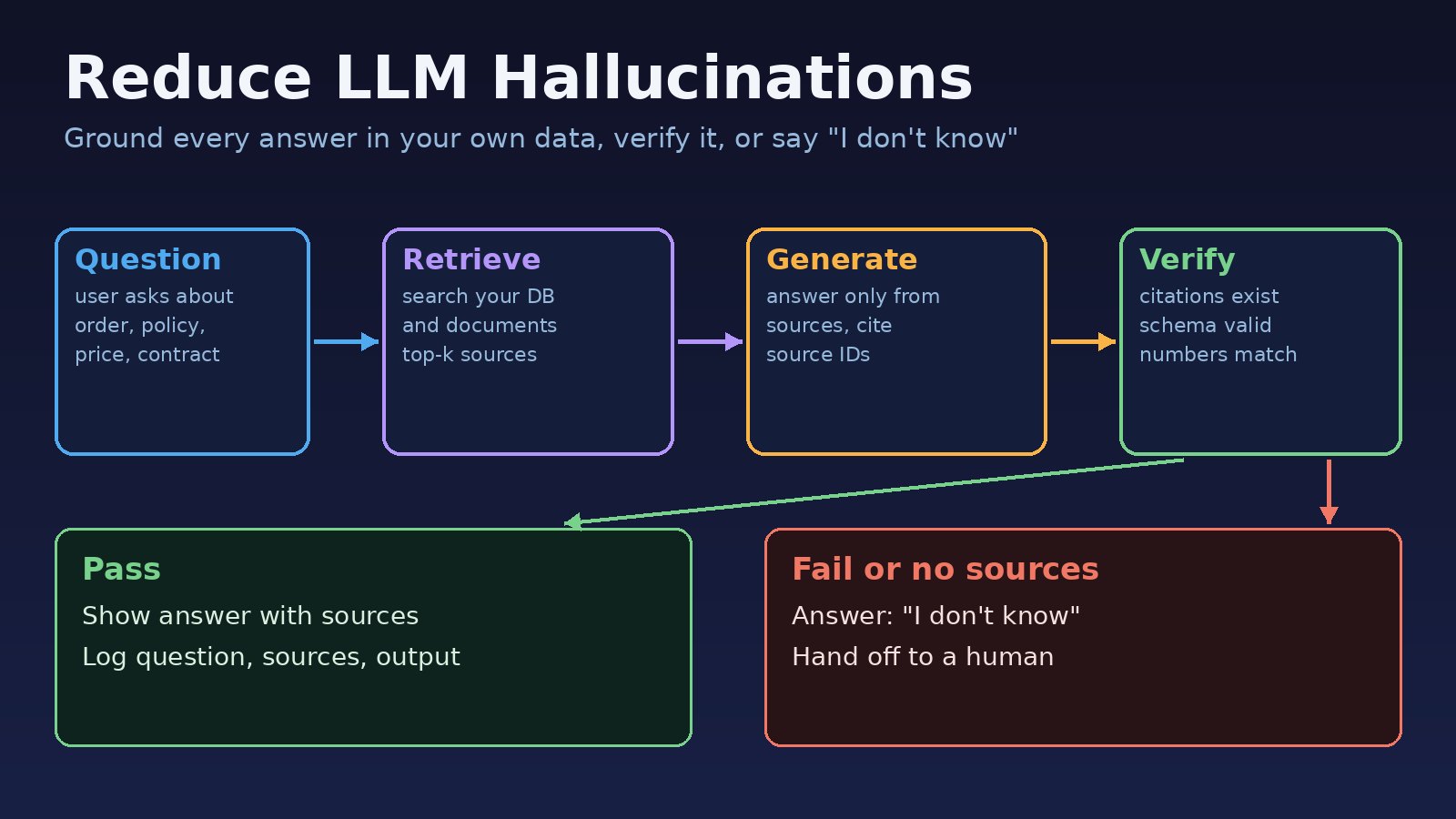
Your support bot tells a customer the refund window is 60 days when your policy says 14. Your internal assistant quotes a contract clause that does not exist. If you want to reduce LLM hallucinations in a business application, you cannot fix it with a better prompt alone. You need to control what the model is allowed to know, force it to show where each fact came from, and check the answer before a user sees it.
This guide explains why large language models make things up, how to spot the problem in your logs, and a step-by-step way to ground answers in your own data with RAG, structured output, citation checks and an honest "I don't know" path. The examples use Python, PostgreSQL and the OpenAI SDK, but the pattern works with any model or stack.
The Problem: AI Hallucinations in Business Applications
A hallucination is a fluent, confident answer that is not supported by facts. The model is not lying on purpose. A language model predicts likely text. When the facts it needs are missing from the prompt, it still produces the most likely-sounding answer, and in business software that can mean a wrong price, a fake policy or an invented order status.
In a chat demo this is an annoyance. In a product it is a support ticket, a refund dispute or a compliance problem. The good news is that most hallucinations in business apps come from a small set of design gaps, and each one has a practical fix.
Symptoms: How LLM Hallucinations Show Up
Hallucinations rarely throw an exception, which is why they slip into production. Watch for these signs in reviews and logs:
- Invented specifics: exact numbers, dates, prices or percentages that do not appear in any of your source documents.
- Fake citations: the answer cites "Section 4.2" or a document ID that was never retrieved, or links to a URL that returns 404.
- Policy drift: answers that sound like a generic company policy instead of yours, for example a standard 30-day return policy.
- Confident answers to unanswerable questions: the user asks about a product you do not sell and gets a full description.
- Made-up code: in developer tools, calls to functions, flags or packages that do not exist, which fail with errors such as
AttributeError: module 'x' has no attribute 'y'ornpm ERR! 404 Not Found. - Inconsistent answers: the same question asked twice gives two different facts.
Root Cause: Why LLMs Hallucinate
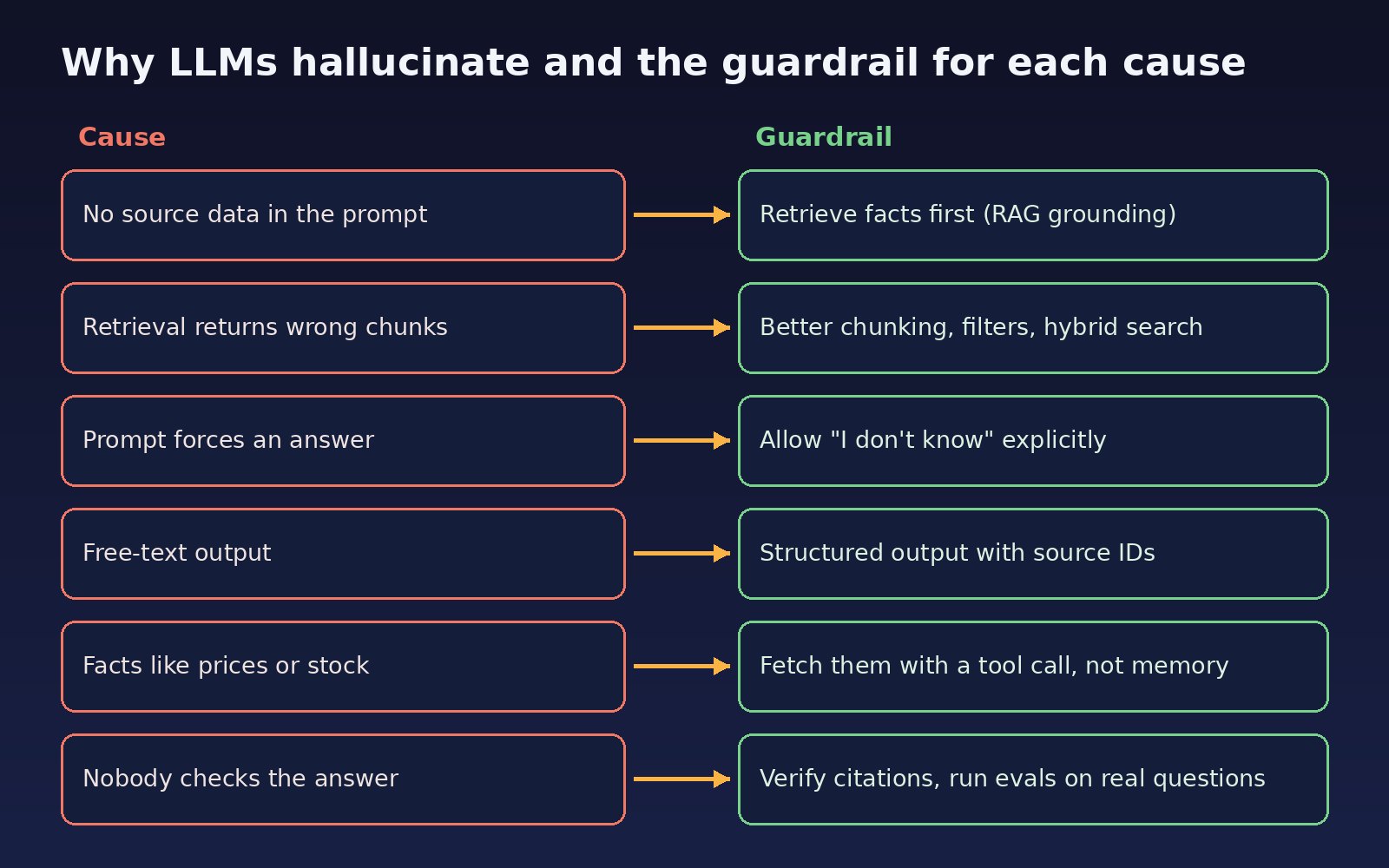
- No source data in the prompt. The model only knows its training data, which does not include your prices, customers or internal policies, and has a cutoff date.
- Retrieval returns the wrong chunks. Your RAG pipeline finds text that looks similar but is about a different product, branch or year, and the model answers from it.
- The prompt forces an answer. Instructions like "always answer the user's question" leave no room to say the information is missing.
- Free-text output. When the answer is a paragraph with no structure, you cannot check which sentence came from which source.
- Live facts answered from memory. Stock levels, order status and exchange rates change every minute. They must come from a database or API call, not from the model.
- No verification step. Nothing compares the answer against the sources before it is shown, and nobody measures how often it is wrong.
Step-by-Step: How to Reduce LLM Hallucinations
1. Decide what the assistant is allowed to answer
Write down the scope: for example "questions about our products, delivery and refund policy, using only the knowledge base and the orders API". Anything outside that scope gets a polite refusal or a handoff. A narrow scope is the cheapest hallucination prevention there is.
2. Ground answers with RAG (retrieval-augmented generation)
Before calling the model, search your own documents and database for the passages that answer the question, and put only those passages in the prompt. Give each passage a stable ID such as doc_142#3. RAG grounding works only if retrieval is good, so filter by metadata (product, city, language, effective date), keep chunks small enough to be about one topic, and consider hybrid search that combines keyword and vector matching for names and codes.
3. Fetch live facts with tool calls
For prices, availability, balances and order status, give the model a function such as get_order_status(order_id) and let your code call the real system. The model should phrase the result, not invent it.
4. Allow "I don't know" in the prompt
Tell the model plainly that the sources may not contain the answer and that saying so is the correct behavior. Ask it to answer only from the provided sources and to cite a source ID for every factual statement.
5. Return structured output with source IDs
Ask for JSON that separates the answer, the cited source IDs and a flag for missing information. This turns a vague paragraph into something your code can check. The guide on getting structured JSON output from an LLM reliably covers schemas and validation in detail.
6. Verify before you show the answer
Check that every cited ID was actually retrieved, that the JSON matches your schema, and that numbers in the answer appear in the cited text. If a check fails, retry once or fall back to "I don't know" and a human handoff.
7. Lower randomness where your model supports it
For factual tasks, a low temperature makes answers more consistent. Some reasoning models do not accept a temperature setting, so check your model's documentation. Lower randomness improves consistency, but it does not add missing facts, so it never replaces grounding.
Code and Commands: A Grounded Answer Pipeline in Python
Retrieve sources from PostgreSQL with pgvector
This assumes a chunks table with an embedding vector(1536) column and metadata columns. The <=> operator is pgvector's cosine distance.
SELECT id, doc_id, content, 1 - (embedding <=> %(query_vec)s::vector) AS similarity
FROM chunks
WHERE product = %(product)s
  AND effective_date <= CURRENT_DATE
ORDER BY embedding <=> %(query_vec)s::vector
LIMIT 5;
Ask for a cited answer with a strict schema
from openai import OpenAI
from pydantic import BaseModel

client = OpenAI()

class GroundedAnswer(BaseModel):
    answer: str
    source_ids: list[str]
    insufficient_context: bool

SYSTEM = (
    "You answer customer questions for our company. Use ONLY the sources provided. "
    "Cite the source id for every fact. If the sources do not contain the answer, "
    "set insufficient_context to true and say you don't know. Never guess numbers, "
    "dates, prices or policy terms."
)

def ask(question: str, chunks: list[dict]) -> GroundedAnswer:
    sources = "\n\n".join(f"[{c['id']}]\n{c['content']}" for c in chunks)
    response = client.responses.parse(
        model="gpt-5.4-mini",          # use the model your app runs on
        input=[
            {"role": "system", "content": SYSTEM},
            {"role": "user", "content": f"Sources:\n{sources}\n\nQuestion: {question}"},
        ],
        text_format=GroundedAnswer,
    )
    return response.output_parsed
Verify citations and numbers before showing the answer
import re

FALLBACK = "I don't have that information. I've passed your question to our team."

def verify(result: GroundedAnswer, chunks: list[dict]) -> str:
    retrieved = {c["id"]: c["content"] for c in chunks}
    if result.insufficient_context or not result.source_ids:
        return FALLBACK
    if any(sid not in retrieved for sid in result.source_ids):
        return FALLBACK                      # cited a source we never gave it
    cited_text = " ".join(retrieved[sid] for sid in result.source_ids)
    for number in re.findall(r"\d+(?:[.,]\d+)?", result.answer):
        if number not in cited_text:
            return FALLBACK                  # number not found in cited sources
    return result.answer
If the model returns JSON that does not match the schema, Pydantic raises an error that starts like 1 validation error for GroundedAnswer. Catch it, log it and use the fallback instead of showing raw output. The number check is deliberately strict: it may reject some correct answers that reformat a value, which is a safer failure than showing an invented price.
Verification: Test That Hallucinations Actually Dropped
Do not trust a few good chats. Build a small evaluation set from real questions, including some that your sources cannot answer, and run it on every prompt or model change.
- Answerable questions: the answer should match the expected fact and cite the right source.
- Unanswerable questions: the correct result is the fallback. Any confident answer here is a hallucination.
cases = [
    {"q": "What is the refund window for online orders?", "expect": "14 days"},
    {"q": "Do you deliver to Gilgit?", "expect": None},   # not in sources: expect fallback
]
for case in cases:
    chunks = retrieve(case["q"])
    final = verify(ask(case["q"], chunks), chunks)
    ok = (final == FALLBACK) if case["expect"] is None else (case["expect"] in final)
    print("PASS" if ok else "FAIL", case["q"], "->", final)
The facts in these test cases are placeholders. Replace them with real ones from your own knowledge base. Then track two numbers over time from your answer logs (log the question, source IDs, answer and user feedback): how often answers are flagged as wrong, and how often the fallback fires. If the fallback rate is very high, your retrieval needs work. For a fuller testing setup, see how to test LLM features before they reach production.
Prevention: Keep AI Hallucination Prevention Working
- Keep sources fresh. Re-index documents when policies or prices change and filter by effective date, or the model will faithfully quote an outdated rule.
- Show citations to users. Linking each answer to its source builds trust and makes wrong answers easy to report.
- Review the log weekly. Read a sample of answers, especially downvoted ones, and add the failures to your evaluation set.
- Keep humans on high-risk actions. Refunds, legal terms and medical or financial advice should need human approval.
- Re-run evals on every change. A new model version, a prompt tweak or a new chunking strategy can quietly change behavior.
- Use domain data. The same pattern applied to property listings is covered in grounding real estate AI answers in your listing database.
FAQs
Can you completely stop LLM hallucinations?
No. You can reduce LLM hallucinations a lot by grounding, verification and a clear fallback, but no current model guarantees zero errors. Design the product so that a wrong answer is caught, flagged or low-impact.
Does RAG grounding eliminate hallucinations?
RAG removes the main cause, missing facts, but the model can still misread a passage or answer from the wrong chunk. That is why citation checks and evaluation sets matter even with RAG.
Does setting temperature to 0 prevent hallucinations?
It makes output more consistent, not more correct. A model with no relevant source can give the same wrong answer every time at temperature 0.
Is fine-tuning better than RAG for hallucination prevention?
Fine-tuning is good for teaching tone, format and task style. For facts that change, such as prices and policies, RAG and tool calls are easier to update and let you cite sources.
How do I detect hallucinations automatically?
Check that cited source IDs were retrieved, that numbers and names in the answer appear in the cited text, and that the output matches your schema. Some teams also run a second model call that judges whether each claim is supported, but treat that as a signal, not proof.
Comments
Join the discussion. Replies load on demand, up to 5 levels.
0 threads
No comments yet
Be the first to start the conversation.