Your LLM feature works in the demo. You ask the model to read a customer message and return JSON, and it does. Then it reaches production and the parser starts failing: a stray sentence before the opening brace, a markdown code fence, a missing field, a budget written as "1.5 crore" instead of a number. If you are wondering how to get structured JSON output from an LLM reliably, the answer is not a better prompt. It is a small pipeline around the model.
This guide walks through that pipeline with a practical example: turning a free-text property inquiry into a clean record your Next.js or Laravel app can store in PostgreSQL. The same approach works for ticket triage, document extraction, tagging and any other feature where code, not a person, reads the model's answer.
Why LLM JSON Output Breaks in Production
A language model generates text one token at a time. Asking for JSON in the prompt makes valid JSON likely, not guaranteed. The failures you will meet fall into a few groups:
- Not parseable: extra prose, code fences, trailing commas, or a response cut off because it hit the token limit.
- Parseable but wrong shape: a missing key, an extra key, a string where you expected a number, or an enum value you never allowed, such as
"flat"when your schema says"apartment". - Right shape, wrong content: a budget the customer never mentioned, or a city guessed from context. This is the dangerous one, because it passes every format check.
Each group needs a different defence, so treat them as separate layers.
How to Get Structured JSON Output From an LLM: Four Layers
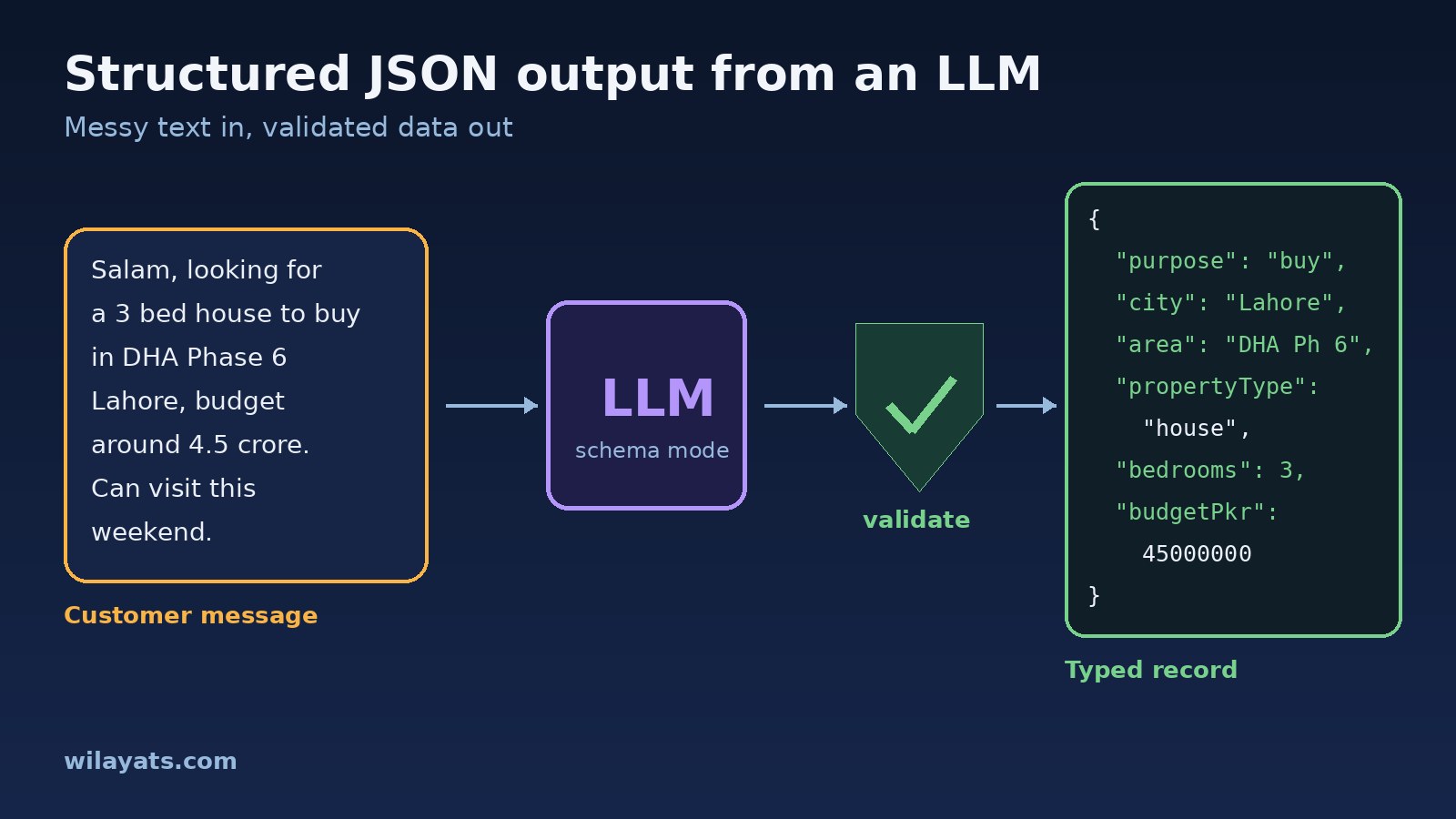
Here is the example input and the record we want back:
Input:  "Salam, looking for a 3 bed house to buy in DHA Phase 6 Lahore,
         budget around 4.5 crore. Can visit this weekend."

Output: {
  "purpose": "buy",
  "city": "Lahore",
  "area": "DHA Phase 6",
  "propertyType": "house",
  "bedrooms": 3,
  "budgetPkr": 45000000
}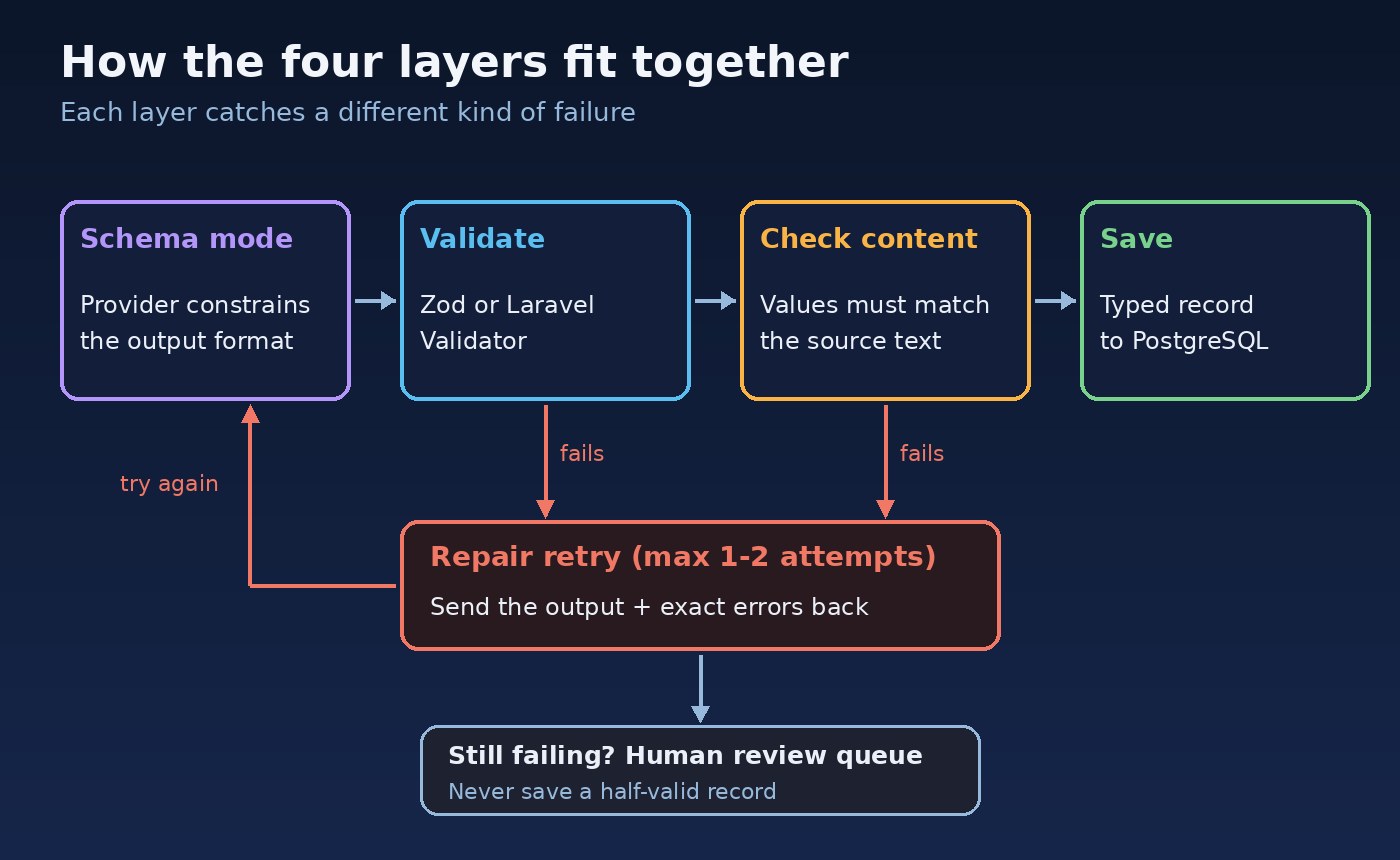
Layer 1: Use the provider's JSON schema mode
Most major LLM APIs now offer a structured output mode where you send a JSON Schema and the provider constrains generation to match it. This is different from the older "JSON mode", which only promises syntactically valid JSON, not your fields. With OpenAI's Chat Completions API, it looks like this in a Next.js route handler:
const inquirySchema = {
  type: "object",
  additionalProperties: false,
  required: ["purpose", "city", "area", "propertyType", "bedrooms", "budgetPkr"],
  properties: {
    purpose: { type: "string", enum: ["buy", "rent"] },
    city: { type: ["string", "null"] },
    area: { type: ["string", "null"] },
    propertyType: { type: "string", enum: ["house", "apartment", "plot", "commercial", "unknown"] },
    bedrooms: { type: ["integer", "null"] },
    budgetPkr: { type: ["integer", "null"], description: "Total budget in PKR. 1 crore = 10,000,000" },
  },
};

const completion = await openai.chat.completions.create({
  model: process.env.LLM_MODEL!,
  messages: [
    { role: "system", content: "Extract the property inquiry. Use null for anything the customer did not say." },
    { role: "user", content: message },
  ],
  response_format: {
    type: "json_schema",
    json_schema: { name: "property_inquiry", strict: true, schema: inquirySchema },
  },
});
Two details matter. Strict schemas usually require every property to be listed as required with additionalProperties: false, so optional values are expressed as a type that allows null. And that null is a feature: if the schema forces a value the customer never gave, the model will invent one. Feature names and supported schema keywords differ between providers, so check your provider's docs before relying on a specific keyword.
Layer 2: Validate every response anyway
Schema mode removes most format errors, but you should still validate in your own code. You may switch models or providers later, a response can be truncated, and the model can return a refusal instead of data. Validation is also how you turn untyped JSON into a typed object. In TypeScript, Zod is a good fit for LLM structured output:
import { z } from "zod";

const Inquiry = z.object({
  purpose: z.enum(["buy", "rent"]),
  city: z.string().min(2).nullable(),
  area: z.string().nullable(),
  propertyType: z.enum(["house", "apartment", "plot", "commercial", "unknown"]),
  bedrooms: z.number().int().min(0).max(20).nullable(),
  budgetPkr: z.number().int().positive().nullable(),
});

const choice = completion.choices[0];
if (choice.finish_reason === "length") throw new Error("Output truncated");
if (choice.message.refusal) throw new Error("Model refused");

const parsed = Inquiry.safeParse(JSON.parse(choice.message.content ?? ""));
if (!parsed.success) {
  // hand parsed.error.issues to the repair step
}
Keep the JSON Schema and the Zod schema in one place, or generate one from the other, so they cannot drift apart. Zod can also enforce rules that JSON Schema modes often don't support well, such as numeric ranges.
Layer 3: Repair with one bounded retry
When validation fails, send the model its own output plus the exact validation errors and ask it to fix only those fields. Cap this at one or two attempts. If the same errors come back, retrying again rarely helps, and an unbounded loop is a quiet way to multiply your API bill.
async function extractInquiry(message: string, attempts = 2) {
  let raw = await callModel(message);
  for (let i = 0; i <= attempts; i++) {
    const result = Inquiry.safeParse(safeJson(raw));
    if (result.success) return result.data;
    if (i === attempts) break;
    raw = await callModel(message, {
      previous: raw,
      errors: result.error.issues.map(e => `${e.path.join(".")}: ${e.message}`),
    });
  }
  return null; // caller sends it to a human review queue
}
The fallback is part of the design. Returning null and putting the inquiry in a review queue is far better than saving a half-valid record or showing the user a 500 error.
Layer 4: Check the content against the source
A response can be perfectly valid and still wrong. Add cheap business rules after validation. If budgetPkr is set, the message should contain a number or words like "lakh" or "crore". If area is set, it should appear in the text or match a known locality such as DHA, Bahria Town or Gulberg. A rent budget of 500 crore is a red flag. These checks catch the invented values that schema validation cannot see. We used the same idea when we covered extracting data from real estate documents with AI.
Validating LLM Output in Laravel
If your backend is Laravel, the built-in validator does the same job as Zod. Call the API with the HTTP client, decode the JSON and validate it like any other request payload:
use Illuminate\Support\Facades\Http;
use Illuminate\Support\Facades\Validator;
use Illuminate\Validation\Rule;

$content = Http::withToken(config('services.openai.key'))
    ->timeout(30)
    ->post('https://api.openai.com/v1/chat/completions', $payload)
    ->throw()
    ->json('choices.0.message.content');

$data = json_decode($content ?? '', true);

$validator = Validator::make(is_array($data) ? $data : [], [
    'purpose'      => ['required', Rule::in(['buy', 'rent'])],
    'city'         => ['present', 'nullable', 'string', 'min:2'],
    'area'         => ['present', 'nullable', 'string'],
    'propertyType' => ['required', Rule::in(['house', 'apartment', 'plot', 'commercial', 'unknown'])],
    'bedrooms'     => ['present', 'nullable', 'integer', 'between:0,20'],
    'budgetPkr'    => ['present', 'nullable', 'integer', 'min:1'],
]);

if ($validator->fails()) {
    // retry once with $validator->errors()->all(), then queue for review
}
The present rule makes sure the key exists even when its value is null, which matches the strict schema. Running this in a queued job keeps slow model calls out of the request cycle.
Schema Design Tips for Reliable JSON
- Keep it flat and small. Deeply nested schemas with dozens of fields fail more often. Split large extractions into smaller calls.
- Prefer enums to free text for anything your code branches on, and include an
"unknown"option. - Allow null for missing information so the model is never forced to guess.
- Use descriptions for units and formats, for example that budgets are in PKR and dates are ISO 8601.
- Version your schema. Store the schema version with each record so you know which rules produced it.
Test and Monitor It Like Any Other Parser
Build a small set of real, anonymised messages with expected outputs, including awkward ones: Urdu-English mixes, prices in lakh, messages with no budget at all. Run them whenever you change the prompt, schema or model. The approach in how to test LLM features before they reach production applies directly.
In production, log the validation failure rate, retry rate and review queue size. A sudden rise usually means a model update or a new kind of input. And remember that extracted text is still untrusted input: never let a field from the model decide which action runs without checks of its own, as explained in the post on protecting your LLM app from prompt injection.
Conclusion
Reliable structured output comes from layers, not luck. Let the provider's JSON schema mode handle the format, validate every response with Zod or Laravel's validator, give the model one bounded chance to repair its mistakes, check the content against the source, and send anything that still fails to a person. Do that, and your LLM becomes a dependable part of the system rather than the component everyone is afraid to touch.