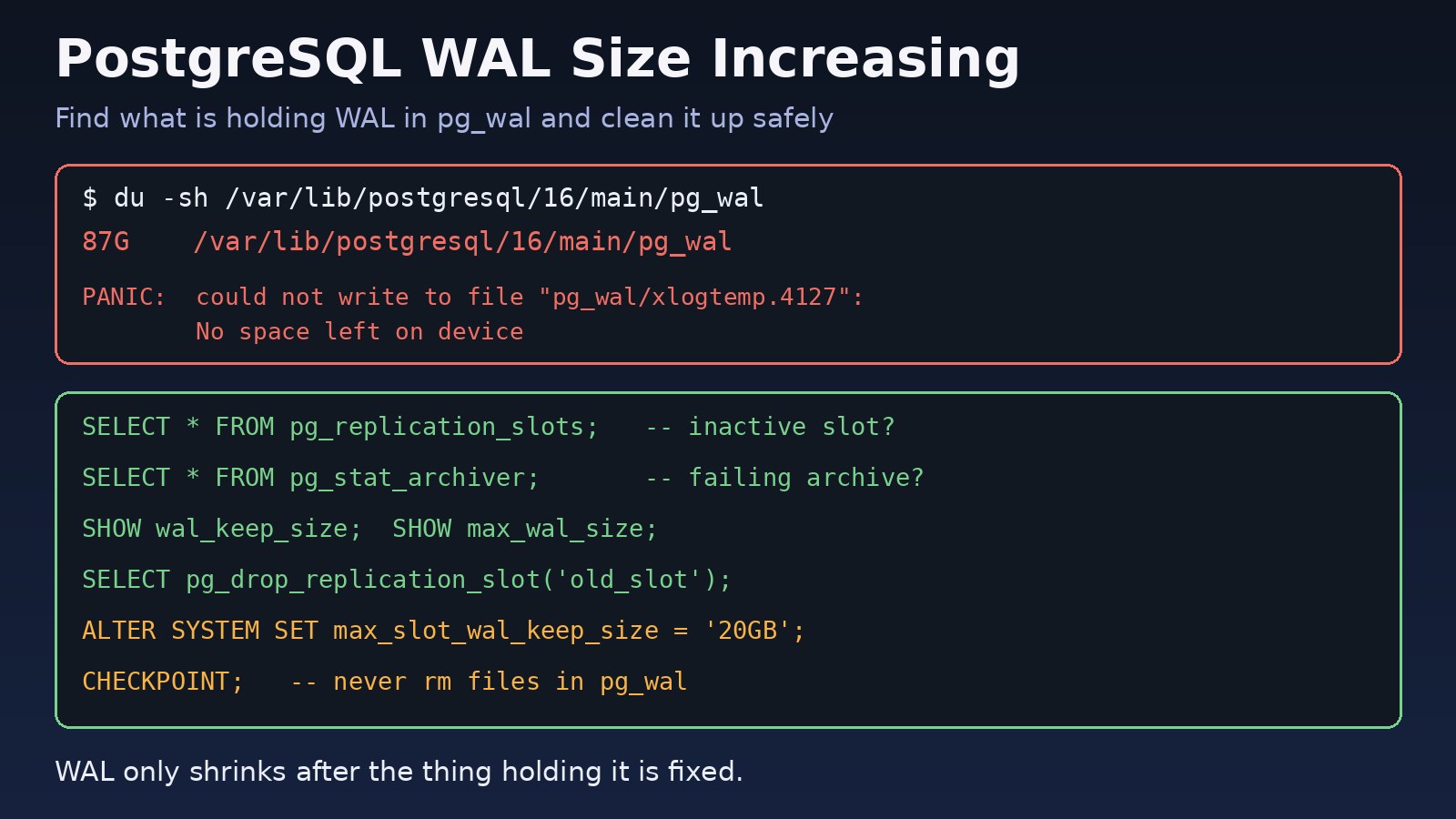
Your database disk alert fires, and when you look, the pg_wal folder is tens of gigabytes and still growing while the tables themselves are small. A postgresql wal size increasing problem almost always means something is stopping PostgreSQL from removing old write-ahead log files. This guide shows how to find what is holding the WAL, clean it up safely, and stop it from filling the disk again.
The Problem: pg_wal Keeps Growing
PostgreSQL writes every change to the write-ahead log (WAL) before it changes the data files. The WAL lives in 16 MB segment files inside pg_wal (called pg_xlog before PostgreSQL 10). After each checkpoint, PostgreSQL removes or recycles segments it no longer needs. If something still needs old segments, they stay, and WAL disk usage grows until the disk is full.
When that happens the server cannot write WAL and stops accepting changes. A full WAL disk is one of the few things that can take PostgreSQL down completely, so it is worth fixing early.
Symptoms of High WAL Disk Usage
du -sh pg_walshows a size far larger thanmax_wal_size(1 GB by default).- The number of files in
pg_walkeeps going up even when write traffic is low. - Many
.readyfiles inpg_wal/archive_status. - Errors like these in the PostgreSQL log:
LOG:  archive command failed with exit code 1
DETAIL:  The failed archive command was: cp pg_wal/0000000100000003000000A1 /mnt/archive/0000000100000003000000A1
WARNING:  archiving write-ahead log file "0000000100000003000000A1" failed too many times, will try again later

PANIC:  could not write to file "pg_wal/xlogtemp.4127": No space left on device
Root Cause: What Keeps WAL Files Around
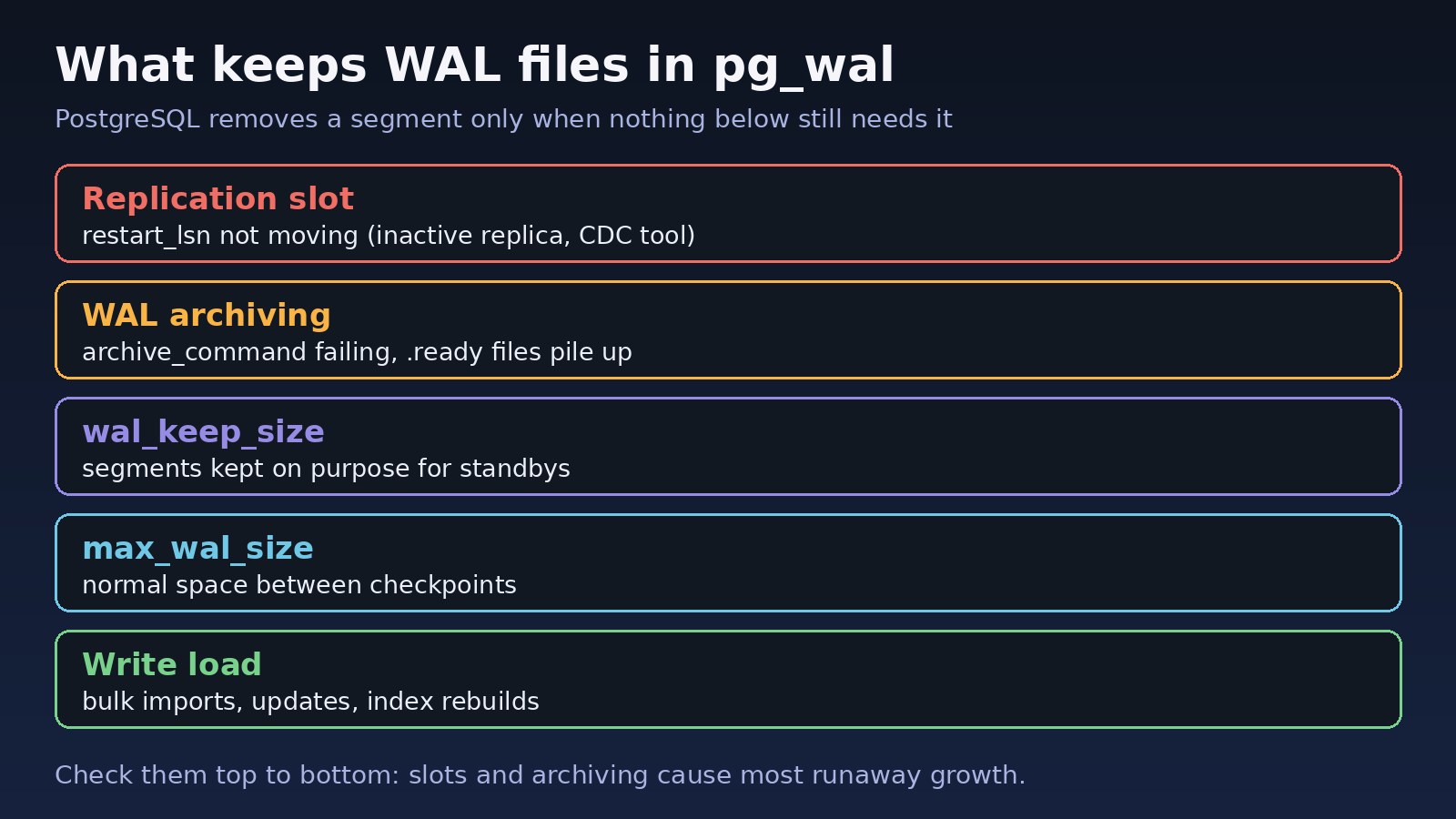
PostgreSQL deletes a WAL segment only when every consumer that needs it is done with it. The usual reasons it cannot:
- An inactive or lagging replication slot. A slot tells the server to keep all WAL from its
restart_lsnonward. If the replica, a logical replication subscriber or a change data capture tool such as Debezium is stopped or deleted but the slot is not, WAL is kept forever. This is the most common cause. - Failing WAL archiving. With
archive_mode = on, a segment cannot be removed untilarchive_commandsucceeds for it. A full backup disk, a wrong path or a missing permission makes every segment wait. - A large wal_keep_size.
wal_keep_size(PostgreSQL 13+,wal_keep_segmentsbefore that) keeps a fixed amount of WAL on purpose for standbys. - A high max_wal_size or heavy writes. Bulk imports, big
UPDATEs and index rebuilds produce a lot of WAL between checkpoints. This is growth up to a limit, not endless growth.
Step-by-Step Solution for PostgreSQL WAL Size Increasing
One rule before you start: never delete files from pg_wal by hand. Removing a segment the server still needs can corrupt the database or break crash recovery. Fix the cause, and PostgreSQL removes the files itself.
Step 1: Measure the WAL disk usage
# On the server (Debian/Ubuntu path; adjust version and data directory)
sudo du -sh /var/lib/postgresql/16/main/pg_wal
sudo ls /var/lib/postgresql/16/main/pg_wal | wc -l

# In Docker, the official image keeps data under /var/lib/postgresql/data
docker exec -it db du -sh /var/lib/postgresql/data/pg_wal
From SQL (superuser or a role in pg_monitor):
SELECT count(*) AS segments,
       pg_size_pretty(sum(size)) AS total_size
FROM pg_ls_waldir();

SHOW max_wal_size;
SHOW wal_keep_size;
SHOW archive_mode;
SHOW max_slot_wal_keep_size;
If the total is close to max_wal_size plus wal_keep_size, the growth is probably normal. If it is many times larger, keep going.
Step 2: Check replication slots
SELECT slot_name,
       slot_type,
       active,
       wal_status,
       pg_size_pretty(pg_wal_lsn_diff(pg_current_wal_lsn(), restart_lsn)) AS retained_wal
FROM pg_replication_slots
ORDER BY pg_wal_lsn_diff(pg_current_wal_lsn(), restart_lsn) DESC;
Look for a slot where active is false and retained_wal is large. The wal_status column (PostgreSQL 13+) shows extended when a slot holds more WAL than max_wal_size. For active physical replicas, check how far behind they are:
SELECT client_addr, state, sent_lsn, replay_lsn, replay_lag
FROM pg_stat_replication;
Step 3: Drop or repair the slot holding WAL
If the slot belongs to a replica or tool you no longer use, drop it. Confirm with your team first: a dropped slot cannot be restored, and a consumer that still needs it will have to be re-synced from scratch.
-- A slot must be inactive before it can be dropped
SELECT pg_drop_replication_slot('old_replica_slot');
If the slot is still needed, fix the consumer instead: start the replica, restart the Debezium connector or the logical subscriber, and watch retained_wal go down as it catches up.
Step 4: Fix failing WAL archiving
SELECT archived_count, last_archived_wal, last_archived_time,
       failed_count, last_failed_wal, last_failed_time
FROM pg_stat_archiver;

-- Count segments waiting to be archived
-- ls /var/lib/postgresql/16/main/pg_wal/archive_status/*.ready | wc -l
SHOW archive_command;
If failed_count is rising, run the archive command by hand as the postgres user to see the real error. Typical fixes are freeing space on the archive disk, fixing the target path or permissions, or fixing credentials for a backup tool such as pgBackRest or WAL-G. Once the command works, the archiver catches up on its own and the .ready files turn into .done files.
If you do not need archiving at all, turn it off. archive_mode needs a restart:
ALTER SYSTEM SET archive_mode = 'off';
-- then: sudo systemctl restart postgresql
Step 5: Review wal_keep_size and max_wal_size
Make sure these settings match what you actually need. A wal_keep_size of hundreds of gigabytes is rarely necessary when your standbys use slots. Both settings apply after a reload:
ALTER SYSTEM SET wal_keep_size = '1GB';
ALTER SYSTEM SET max_wal_size = '4GB';
SELECT pg_reload_conf();
Step 6: Run a checkpoint for PostgreSQL WAL cleanup
WAL files are removed or recycled at checkpoints. After fixing the cause, you can force one instead of waiting for checkpoint_timeout:
CHECKPOINT;

SELECT count(*), pg_size_pretty(sum(size)) FROM pg_ls_waldir();
The count should drop within a checkpoint or two. A note on pg_archivecleanup: it cleans an archive directory for standbys, not the live pg_wal of a primary, so do not point it at pg_wal.
Step 7: If the disk is already full
If PostgreSQL has stopped with No space left on device, free space somewhere else first: old logs, Docker images (see the Docker no space left on device fix) or old backups on the same volume. You can also grow the volume. Then start PostgreSQL, and fix the slot or archiving problem above. Do not free space by removing WAL segments.
Code and Commands: Quick Checklist
-- 1. How big is pg_wal?
SELECT pg_size_pretty(sum(size)) FROM pg_ls_waldir();
-- 2. Which slot is holding WAL?
SELECT slot_name, active, pg_size_pretty(pg_wal_lsn_diff(pg_current_wal_lsn(), restart_lsn))
FROM pg_replication_slots;
-- 3. Is archiving failing?
SELECT failed_count, last_failed_wal, last_failed_time FROM pg_stat_archiver;
-- 4. What is kept on purpose?
SHOW wal_keep_size; SHOW max_wal_size;
-- 5. Clean up after fixing the cause
CHECKPOINT;
Verification
- Run the
pg_ls_waldir()query again and confirm the size is nearmax_wal_sizeand not growing. - Confirm every row in
pg_replication_slotsis active or intentionally kept, with a small retained size. - Confirm
failed_countinpg_stat_archiverstays the same andlast_archived_timekeeps updating. - Check
df -hon the data volume over a day of normal traffic.
Prevention
- Set
max_slot_wal_keep_size(PostgreSQL 13+) so one forgotten slot cannot fill the disk. A slot that passes the limit is invalidated and its consumer must re-sync, which is better than an outage. - Drop the replication slot whenever you remove a replica or turn off a CDC tool.
- Alert on WAL disk usage, inactive slots and a rising archiver
failed_count. - Put
pg_walon a volume with headroom, and test that backups and archiving actually succeed. - Watch for other long-running work too. The guides on PostgreSQL idle in transaction and optimizing a slow PostgreSQL query cover related problems.
FAQs
Why is my PostgreSQL WAL size increasing even with no replicas?
Check pg_replication_slots anyway. Slots created by a past replica, a logical replication test or a CDC tool stay after the consumer is gone. Failing archiving and a large wal_keep_size are the next things to check.
Can I delete files in pg_wal manually?
No. PostgreSQL may still need them for crash recovery, replication or archiving. Removing them can leave the database unable to start. Fix the cause and run CHECKPOINT.
How do I reduce WAL disk usage quickly?
Drop unused replication slots, fix the archive command, lower wal_keep_size if it is oversized, then run CHECKPOINT. Those steps release space in minutes once the cause is gone.
What is a normal pg_wal size?
Usually around max_wal_size plus wal_keep_size, and it can briefly go above max_wal_size under heavy writes. Steady growth beyond that means something is retaining WAL.
Does PostgreSQL WAL cleanup happen automatically?
Yes. At each checkpoint PostgreSQL removes or recycles segments that no slot, archiver or wal_keep_size setting still needs. You only need to step in when one of those holds WAL longer than it should.
Does VACUUM reduce WAL size?
No. VACUUM cleans dead rows in tables and actually writes some WAL itself. WAL size is controlled by slots, archiving and the WAL settings above.



Comments
Join the discussion. Replies load on demand, up to 5 levels.
0 threads
No comments yet
Be the first to start the conversation.