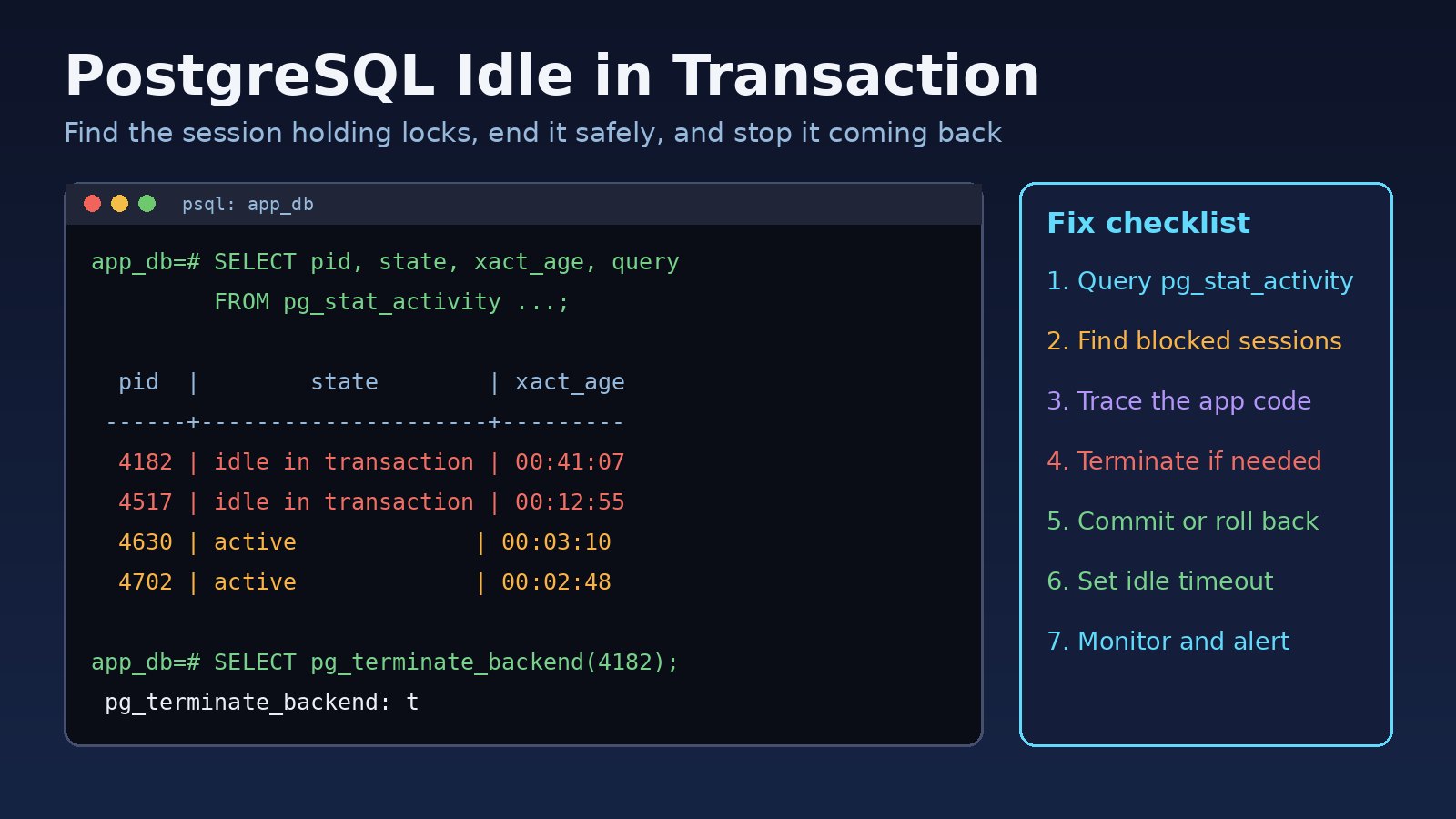
A PostgreSQL idle in transaction session is a connection that ran BEGIN (or an implicit transaction), executed some statements, and then stopped sending anything without a COMMIT or ROLLBACK. It does no work, but it keeps its locks, keeps its connection slot, and can stop VACUUM from cleaning up dead rows. In Laravel, Node.js, Python or ERP-style backends, one forgotten transaction like this can freeze checkout pages, hang migrations and fill your connection pool. This guide shows how to find these sessions in pg_stat_activity, end them safely, and fix the code that creates them.
Problem: What "Idle in Transaction" Means in PostgreSQL
Every backend process in PostgreSQL has a state that you can see in the pg_stat_activity view. The common values are:
active: the session is running a query right now.idle: the session is connected and waiting for a new command, with no open transaction. This is normal for pooled connections.idle in transaction: a transaction is open, but the session is waiting for the client to send the next command.idle in transaction (aborted): a statement inside the transaction failed, and the client has not yet sentROLLBACK.
Short idle-in-transaction moments are normal. Your app sends BEGIN, then a query, then processes the result for a few milliseconds before sending the next query. The problem starts when those gaps grow to seconds, minutes or hours.
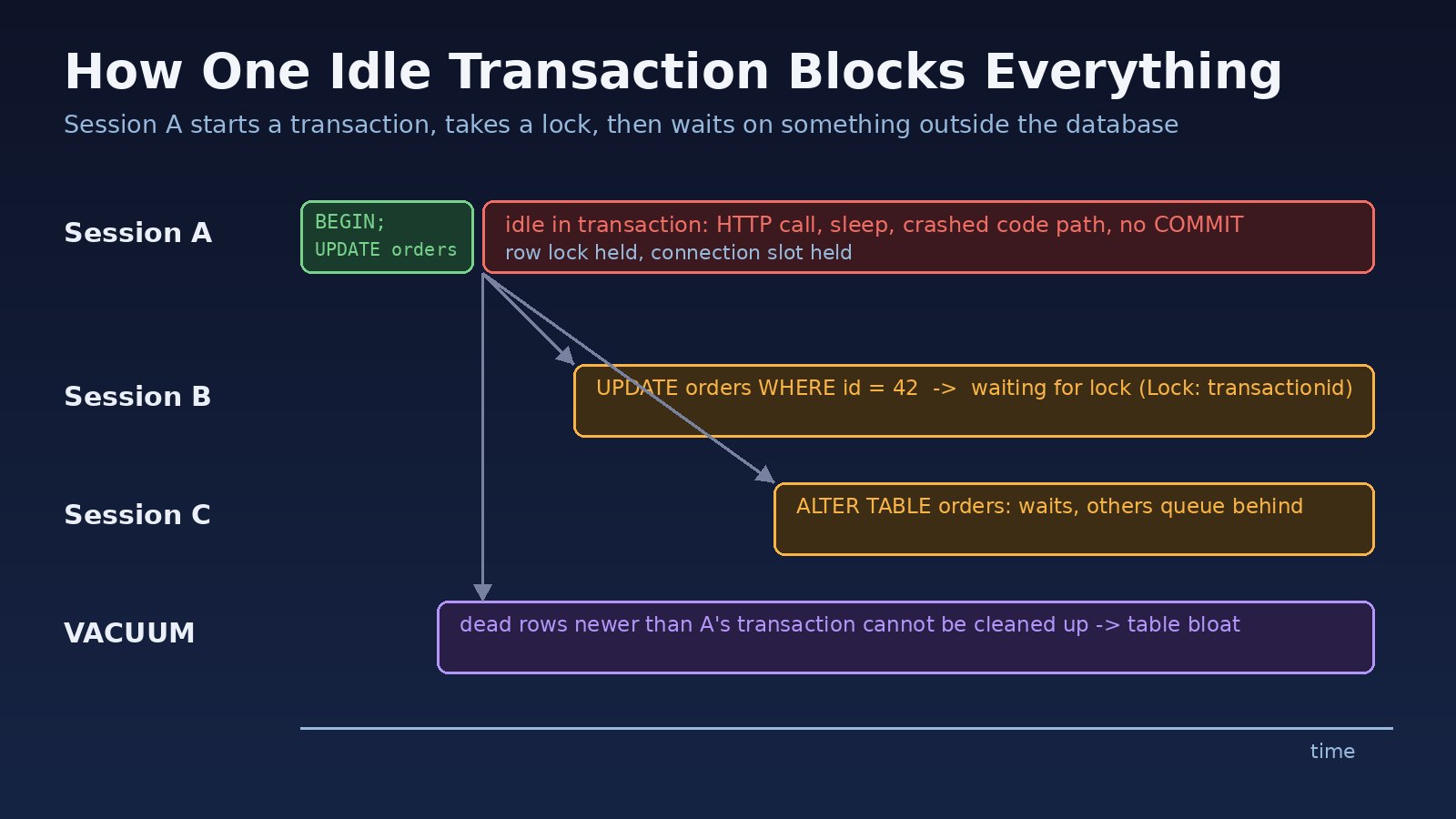
Symptoms of Idle in Transaction Sessions and Database Locks
- Requests that update the same rows hang until a gateway timeout, while CPU on the database server stays low.
- A migration such as
php artisan migrateorALTER TABLEnever finishes, and simpleSELECTqueries on that table start hanging too. pg_stat_activityshows sessions withstate = 'idle in transaction'and an oldxact_start.- The connection pool runs out, ending in
FATAL: sorry, too many clients alreadyor pool timeouts in the app. - Tables and indexes grow even though the row count is stable, because autovacuum cannot remove dead row versions.
- After you add a timeout, the app logs
FATAL: terminating connection due to idle-in-transaction timeout, or in LaravelSQLSTATE[25P03]. - For aborted sessions, every further query fails with
ERROR: current transaction is aborted, commands ignored until end of transaction block(SQLSTATE[25P02]).
Root Cause: Why Transactions Stay Open
PostgreSQL never closes a transaction on its own unless a timeout is set. Something in the client opened it and did not finish it. The usual causes are:
- Slow work inside a transaction. Code starts a transaction, updates a row, then calls a payment gateway, sends an email, uploads a file or waits for a queue job, all before committing.
- Missing rollback on errors. An exception is thrown after
BEGIN, the error is caught higher up, and nothing sendsROLLBACK. In Laravel this happens with manualDB::beginTransaction()calls that have no rollback in thecatchblock. - Leaked pool clients. In Node.js with
pg, a client taken withpool.connect()runsBEGINand is never released or rolled back. - Autocommit turned off. Python's psycopg2 opens a transaction on the first query by default. A long-running script or worker that only reads and never commits stays idle in transaction.
- Humans and tools. Someone ran
BEGIN;in psql and went to lunch, or a GUI client such as DBeaver or pgAdmin is in manual-commit mode. - Long-lived workers. Queue workers and daemons keep one connection for hours, so a single leaked transaction stays open until the worker restarts.
While the transaction is open, row locks and table locks taken by its statements are kept. Even a plain SELECT takes an ACCESS SHARE lock on the table, which is enough to block ALTER TABLE. Because lock requests queue in order, the waiting ALTER TABLE then blocks normal queries that arrive after it.
Step-by-Step Fix for PostgreSQL Idle in Transaction
Step 1: Find idle transactions with pg_stat_activity
Connect as a superuser or a role with pg_read_all_stats so you can see other users' queries, then list open idle transactions, oldest first:
SELECT pid,
       usename,
       application_name,
       client_addr,
       state,
       now() - xact_start   AS xact_age,
       now() - state_change AS idle_for,
       left(query, 120)     AS last_query
FROM pg_stat_activity
WHERE state IN ('idle in transaction', 'idle in transaction (aborted)')
ORDER BY xact_start;
The query column shows the last statement the session ran, not a running one. That last statement, plus application_name and client_addr, is usually enough to find the code path.
Step 2: Check which sessions are blocked
pg_blocking_pids() shows who is waiting on whom:
SELECT pid,
       pg_blocking_pids(pid) AS blocked_by,
       wait_event_type,
       wait_event,
       now() - query_start AS waiting_for,
       left(query, 120) AS query
FROM pg_stat_activity
WHERE cardinality(pg_blocking_pids(pid)) > 0;
If the pids in blocked_by are the idle-in-transaction sessions from Step 1, you have found the root of the lock chain. To see the locks a session holds, query pg_locks:
SELECT l.pid, l.locktype, l.mode, l.granted, c.relname
FROM pg_locks l
LEFT JOIN pg_class c ON c.oid = l.relation
WHERE l.pid = 4182;
Step 3: End the session safely
pg_cancel_backend(pid) only cancels a running query, so it does not help a session that is idle. Use pg_terminate_backend, which closes the connection and rolls back its open transaction:
SELECT pg_terminate_backend(4182);

-- or every idle transaction older than 10 minutes
SELECT pg_terminate_backend(pid)
FROM pg_stat_activity
WHERE state LIKE 'idle in transaction%'
  AND xact_start < now() - interval '10 minutes'
  AND pid <> pg_backend_pid();
Any uncommitted changes in that transaction are lost, so check what it was doing first. On managed services such as Amazon RDS or Cloud SQL, the admin role can usually terminate sessions of other non-superuser roles.
Step 4: Fix the application code
Terminating sessions treats the symptom. The real fix is to make every transaction short and always finished. In Laravel, prefer the closure form, which commits on success and rolls back on any exception:
use Illuminate\Support\Facades\DB;

// Do slow external work BEFORE or AFTER the transaction, not inside it
$charge = $paymentGateway->charge($order->total);

DB::transaction(function () use ($order, $charge) {
    $order->update(['status' => 'paid', 'charge_id' => $charge->id]);
    $order->items()->update(['reserved' => false]);
});

// Queue follow-up work only after the commit
SendReceipt::dispatch($order)->afterCommit();
If you must use manual transactions, always roll back in catch:
DB::beginTransaction();
try {
    // queries only, no HTTP calls
    DB::commit();
} catch (\Throwable $e) {
    DB::rollBack();
    throw $e;
}
In Node.js with pg, use try/catch/finally so the client is always rolled back and released:
const client = await pool.connect();
try {
  await client.query('BEGIN');
  await client.query('UPDATE orders SET status = $1 WHERE id = $2', ['paid', id]);
  await client.query('COMMIT');
} catch (err) {
  await client.query('ROLLBACK');
  throw err;
} finally {
  client.release();
}
In Python with psycopg2, use the connection as a context manager (with conn:) so it commits or rolls back at the end of the block, or set conn.autocommit = True for read-only scripts.
Step 5: Set idle_in_transaction_session_timeout
Since PostgreSQL 9.6, idle_in_transaction_session_timeout makes the server close any session that stays idle in a transaction longer than the limit. Set it per database or per application role rather than globally, so admin sessions are not affected:
ALTER ROLE app_user SET idle_in_transaction_session_timeout = '60s';
-- or
ALTER DATABASE app_db SET idle_in_transaction_session_timeout = '60s';

-- check the value in a new session
SHOW idle_in_transaction_session_timeout;
The setting applies to new connections, so restart your app or queue workers after changing it. Pick a value well above your longest normal gap between statements. PostgreSQL 17 also adds transaction_timeout to cap the total length of a transaction, and if you use PgBouncer, its idle_transaction_timeout setting does a similar job at the pooler.
Code and Commands: Quick Reference
-- Count sessions by state
SELECT state, count(*) FROM pg_stat_activity GROUP BY state;

-- Oldest open transaction age
SELECT max(now() - xact_start) FROM pg_stat_activity
WHERE state LIKE 'idle in transaction%';

-- Make migrations fail fast instead of queueing behind a lock
SET lock_timeout = '5s';

-- Log lock waits longer than deadlock_timeout (postgresql.conf)
log_lock_waits = on
Give each app a clear name so you can tell sessions apart. In Laravel's config/database.php pgsql connection, set 'application_name' => 'laravel-web' for the web app and a different name for workers. Many drivers also accept application_name in the connection string.
If idle sessions are also exhausting connections, read PostgreSQL too many connections: causes and fixes and the PgBouncer PostgreSQL connection pooling guide. For queries that are slow rather than stuck, see how to optimize a slow PostgreSQL query step by step.
Verification
- Run the Step 1 query again. It should return no rows, or only rows with an
idle_forof a few seconds or less. - Run the Step 2 query. It should return no blocked sessions during normal traffic.
- Retry the migration or request that was hanging. It should complete in normal time.
- Test the timeout: in psql, run
BEGIN; SELECT 1;and wait longer than the limit. The next command should fail withFATAL: terminating connection due to idle-in-transaction timeout. - Over the next days, check that table size stops growing and that autovacuum runs complete (
last_autovacuuminpg_stat_user_tables).
Prevention
- Keep transactions to database work only. No HTTP calls, file uploads, emails or sleeps between
BEGINandCOMMIT. - Use framework helpers that always finish the transaction, such as
DB::transaction()in Laravel or afinallyblock in Node.js. - Dispatch queue jobs and events after commit so workers do not read uncommitted data or wait on locks.
- Set
idle_in_transaction_session_timeoutfor application roles andlock_timeoutfor migrations. - Alert when the oldest idle transaction is older than a few minutes, using the quick reference query in your monitoring tool.
- Use autocommit or read-only connections for reporting scripts and BI tools.
FAQs
How do I find idle transactions in pg_stat_activity?
Filter on state IN ('idle in transaction', 'idle in transaction (aborted)') and sort by xact_start. The query column shows the last statement each session ran, which points to the code that left the transaction open.
Is idle in transaction always a problem?
No. Every transaction is briefly idle between statements. It becomes a problem when the same pid stays in that state for many seconds or minutes, holds locks others need, or appears in large numbers.
Do idle in transaction sessions cause database locks?
Yes. They keep every lock their statements took until the transaction ends. Row locks from UPDATE or SELECT ... FOR UPDATE block other writers, and table locks block ALTER TABLE and similar schema changes.
What is a good value for idle_in_transaction_session_timeout?
Many teams start with 30 to 60 seconds for web apps. Choose a value longer than any legitimate gap in your code, apply it to the application role, and watch the logs for terminated sessions before lowering it.
What is the difference between idle and idle in transaction?
idle means the connection has no open transaction and holds no locks. idle in transaction means a transaction is still open, so its locks and snapshot are still in effect.
Conclusion
To fix PostgreSQL idle in transaction problems, find the sessions in pg_stat_activity, follow the lock chain with pg_blocking_pids(), terminate the stuck session if users are affected, and then fix the code so every transaction is short and always committed or rolled back. A role-level idle_in_transaction_session_timeout is a safety net for the next leak.
Comments
Join the discussion. Replies load on demand, up to 5 levels.
0 threads
No comments yet
Be the first to start the conversation.