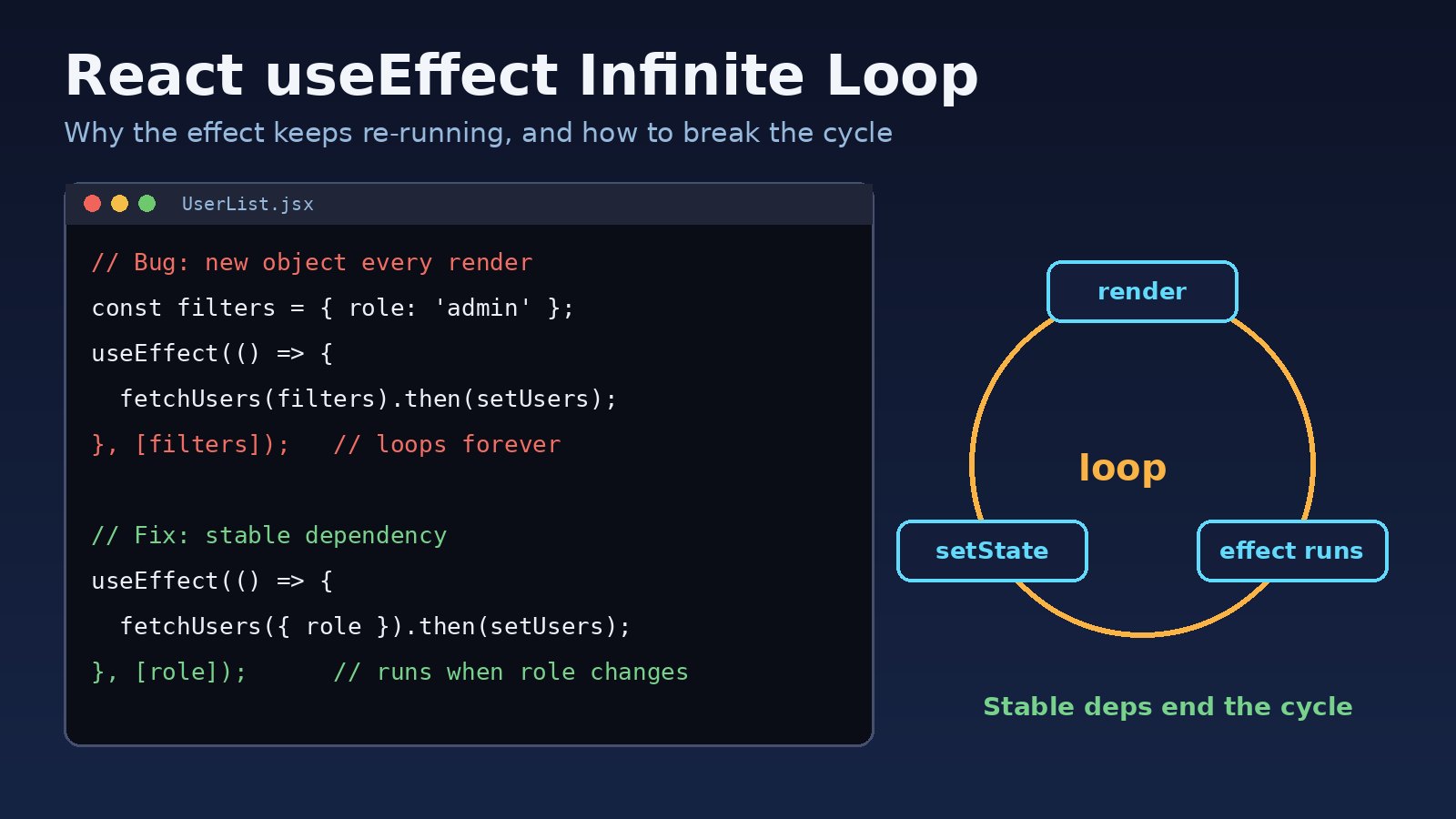
A useEffect infinite loop happens when an effect updates state, the state update causes a new render, and something in the effect's dependency array looks different on that new render, so the effect runs again. The page freezes, your API gets hammered with the same request hundreds of times, and the console fills with warnings. This guide explains why React keeps re-running the effect, how to find the exact dependency causing it, and the fixes that work in real React and Next.js apps.
Problem: Why a useEffect Infinite Loop Happens
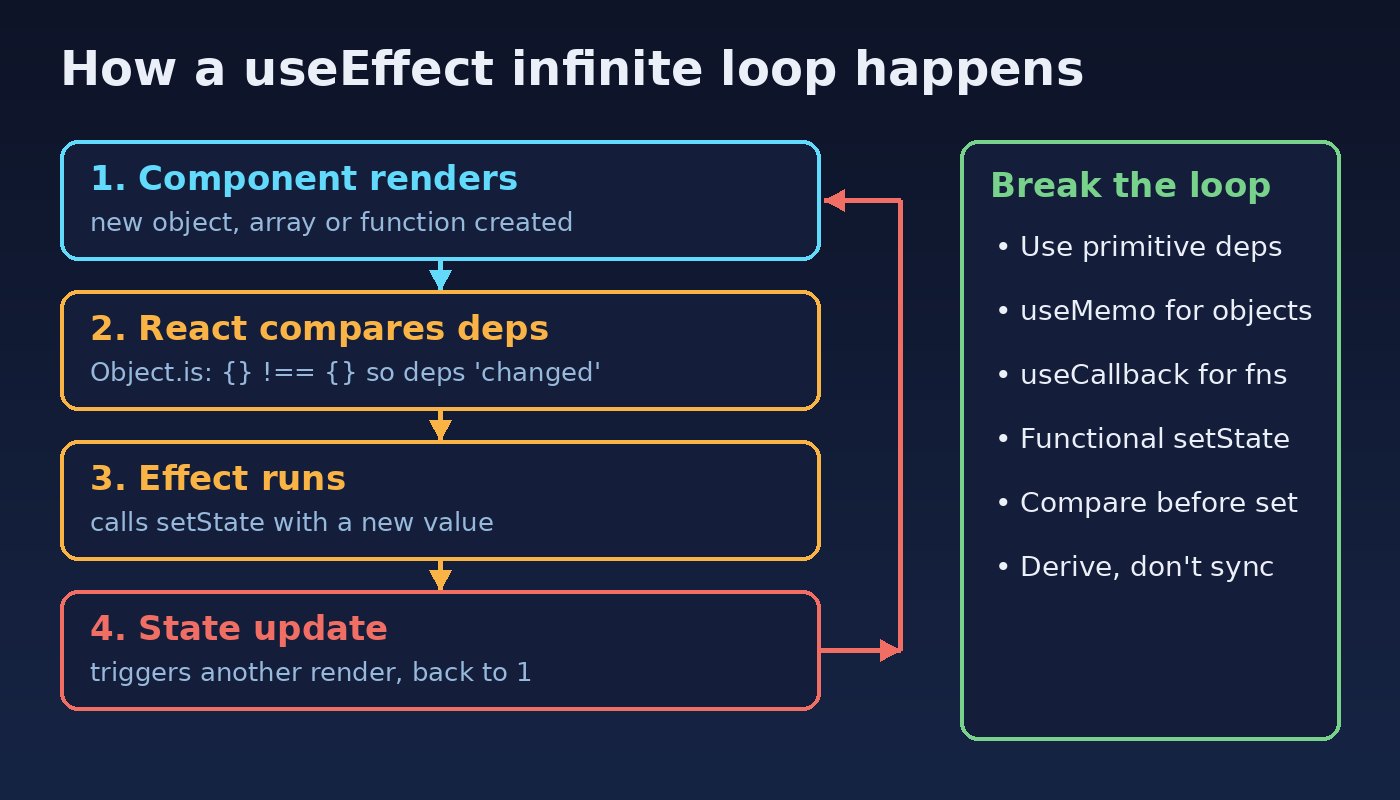
useEffect runs after React commits a render. If you pass a dependency array, React compares each item with its value from the previous render using Object.is. If any item is different, the effect runs again. That design is fine until the effect itself causes the next render:
- The component renders.
- React compares the dependencies and decides they changed.
- The effect runs and calls a state setter.
- The state update triggers another render, and the cycle starts again.
The cycle only stops when a render produces the same dependency values as the previous one. If a dependency is a new object, array or function on every render, that never happens.
Symptoms of a useEffect Rerender Loop
- The browser tab freezes or the fan spins up as soon as the component mounts.
- The Network tab shows the same API request firing again and again, sometimes enough to trigger rate limiting on your backend.
- The console shows:
Warning: Maximum update depth exceeded. This can happen when a component calls setState inside useEffect, but useEffect either doesn't have a dependency array, or one of the dependencies changes on every render. - A
console.loginside the effect prints continuously. - React DevTools Profiler records a long run of commits for the same component without any user action.
If you see Error: Too many re-renders. React limits the number of renders to prevent an infinite loop. instead, the state setter is being called directly during render (for example onClick={setOpen(true)}), not inside an effect. Fix that by passing a function: onClick={() => setOpen(true)}.
Root Cause: The React Dependency Array
Almost every useEffect infinite loop comes from one of these patterns.
1. No dependency array at all
Without a second argument, the effect runs after every render. Setting state inside it guarantees a loop.
useEffect(() => {
  fetch('/api/users').then(r => r.json()).then(setUsers); // runs after every render
});
2. Objects or arrays created during render
{} and [] create a new reference each time. Object.is({role: 'admin'}, {role: 'admin'}) is false, so React treats the dependency as changed on every render.
function UserList({ role }) {
  const [users, setUsers] = useState([]);
  const filters = { role, active: true }; // new object every render

  useEffect(() => {
    fetchUsers(filters).then(setUsers);
  }, [filters]); // always "changed" -> infinite loop
}
3. Functions defined inside the component
A function declared in the component body is a new function on each render, so listing it as a dependency has the same effect as an inline object.
const loadOrders = async () => {
  const res = await api.get(`/orders?status=${status}`);
  setOrders(res.data);
};

useEffect(() => {
  loadOrders();
}, [loadOrders]); // new function every render
4. Setting the same state you depend on
An effect that reads a value and writes a new version of that same value will loop, because every write changes the dependency.
useEffect(() => {
  setItems([...items, newItem]); // new array each time
}, [items]);
5. Unstable props from the parent
Sometimes the child is correct and the parent passes a new object or callback on every render, such as <Chart options={{ stacked: true }} onLoad={() => setReady(true)} />. If the child uses options or onLoad in an effect that changes parent state, the loop crosses two components.
Step-by-Step Fix for a useEffect Infinite Loop
Step 1: Find the dependency that keeps changing
Log the dependencies and compare them with the previous render. A small helper makes this quick:
import { useEffect, useRef } from 'react';

export function useWhyDidRun(name, deps) {
  const prev = useRef(deps);
  useEffect(() => {
    deps.forEach((dep, i) => {
      if (!Object.is(dep, prev.current[i])) {
        console.log(`[${name}] dependency ${i} changed`, prev.current[i], '->', dep);
      }
    });
    prev.current = deps;
  });
}

// usage inside the component
useWhyDidRun('UserList effect', [filters, role]);
If the log shows a dependency "changing" while its contents look identical, you have a reference problem (patterns 2, 3 or 5). If the contents really change every time, the effect is writing to its own dependency (pattern 4).
Step 2: Depend on primitive values instead of objects
Move the object inside the effect and depend on the primitive values it is built from. Strings, numbers and booleans compare by value, so the effect only re-runs when they actually change.
useEffect(() => {
  const filters = { role, active: true };
  fetchUsers(filters).then(setUsers);
}, [role]); // runs only when role changes
Step 3: Memoize objects with useMemo
When the object has to live outside the effect, for example because several hooks share it, wrap it in useMemo so its reference stays the same until its inputs change.
const filters = useMemo(() => ({ role, active: true }), [role]);

useEffect(() => {
  fetchUsers(filters).then(setUsers);
}, [filters]);
Step 4: Stabilize functions with useCallback (or move them into the effect)
The simplest fix is to define the function inside the effect. If other code needs it too, use useCallback:
const loadOrders = useCallback(async () => {
  const res = await api.get(`/orders?status=${status}`);
  setOrders(res.data);
}, [status]);

useEffect(() => {
  loadOrders();
}, [loadOrders]); // stable until status changes
Step 5: Use functional state updates
When the new state depends on the old state, pass an updater function. The effect no longer needs to read the state, so it can be removed from the dependency array.
useEffect(() => {
  if (!newItem) return;
  setItems(prev => [...prev, newItem]);
}, [newItem]); // items is not a dependency anymore
Step 6: Only set state when the value actually changes
For effects that sync data, compare before writing. Setting a primitive to the same value lets React skip the re-render, but a new array or object with the same contents does not.
useEffect(() => {
  const next = computeTotal(cart);
  setTotal(prev => (prev === next ? prev : next));
}, [cart]);
Step 7: Remove the effect if the value can be derived
Many loops come from effects that copy props or state into another state variable. If a value can be calculated from what you already have, calculate it during render instead. That removes the extra render and the loop at the same time.
// Instead of useState + useEffect to keep fullName in sync:
const fullName = `${firstName} ${lastName}`;

// Expensive calculation? Memoize it instead of syncing it:
const visibleTodos = useMemo(() => filterTodos(todos, tab), [todos, tab]);
If your components have many effects like this, the article on why too many useEffect hooks are a code smell covers what to use instead.
Code Examples: Fetching Data Without a Loop
A complete data-fetching effect with a stable dependency, cleanup for stale requests and no reference traps:
import { useEffect, useState } from 'react';

export function useProjects(teamId) {
  const [projects, setProjects] = useState([]);
  const [error, setError] = useState(null);

  useEffect(() => {
    if (!teamId) return;
    const controller = new AbortController();

    fetch(`/api/teams/${teamId}/projects`, { signal: controller.signal })
      .then(res => {
        if (!res.ok) throw new Error(`HTTP ${res.status}`);
        return res.json();
      })
      .then(setProjects)
      .catch(err => {
        if (err.name !== 'AbortError') setError(err);
      });

    return () => controller.abort();
  }, [teamId]);

  return { projects, error };
}
For apps that fetch a lot of server data, a library such as TanStack Query or SWR handles caching and deduplication for you, which removes most hand-written fetching effects.
Turn on the exhaustive-deps lint rule
The official eslint-plugin-react-hooks package warns about missing or unstable dependencies before they reach the browser:
npm install --save-dev eslint-plugin-react-hooks

// .eslintrc.json
{
  "plugins": ["react-hooks"],
  "rules": {
    "react-hooks/rules-of-hooks": "error",
    "react-hooks/exhaustive-deps": "warn"
  }
}
Do not silence the rule by deleting dependencies the effect really uses. That swaps an infinite loop for stale data bugs. Fix the dependency instead, using the steps above.
Verification: Confirm the Loop Is Gone
- Add a temporary
console.log('effect ran')inside the effect. On mount it should print once, or twice in development with<React.StrictMode>, which intentionally mounts, unmounts and re-mounts components to surface missing cleanup. That double run is expected and is not a loop. - Open the Network tab and reload. Each request should appear once per real change in its inputs.
- Record a few seconds in the React DevTools Profiler with no interaction. The component should not keep committing.
- Change the input the effect depends on (for example the selected role) and confirm the effect runs once for that change.
- Run
npx eslint srcand confirm there are noreact-hooks/exhaustive-depswarnings left for that component.
Prevention: Avoid useEffect Rerender Problems
- Keep dependency arrays to primitives where you can: ids, strings, numbers and booleans.
- Create objects and functions inside the effect unless something else needs them.
- Use
useMemoanduseCallbackfor values passed to child components that use them in effects. - Prefer functional updates (
setX(prev => ...)) when the next state depends on the current one. - Derive values during render instead of syncing them with effects.
- Keep
react-hooks/exhaustive-depsenabled in CI. - Rate-limit or debounce expensive endpoints on the backend so a frontend bug cannot overload them.
Unstable references also cause wasted renders even when they don't loop. The React performance optimization guide covers memoization in more depth, and if your effect touches browser-only APIs in Next.js, see how to fix the Next.js hydration error.
FAQs About the useEffect Infinite Loop
Why does useEffect run infinitely with an empty dependency array?
It doesn't. An effect with [] runs once after mount (twice in development under StrictMode). If it seems to run forever, the component itself is being unmounted and re-mounted, usually because a parent changes its key or renders it conditionally inside a loop of its own.
How does the React dependency array compare values?
React uses Object.is on each item. Primitives compare by value, while objects, arrays and functions compare by reference, so a freshly created one is always treated as different.
Can I just leave a dependency out to stop the useEffect rerender?
That stops the loop but the effect will use stale values from an old render. Make the dependency stable with useMemo, useCallback or a primitive instead.
Is it safe to call setState inside useEffect?
Yes, as long as the update does not change one of the effect's own dependencies on every run, or you guard it with a condition so it stops once the value is correct.
Does the same fix work in Next.js?
Yes. Client components in Next.js use the same hooks and the same rules. Effects don't run on the server, so the loop only shows up in the browser.
To fix a useEffect infinite loop, find the dependency that changes on every render, replace it with a primitive or a memoized value, use functional state updates, and remove effects that only copy data you could derive during render. With exhaustive-deps enabled, most of these loops get caught before they ship.

Comments
Join the discussion. Replies load on demand, up to 5 levels.
0 threads
No comments yet
Be the first to start the conversation.