
Shipping features should not mean scheduling an outage. Zero downtime deployment is how modern backends release new code while customers keep working: overlapping healthy instances, strict readiness checks, schema changes that old and new binaries can share, drained connections and a rollback you have actually rehearsed.
This article expands the \"deploy without downtime\" reel into a production checklist for Laravel APIs on Kubernetes or traditional fleets, with the same discipline banks and large SaaS teams use when a two-minute blackout is unacceptable.
Where Downtime Comes From
A single-host deploy script typically stops the process, pulls artifacts, installs dependencies, migrates the database and starts again. Every request in that window fails. Multi-host fleets recreate the outage if they bounce every instance together. Edge proxies then surface 502 bad gateway or 504 gateway timeout even though the \"root cause\" was simply an empty upstream pool.
Zero downtime therefore requires overlap. Something healthy must answer while something else updates. Overlap alone is not enough: the new version must refuse traffic until it is ready, and the database must tolerate mixed versions during the roll.
Rolling Updates
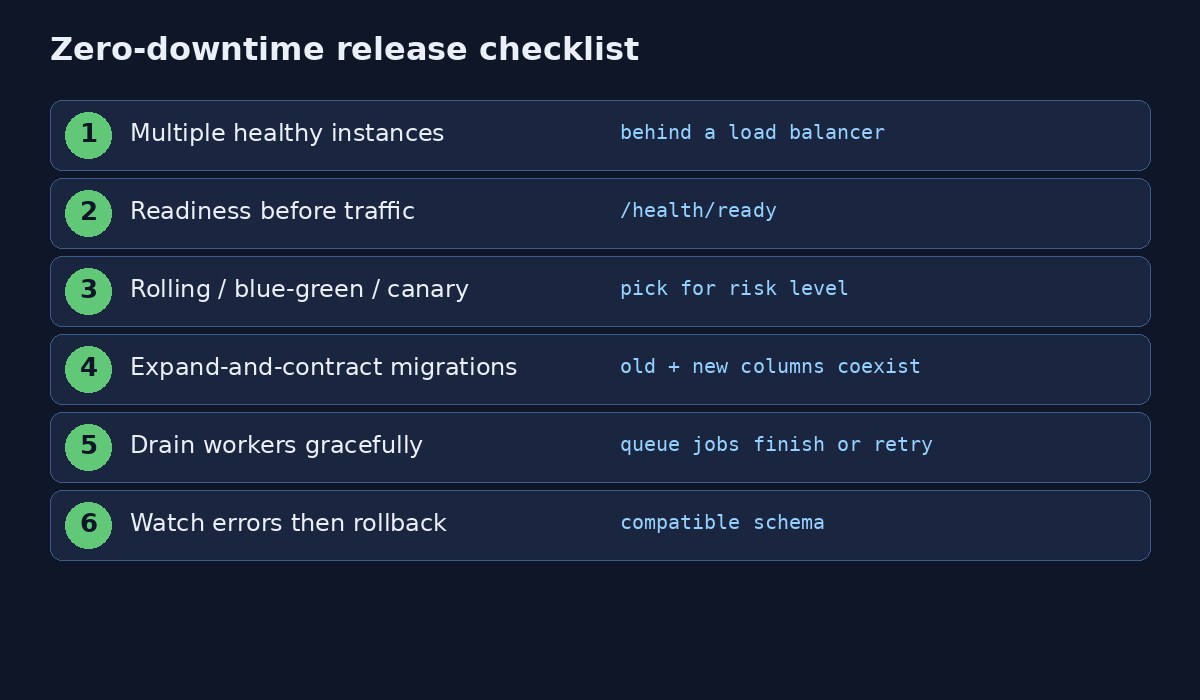
Rolling deployments replace instances in small batches. Kubernetes Deployments expose this as RollingUpdate. With four replicas, maxSurge: 1 and maxUnavailable: 0, the control plane may start one extra Pod while never dropping below the desired healthy count. Traffic moves only to Pods that pass readiness. Terminating Pods get SIGTERM and a grace period to finish requests.
spec:
  replicas: 4
  strategy:
    type: RollingUpdate
    rollingUpdate:
      maxSurge: 1
      maxUnavailable: 0
Teams sometimes assume rolling equals zero errors. It does not. A migration that breaks old Pods, a readiness probe that only checks process uptime or a load balancer that ignores drain still produces user-visible failures mid-roll.
Probes That Mean Something
Readiness decides whether a Pod may receive Service traffic. Liveness decides whether the runtime should kill and restart a stuck container. Startup probes give slow boots time before liveness applies. A Laravel readiness endpoint should confirm the process can read configuration and reach critical dependencies without running a ten-second report. Too shallow and broken Pods take traffic; too deep and probes themselves become an outage.
Blue-Green Releases
Blue-green keeps two environments. Blue serves production. Green receives the candidate build and automated verification. When Green looks good, the load balancer flips. Blue stays warm for immediate rollback. The tradeoff is cost and the need for database compatibility across both colors while both exist.
Canary Releases
Canaries send a slice of traffic—often five percent—to the new version. Error rates, latency and business KPIs decide whether to continue. Canaries need version labels in metrics and enough volume to separate regressions from noise. They shine when blast radius matters more than maintaining a full duplicate stack.
Expand-and-Contract Migrations
Schema is the usual silent killer. If version one reads customer_name and a migration renames it to full_name while deleting the old column immediately, remaining version-one Pods crash during the roll. Expand by adding the new column. Transition by dual-writing or backfilling and deploying code that understands both shapes. Contract by dropping the obsolete column only after web and worker processes no longer reference it.
The same thinking applies to queue payload fields, Redis key formats and gRPC contracts. Dual compatibility during the window is the price of continuous service.
Laravel Web and Worker Rollouts
A careful release builds a versioned image, runs a backward-compatible migration Job, rolls the web Deployment, waits for Ready Pods, then rolls workers. Workers must stop accepting new jobs, finish or safely retry in-flight work, and start on the new image. Leaving Horizon on the old image overnight is how teams discover serialization mismatches the hard way. Watch resource headroom during surge; memory kills look like Docker exit code 137.
Failure Modes to Rehearse
- Migrations incompatible with still-running old code
- Ready checks that ignore dependency failure
- Sessions pinned to local disk
- Queue consumers that cannot read new payloads
- Balancers that keep sending to terminating instances
- Clusters without capacity for surge Pods
Game-day these scenarios. A rollback that exists only in a wiki page is not a rollback.
FAQs
Is rolling deployment the same as zero downtime deployment?
Rolling is the common mechanism. Zero downtime also needs meaningful probes, connection drain, compatible migrations and monitoring with a tested rollback.
Should every change be blue-green?
Use blue-green when instant environment-level rollback justifies duplicate capacity. Use canaries when you want limited exposure and strong telemetry.
How do you deploy without downtime in an interview?
Describe multiple instances, gradual replacement, readiness before traffic, graceful shutdown, expand-and-contract schema changes and metric-gated rollback.
Putting It Into Practice
Teams that succeed treat architecture as a sequence of bets backed by measurements. They keep a short written playbook: which metrics page to open during an incident, which cache keys are sacred, which database roles exist for read traffic, and which deploy strategy applies to API versus workers. They load-test the paths that matter—login, search, checkout—before marketing campaigns, and they refuse to "just shard" because a dashboard looked busy for an hour.
Documentation should capture the failure modes you already paid for: a session store that was local, a migration that dropped a column too early, a cache TTL that stampeded PostgreSQL, a retry loop without jitter. New engineers should be able to replay those lessons without repeating the outage. Pair this article with the sibling write-ups in this batch on zero-downtime releases, cache stampede control, Bloom filters, exponential backoff and read replicas versus sharding so the whole toolkit sits in one place.
Finally, remember that customer interest keywords—faster checkout, fewer timeouts, safer deploys, quicker username checks—map directly to these engineering choices. Marketing language and system design meet where latency and reliability become features users can feel.
Operational Checklist Teams Actually Use
Write the runbook while the system is healthy. Name the dashboards that show latency, error rate, saturation and dependency health. Record which alerts page which engineers, and which feature flags disable expensive paths when a dependency falters. After every incident, add one concrete prevention item—an index, a probe, a lock, a backoff—and assign an owner with a date.
Load-test the golden journeys before campaigns: authentication, search, write paths and payment or booking confirmation. Synthetic traffic that only hits health endpoints will not reveal stampede, lock or migration bugs. Prefer realistic payloads and concurrency patterns captured from production anonymized traces.
Keep environment parity honest. Staging should exercise the same session store, cache backend, queue driver and migration path as production, even at smaller scale. Many \"works on my machine\" deploy failures are really \"staging used the file session driver.\" Align configuration templates and fail CI when critical env keys diverge.
Security and reliability meet in the same releases. Rotate credentials when workers or containers may have logged them, limit debug endpoints and ensure readiness checks never expose secrets. Customer-facing promises—fast pages, safe checkout, always-on apps—depend on these unglamorous controls as much as on clever algorithms.
How This Fits Customer-Facing Messaging
Engineering topics translate cleanly into buyer language when you stay specific. Faster page loads come from caching and query work. Fewer failed checkouts come from idempotent retries and primary reads after writes. Continuous releases without maintenance banners come from zero-downtime deployment discipline. Instant \"username taken\" feedback comes from probabilistic filters backed by real constraints. Use those outcomes in titles and meta descriptions so searchers who care about reliability find the technical depth behind the promise.


Comments
Join the discussion. Replies load on demand, up to 5 levels.
0 threads
No comments yet
Be the first to start the conversation.