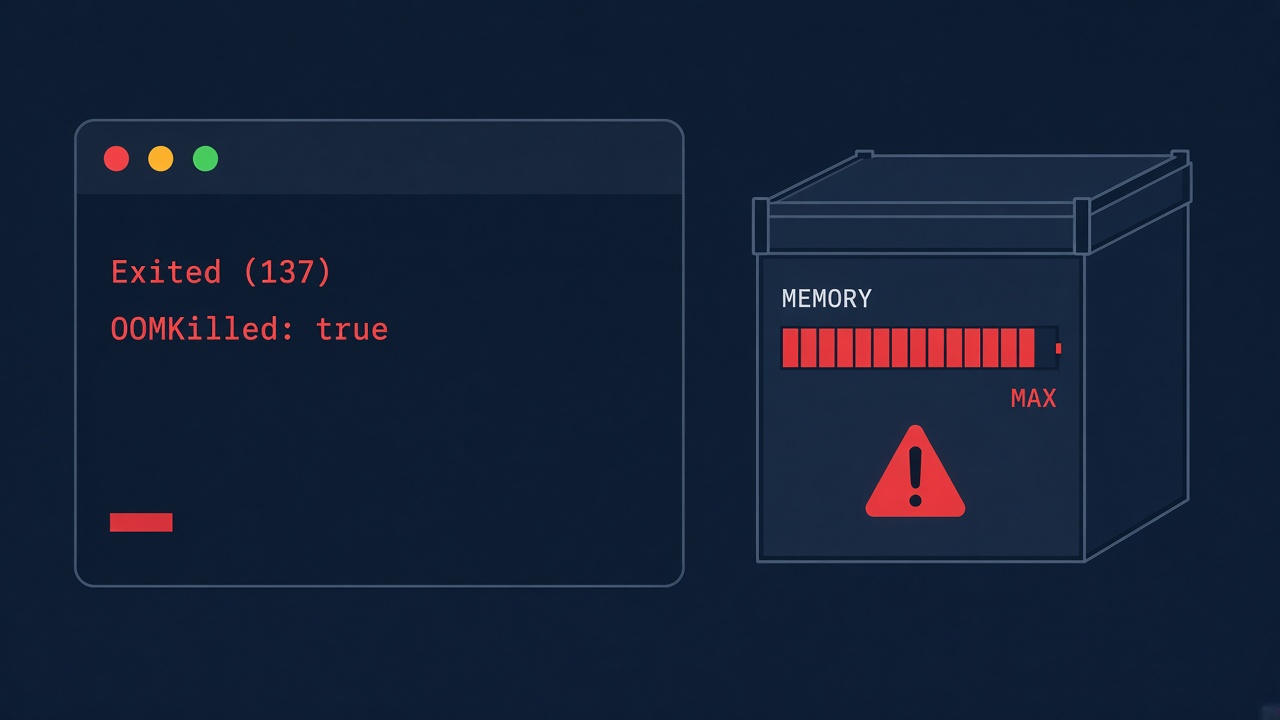
Your container stops and docker ps -a shows Exited (137). The docker exit code 137 means the main process was killed with SIGKILL (128 + signal 9). Most of the time the kernel's out-of-memory killer did it because the container hit its memory limit, but a slow docker stop produces the same code. This guide shows how to tell the causes apart and fix each one for Node.js, Next.js builds, Laravel queue workers, PostgreSQL and Redis containers.
Problem: Docker Container Exited with Code 137
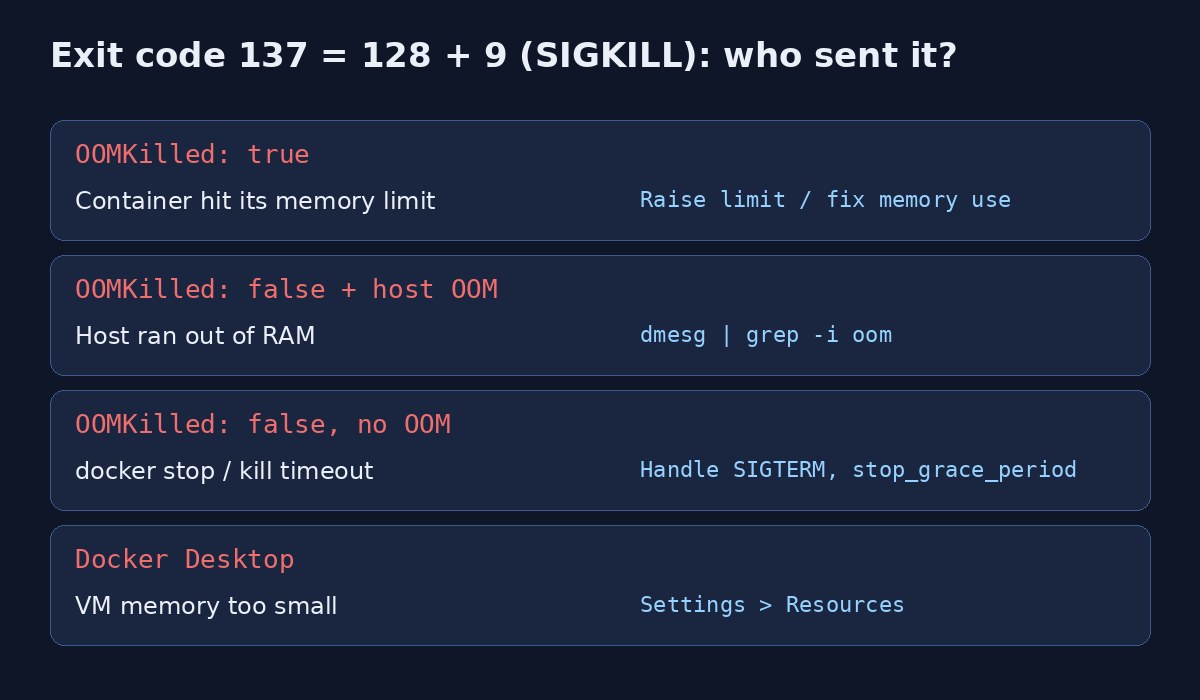
When a process ends because of a signal, the shell and Docker report the exit code as 128 plus the signal number. SIGKILL is 9, so 137 means "killed, no chance to clean up". SIGKILL can't be caught or ignored, so your application logs usually just stop mid-line with no stack trace.
Three things commonly send it: the kernel OOM killer enforcing a container or host memory limit, Docker itself after the stop timeout expires, or an orchestrator such as Kubernetes or a CI runner enforcing its own limits.
Symptoms
docker ps -ashowsExited (137) 2 minutes ago.docker compose upprintsapp-1 exited with code 137.- A
docker buildstep fails withdid not complete successfully: exit code: 137, often duringnpm run build,next buildorcomposer install. - Kubernetes shows
OOMKilledwithExit Code: 137inkubectl describe pod. - Combined with
restart: always, the container ends up in a restart loop. - Logs end abruptly, with no error from the application itself.
Root Cause: Why a Container Gets Killed
Container memory limit reached (Docker out of memory)
If you set --memory or mem_limit/deploy.resources.limits.memory, the cgroup enforces it. When the processes inside need more, the kernel kills one, and Docker records OOMKilled: true.
Host out of memory
Without per-container limits, all containers share the host's RAM. When the host runs out, the kernel OOM killer picks a victim, often the largest process: a Node.js server, a PostgreSQL backend or Redis.
Docker Desktop VM too small
On macOS and Windows, containers run inside a VM with a fixed memory allowance. A heavy build or several services can exhaust it even though your laptop has plenty of free RAM.
docker stop timeout (not memory at all)
docker stop sends SIGTERM, waits 10 seconds by default, then sends SIGKILL. If your process ignores SIGTERM, for example because a shell script is PID 1 and doesn't forward signals, every stop ends in 137.
Memory leaks and unbounded workloads
A Node.js app caching everything in memory, a Laravel queue worker processing huge collections without chunking, or Redis with no maxmemory will eventually reach any limit you set.
Step-by-Step Solution
Step 1: Confirm the exit code and OOMKilled flag
docker ps -a --filter "status=exited"
docker inspect my-app --format '{{.State.ExitCode}} OOMKilled={{.State.OOMKilled}} {{.State.FinishedAt}}'
docker inspect my-app --format '{{.HostConfig.Memory}}'   # 0 means no limit
OOMKilled=true means the memory limit was the cause. false means look at the host or at how the container was stopped.
Step 2: Check the kernel log for the OOM killer
sudo dmesg -T | grep -iE "killed process|out of memory|oom-kill"
sudo journalctl -k --since "1 hour ago" | grep -i oom
docker events --since 1h --filter event=oom
A line like Memory cgroup out of memory: Killed process 12345 (node) confirms a container limit; Out of memory: Killed process without "cgroup" points to the whole host running out.
Step 3: Measure real memory usage
docker stats --no-stream
docker stats my-app      # watch it live while reproducing the load
free -h
Step 4: Raise or set a sensible memory limit
If usage legitimately needs more, give it more, and always set a limit so one container can't take down the host.
docker run -d --name my-app --memory=1g --memory-swap=1g my-image
docker update --memory=1g --memory-swap=1g my-app# compose.yaml
services:
app:
image: my-image
mem_limit: 1g
# or, with Compose deploy syntax:
deploy:
resources:
limits:
memory: 1gStep 5: Reduce memory use inside the container
Tune the runtime to the limit instead of letting it grow:
# Node.js / Next.js: cap the V8 heap below the container limit
ENV NODE_OPTIONS="--max-old-space-size=768"

# Laravel queue worker: restart before memory grows too large
php artisan queue:work redis --memory=256 --max-jobs=500

# Redis: bound memory and choose an eviction policy
redis-server --maxmemory 512mb --maxmemory-policy allkeys-lru
For PostgreSQL, keep shared_buffers, work_mem and max_connections realistic for the container's limit; work_mem is allocated per sort or hash operation, so many connections multiply it.
Step 6: Fix exit code 137 on docker stop
If OOMKilled=false and there's no OOM in the kernel log, the container probably didn't shut down within the grace period.
# use exec form so your app is PID 1 and receives SIGTERM
CMD ["node", "server.js"]

# in an entrypoint script, replace the shell with the app
exec "$@"

# add a tiny init to forward signals and reap zombies
docker run --init my-image

# give slow shutdowns more time
docker stop -t 30 my-app# compose.yaml
services:
worker:
init: true
stop_grace_period: 30sStep 7: Fix exit code 137 during docker build
Builds of large Next.js or React apps are a common trigger. Increase the Docker Desktop memory under Settings, then Resources, give the CI runner more RAM, or limit the build's heap with NODE_OPTIONS as above. Multi-stage builds also keep the final image small, though they don't reduce peak build memory.
Code and Commands Examples
A one-liner to list every exited container with its code and OOM flag:
docker ps -aq --filter status=exited | xargs -r docker inspect \
  --format '{{.Name}} exit={{.State.ExitCode}} oom={{.State.OOMKilled}}'
Reproduce an OOM kill safely to check your monitoring:
docker run --rm --memory=64m python:3-slim \
  python -c "x = bytearray(512 * 1024 * 1024)"
echo $?   # 137
If the container keeps coming back and dying, the restart policy hides the root cause; see why Docker containers keep restarting. Builds can also fail on disk rather than memory, covered in Docker no space left on device.
Verification
docker inspect my-app --format '{{.State.Status}} restarts={{.RestartCount}} oom={{.State.OOMKilled}}'
docker stats --no-stream my-app
docker stop my-app; docker inspect my-app --format '{{.State.ExitCode}}'   # expect 0 or 143
Run your normal peak workload and confirm memory stays below the limit with headroom. After a graceful stop, the exit code should be 0 or 143 (128 + SIGTERM), not 137.
Prevention
- Set memory limits on every production container and size them from measured usage.
- Configure runtime limits to match:
--max-old-space-size, Laravel worker--memory, Redismaxmemory, PostgreSQL memory settings. - Use exec-form
CMD,execin entrypoints, andinit: trueso shutdowns are graceful. - Alert on OOM events with
docker eventsor your monitoring agent, not just on container restarts. - Process large data in chunks (Laravel
chunk()/lazy(), streams in Node.js) instead of loading everything at once. - For PostgreSQL connection storms that eat memory, put a pooler in front; see PostgreSQL idle in transaction for spotting sessions that hold resources.
FAQs
What does docker exit code 137 mean?
The container's main process received SIGKILL (signal 9). 137 is 128 + 9. It is usually an out-of-memory kill, but can also be a forced stop.
Is exit code 137 always Docker out of memory?
No. Check OOMKilled in docker inspect and the kernel log. If neither shows an OOM, the container was killed after the stop timeout or by another tool.
How do I find out why my container was killed?
Run docker inspect for the exit code and OOMKilled, dmesg -T | grep -i oom for kernel kills, and docker events for oom, kill and die events.
What is the difference between exit code 137 and 143?
143 means the process exited after SIGTERM, which is a graceful stop. 137 means it was force-killed with SIGKILL.
Does adding swap fix a container killed for memory?
It can delay the kill, but heavy swapping makes the app very slow. Fix the memory usage or raise the limit instead.
Why does npm run build fail with exit code 137 in Docker?
The build ran out of memory, usually in Docker Desktop's VM or a small CI runner. Increase available memory or cap the Node.js heap with NODE_OPTIONS.
Comments
Join the discussion. Replies load on demand, up to 5 levels.
0 threads
No comments yet
Be the first to start the conversation.