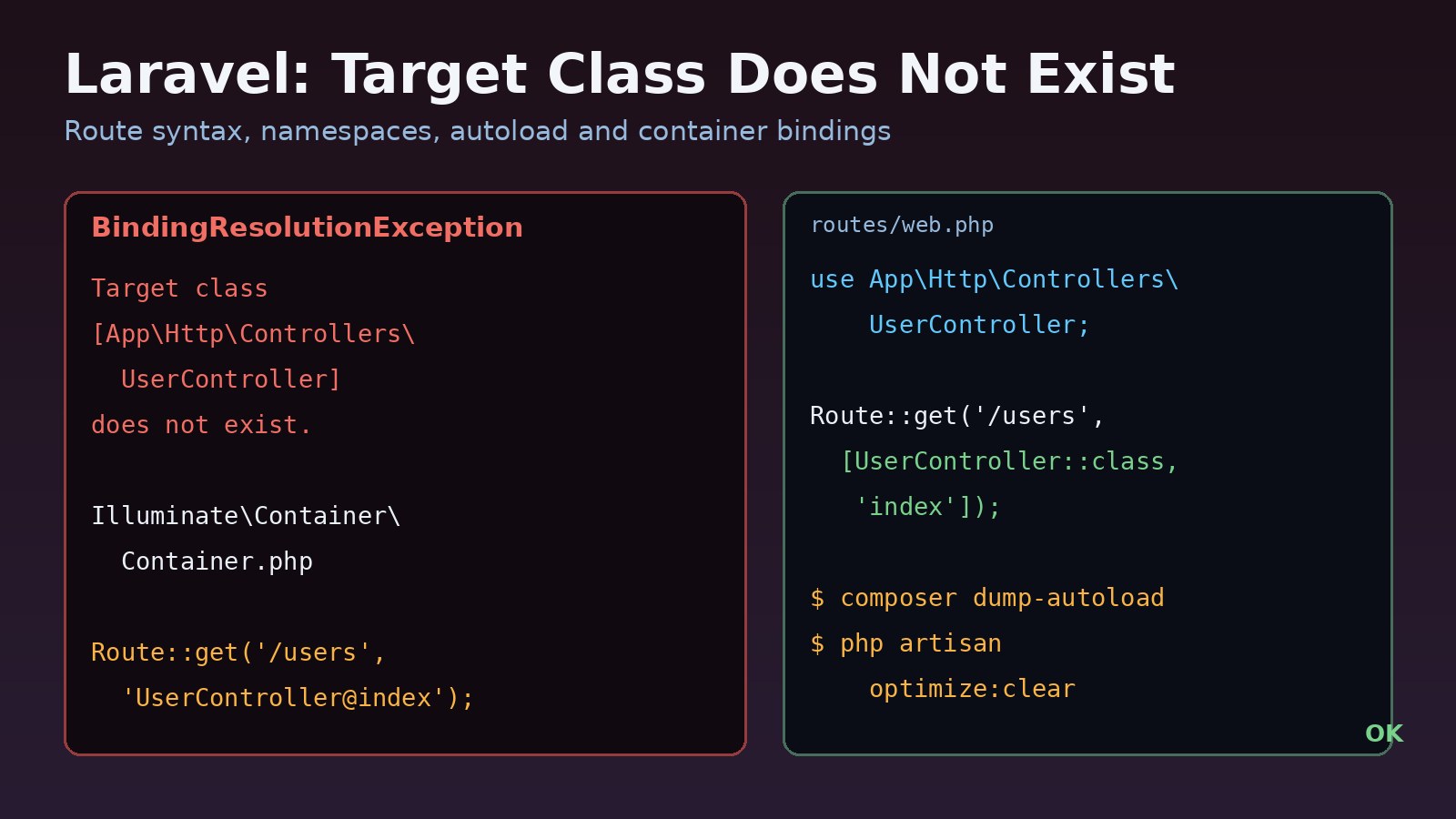
You add a route, open the page, and Laravel throws Illuminate\Contracts\Container\BindingResolutionException: Target class [UserController] does not exist. The laravel target class does not exist error means the service container was asked to build a class it could not find or autoload. In most projects the cause is the route syntax after Laravel 8, a namespace that doesn't match the folder, a stale autoloader or route cache, or a missing binding. This guide shows how to read the error, fix each cause, and keep it from coming back in Docker and CI.
Problem: Laravel Target Class Does Not Exist
Laravel resolves almost everything through its service container: controllers in routes, middleware, form requests, jobs, and every class you type-hint in a constructor. When the container gets a class name, it uses PHP's autoloader (Composer's PSR-4 rules) to load the file, then uses reflection to build the object. If the autoloader can't find a class with that exact fully qualified name, reflection fails and Laravel reports that the target class does not exist.
So this is rarely a bug in Laravel. It is a mismatch between the name Laravel was given and the class that actually exists on disk.
Symptoms of the Laravel Controller Error
Illuminate\Contracts\Container\BindingResolutionException
Target class [UserController] does not exist.

Illuminate\Contracts\Container\BindingResolutionException
Target class [App\Http\Controllers\App\Http\Controllers\UserController] does not exist.

Illuminate\Contracts\Container\BindingResolutionException
Target class [role] does not exist.- A page returns a 500 error and the log in
storage/logs/laravel.logshows the message above. php artisan route:listfails with the same exception, because it has to resolve every controller.- The app works on your Mac or Windows machine but fails on a Linux server or in a Docker container.
- Everything worked until you ran
php artisan route:cacheor deployed a new image. - The class name in the brackets is a short alias like
roleoradmininstead of a class, which points to middleware.
The text inside the square brackets is the most useful clue. It is exactly what the container tried to load.
Root Cause: Why the Service Container Can't Find the Class
Old string route syntax after Laravel 8
Up to Laravel 7, RouteServiceProvider set protected $namespace = 'App\Http\Controllers'; and prefixed it to every controller string. New Laravel 8 applications ship with that line commented out, and Laravel 11 doesn't create a RouteServiceProvider at all. A route written as 'UserController@index' is then looked up as a global class named UserController, which doesn't exist.
Doubled or missing namespace
The opposite happens in upgraded apps that still set $namespace: if a route uses the full name as a string, the prefix is added twice and you get App\Http\Controllers\App\Http\Controllers\UserController.
Namespace, folder or file name mismatch
Composer's PSR-4 rule "App\\": "app/" maps a namespace to a path. App\Http\Controllers\Admin\UserController must live in app/Http/Controllers/Admin/UserController.php, with that exact capitalization. macOS and Windows file systems usually ignore case, so Usercontroller.php or an admin folder works locally and breaks on Linux.
Stale autoloader or cached routes
If Composer was run with an optimized or authoritative classmap, new classes aren't found until the autoloader is rebuilt. A cached route file (bootstrap/cache/routes-v7.php) can still point at a controller you renamed or moved.
Missing bindings and middleware aliases
Type-hinting an interface whose import is wrong, or using a middleware alias like role that was never registered, sends a name to the container that it can't turn into a class.
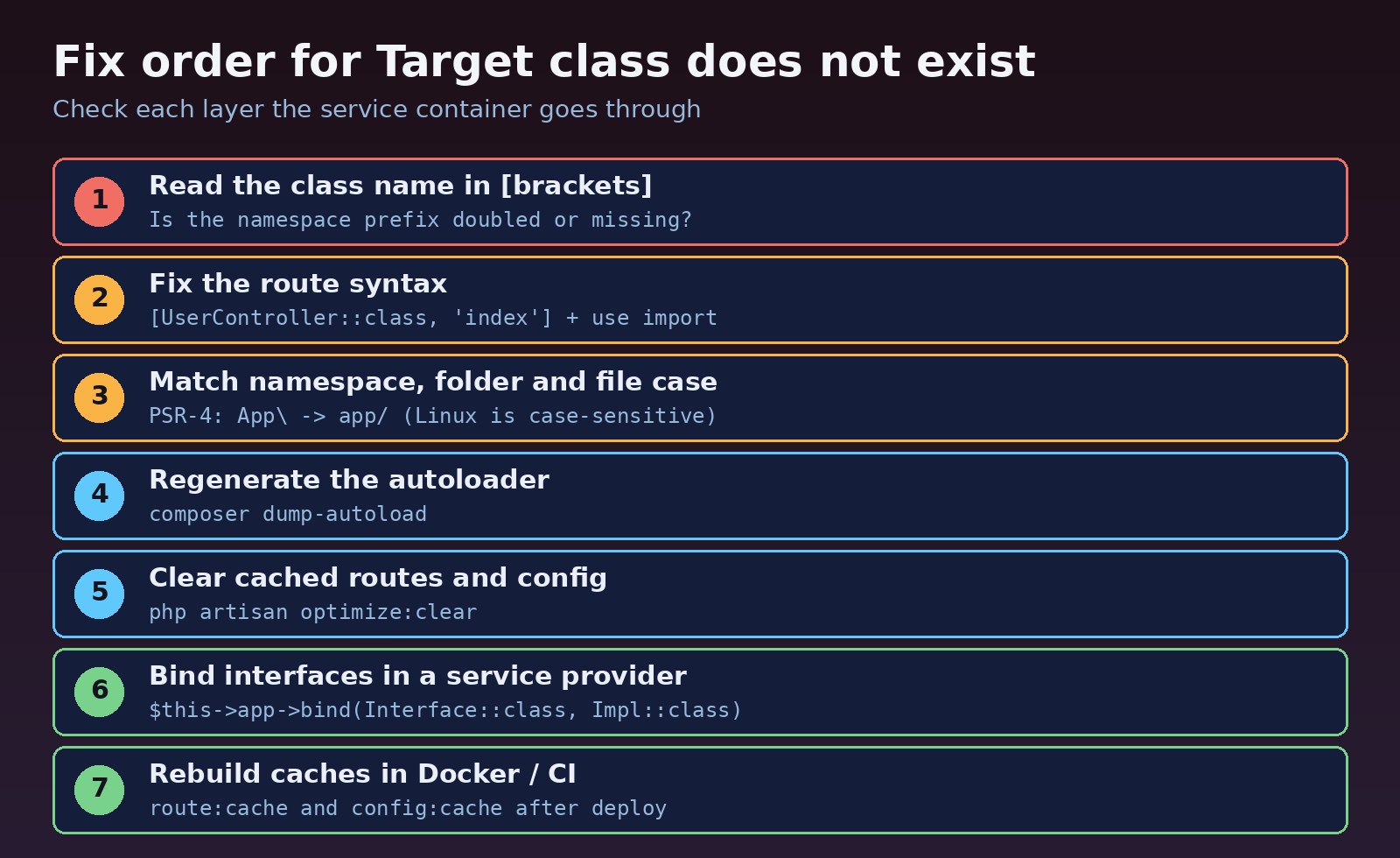
Step-by-Step Solution
Step 1: Read the class name in the error
Compare the name in the brackets with the namespace line at the top of your controller. A bare name like [UserController] means the namespace is missing. A repeated prefix means it was added twice. A short lowercase word means a middleware alias or a container key.
Step 2: Use the ::class route syntax
The fix that works in every Laravel version since 8 is to import the controller and reference it with ::class. Your editor and static analysis tools can then check that the class exists.
<?php
// routes/web.php
use App\Http\Controllers\UserController;
use App\Http\Controllers\Admin\ReportController;
use Illuminate\Support\Facades\Route;

Route::get('/users', [UserController::class, 'index']);
Route::post('/users', [UserController::class, 'store']);
Route::get('/admin/reports', ReportController::class); // invokable controller

// Before (fails in a fresh Laravel 8+ app):
// Route::get('/users', 'UserController@index');
If you are upgrading a large app and can't convert every route at once, you can restore the old prefix on Laravel 8 to 10 by uncommenting protected $namespace = 'App\\Http\\Controllers'; in app/Providers/RouteServiceProvider.php and making sure the route groups call ->namespace($this->namespace). Treat that as a temporary bridge, and don't mix it with full class names in strings.
Step 3: Match the namespace, folder and file name
<?php
// app/Http/Controllers/Admin/ReportController.php
namespace App\Http\Controllers\Admin;

use App\Http\Controllers\Controller;

class ReportController extends Controller
{
    public function __invoke()
    {
        return view('admin.reports');
    }
}
The namespace, the folder path and the file name must match the class name exactly, including case. Fix a case-only rename with Git so the change is actually committed on case-insensitive systems:
git mv app/Http/Controllers/Usercontroller.php app/Http/Controllers/Tmp.php
git mv app/Http/Controllers/Tmp.php app/Http/Controllers/UserController.php
Also check composer.json still maps App\ to app/. If you moved code into modules or a src/ folder, add a PSR-4 entry for it. A clear folder structure makes this much easier, as covered in how to structure a Laravel project for large applications.
"autoload": {
    "psr-4": {
        "App\\": "app/",
        "Modules\\": "modules/"
    }
}
Step 4: Regenerate the Composer autoloader
composer dump-autoload
# production builds:
composer dump-autoload --optimize
Step 5: Clear cached routes and config
optimize:clear removes the cached config, routes, views, events and compiled files in one command. Then list the routes to confirm every controller resolves.
php artisan optimize:clear
php artisan route:list --path=users
Step 6: Register middleware aliases
Target class [role] does not exist usually comes from packages such as spatie/laravel-permission when the alias isn't registered. In Laravel 11 and later, add it in bootstrap/app.php; in Laravel 10 and earlier, add it to $middlewareAliases (or $routeMiddleware) in app/Http/Kernel.php. See Laravel role based permissions for a full RBAC setup.
// bootstrap/app.php (Laravel 11+)
->withMiddleware(function (Middleware $middleware) {
    $middleware->alias([
        'role' => \Spatie\Permission\Middleware\RoleMiddleware::class,
        'permission' => \Spatie\Permission\Middleware\PermissionMiddleware::class,
    ]);
})
Code and Commands Examples
Binding interfaces for dependency injection
Constructor dependency injection only works if the container knows which concrete class to build. If the use statement for an interface is wrong, the container receives a name that doesn't exist and reports the target class error. If the interface exists but nothing is bound to it, you get a related message: Target [App\Contracts\PaymentGateway] is not instantiable. Both are fixed by correct imports and a binding in a service provider:
<?php
// app/Providers/AppServiceProvider.php
namespace App\Providers;

use App\Contracts\PaymentGateway;
use App\Services\StripePaymentGateway;
use Illuminate\Support\ServiceProvider;

class AppServiceProvider extends ServiceProvider
{
    public function register(): void
    {
        $this->app->bind(PaymentGateway::class, StripePaymentGateway::class);
    }
}<?php
namespace App\Http\Controllers;
use App\Contracts\PaymentGateway;
class CheckoutController extends Controller
{
public function __construct(private PaymentGateway $payments) {}
}The same rule applies to classes resolved outside HTTP requests, such as queued jobs and listeners. If a worker fails with this error, restart it after deploying so it loads the new code; the Laravel queue Redis guide covers worker restarts in detail.
Caching safely in Docker and CI
Run the cache commands at container start or as a deploy step, after the final code and environment are in place, not in an early build layer that later changes:
composer install --no-dev --optimize-autoloader --no-interaction
php artisan optimize:clear
php artisan config:cache
php artisan route:cache
php artisan view:cache
Note that --no-dev skips packages in require-dev. If a production route or provider references a class from a dev-only package, it will fail with the same error.
Finding old string routes
grep -rnE "'[A-Za-z\\]+@[A-Za-z]+'" routes/Verification
php artisan optimize:clear
php artisan route:list
php artisan route:cache && php artisan route:clear
curl -s -o /dev/null -w "%{http_code}\n" http://localhost:8000/users
route:list should print every route without an exception, route:cache should succeed (it fails fast if a controller can't be resolved), and the page should return 200. Run the same checks inside the Docker image or on the Linux server, because case problems only appear there.
Prevention
- Always use
[Controller::class, 'method']with auseimport instead of string routes. - Create classes with
php artisan make:controller Admin/ReportControllerso the namespace and path match. - Run tests and
php artisan route:cachein a Linux CI job on every pull request to catch case mismatches. - Bind interfaces in a service provider as soon as you introduce them.
- Clear and rebuild caches as part of every deploy, and restart queue workers afterwards.
FAQs
Why does Laravel 8 say target class does not exist for a controller that exists?
Because the default controller namespace prefix was removed. A route like 'UserController@index' is looked up without the App\Http\Controllers namespace. Use [UserController::class, 'index'] with an import.
Does composer dump-autoload fix the Laravel controller error?
It fixes it when the autoloader is stale, for example after moving files or using an optimized classmap. It won't fix a wrong namespace or route syntax.
Why does it work locally but fail on the server?
Usually a case mismatch between the class and the file or folder name. Linux file systems are case-sensitive; most macOS and Windows setups are not. A stale route or config cache on the server is the other common cause.
What does Target class [role] does not exist mean?
Laravel is treating the middleware alias role as a class name because the alias was never registered. Register it in bootstrap/app.php or app/Http/Kernel.php.
How is this related to dependency injection?
Every type-hinted constructor or method parameter is resolved by the service container. A wrong import or a missing binding for an interface causes the same family of BindingResolutionException errors.
Should I run php artisan route:cache in development?
No. A cached route file ignores changes to your route files until you clear it. Use it in production builds and run php artisan route:clear locally.
Comments
Join the discussion. Replies load on demand, up to 5 levels.
0 threads
No comments yet
Be the first to start the conversation.