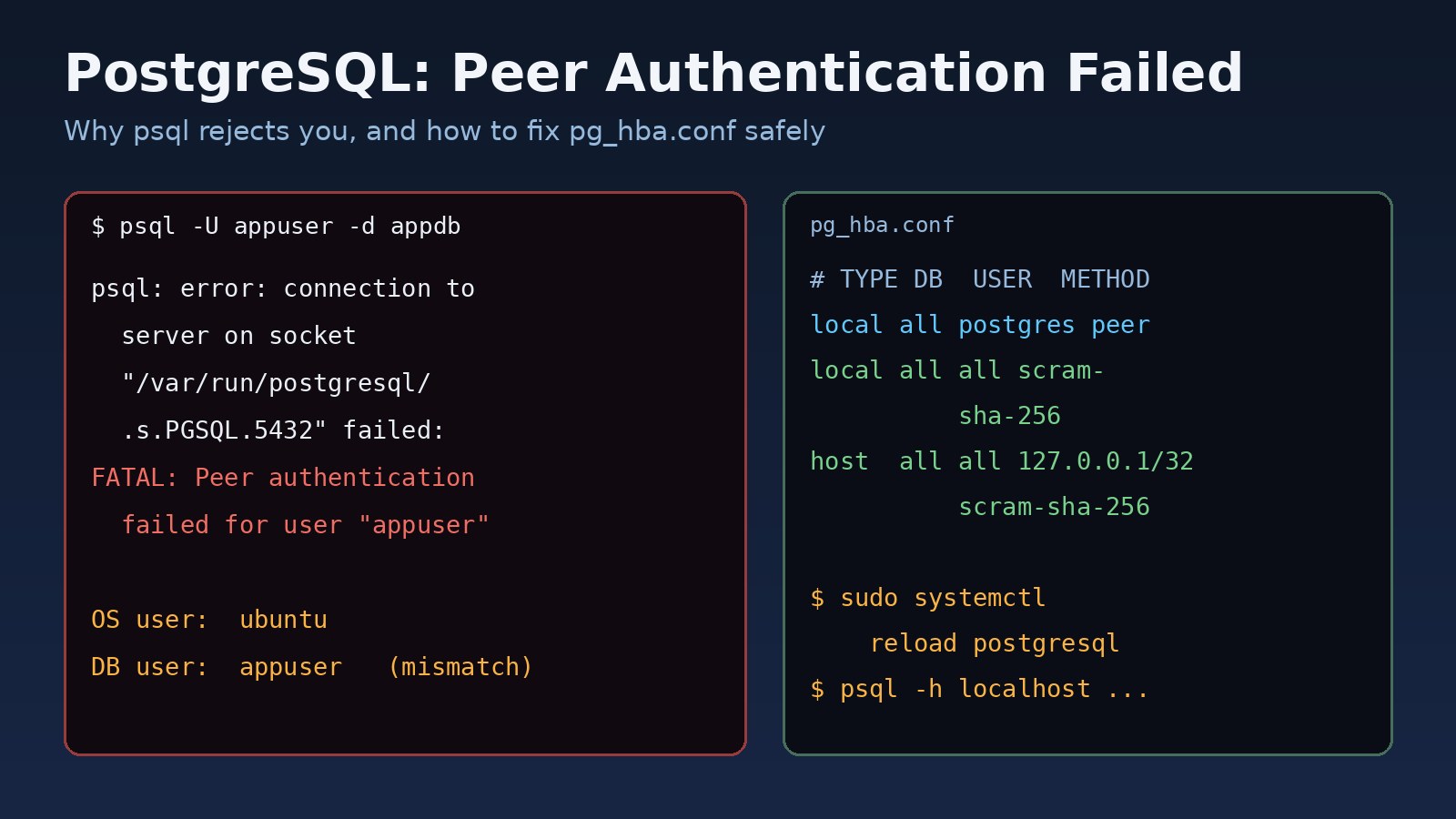
You type psql -U appuser -d appdb on a fresh Ubuntu server and get FATAL: Peer authentication failed for user "appuser". The postgresql peer authentication failed error is not a wrong password. PostgreSQL never asked for one. It compared your Linux user name with the database role name, saw they didn't match, and refused the connection because of a rule in pg_hba.conf. This guide explains how that rule works, how to fix it without opening your database to everyone, and how to check the fix.
Problem: PostgreSQL Peer Authentication Failed
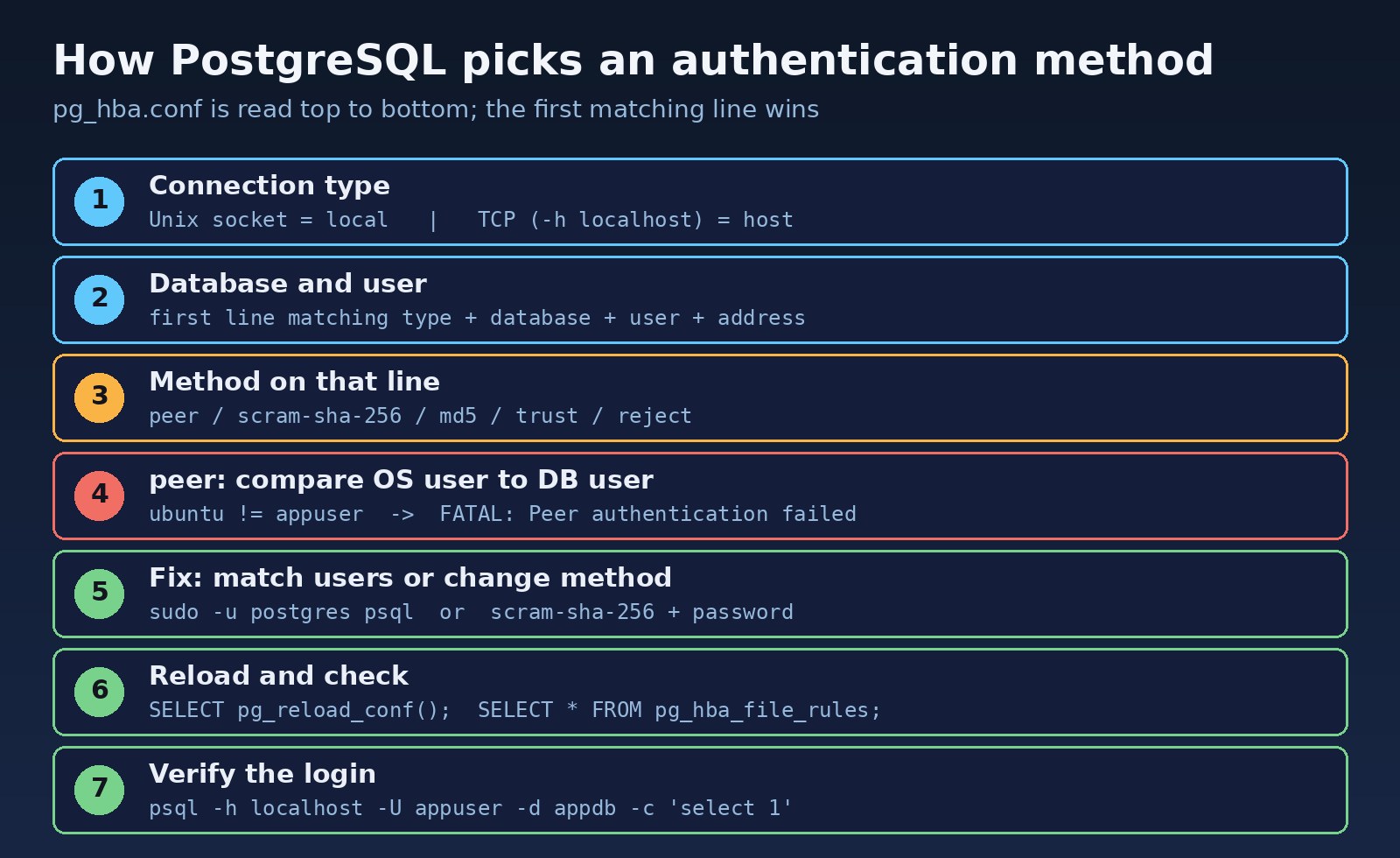
PostgreSQL decides how to authenticate each connection using the client authentication file, pg_hba.conf. Every line names a connection type, a database, a user, an address (for network connections) and a method. PostgreSQL reads the file from top to bottom and uses the first line that matches. There is no fallback: if that line's method fails, the connection fails.
The peer method only applies to local connections over a Unix socket. The server asks the operating system which user owns the client process and allows the login only if that OS user name equals the requested database role (or is mapped to it). Debian, Ubuntu and many RHEL-family packages use peer for local connections by default, which is why this error shows up so often right after installing PostgreSQL.
Symptoms of the PostgreSQL Authentication Error
$ psql -U appuser -d appdb
psql: error: connection to server on socket "/var/run/postgresql/.s.PGSQL.5432" failed: FATAL:  Peer authentication failed for user "appuser"

# Older psql versions print a shorter form:
psql: FATAL: Peer authentication failed for user "postgres"psqlfails immediately, without a password prompt.sudo -u postgres psqlworks, butpsql -U postgresas your own user fails.- The same login works when you add
-h localhostor-h 127.0.0.1. - A cron job, deploy script or app using a Unix socket connection fails, while the app over TCP works.
- The server log, for example
/var/log/postgresql/postgresql-16-main.logon Ubuntu, showsPeer authentication failedand a line such asConnection matched file "/etc/postgresql/16/main/pg_hba.conf" line 123.
Root Cause: How pg_hba.conf Chooses Peer Authentication
Socket connections match "local" lines
When you run psql with no -h option, libpq connects through the Unix socket in /var/run/postgresql. That connection matches local lines. A typical Ubuntu file looks like this:
# TYPE  DATABASE  USER      ADDRESS        METHOD
local   all       postgres                 peer
local   all       all                      peer
host    all       all       127.0.0.1/32   scram-sha-256
host    all       all       ::1/128        scram-sha-256
With this file, any socket login uses peer. Logged in to Linux as ubuntu and asking for role appuser, the names differ and the login is rejected.
The OS user and the database role don't match
Database roles and Linux accounts are separate. Creating the role appuser with CREATE ROLE does not create a Linux user, and the postgres Linux account is the only one that matches the postgres role out of the box.
A more specific line is lower in the file
Because the first matching line wins, adding local appdb appuser scram-sha-256 at the bottom does nothing if local all all peer sits above it.
The change was never reloaded
Edits to pg_hba.conf take effect only after a reload. If the file has a syntax error, the server keeps the old rules and logs a warning, so it can look like your edit was ignored.
Step-by-Step Solution
Step 1: Find the pg_hba.conf file in use
Don't guess the path. Ask the server, using the postgres OS user, which peer authentication allows:
sudo -u postgres psql -c "SHOW hba_file;"
#              hba_file
# -------------------------------------
#  /etc/postgresql/16/main/pg_hba.conf
On RHEL, Rocky or Fedora packages the file is usually in the data directory, such as /var/lib/pgsql/16/data/pg_hba.conf.
Step 2: Decide which fix you need
There are three safe options. Pick based on who is connecting:
- Administrative work: run commands as the matching OS user and keep
peer. - An application or a developer using a password: connect over TCP, or change the
localrule for that role toscram-sha-256. - A Linux account that should act as a specific role: keep
peerand add a user name map.
Step 3: Option A, connect as the matching OS user
sudo -u postgres psql
sudo -u postgres createuser --pwprompt appuser
sudo -u postgres createdb --owner=appuser appdb
This is the intended way to manage PostgreSQL on Debian and Ubuntu. It needs no config change and keeps the superuser protected by your sudo rules.
Step 4: Option B, use password authentication
First make sure the role has a password. Since PostgreSQL 14, password_encryption defaults to scram-sha-256, so new passwords are stored in that format:
sudo -u postgres psql -c "SHOW password_encryption;"
sudo -u postgres psql -c "\password appuser"
The quickest fix is to skip the socket and connect over TCP, which matches the host lines that already use scram-sha-256:
psql -h 127.0.0.1 -U appuser -d appdbIf you want socket logins with a password, add a specific line above the generic local all all peer line, so only this role changes:
# TYPE  DATABASE  USER      ADDRESS        METHOD
local   all       postgres                 peer
local   appdb     appuser                  scram-sha-256
local   all       all                      peer
host    all       all       127.0.0.1/32   scram-sha-256
Avoid changing lines to trust. That lets anyone who can reach the socket log in as any role, including postgres, without a password. Also keep local all postgres peer as it is, so you can still get in to fix mistakes.
Step 5: Option C, map a Linux user to a database role
If the Linux account deploy should log in as appuser without a password, use pg_ident.conf (in the same folder; check with SHOW ident_file;):
# pg_ident.conf
# MAPNAME   SYSTEM-USERNAME   PG-USERNAME
appmap      deploy            appuser

# pg_hba.conf, above "local all all peer"
local   appdb   appuser   peer map=appmap
Step 6: Reload PostgreSQL and check the rules
sudo systemctl reload postgresql
# or from psql:
sudo -u postgres psql -c "SELECT pg_reload_conf();"

# see the rules the server parsed, with any errors
sudo -u postgres psql -c "SELECT line_number, type, database, user_name, address, auth_method, error FROM pg_hba_file_rules;"
The pg_hba_file_rules view (PostgreSQL 10 and later) shows each line as the server reads it and fills the error column if a line can't be parsed. Fix any errors before you trust the reload.
Code and Commands Examples
Laravel and other applications
Point the app at TCP with a password instead of the socket. In a Laravel .env file:
DB_CONNECTION=pgsql
DB_HOST=127.0.0.1
DB_PORT=5432
DB_DATABASE=appdb
DB_USERNAME=appuser
DB_PASSWORD=change-me
If DB_HOST is a socket directory such as /var/run/postgresql, the connection matches local lines and peer rules apply. If your app opens many connections, also read how to fix PostgreSQL too many connections and consider PgBouncer connection pooling, which has its own authentication settings to match.
Scripts and cron jobs without a prompt
Store the password in ~/.pgpass for the OS user that runs the script. libpq ignores the file if its permissions are too open.
# ~/.pgpass  format: hostname:port:database:username:password
127.0.0.1:5432:appdb:appuser:change-me

chmod 600 ~/.pgpass
psql -h 127.0.0.1 -U appuser -d appdb -c "select now();"
Docker containers
The official postgres Docker image writes its own pg_hba.conf and doesn't rely on peer for client apps, so other containers should connect over the network with POSTGRES_USER and POSTGRES_PASSWORD. If you see peer errors in a container, you are usually using a distro package inside the image, or running psql through the socket as a different OS user. Use docker exec -it db psql -U postgres or connect with -h.
Verification
# password login over TCP
psql -h 127.0.0.1 -U appuser -d appdb -c "select current_user, inet_server_addr();"

# socket login after changing the local rule
psql -U appuser -d appdb -c "select current_user;"

# admin access still works
sudo -u postgres psql -c "select 1;"

# watch the log while testing
sudo tail -f /var/log/postgresql/postgresql-16-main.log
You should see your role in current_user, no FATAL lines in the log, and admin access through sudo -u postgres still working. Test the application too, since it may use a different host setting than your shell.
Prevention
- Use separate roles for each app and keep application logins on
hostlines withscram-sha-256. - Keep specific rules above generic ones and comment why each line exists.
- Manage
pg_hba.confwith Ansible, Terraform or your image build so servers don't drift. - After every change, reload and query
pg_hba_file_rulesfor errors. - Never use
truston shared or production servers, and limithostlines to the networks that need access. - Use the same key-based thinking you use for SSH access; the SSH permission denied (publickey) guide covers a similar "who are you really" check at the OS level.
FAQs
What does peer authentication failed for user postgres mean?
You tried to connect as the postgres role through the Unix socket while logged in as another Linux user. Run sudo -u postgres psql, or connect over TCP with a password.
Why does psql work with -h localhost but not without it?
-h localhost makes a TCP connection, which matches host lines that ask for a password. Without -h, psql uses the socket and matches local lines that use peer.
Should I change peer to md5 or scram-sha-256 in pg_hba.conf?
Use scram-sha-256 where your clients support it (libpq 10 and later). Change only the lines for the roles that need password logins, not the postgres line.
What is the difference between peer and ident authentication?
Both check the OS user name. peer asks the kernel about the local socket client. ident asks an ident server on the client machine over TCP, so "Ident authentication failed" errors come from host lines, common on older RHEL setups.
Do I need to restart PostgreSQL after editing pg_hba.conf?
No. A reload is enough: sudo systemctl reload postgresql or SELECT pg_reload_conf();.
Why do I now get password authentication failed?
Peer is no longer used, but the password is wrong or was never set for the role. Set it with \password appuser as the postgres user and try again.
Comments
Join the discussion. Replies load on demand, up to 5 levels.
0 threads
No comments yet
Be the first to start the conversation.