Every property agency has the same hidden leak. A buyer fills in a form on a portal at 11 p.m., the lead lands in someone's inbox, and by the time an agent calls back two days later, the buyer has already visited three houses with a competitor. The problem is rarely a shortage of leads; it is the lack of a system that puts every enquiry in front of the right agent fast. That system is a CRM, and generic tools often fit real estate badly because they were never built around plots, units, site visits and token payments. This guide walks through real estate CRM development from scratch: the modules you need, a practical database design, automation, integrations, architecture and the order to build it in.
What makes a real estate CRM different
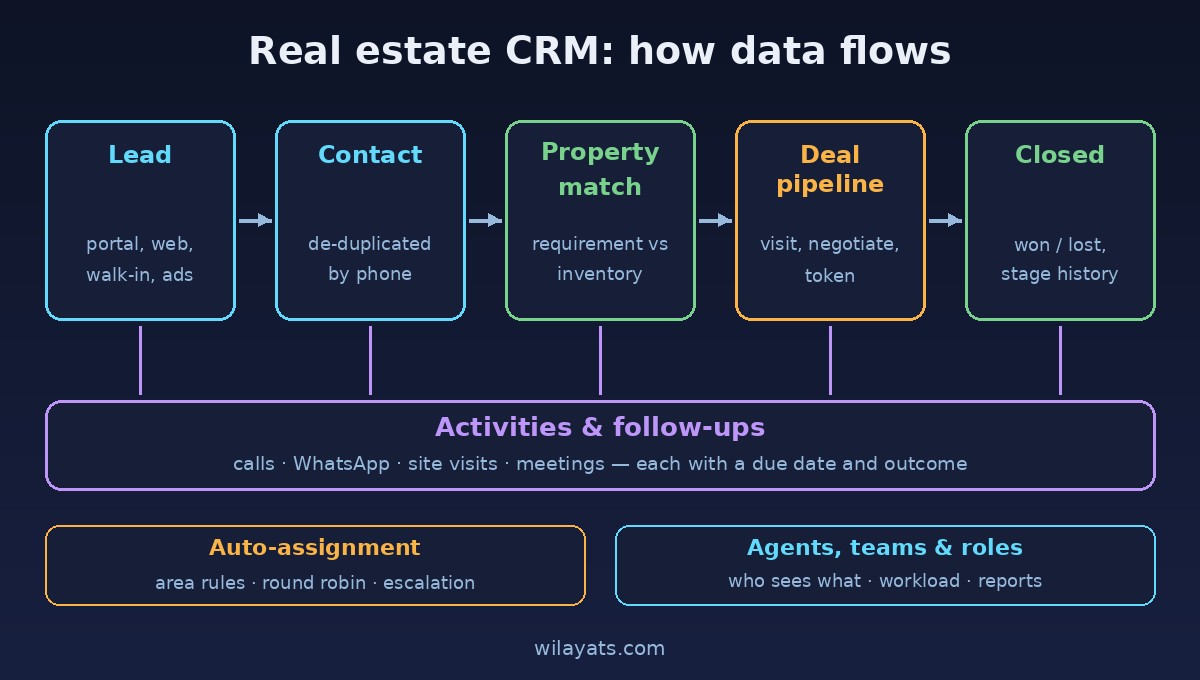
A real estate CRM tracks three things that constantly interact: the person (buyer, tenant, seller or landlord), the property (a listing with location, size, price and availability) and the requirement that connects them ("3-bed apartment, under a certain budget, in these two areas"). One buyer can look at ten properties, one property can have twenty interested buyers. If your data model ignores that, agents drift back to spreadsheets and WhatsApp.
Core modules
Leads: every raw enquiry with its source (portal, website, walk-in, referral, ad campaign), the requirement and a status such as new, contacted, qualified or lost.
Contacts: the de-duplicated person behind one or more leads, with phone numbers, email, preferred language and communication consent.
Properties and listings: inventory with type, area, size, price, purpose (sale or rent), status (available, on hold, sold) and owner details.
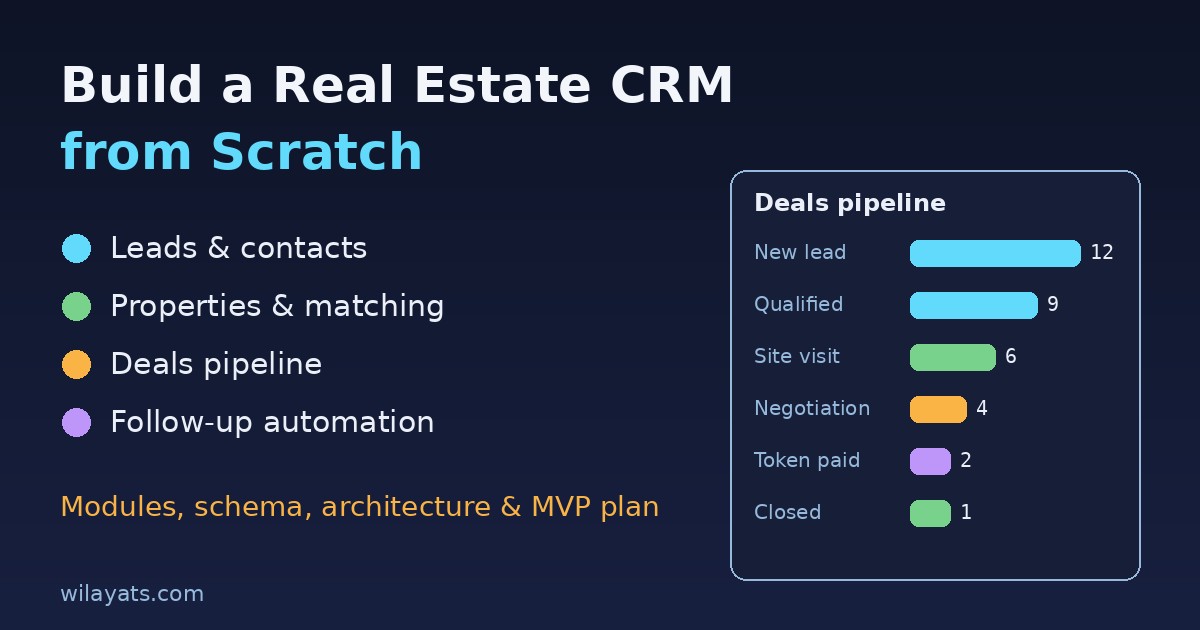
Deals pipeline: stages such as matched, site visit, negotiation, token paid and closed, with the expected value and close date.
Activities and follow-ups: calls, messages, meetings and site visits, each with a due date and an outcome.
Agents and teams: who works where, which areas or projects they cover and their current workload.
Roles and permissions: agents see their own leads, team leads see their team, managers see everything, and exports are restricted.
CRM database design: a sample relational schema
Keep leads and contacts separate. A lead is an event ("someone asked about something"); a contact is a person. When the same phone number enquires three times, you get three leads linked to one contact, and your reports stay honest. Here is a trimmed PostgreSQL starting point:
CREATE TABLE agents (
  id BIGSERIAL PRIMARY KEY,
  name TEXT NOT NULL,
  team_id BIGINT,
  role TEXT NOT NULL CHECK (role IN ('agent','team_lead','manager','admin')),
  is_active BOOLEAN DEFAULT true
);

CREATE TABLE contacts (
  id BIGSERIAL PRIMARY KEY,
  full_name TEXT NOT NULL,
  phone TEXT NOT NULL UNIQUE,  -- store normalized, e.g. +923001234567
  email TEXT,
  created_at TIMESTAMPTZ DEFAULT now()
);

CREATE TABLE properties (
  id BIGSERIAL PRIMARY KEY,
  purpose TEXT CHECK (purpose IN ('sale','rent')),
  type TEXT, city TEXT, area TEXT,
  size_value NUMERIC, size_unit TEXT,  -- marla, kanal, sq ft
  price NUMERIC, status TEXT DEFAULT 'available'
);

CREATE TABLE leads (
  id BIGSERIAL PRIMARY KEY,
  contact_id BIGINT REFERENCES contacts(id),
  source TEXT NOT NULL,
  requirement JSONB,  -- budget, areas, type, bedrooms
  status TEXT DEFAULT 'new',
  assigned_agent_id BIGINT REFERENCES agents(id),
  first_response_at TIMESTAMPTZ,
  created_at TIMESTAMPTZ DEFAULT now()
);

CREATE TABLE deals (
  id BIGSERIAL PRIMARY KEY,
  lead_id BIGINT REFERENCES leads(id),
  property_id BIGINT REFERENCES properties(id),
  stage TEXT DEFAULT 'matched',
  value NUMERIC, closed_at TIMESTAMPTZ
);

CREATE TABLE activities (
  id BIGSERIAL PRIMARY KEY,
  lead_id BIGINT REFERENCES leads(id),
  deal_id BIGINT REFERENCES deals(id),
  agent_id BIGINT REFERENCES agents(id),
  type TEXT,  -- call, whatsapp, visit, meeting
  due_at TIMESTAMPTZ, done_at TIMESTAMPTZ, outcome TEXT
);
Add a stage_history table that records every stage change with a timestamp and the user who made it. Without it you can never answer "how long do deals sit in negotiation?" Index leads(assigned_agent_id, status) and activities(agent_id, due_at) early, because those power the screens agents open fifty times a day.
Lead assignment and follow-up automation
Speed to first contact is where a CRM earns its keep, so automate assignment instead of leaving it to a manager's inbox:
Normalize and de-duplicate the phone number. If the contact already has an active lead with an agent, route the new enquiry to that same agent.
Match rules by city, area, project or purpose (sale vs rent) to find eligible agents.
Pick the agent using round robin or lowest open-lead count among those who are active and on shift.
Create a first follow-up task due within a short window, and notify the agent by push or WhatsApp.
Escalate if
first_response_atis still empty when the window ends: reassign or alert the team lead.
Run these as idempotent background jobs so a retry never assigns the same lead twice. A scheduler can also flag qualified leads with no activity for a week.
Integrations that matter
Property portals and website forms: ingest leads through webhooks or scheduled imports, and store the raw payload for debugging.
WhatsApp and SMS: use an official business API with approved templates, and log every outbound message as an activity.
Email: property matches and visit confirmations, with bounce tracking.
Call logs: connect a cloud telephony provider or a mobile app that syncs call duration and recordings to the lead automatically, so activity data isn't self-reported.
Real estate CRM architecture and tech stack
You don't need microservices on day one. A well-structured monolith ships faster and is easier for a small team to own:
Backend: Laravel, Django or Node.js (NestJS) with a clear module per domain: leads, inventory, deals, activities.
Database: PostgreSQL for relational data, JSONB for flexible requirements, PostGIS later if you want map-based matching.
Queue and cache: Redis for background jobs, assignment locks and rate limiting outbound messages.
Frontend: a React or Next.js web app for managers and a mobile app (or responsive PWA) for agents in the field.
Audit log: who viewed, exported or changed what.
Reporting that drives decisions
Leads by source and their conversion rate to site visits and closed deals.
Median time to first response per agent and per team.
Pipeline value by stage, and how long deals stay in each stage.
Overdue follow-ups per agent, which is the best early warning you have.
Common mistakes to avoid
Merging leads and contacts into one table, which breaks de-duplication and source attribution.
Storing phone numbers in random formats, so the same buyer appears as three people.
Hard-coding pipeline stages instead of keeping them configurable per business line.
Ignoring the mobile experience. Agents work from cars and site visits, not desks.
Weak permissions that let any agent export the entire client database.
MVP build order
Auth, agents, teams and roles.
Contacts and leads with manual entry, de-duplication and a lead list with filters.
Activities and follow-up reminders.
Properties and simple requirement matching.
Deals pipeline with stage history.
Automated assignment and portal/website lead ingestion.
WhatsApp, email and call log integrations.
Reports and dashboards.
Ship steps one to three to a single team first. If agents use it daily, build on it; if they don't, fix that before adding anything else.
Conclusion
A real estate CRM is not about fancy dashboards. It is about making sure every enquiry reaches the right agent quickly, every follow-up has a due date, and every deal has a history you can learn from. Get the data model right with separate leads, contacts, properties and deals, automate assignment and reminders, integrate the channels your clients already use, and build in a sensible order. Do that, and the CRM becomes the tool that helps agents close, not a form they are forced to fill in.
Comments
Join the discussion. Replies load on demand, up to 5 levels.
0 threads
No comments yet
Be the first to start the conversation.