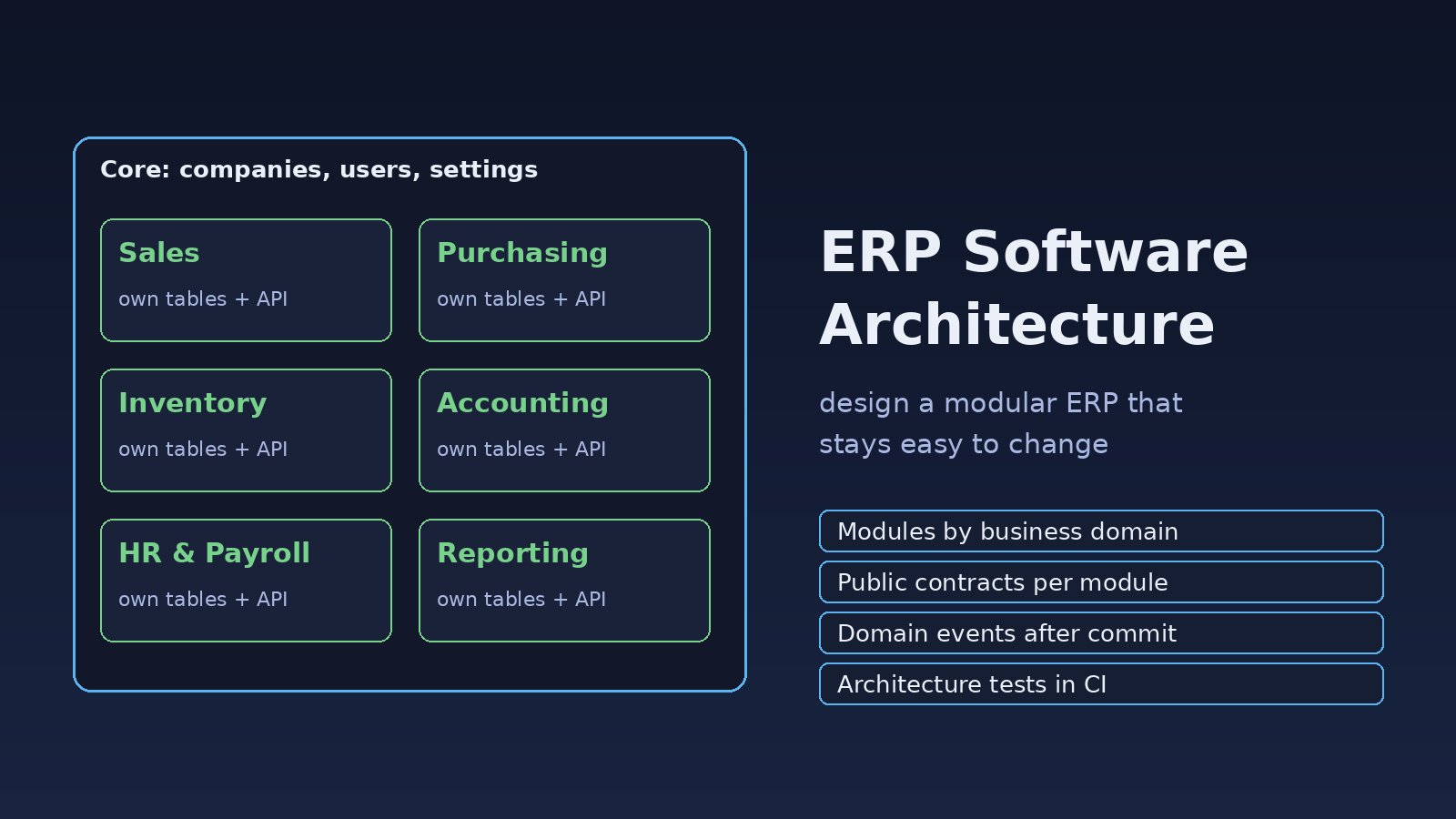
Most ERP projects start clean. A sales screen, an inventory table, a couple of invoices. Two years later, changing a tax rule breaks stock reports, the purchase module queries payroll tables directly, and nobody wants to touch the code before month-end closing. Good erp software architecture prevents that slide by splitting the system into modules with clear boundaries, their own data and explicit contracts between them. This guide shows how to fix a tangled ERP codebase step by step and design a modular ERP that stays maintainable as new departments come on board.
Problem: The ERP Has Become One Big Ball of Code
An ERP covers many business domains: sales, purchasing, inventory, accounting, HR, payroll and reporting. When all of them live in one codebase with no boundaries, every module can read and write every table. It works for a while, then each new feature starts touching code in three other modules.
A typical example in a Laravel ERP looks like this, with the sales controller reaching straight into inventory and accounting tables:
// SalesOrderController@confirm - everything in one place
DB::transaction(function () use ($order) {
    $order->update(['status' => 'confirmed']);

    foreach ($order->lines as $line) {
        DB::table('stock_items')
            ->where('product_id', $line->product_id)
            ->decrement('qty_on_hand', $line->qty);
    }

    DB::table('journal_entries')->insert([
        'account_id' => 4000,          // hard-coded revenue account
        'credit'     => $order->total,
        'created_at' => now(),
    ]);
});
Sales now depends on the internal shape of the inventory and accounting tables. Rename a column in stock_items and order confirmation breaks.
Symptoms of a Poor ERP Architecture
- A small change in one department (for example a new discount rule) needs edits in five or more folders.
- Deployments are risky because nobody knows what else a change affects.
- Queries join across many domains, such as
orders,stock_items,employeesandjournal_entriesin one report query. - Tests are slow or missing because every test needs the whole database seeded.
- Different teams step on each other in the same files and get constant merge conflicts.
- Customers who only want inventory and sales still get payroll code and its migrations.
Root Cause: No Module Boundaries or Ownership
The real issue is rarely the framework or the database. It is that the system was organized by technical layer (controllers, models, views) instead of by business capability. Without boundaries:
- Every model is shared, so every table has many writers.
- Business rules are copied into controllers, jobs and reports instead of living in one place.
- Modules call each other synchronously for things that could be events, so one slow module slows everything.
- There is no rule about who owns which data, so no one can change a schema safely.
A modular ERP fixes this by giving each business domain its own code, tables and public interface. If you are still deciding between a single deployable and separate services, read monolith vs modular monolith vs microservices first. For most ERP teams, a modular monolith is the right starting point.
Step-by-Step: How to Design a Modular ERP System Architecture
Step 1: Map business domains into modules
Start with the business, not the code. List the departments and the main things each one owns. A common split for modular ERP design is:
- Core: companies, branches, users, settings, numbering sequences.
- Catalog: products, units of measure, price lists.
- Sales: customers, quotations, sales orders, deliveries.
- Purchasing: suppliers, purchase orders, goods receipts.
- Inventory: warehouses, stock levels, stock movements.
- Accounting: chart of accounts, journal entries, invoices, payments.
- HR and Payroll: employees, attendance, salary runs.
- Reporting: read models and dashboards built from other modules.
Each module should be something one team could own and explain in a sentence.
Step 2: Give each module its own folder, tables and service provider
In Laravel, a simple layout under app/Modules (or separate packages) keeps code grouped by domain:
app/Modules/
  Sales/
    Contracts/SalesApi.php
    Events/SalesOrderConfirmed.php
    Http/Controllers/
    Models/SalesOrder.php
    Services/ConfirmSalesOrder.php
    Database/Migrations/
    SalesServiceProvider.php
  Inventory/
    Contracts/InventoryApi.php
    Listeners/ReserveStockForOrder.php
    Models/StockItem.php
    Database/Migrations/
    InventoryServiceProvider.php
  Accounting/
    Listeners/PostRevenueJournal.php
    ...
Prefix tables by module (sales_orders, inv_stock_items, acc_journal_entries) so ownership is obvious in the database too. Register each module's migrations from its provider:
// app/Modules/Inventory/InventoryServiceProvider.php
public function boot(): void
{
    $this->loadMigrationsFrom(__DIR__.'/Database/Migrations');
    $this->loadRoutesFrom(__DIR__.'/routes.php');
}
Step 3: Expose a small public API per module
Other modules must never query another module's tables. They call a contract instead. This is the single most important rule in enterprise resource planning architecture.
// app/Modules/Inventory/Contracts/InventoryApi.php
namespace App\Modules\Inventory\Contracts;

interface InventoryApi
{
    public function availableQty(int $productId, int $warehouseId): float;

    /** @throws InsufficientStock */
    public function reserve(string $reference, array $lines): void;
}
Bind the interface in the module's provider with $this->app->bind(InventoryApi::class, InventoryService::class);. Sales depends on the interface, not on StockItem, so Inventory can change its tables freely.
Step 4: Use domain events for cross-module side effects
When a sales order is confirmed, Inventory and Accounting both need to react, but Sales should not know the details. Fire an event and let each module listen:
// Sales module
final class ConfirmSalesOrder
{
    public function __construct(private InventoryApi $inventory) {}

    public function handle(SalesOrder $order): void
    {
        DB::transaction(function () use ($order) {
            $this->inventory->reserve("SO-{$order->id}", $order->linesForStock());
            $order->update(['status' => 'confirmed']);

            SalesOrderConfirmed::dispatch($order->id, $order->total, $order->currency);
        });
    }
}

// Accounting module listens - queued, so a slow ledger never blocks sales
class PostRevenueJournal implements ShouldQueue
{
    public $afterCommit = true;

    public function handle(SalesOrderConfirmed $event): void
    {
        $this->journal->postSale($event->orderId, $event->total, $event->currency);
    }
}
Setting $afterCommit = true means the listener only runs if the transaction actually committed, so you never post revenue for an order that rolled back. For heavier workloads, move these events onto a broker; see how to build a reliable message queue system.
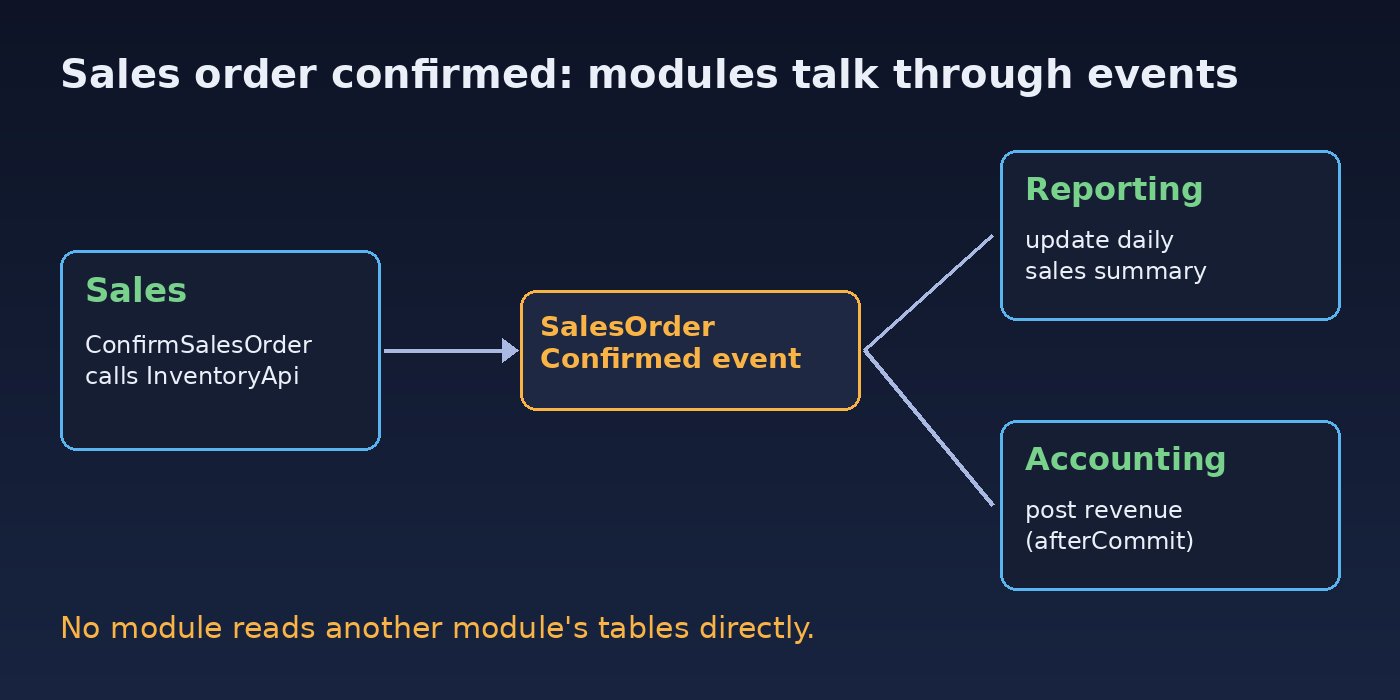
Step 5: Keep shared data in Core and pass IDs, not models
Companies, branches, currencies and users are needed everywhere. Put them in a Core module that others may read through its API. Between other modules, pass IDs and small data objects instead of Eloquent models, so no module accidentally lazy-loads another module's relations.
Step 6: Plan multi-company and multi-tenant data early
ERP customers often run several companies or branches. Add company_id (and branch_id where needed) to every business table from day one and enforce it with a global scope. Retrofitting it later is painful. The multi-tenant SaaS database design guide covers the options in detail.
// app/Modules/Core/Scopes/CompanyScope.php
public function apply(Builder $builder, Model $model): void
{
    $builder->where($model->getTable().'.company_id', app(CurrentCompany::class)->id());
}
Step 7: Build reports from read models
Reporting is where boundaries usually break, because managers want one screen with sales, stock and margins. Instead of giant cross-module joins, let the Reporting module listen to events and maintain its own summary tables (for example rpt_daily_sales), or use database views owned by Reporting. Heavy reports can then run on a read replica without locking transactional tables.
Code and Commands to Enforce Module Boundaries
Rules that are not checked get broken. Add an architecture test with Pest so CI fails when a module reaches into another module's internals:
// tests/Architecture/ModulesTest.php  (Pest 2+)
arch('sales does not use inventory internals')
    ->expect('App\Modules\Sales')
    ->not->toUse([
        'App\Modules\Inventory\Models',
        'App\Modules\Inventory\Services',
    ]);

arch('sales does not use accounting internals')
    ->expect('App\Modules\Sales')
    ->not->toUse('App\Modules\Accounting\Models');
Run it locally and in your pipeline:
composer require pestphp/pest --dev
php artisan migrate --path=app/Modules/Inventory/Database/Migrations
./vendor/bin/pest tests/Architecture
To find existing cross-module table access before refactoring, search the code for raw table names that belong to other modules:
grep -rn "stock_items\|journal_entries" app/Modules/Sales app/HttpVerification: How to Know the Architecture Is Working
- The architecture tests pass in CI and fail when you add a forbidden import on purpose.
- Renaming a column inside one module only requires changes in that module.
- Confirming a sales order creates a stock reservation and, after commit, a journal entry, and a rollback creates neither. Check with
php artisan queue:work --onceand the related tables. - Each module's tests can run with only its own migrations plus Core.
- You can disable a module (for example Payroll) for a customer by not registering its provider, without errors in the others.
Prevention: Keep the ERP Modular Over Time
- Write down module ownership: which team owns which tables and contracts.
- Review contracts, not just code: any change to a module's public API or events gets an extra reviewer.
- Version events: add fields instead of renaming them, and keep old listeners working until all consumers move.
- Use idempotent listeners: queued jobs can run twice, so posting a journal twice for the same order must be blocked by a unique key.
- Extract services only when needed: once a module has clear boundaries, moving it to its own service is straightforward. Do it for scaling or team reasons, not by default.
- Keep audit logs per module: who changed what and when matters a lot in finance and inventory.
FAQs About ERP Software Architecture
What is the best architecture for ERP software?
For most teams, a modular monolith: one deployable application split into business modules with their own tables, public interfaces and events. It gives clear boundaries without the network and operations cost of microservices.
Should an ERP use microservices?
Only when you have a real need, such as separate teams deploying independently or one module with very different scaling needs. Accounting and inventory need strong consistency, which is harder across services. Start modular and extract later.
How do ERP modules share data without tight coupling?
Through small public APIs (interfaces or internal HTTP endpoints) for queries and domain events for side effects. Modules exchange IDs and data objects, never direct table access.
How should the database be designed in a modular ERP?
One database is fine, but each module owns its own tables, ideally with a prefix or separate schema in PostgreSQL. Foreign keys across modules should be kept to Core tables such as companies and users.
How do I migrate an existing ERP to a modular design?
Do it gradually. Pick one module, move its code into a module folder, add a contract for what others use, replace direct table access with that contract, then add an architecture test so it stays clean. Repeat module by module.



Comments
Join the discussion. Replies load on demand, up to 5 levels.
0 threads
No comments yet
Be the first to start the conversation.