
Your app was working, traffic picked up, and suddenly every new request fails with FATAL: remaining connection slots are reserved for non-replication superuser connections. The remaining connection slots are reserved error means PostgreSQL has almost hit max_connections: the last few slots are kept for superusers, so normal application roles are turned away. Existing sessions keep working, but nothing new can connect. This guide shows how to confirm what is holding the connections, free them safely, and fix the root cause with sane connection limits and pooling for Laravel, Node.js, Prisma and Docker setups.
Problem: Remaining Connection Slots Are Reserved in PostgreSQL
PostgreSQL starts one backend process per client connection, and the total is capped by the max_connections setting (default 100). A small number of those slots, set by superuser_reserved_connections (default 3), are held back so an administrator can still log in when the server is full. Once regular connections reach max_connections - superuser_reserved_connections, every new non-superuser connection is rejected with this error.
So the message is not a crash and not a network problem. It is PostgreSQL telling you that the PostgreSQL max connections limit is used up by sessions that already exist.
Symptoms
- Application logs show one of these messages, depending on your PostgreSQL version:
FATAL:  remaining connection slots are reserved for non-replication superuser connections
FATAL:  remaining connection slots are reserved for roles with the SUPERUSER attribute
FATAL: remaining connection slots are reserved for roles with privileges of the "pg_use_reserved_connections" role- Laravel throws
SQLSTATE[08006] [7] FATAL: remaining connection slots are reserved...and returns HTTP 500. - Node.js (
pg) or Prisma report connection errors or timeouts at startup or under load. psqlas the app user fails, butpsqlaspostgresstill works.- The problem appears during traffic spikes, deployments, or after scaling up containers, workers or PHP-FPM children.
- Closely related: if even the reserved slots are gone you see
FATAL: sorry, too many clients already.
Root Cause: Why PostgreSQL Runs Out of Connection Slots
The connection limit is reached because the sum of all clients is larger than the server allows. Common reasons:
Too many app processes, each with its own connections
Every PHP-FPM child, queue worker, Node.js process, cron job and container replica can open its own connection or pool. Ten Node.js replicas with a pool max of 20 can ask for 200 connections on a server that allows 100.
Idle and idle-in-transaction sessions
Connections that stay open while doing nothing still hold a slot. Sessions in idle in transaction are worse: they also hold locks and snapshots, often because code opened a transaction and never committed after an exception.
Connection leaks
Code that checks out a client from a pool and never releases it, or creates a new client per request without closing it, slowly fills all slots until the server refuses new ones.
No connection pooler in front of PostgreSQL
PostgreSQL connections are relatively heavy processes. Without PgBouncer or a similar pooler, short-lived web requests translate directly into server connections.
Step-by-Step Solution
Step 1: Connect as a superuser and check the limits
The reserved slots exist exactly for this moment. Connect as postgres (or another superuser) and read the current settings:
sudo -u postgres psql

SHOW max_connections;
SHOW superuser_reserved_connections;
SELECT count(*) AS total_connections FROM pg_stat_activity;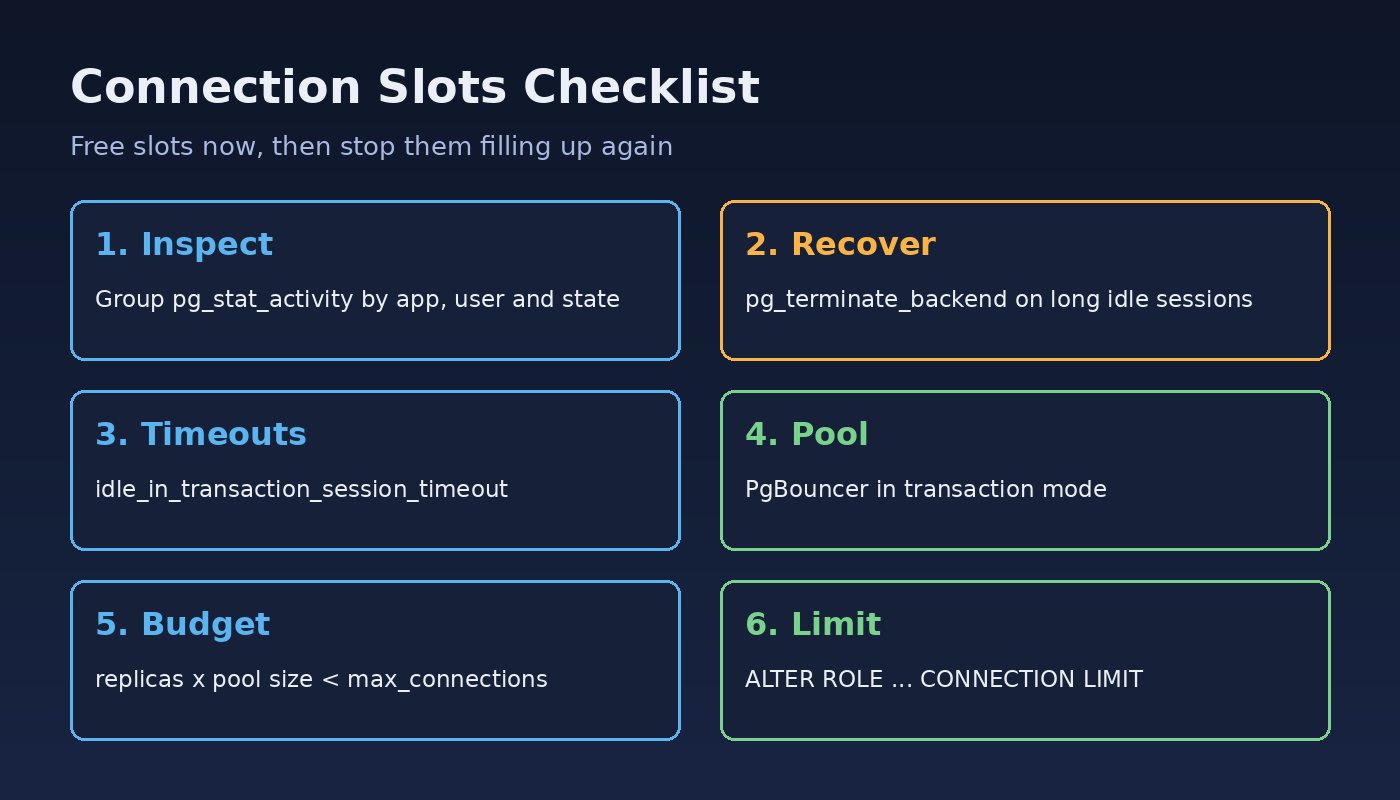
Step 2: Find out who is using the connections
Group sessions by database, user, application and state to see where the slots went:
SELECT datname, usename, application_name, client_addr, state, count(*)
FROM pg_stat_activity
WHERE backend_type = 'client backend'
GROUP BY datname, usename, application_name, client_addr, state
ORDER BY count(*) DESC;
Look for one host or application holding far more than its share, and for large numbers of idle or idle in transaction sessions. To see the oldest idle transactions:
SELECT pid, usename, application_name, state,
       now() - state_change AS idle_for, left(query, 80) AS last_query
FROM pg_stat_activity
WHERE state IN ('idle', 'idle in transaction')
ORDER BY state_change
LIMIT 20;
Step 3: Free slots right now (carefully)
To recover quickly, end sessions that have been idle for a long time. This closes those client connections, and any open transaction in them is rolled back, so target idle sessions, not active queries:
SELECT pg_terminate_backend(pid)
FROM pg_stat_activity
WHERE usename = 'app_user'
  AND state IN ('idle', 'idle in transaction')
  AND now() - state_change > interval '10 minutes';
Then fix the client side as well, otherwise the slots fill up again within minutes.
Step 4: Add timeouts for idle sessions
Let PostgreSQL clean up abandoned sessions automatically. idle_in_transaction_session_timeout is available since PostgreSQL 9.6 and idle_session_timeout since PostgreSQL 14:
ALTER SYSTEM SET idle_in_transaction_session_timeout = '5min';
ALTER SYSTEM SET idle_session_timeout = '30min';   -- PostgreSQL 14+
SELECT pg_reload_conf();
Be careful with idle_session_timeout if your application pool keeps long-lived connections: pick a value longer than the pool's own idle timeout, or set it per role instead of globally.
Step 5: Put PgBouncer in front of PostgreSQL
A pooler lets hundreds of client connections share a small number of server connections. A minimal pgbouncer.ini:
[databases]
appdb = host=127.0.0.1 port=5432 dbname=appdb

[pgbouncer]
listen_addr = 0.0.0.0
listen_port = 6432
auth_type = scram-sha-256
auth_file = /etc/pgbouncer/userlist.txt
pool_mode = transaction
max_client_conn = 1000
default_pool_size = 20
Point the application at port 6432 instead of 5432. In transaction pool mode, session-level features such as SET without LOCAL, advisory session locks and LISTEN do not behave as they would on a direct connection, so test before switching production.
Step 6: Set an explicit connection limit per app
Make the total of all pools fit under the server limit. A simple rule: replicas x pool size + workers + admin headroom < max_connections.
Node.js (node-postgres):
const { Pool } = require('pg');

const pool = new Pool({
  connectionString: process.env.DATABASE_URL,
  max: 10,                     // per process
  idleTimeoutMillis: 30000,
  connectionTimeoutMillis: 5000,
});

// always release clients
const client = await pool.connect();
try {
  await client.query('SELECT 1');
} finally {
  client.release();
}
Prisma: limit the pool in the connection string:
DATABASE_URL="postgresql://app_user:secret@db:5432/appdb?connection_limit=5&pool_timeout=10"Laravel: each PHP-FPM child holds at most one connection per database for the request, and queue workers hold one each while running. Keep pm.max_children across all servers, plus Horizon or queue workers, below the PostgreSQL limit, or route Laravel through PgBouncer by setting DB_PORT=6432. Avoid enabling persistent PDO connections unless you have sized for them.
Step 7: Cap noisy roles with a connection limit
Stop one service from starving the others with a per-role or per-database limit:
ALTER ROLE reporting_user CONNECTION LIMIT 20;
ALTER DATABASE analytics CONNECTION LIMIT 30;
Step 8: Raise max_connections only if the server can handle it
Increasing the PostgreSQL max connections value is a valid fix when the server has enough memory and CPU, but each connection uses memory, and work_mem can be used several times per query. Change it and restart, because max_connections cannot be changed with a reload:
ALTER SYSTEM SET max_connections = 200;
-- then restart PostgreSQL
sudo systemctl restart postgresql

# Docker
docker run -d postgres:16 -c max_connections=200
For more on sizing pools, see our guide to fixing PostgreSQL connection pool exhaustion and the related PostgreSQL too many connections fix.
Verification
- Run the grouping query from Step 2 again and confirm the total sits comfortably below
max_connections. - Connect as the application user with
psql -U app_user -d appdband confirm the login succeeds. - Watch the count under load:
watch -n 5 "sudo -u postgres psql -Atc \"SELECT state, count(*) FROM pg_stat_activity WHERE backend_type='client backend' GROUP BY state\""- If you added PgBouncer, connect to its admin console (
psql -p 6432 -U pgbouncer pgbouncer) and runSHOW POOLS;to see client and server connections. - Check application logs for a full day of traffic with no new
remaining connection slots are reservedmessages.
Prevention
- Size every pool on purpose and write the connection budget down: replicas, workers and cron jobs included.
- Use PgBouncer (or your cloud provider's pooler) for web traffic with many short requests.
- Always release clients in a
finallyblock and close transactions on errors. - Keep
idle_in_transaction_session_timeoutenabled in production. - Alert when connections pass about 80% of
max_connections. - Re-check the budget whenever you scale containers, add Laravel queue workers or increase PHP-FPM children.
If your Laravel app cannot reach the database at all, rather than being refused for lack of slots, see how to fix Laravel SQLSTATE connection refused.
FAQs
What does remaining connection slots are reserved mean?
It means the number of connections has reached max_connections minus the reserved superuser slots. PostgreSQL keeps those last slots for administrators, so ordinary roles are rejected until other sessions close.
How do I check the PostgreSQL connection limit?
Run SHOW max_connections; and SHOW superuser_reserved_connections;, and compare them with SELECT count(*) FROM pg_stat_activity;. Per-role limits are in pg_roles.rolconnlimit, where -1 means no limit.
Should I just increase PostgreSQL max connections?
Only after checking for leaks and idle sessions. More connections use more memory and can slow the server down. A pooler with a modest max_connections is usually the more stable fix.
Can I change max_connections without a restart?
No. max_connections is a server start setting. ALTER SYSTEM writes the new value, but it only takes effect after PostgreSQL restarts.
Is this error the same as "sorry, too many clients already"?
They are closely related. The reserved-slots error is raised while superuser slots are still free; "too many clients already" appears when every slot, including the reserved ones, is in use.


Comments
Join the discussion. Replies load on demand, up to 5 levels.
0 threads
No comments yet
Be the first to start the conversation.