Your app works fine for hours, then requests suddenly hang or fail with database errors, and restarting the app "fixes" it until the next peak. That is the classic sign of a postgresql connection pool exhausted situation: every connection in the pool (or every slot on the server) is taken, and new requests have nothing to use. This guide shows how to read the error messages, find what is holding connections, size pools and PgBouncer correctly, and stop it from happening again.
The Problem: PostgreSQL Connection Pool Exhausted
Each PostgreSQL connection is a separate server process with its own memory, so the server limits them with max_connections (100 by default). Applications use a connection pool so they can reuse a small set of connections instead of opening a new one per request.
The pool can run dry in two places. The application pool (node-postgres, Prisma, HikariCP, Laravel Octane workers and so on) can have all its connections checked out, so new requests wait and time out. Or PostgreSQL itself can run out of slots because too many pools, workers and scripts connect at once. Both look like "the database is down", but the database is usually healthy and mostly idle.
Symptoms and Error Messages
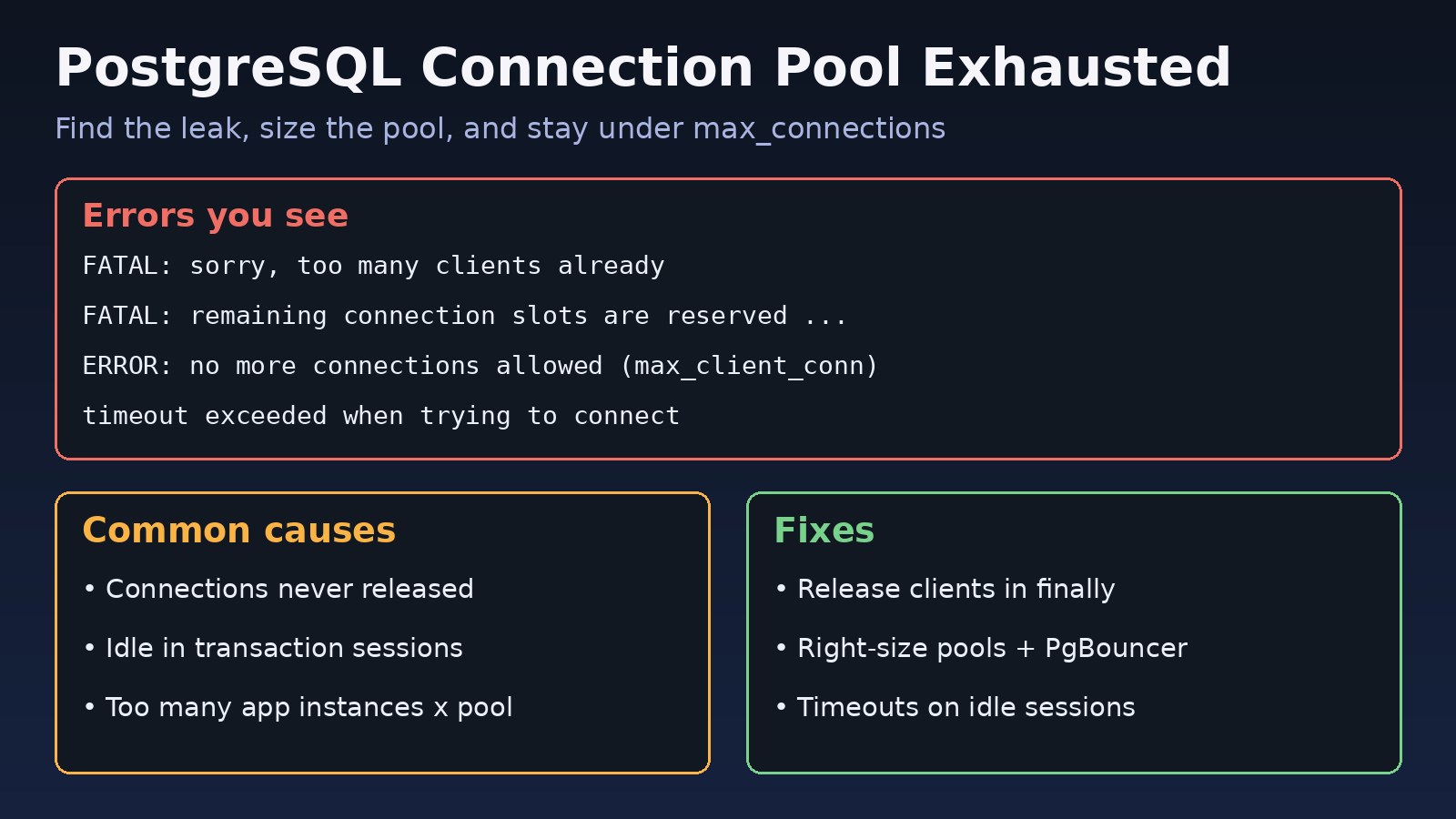
Depending on where the limit is hit, you will see one or more of these:
FATAL:  sorry, too many clients already
FATAL:  remaining connection slots are reserved for non-replication superuser connections
FATAL:  remaining connection slots are reserved for roles with the SUPERUSER attribute
ERROR:  no more connections allowed (max_client_conn)
ERROR:  query_wait_timeout
Error: timeout exceeded when trying to connect
Timed out fetching a new connection from the connection pool. (Prisma P2024)
SQLSTATE[08006] [7] FATAL: sorry, too many clients already- The first three come from PostgreSQL itself: the server has no free slots. The wording of the "reserved" message depends on your PostgreSQL version.
no more connections allowed (max_client_conn)andquery_wait_timeoutcome from PgBouncer.timeout exceeded when trying to connectis node-postgres whenconnectionTimeoutMillisis reached. Prisma reports P2024, and Laravel shows the PostgreSQL error wrapped inSQLSTATE[08006].- Response times climb before the errors start, because requests are queuing for a connection.
pg_stat_activityshows many sessions inidleoridle in transactionstate while CPU on the database is low.
Root Cause: Why Connections Run Out
- Connection leaks. Code checks out a client and never releases it, often on an error path. With node-postgres this is a missing
client.release(). The pool slowly drains until every connection is "in use" by nothing. - Idle in transaction sessions. A transaction is opened, then the code waits on an HTTP call, a queue or a user. The connection is held and cannot be reused. See how to fix PostgreSQL idle in transaction.
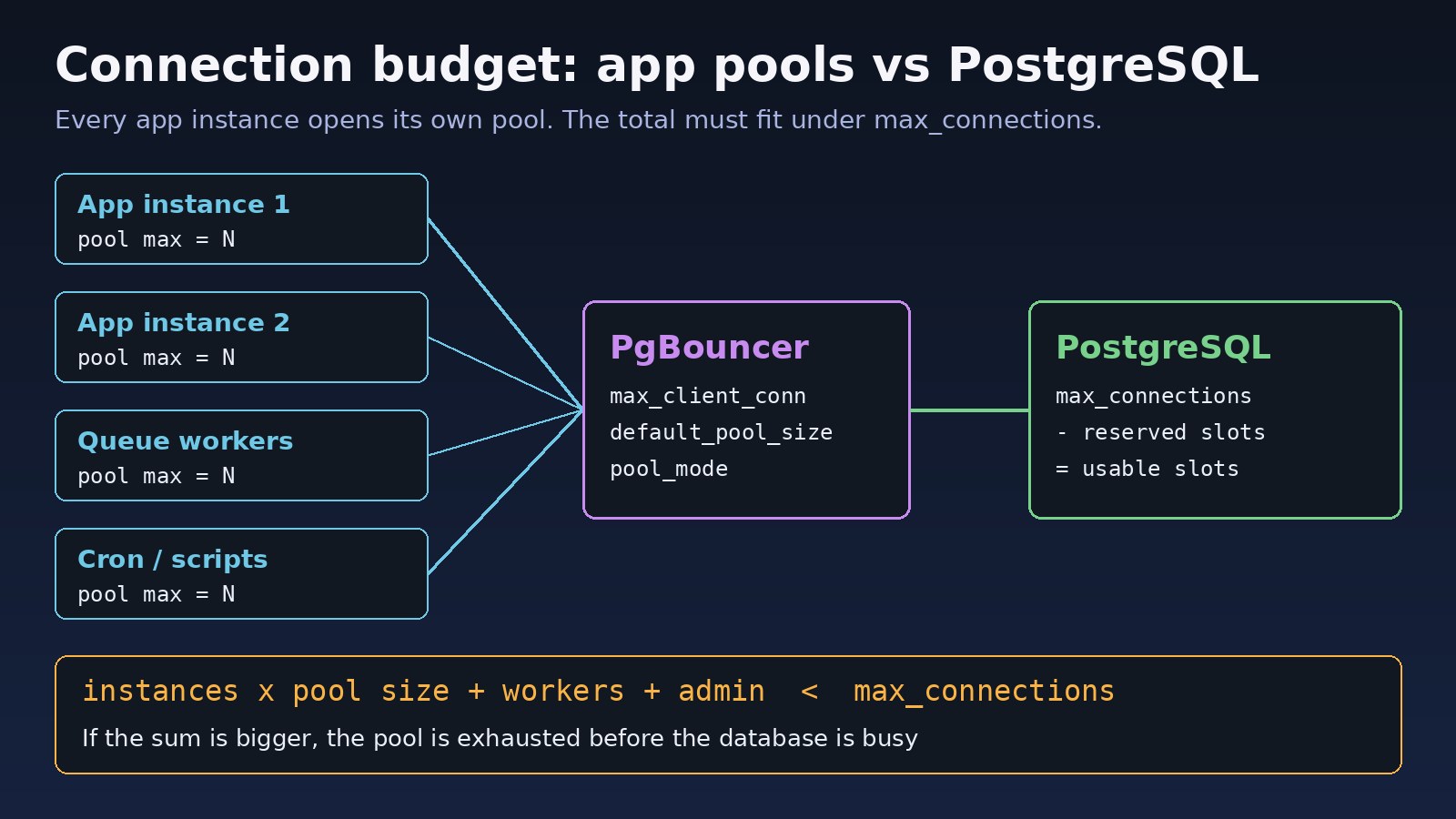
- Too many pools. Ten containers with a pool of 20 each need 200 connections, before counting queue workers, cron jobs and migrations. Autoscaling makes this worse because every new instance adds a full pool.
- Slow queries. If each query holds a connection for seconds instead of milliseconds, the same traffic needs many more connections. Check long-running PostgreSQL queries.
- PHP-FPM without pooling. Classic Laravel on PHP-FPM opens a connection per worker process, so
pm.max_childrentimes the number of servers is your real connection count. - Wrong PgBouncer sizing. A small
default_pool_sizemakes clients queue, and a lowmax_client_connrejects them outright.
Step-by-Step Solution
Step 1: Check database connection limits and current usage
SHOW max_connections;
SHOW superuser_reserved_connections;

SELECT count(*) AS total,
       count(*) FILTER (WHERE state = 'active') AS active,
       count(*) FILTER (WHERE state = 'idle') AS idle,
       count(*) FILTER (WHERE state = 'idle in transaction') AS idle_in_tx
FROM pg_stat_activity
WHERE backend_type = 'client backend';
If total is close to max_connections minus the reserved slots, the server is the bottleneck. If it is well below but the app still times out, the application pool is the bottleneck.
Step 2: Find who is holding connections
SELECT usename, application_name, client_addr, state, count(*)
FROM pg_stat_activity
WHERE backend_type = 'client backend'
GROUP BY 1, 2, 3, 4
ORDER BY count(*) DESC;

SELECT pid, usename, application_name, state,
       now() - state_change AS in_state_for,
       left(query, 80) AS last_query
FROM pg_stat_activity
WHERE state IN ('idle in transaction', 'idle in transaction (aborted)')
ORDER BY state_change;
Set application_name in each service's connection string so you can tell the API, queue workers and cron jobs apart. If you must free slots immediately, end clearly stuck sessions with SELECT pg_terminate_backend(pid);. That is a stopgap, not a fix.
Step 3: Fix connection leaks in the application
In Node.js with node-postgres, always release in finally, or use pool.query() which releases for you:
const { Pool } = require('pg');

const pool = new Pool({
  max: 10,                       // per process
  idleTimeoutMillis: 30000,
  connectionTimeoutMillis: 5000, // fail fast instead of hanging
});

async function transfer(fromId, toId, amount) {
  const client = await pool.connect();
  try {
    await client.query('BEGIN');
    await client.query('UPDATE accounts SET balance = balance - $1 WHERE id = $2', [amount, fromId]);
    await client.query('UPDATE accounts SET balance = balance + $1 WHERE id = $2', [amount, toId]);
    await client.query('COMMIT');
  } catch (err) {
    await client.query('ROLLBACK');
    throw err;
  } finally {
    client.release(); // runs on success and on error
  }
}
Also create one pool per process at startup. Creating a new Pool inside a request handler, or a new PrismaClient on every hot reload in Next.js development, multiplies connections quickly.
Step 4: Size the pools against the connection budget
Add up every source of connections and keep the total below max_connections minus reserved slots, with some headroom for admin sessions and migrations:
app_instances x pool_max
+ queue_workers x connections_per_worker
+ cron jobs, migrations, admin tools
< max_connections - superuser_reserved_connections
Bigger pools are not automatically faster. PostgreSQL can only run as many queries in parallel as it has CPU and I/O to support, so a small pool with short queries usually beats a huge pool. Raising max_connections is possible, but every connection costs memory and the change needs a restart, so prefer pooling first.
Step 5: Put PgBouncer in front and tune the PgBouncer pool size
PgBouncer lets thousands of client connections share a small number of server connections. A typical pgbouncer.ini for a web app:
[databases]
appdb = host=127.0.0.1 port=5432 dbname=appdb

[pgbouncer]
listen_addr = 0.0.0.0
listen_port = 6432
auth_type = scram-sha-256
auth_file = /etc/pgbouncer/userlist.txt
pool_mode = transaction
max_client_conn = 1000
default_pool_size = 20
reserve_pool_size = 5
reserve_pool_timeout = 3
max_db_connections = 50
server_idle_timeout = 600
query_wait_timeout = 120
max_client_conn is how many app connections PgBouncer accepts. default_pool_size is how many server connections it opens per user and database pair. In transaction mode, avoid session features such as session-level advisory locks or SET without LOCAL, because consecutive transactions may run on different server connections. The full setup is in the PgBouncer PostgreSQL setup guide.
Step 6: Add timeouts so stuck sessions free themselves
ALTER ROLE app_user SET idle_in_transaction_session_timeout = '60s';
ALTER ROLE app_user SET statement_timeout = '30s';
-- PostgreSQL 14+ can also close idle sessions:
-- ALTER ROLE app_user SET idle_session_timeout = '10min';
Do not set idle_session_timeout for connections that come through PgBouncer or an app pool that keeps idle connections on purpose, or the pool will keep receiving closed connections.
Code/Commands Examples
Watch PgBouncer pools live
psql -h 127.0.0.1 -p 6432 -U pgbouncer_admin pgbouncer -c "SHOW POOLS;"
psql -h 127.0.0.1 -p 6432 -U pgbouncer_admin pgbouncer -c "SHOW CLIENTS;"
psql -h 127.0.0.1 -p 6432 -U pgbouncer_admin pgbouncer -c "RELOAD;"
In SHOW POOLS, a growing cl_waiting with a non-zero maxwait means clients are queuing for server connections. The user must be listed in admin_users or stats_users.
Laravel connection settings for PostgreSQL
# .env - point Laravel at PgBouncer instead of PostgreSQL
DB_CONNECTION=pgsql
DB_HOST=127.0.0.1
DB_PORT=6432
DB_DATABASE=appdb
DB_USERNAME=app_user
PDO for PostgreSQL uses server-side prepared statements. PgBouncer in transaction mode supports them from version 1.21 when max_prepared_statements is set. On older versions, add PDO::ATTR_EMULATE_PREPARES => true to the options of the pgsql connection in config/database.php. Also count queue workers: each php artisan queue:work process keeps its own connection open.
Prisma connection limit
DATABASE_URL="postgresql://app_user:[email protected]:6432/appdb?connection_limit=5&pool_timeout=10&pgbouncer=true"Verification
- Re-run the
pg_stat_activitycount from Step 1 during peak traffic. Total connections should stay well below the limit. idle in transactionsessions should be rare and short-lived.- In PgBouncer,
cl_waitingshould be zero or brief, andsv_activeshould stay at or belowdefault_pool_size. - Application logs should no longer show
too many clients, P2024 or pool timeout errors. - Run a short load test (for example with
k6orab) and watch connection counts while it runs.
Prevention
- Treat connections as a budget. Document how many each service uses and recheck it when you add instances, workers or autoscaling.
- Always release connections in
finallyblocks or use helpers that release automatically. - Keep transactions short and never wait on external APIs inside a transaction.
- Use PgBouncer for apps with many processes, serverless functions or PHP-FPM.
- Set timeouts: pool acquire timeouts in the app,
statement_timeoutandidle_in_transaction_session_timeoutin PostgreSQL. - Alert on connection usage as a percentage of
max_connections, so you hear about it before users do.
FAQs
What does postgresql connection pool exhausted mean?
It means every connection your pool or server allows is already in use, so new requests must wait or fail. The cause is usually leaked or idle connections, or more pools than the server can serve, not a lack of database power.
How do I fix "FATAL: sorry, too many clients already"?
Find which applications hold connections in pg_stat_activity, fix leaks and idle transactions, reduce per-instance pool sizes, and put PgBouncer in front. Raise max_connections only if the server has memory for it.
What PgBouncer pool size should I use?
Start with a default_pool_size close to the number of queries your server can run in parallel, often a small multiple of its CPU cores, and keep max_db_connections under PostgreSQL's limit. Then tune using SHOW POOLS under real load.
What is the difference between max_client_conn and default_pool_size?
max_client_conn limits connections from applications to PgBouncer. default_pool_size limits connections from PgBouncer to PostgreSQL per user and database. The first can be large; the second must fit your database connection limits.
Should I just increase max_connections?
It can buy time, but each connection uses memory and adds overhead, and a leak will fill the new limit too. Fix the cause and use pooling first. The guide on PostgreSQL too many connections covers this decision.
Why does my Laravel app hit the limit with low traffic?
Each PHP-FPM worker and each queue worker holds its own connection. Several servers with high pm.max_children values plus Horizon workers can exceed max_connections even when traffic is light.
Comments
Join the discussion. Replies load on demand, up to 5 levels.
0 threads
No comments yet
Be the first to start the conversation.