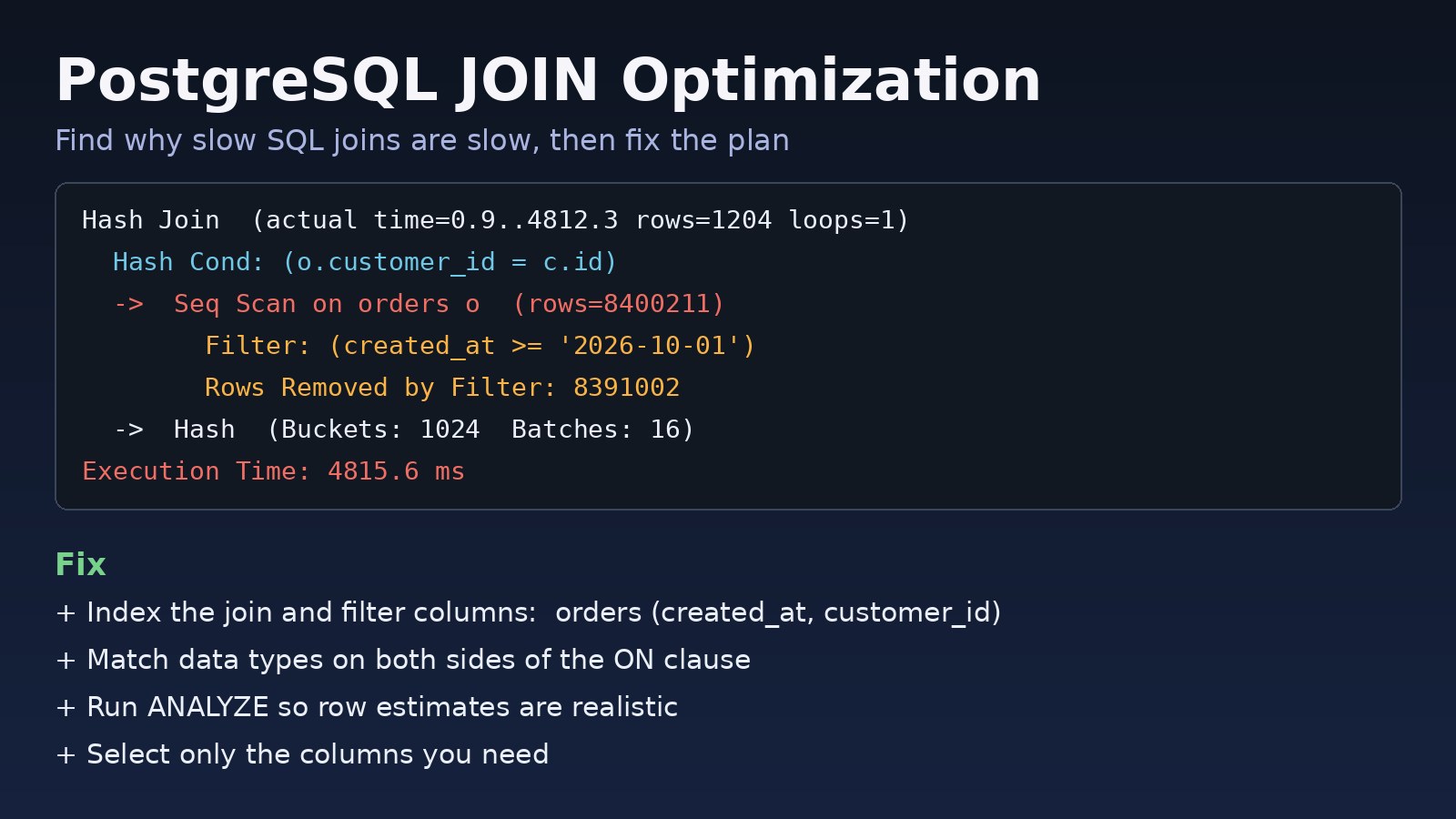
A report page that joins orders, customers and order_items worked fine in development, but in production it takes several seconds and sometimes times out. PostgreSQL join optimization is mostly about one thing: helping the planner find the matching rows without reading entire tables. This guide shows how to spot slow SQL joins, read what the plan is telling you, and fix them with the right PostgreSQL indexes, statistics and query changes.
The Problem: Slow SQL Joins in PostgreSQL
A join combines rows from two or more tables based on a condition, usually a foreign key such as orders.customer_id = customers.id. With small tables almost any plan is fast. As tables grow to millions of rows, a missing index, a type mismatch or a bad row estimate can turn a 5 ms query into a 5 second one.
Typical places this shows up are dashboards, ERP reports, admin list pages with filters, and Laravel Eloquent queries that use join() or whereHas().
Symptoms of a Slow JOIN
- A query that joins two or more large tables is slow, while each table on its own responds quickly with a simple filter.
- The slow query log or
pg_stat_statementsshows the same join query near the top by total time. - The app hits timeouts such as
ERROR: canceling statement due to statement timeoutor Laravel showsSQLSTATE[57014]: Query canceled. - CPU or disk read activity on the database server spikes every time the report runs.
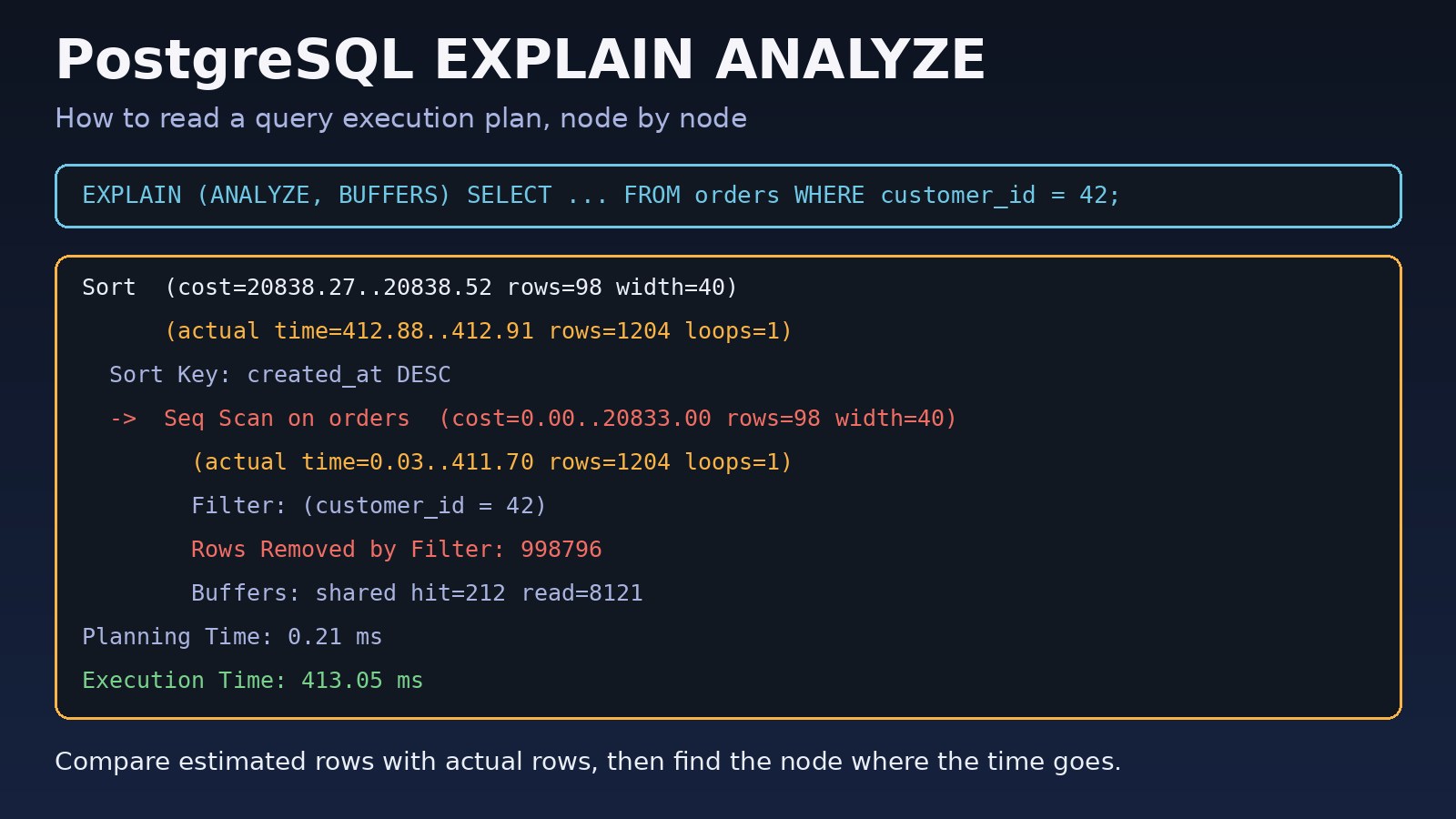
EXPLAIN ANALYZEshowsSeq Scanon a big table, aNested Loopwith a very highloopscount, or aHashnode withBatchesgreater than 1.
Root Cause: Why PostgreSQL Joins Become Slow
PostgreSQL has three join strategies, and the planner picks one based on its estimates of how many rows each side returns:
- Nested Loop: for each row on the outer side, look up matching rows on the inner side. Great when the outer side is small and the inner join column is indexed.
- Hash Join: build an in-memory hash table from one side, then probe it with the other. Good for large unsorted inputs, as long as the hash fits in
work_mem. - Merge Join: walk two inputs that are sorted on the join key. Good when both sides can be read in order from an index.
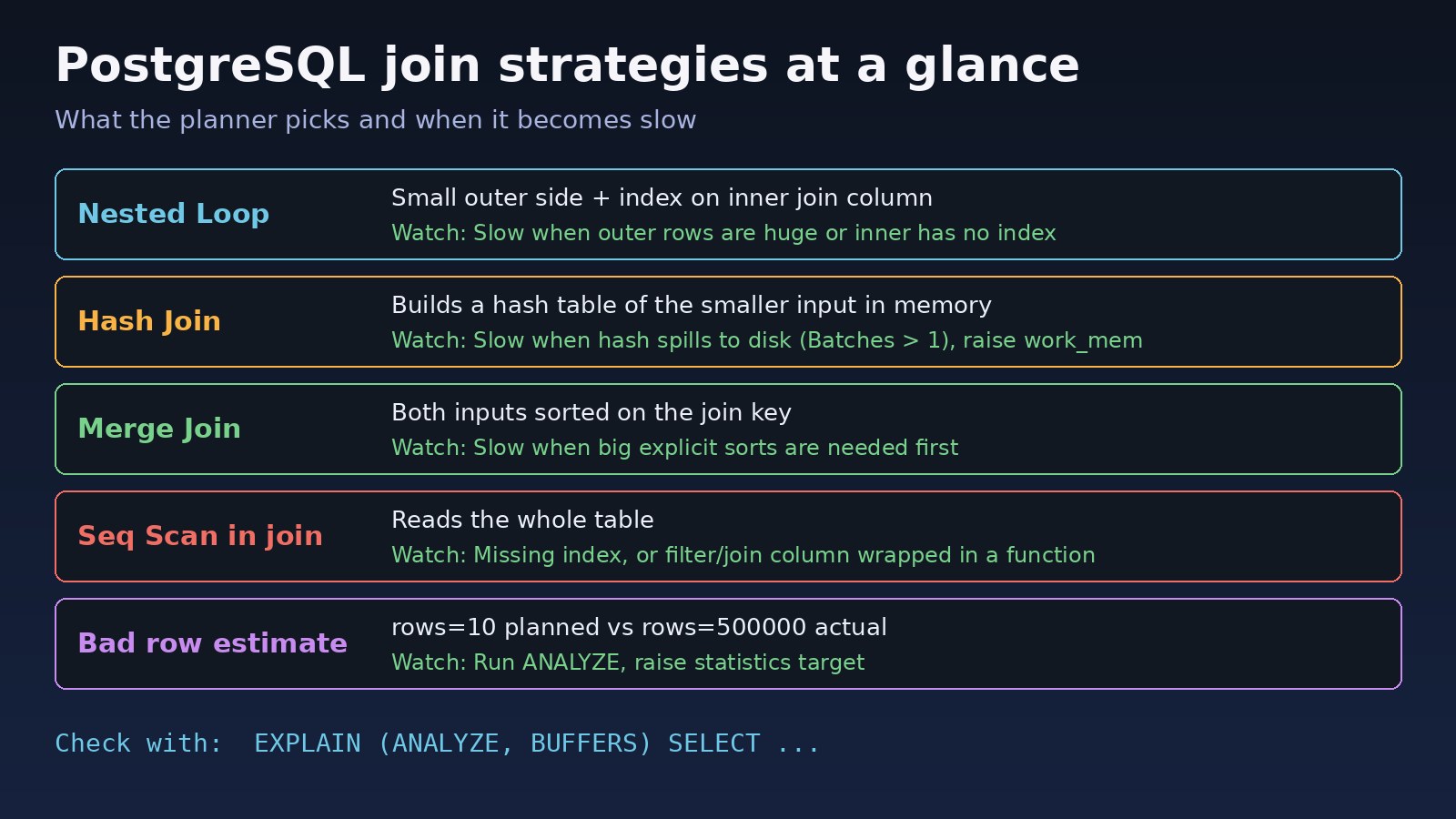
Joins become slow for a small set of reasons:
- No index on the foreign key column. PostgreSQL automatically indexes primary keys and unique constraints, but not foreign key columns.
orders.customer_idhas no index unless you create one. - Filters that cannot use an index, for example
WHERE DATE(created_at) = '2026-10-01'orWHERE LOWER(email) = ...without a matching expression index. - Data type mismatches in the
ONclause, such asbigintjoined tovarchar, which force a cast on every row and can block index use. - Stale statistics, so the planner expects 10 rows and gets 500,000, then chooses a nested loop that runs half a million times.
- Too little
work_mem, so hash joins and sorts spill to disk. - Row multiplication: joining two one-to-many relations at once (for example items and payments of the same order) creates a huge intermediate result, which developers often hide with
DISTINCT.
Step-by-Step Solution
Step 1: Get the real plan with EXPLAIN ANALYZE
Always start with the actual plan, not a guess. Run it on a copy of production data or carefully in production, because ANALYZE executes the query.
EXPLAIN (ANALYZE, BUFFERS)
SELECT o.id, o.total, c.name
FROM orders o
JOIN customers c ON c.id = o.customer_id
WHERE o.created_at >= '2026-10-01'
  AND o.status = 'paid';
Look for the node with the largest actual time, sequential scans on big tables, and Rows Removed by Filter counts in the millions. If you are new to reading plans, see PostgreSQL EXPLAIN ANALYZE: how to read query plans.
Step 2: Index the join and filter columns
Most slow SQL joins are fixed here. Index the foreign key used in the join, and combine it with the columns you filter on:
-- the foreign key used in the join
CREATE INDEX CONCURRENTLY idx_orders_customer_id ON orders (customer_id);

-- filter + join column together for the query above
CREATE INDEX CONCURRENTLY idx_orders_status_created_customer
    ON orders (status, created_at, customer_id);

-- child table joined by order_id
CREATE INDEX CONCURRENTLY idx_order_items_order_id ON order_items (order_id);
Put columns compared with equality (status) before range columns (created_at). CONCURRENTLY avoids blocking writes while the index builds, but it cannot run inside a transaction block. Do not add indexes blindly: each one slows inserts and updates and uses disk space, so add the ones the plan actually needs.
Step 3: Make the conditions index-friendly
-- slow: function on the column prevents a plain index scan
WHERE DATE(o.created_at) = '2026-10-01'

-- fast: use a range on the raw column
WHERE o.created_at >= '2026-10-01'
  AND o.created_at <  '2026-10-02'

-- or index the expression you really query
CREATE INDEX CONCURRENTLY idx_customers_lower_email ON customers (LOWER(email));
Also check that both sides of the ON clause use the same data type. If orders.customer_id is bigint, the referenced column should be bigint too, not text.
Step 4: Refresh statistics
If estimated and actual row counts in the plan differ by orders of magnitude, update statistics:
ANALYZE orders;
ANALYZE customers;

-- give the planner more detail for a skewed column
ALTER TABLE orders ALTER COLUMN status SET STATISTICS 500;
ANALYZE orders;
Step 5: Reduce the rows before joining
Filter early and avoid joins that multiply rows. If you only need to know whether a related row exists, use EXISTS instead of a join plus DISTINCT:
-- row multiplication hidden by DISTINCT
SELECT DISTINCT c.id, c.name
FROM customers c
JOIN orders o ON o.customer_id = c.id
WHERE o.status = 'paid';

-- better: semi-join, stops at the first match
SELECT c.id, c.name
FROM customers c
WHERE EXISTS (
    SELECT 1 FROM orders o
    WHERE o.customer_id = c.id AND o.status = 'paid'
);
When you need totals from two child tables, aggregate each one first and then join the small results, instead of joining both children to the parent at once.
Step 6: Give hash joins enough memory
A Hash node showing Batches: 16 means the hash table did not fit in work_mem and spilled to disk. Test a higher value for the session that runs the report:
SET work_mem = '64MB';
EXPLAIN (ANALYZE, BUFFERS) SELECT ...;   -- check that Batches drops to 1
RESET work_mem;
Be careful raising it globally: work_mem applies per sort or hash operation, per connection, so a large value multiplied by many connections can exhaust server memory.
Code/Commands Examples
Find foreign key columns without an index
SELECT c.conrelid::regclass AS table_name,
       a.attname          AS fk_column,
       c.conname          AS constraint_name
FROM pg_constraint c
JOIN pg_attribute a
  ON a.attrelid = c.conrelid AND a.attnum = c.conkey[1]
WHERE c.contype = 'f'
  AND NOT EXISTS (
      SELECT 1 FROM pg_index i
      WHERE i.indrelid = c.conrelid
        AND i.indkey[0] = c.conkey[1]
  );
This checks single-column foreign keys and reports those whose column is not the first column of any index.
Find the slowest join queries with pg_stat_statements
CREATE EXTENSION IF NOT EXISTS pg_stat_statements;

SELECT calls,
       round(mean_exec_time::numeric, 1)  AS mean_ms,
       round(total_exec_time::numeric, 0) AS total_ms,
       left(query, 120)                   AS query
FROM pg_stat_statements
WHERE query ILIKE '%join%'
ORDER BY total_exec_time DESC
LIMIT 10;
The extension must also be listed in shared_preload_libraries in postgresql.conf, which requires a restart. The column names above are for PostgreSQL 13 and later.
Check whether an index is being used
SELECT relname, indexrelname, idx_scan
FROM pg_stat_user_indexes
WHERE relname IN ('orders', 'order_items', 'customers')
ORDER BY idx_scan;
Laravel: a join that uses the new index
// select only what the page needs
$orders = DB::table('orders as o')
    ->join('customers as c', 'c.id', '=', 'o.customer_id')
    ->where('o.status', 'paid')
    ->where('o.created_at', '>=', now()->subDays(30))
    ->select('o.id', 'o.total', 'c.name')
    ->orderByDesc('o.created_at')
    ->paginate(50);

// migration for the index
Schema::table('orders', function (Blueprint $table) {
    $table->index(['status', 'created_at', 'customer_id']);
});
Note that $table->foreignId('customer_id')->constrained() creates the constraint in PostgreSQL, but PostgreSQL itself does not index it. Add the index explicitly. For more Eloquent tips, read Laravel Eloquent optimization.
Verification
- Run the same
EXPLAIN (ANALYZE, BUFFERS)again. The bigSeq Scanshould be replaced by anIndex Scan,Index Only ScanorBitmap Index Scan, andExecution Timeshould drop. - Estimated and actual row counts should be in the same order of magnitude.
- Hash nodes should show
Batches: 1. - In
pg_stat_statements, the mean time for the query falls after you reset its stats withSELECT pg_stat_statements_reset();and let traffic run. - The report page or API endpoint responds within its target time under normal load.
Prevention
- Index every foreign key you join or delete by, as part of the same migration that adds the column.
- Review plans for new queries on realistic data volumes before release, not only on a small local database.
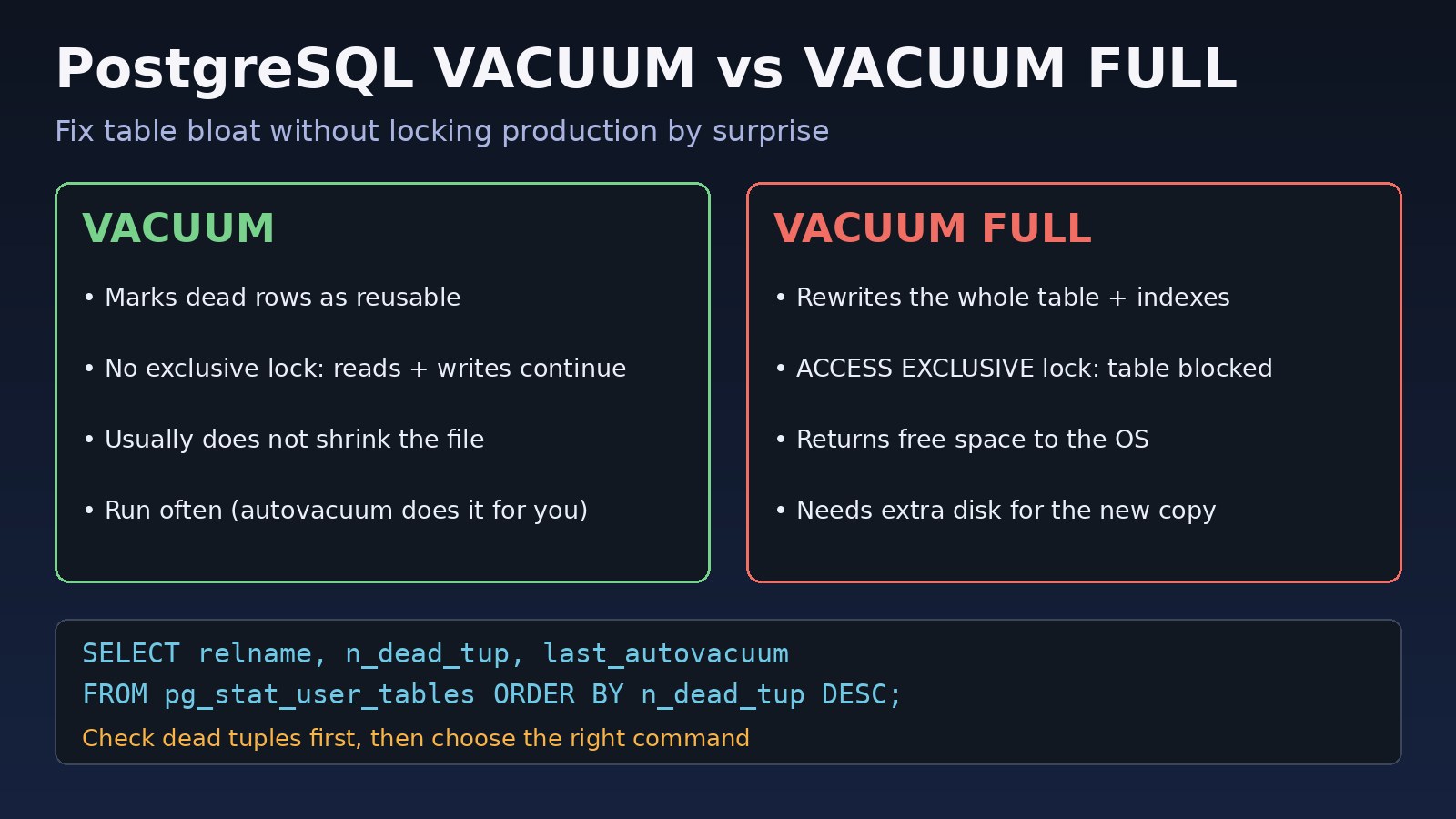
- Keep autovacuum and autoanalyze healthy so statistics stay fresh.
- Monitor
pg_stat_statementsweekly and log slow queries withlog_min_duration_statement. - Avoid functions on indexed columns in
WHEREandONclauses, and keep join column types identical. - Paginate and select only needed columns instead of
SELECT *across several joined tables.
For a wider checklist beyond joins, see how to optimize a slow PostgreSQL query step by step.
FAQs
What is the fastest way to start PostgreSQL join optimization?
Run EXPLAIN (ANALYZE, BUFFERS) on the slow query and look for a sequential scan on a large table. In most cases, adding an index on the join column, combined with the filter columns, gives the biggest improvement.
Does PostgreSQL automatically index foreign keys?
No. PostgreSQL indexes primary keys and unique constraints automatically, but not the referencing column of a foreign key. You need to create PostgreSQL indexes on foreign key columns yourself.
Why are my SQL joins slow even with indexes?
Common reasons are stale statistics, a function or cast on the indexed column, a data type mismatch in the ON clause, the query returning a large share of the table (where a sequential scan is cheaper), or a hash join spilling to disk because work_mem is too low.
Is a JOIN faster than a subquery in PostgreSQL?
Not automatically. The planner often turns IN and EXISTS subqueries into semi-joins. When you only check whether related rows exist, EXISTS is usually clearer and avoids duplicate rows. Compare the plans for your data.
Does the order of tables in a JOIN matter?
Usually not. The planner reorders inner joins to find a cheaper plan. With many tables, beyond join_collapse_limit (8 by default), it stops searching every order, so very large join queries can benefit from being simplified.
Comments
Join the discussion. Replies load on demand, up to 5 levels.
0 threads
No comments yet
Be the first to start the conversation.