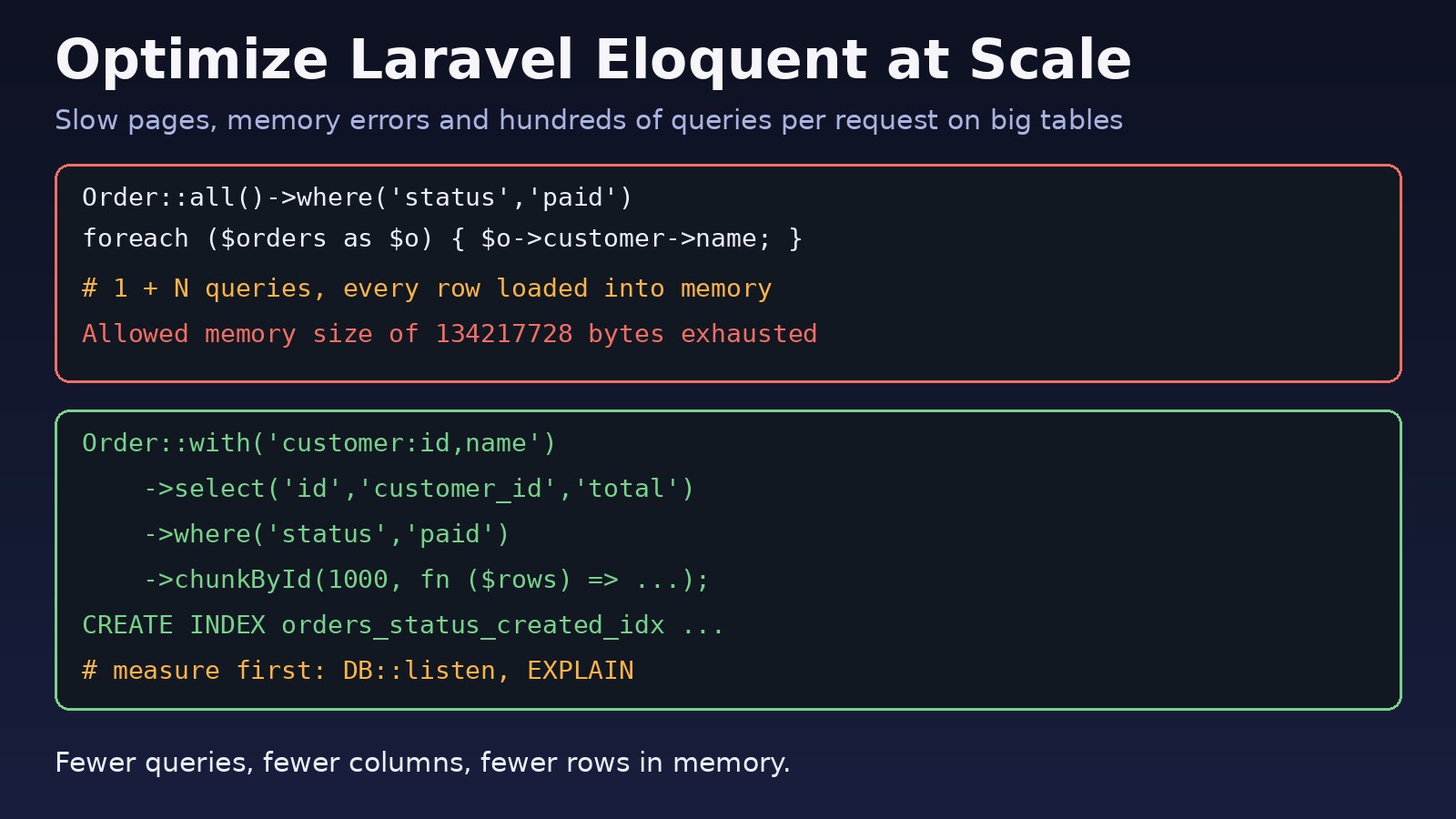
An Eloquent query that felt instant with 500 rows can take seconds, or crash with a memory error, once the table holds millions. The fix is rarely "drop Eloquent and write raw SQL". In most apps, laravel eloquent optimization comes down to a handful of habits: run fewer queries, fetch fewer columns, keep fewer rows in memory at once, and give the database the indexes it needs. This guide shows how to find the slow queries in a large Laravel database and fix each one with real code you can drop into an ERP, SaaS or admin panel today.
Problem: Eloquent Gets Slow on Large Tables
Eloquent makes data access easy to write, which also makes expensive patterns easy to write. A loop that touches a relationship, a Model::all() followed by collection filtering, or a whereHas() on an unindexed column all look harmless in code review. On a table with a few hundred rows nobody notices. On an orders, ledger or audit-log table with millions of rows, the same code turns into hundreds of queries per request, full table scans, or PHP running out of memory.
The good news is that Eloquent already has the tools to handle large databases. You just have to measure first and then apply the right one.
Symptoms of Poor Eloquent Performance
- List and report pages get slower every month as data grows, even though the code has not changed.
- Laravel Debugbar or Telescope shows dozens or hundreds of nearly identical
select * from ... where id = ?queries on one page. - Exports and scheduled jobs fail with
Allowed memory size of 134217728 bytes exhausted. - Requests hit
Maximum execution time of 30 seconds exceededor a 504 from Nginx. - The database server's CPU spikes while PHP-FPM workers sit waiting.
- The MySQL or PostgreSQL slow query log is full of queries without a usable index.
Root Cause: Why Eloquent Queries Slow Down
N+1 queries from lazy loading
Accessing $order->customer inside a loop runs one extra query per row unless the relationship was eager loaded. Fifty orders means fifty-one queries. Nested relationships multiply that. We cover the pattern in depth in N+1 query problems and application performance.
Loading everything into PHP
Order::all() or Order::get() without a tight where pulls every row and every column into memory as full model objects. Filtering afterwards with collection methods like ->where(), ->filter() or ->count() does the work in PHP instead of the database.
Selecting columns you never use
The default is select *. Wide tables with JSON, TEXT or blob columns move a lot of data over the network and into memory for no reason.
Missing or unusable indexes
Eloquent generates SQL; it cannot add indexes for you. Filtering or sorting on columns without an index forces a full scan. A function on the column, a leading wildcard LIKE '%term', or a composite index in the wrong column order can stop an index from being used.
Expensive query shapes
whereHas() compiles to an EXISTS subquery, deep OFFSET pagination scans and discards rows, and counting a relationship by loading it ($post->comments->count()) loads every comment just to count them.
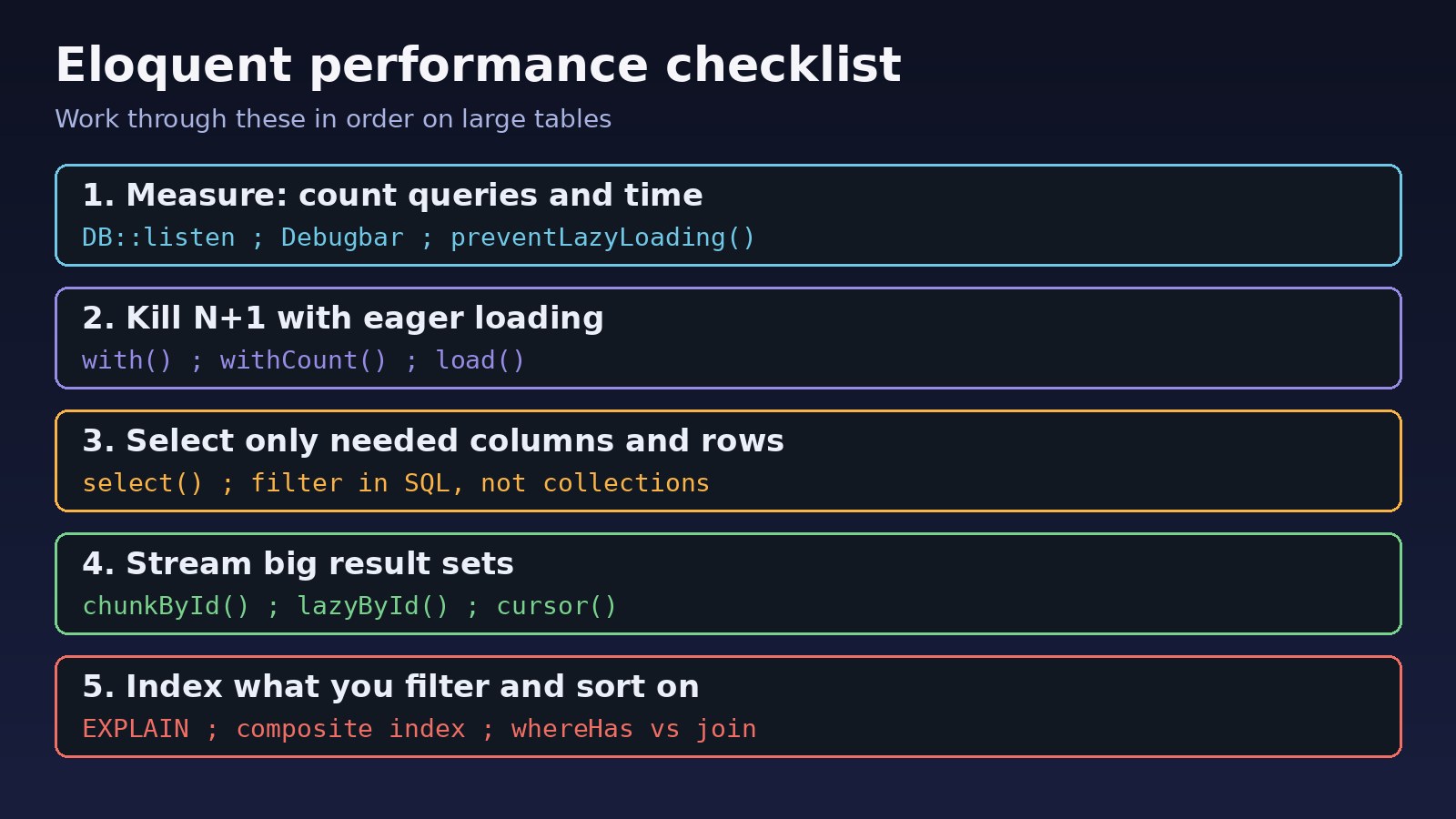
Step-by-Step Laravel Eloquent Optimization
Step 1: Measure queries before changing code
Guessing wastes time. Install Laravel Debugbar in development, or log every query with its duration:
// app/Providers/AppServiceProvider.php
use Illuminate\Support\Facades\DB;
use Illuminate\Support\Facades\Log;

public function boot(): void
{
    if (app()->isLocal()) {
        DB::listen(function ($query) {
            Log::debug($query->time.'ms '.$query->sql, $query->bindings);
        });
    }
}
For a single code path, wrap it with the query log and count what ran:
DB::enableQueryLog();
$orders = Order::where('status', 'paid')->latest()->take(50)->get();
foreach ($orders as $order) { $order->customer->name; }
dump(count(DB::getQueryLog()));   // 51 means N+1
On Laravel 10.15 and later you can also flag slow cumulative database time per request with DB::whenQueryingForLongerThan(500, fn ($connection) => Log::warning('Slow DB time')).
Step 2: Fix N+1 with eager loading
Load relationships up front with with(). Two queries replace fifty-one:
// Before: 1 + N queries
$orders = Order::latest()->take(50)->get();

// After: 2 queries
$orders = Order::with('customer')->latest()->take(50)->get();

// Nested and constrained relationships
$orders = Order::with([
    'customer:id,name,email',
    'items' => fn ($q) => $q->select('id', 'order_id', 'product_id', 'qty'),
    'items.product:id,name',
])->latest()->take(50)->get();
When selecting columns on an eager-loaded relationship, always include the keys Eloquent needs to match rows: the primary key and the foreign key (order_id above). If you leave them out, the relationship comes back empty.
Then make lazy loading fail loudly in development so new N+1 bugs never reach production:
// AppServiceProvider::boot()
use Illuminate\Database\Eloquent\Model;

Model::preventLazyLoading(! app()->isProduction());
Step 3: Count and aggregate in the database
Never load a relationship just to count or sum it. Use the aggregate helpers, which add a subquery instead:
$customers = Customer::withCount('orders')
    ->withSum('orders', 'total')
    ->get();

// $customer->orders_count, $customer->orders_sum_total

// Simple totals
$paid = Order::where('status', 'paid')->count();
$revenue = Order::where('status', 'paid')->sum('total');
Step 4: Select only the columns you need
// Before
$products = Product::where('active', true)->get();

// After
$products = Product::where('active', true)
    ->select('id', 'sku', 'name', 'price')
    ->get();

// Key-value list for a dropdown: no models at all
$options = Product::where('active', true)->pluck('name', 'id');
Step 5: Filter in SQL, not in collections
// Bad: loads every order, filters in PHP
$paid = Order::all()->where('status', 'paid')->where('total', '>', 1000);

// Good: the database filters and returns only matching rows
$paid = Order::where('status', 'paid')
    ->where('total', '>', 1000)
    ->get();
Step 6: Process large result sets in chunks
For exports, recalculations and backfills, never get() a million rows. Stream them:
// Processes 1,000 rows at a time, safe to update rows while iterating
Order::where('status', 'pending')
    ->chunkById(1000, function ($orders) {
        foreach ($orders as $order) {
            $order->update(['status' => 'expired']);
        }
    });

// Lazy collection with a small memory footprint
foreach (Order::where('year', 2026)->lazyById(1000) as $order) {
    fputcsv($handle, [$order->id, $order->total]);
}
Prefer chunkById() or lazyById() over chunk() when you modify the filtered column, because offset-based chunking skips rows as the result set shifts. cursor() runs one query and hydrates one model at a time, but it cannot eager load relationships, so use it only for flat data. For pure bulk updates, skip models entirely:
Order::where('status', 'pending')
    ->where('created_at', '<', now()->subDays(30))
    ->update(['status' => 'expired']);
Keep in mind that query-builder updates like this do not fire model events or observers.
Step 7: Add the right indexes
Copy the SQL from your query log and ask the database how it runs it. In Laravel 10 and later you can call ->explain() on a query builder too:
EXPLAIN SELECT id, customer_id, total
FROM orders
WHERE status = 'paid'
ORDER BY created_at DESC
LIMIT 50;

-- PostgreSQL: real timings
EXPLAIN ANALYZE SELECT ...;
In MySQL, type: ALL and a large rows estimate mean a full table scan. In PostgreSQL, look for Seq Scan on a big table. Add a composite index that matches the filter first and the sort second:
// database/migrations/2026_10_29_000000_add_orders_status_created_index.php
Schema::table('orders', function (Blueprint $table) {
    $table->index(['status', 'created_at']);
    $table->index('customer_id'); // if not already a foreign key index
});
Index foreign keys used in relationships, columns in frequent where clauses, and columns you sort by. On PostgreSQL, foreign key columns are not indexed automatically. For a full walkthrough of reading plans, see how to optimize a slow PostgreSQL query step by step.
Step 8: Replace slow whereHas and deep pagination
If whereHas() is slow even with indexes, try whereIn with a subquery or a join, and compare plans:
// whereHas: EXISTS subquery
$customers = Customer::whereHas('orders', fn ($q) => $q->where('status', 'paid'))->get();

// Alternative: IN subquery
$customers = Customer::whereIn('id',
    Order::select('customer_id')->where('status', 'paid')
)->get();
For large lists, paginate() runs an extra count(*) and uses OFFSET, which gets slower on later pages. Use simplePaginate() to skip the count, or cursorPaginate() for infinite scroll and APIs:
$orders = Order::where('status', 'paid')
    ->orderBy('id', 'desc')
    ->cursorPaginate(50);
Step 9: Cache expensive reads
Dashboard totals and reference data that change rarely can be cached in Redis for a short time:
$stats = Cache::remember('dashboard:order-stats', now()->addMinutes(10), function () {
    return Order::selectRaw('status, count(*) as total, sum(total) as amount')
        ->groupBy('status')
        ->get();
});
Clear or let the key expire when the underlying data changes. Caching hides a slow query; it does not fix it, so do it after the steps above.
Verification: Confirm Eloquent Performance Improved
- Re-run the page with the query log or Debugbar and compare the query count and total query time before and after.
- Run
EXPLAINagain and confirm the new index appears in thekeycolumn (MySQL) or as anIndex Scan(PostgreSQL). - Run the export or job with
php -d memory_limit=128M artisan your:commandto prove it now fits in a small memory limit. - Watch the slow query log for a day to make sure the query has dropped out.
// Quick memory check inside a command
$this->info('Peak memory: '.round(memory_get_peak_usage(true) / 1048576).' MB');
Prevention: Keep Laravel Queries Fast as Data Grows
- Keep
Model::preventLazyLoading()on in local and CI so N+1 bugs fail tests. - Add a feature test that asserts the query count for key pages stays below a limit.
- Add indexes in the same migration that introduces a new filter or sort column.
- Use
chunkById()orlazyById()for every job that touches large tables. - Review the slow query log weekly and seed a staging database with production-sized data.
- Move heavy reports to queued jobs and organise query logic in scopes or query classes, as described in how to structure a Laravel project for large applications.
FAQs
What is the fastest win for laravel eloquent optimization?
Fixing N+1 queries with with() usually gives the biggest improvement for the least effort, because it can cut a page from hundreds of queries to a few. Turn on preventLazyLoading() to find them.
Is Eloquent too slow for large databases?
No. Model hydration has some overhead, but most slow Eloquent code is slow because of the SQL it generates or the number of queries it runs. For heavy bulk work, the query builder (DB::table()) or a single update() avoids creating model objects.
chunk vs chunkById vs cursor vs lazy: which should I use?
Use chunkById() or lazyById() for most large jobs, especially when updating rows. cursor() uses one query and very little memory but cannot eager load. Plain chunk() is fine for read-only work where the filtered columns do not change.
How do I improve Laravel query optimization for reports?
Aggregate in SQL with selectRaw, groupBy, withCount and withSum, add composite indexes for the filters, run reports in queued jobs, and cache the results for a few minutes.
Why is whereHas slow in Laravel?
It generates an EXISTS subquery that depends on indexes on the related table's foreign key and filter columns. Add those indexes first; if it is still slow, compare it with a whereIn subquery or a join using EXPLAIN.
Does Eloquent performance depend on MySQL or PostgreSQL?
The techniques are the same on both. The differences are in reading EXPLAIN output and in details such as PostgreSQL not indexing foreign keys automatically.



Comments
Join the discussion. Replies load on demand, up to 5 levels.
0 threads
No comments yet
Be the first to start the conversation.