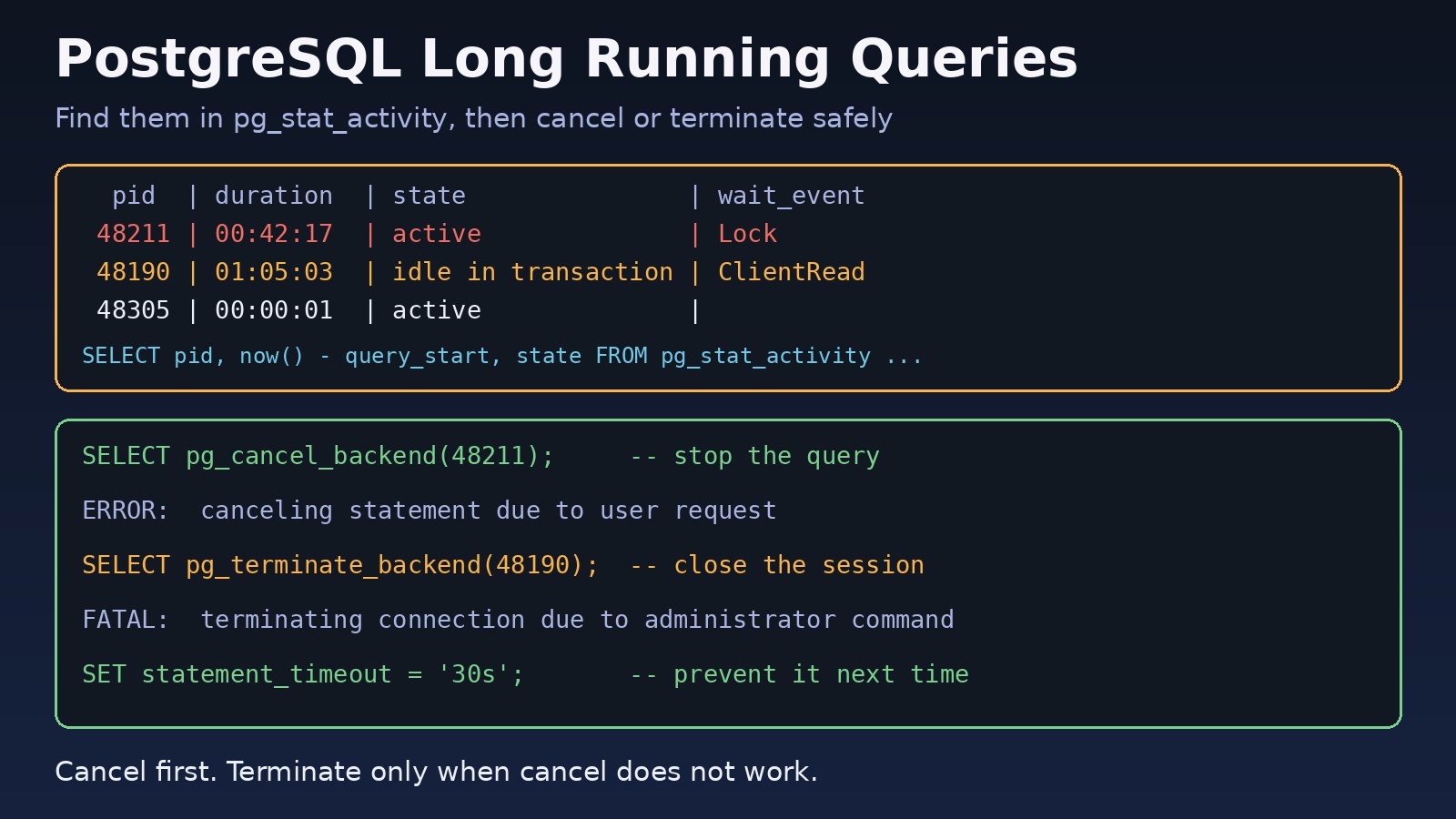
The app is slow, CPU on the database server is high, and requests that normally take milliseconds are timing out. Very often the reason is one or two postgresql long running queries holding locks, eating CPU or keeping a transaction open while everything else waits behind them. This guide shows how to find those queries in pg_stat_activity, stop them safely with pg_cancel_backend or pg_terminate_backend, and set timeouts so they do not come back.
The Problem: PostgreSQL Long Running Queries Block Your App
Every client connection in PostgreSQL is served by its own backend process. A query that runs for minutes is not just slow on its own. It can hold row or table locks, keep old row versions alive so VACUUM cannot clean them, and use a connection from a pool that is already small. Other requests queue up behind it, and from the outside it looks like the whole database is down.
Restarting PostgreSQL makes the symptom go away, but it drops every connection and hides the cause. A better approach is to find the exact process, stop only that one, and then fix why it ran so long.
Symptoms
- API requests or pages hang, then fail with timeouts from the app or the load balancer.
- Connection pool errors such as Laravel's
SQLSTATE[08006]or Node'stimeout exceeded when trying to connect, because every pooled connection is busy. - Simple
UPDATEorALTER TABLEstatements that never finish because they wait on a lock. - High CPU or disk I/O on the database host with only a few active sessions.
- Table bloat growing because old row versions cannot be removed.
Root Cause: Why Queries Run Too Long
- Missing indexes or a bad plan. A sequential scan on a large table, or a join that the planner estimated badly, can turn a fast query into a very long one.
- Lock waits. The query itself is fast, but it waits for a lock held by another session. In
pg_stat_activityit showswait_event_type = 'Lock'. - Idle in transaction. The application ran
BEGIN, did some work, and never sentCOMMITorROLLBACK. The session does nothing but keeps its locks. - Unbounded reports and exports. Admin reports, CSV exports or ad-hoc queries without a
LIMITor date range. - No timeouts. By default
statement_timeoutis0, which means a statement may run forever.
Step-by-Step Solution
Step 1: Find long running queries in pg_stat_activity
Connect with psql as a superuser or a role that is a member of pg_monitor (otherwise you cannot see other users' query text) and run:
SELECT pid,
       usename,
       datname,
       application_name,
       client_addr,
       state,
       wait_event_type,
       wait_event,
       now() - query_start AS duration,
       left(query, 120)    AS query
FROM pg_stat_activity
WHERE state <> 'idle'
  AND backend_type = 'client backend'
  AND pid <> pg_backend_pid()
  AND now() - query_start > interval '1 minute'
ORDER BY duration DESC;
Read the result carefully before you stop anything:
state = 'active'means the query is running right now.state = 'idle in transaction'means a transaction is open but no query is running. Usenow() - xact_startornow() - state_changeto see how long it has been open.wait_event_typeandwait_eventtell you what the session is waiting for:Lock,IO,LWLockorClient. If you see many LWLock waits, read the guide on PostgreSQL LWLock wait events.application_nameandclient_addrhelp you find which service or server sent the query.
Step 2: Find the blocking session with pg_blocking_pids
If many queries are waiting on locks, the real problem is usually one session at the top of the chain. pg_blocking_pids() (PostgreSQL 9.6 and later) shows who is blocking whom:
SELECT blocked.pid                  AS blocked_pid,
       left(blocked.query, 60)      AS blocked_query,
       blocking.pid                 AS blocking_pid,
       blocking.state               AS blocking_state,
       now() - blocking.xact_start  AS blocking_xact_age,
       left(blocking.query, 60)     AS blocking_query
FROM pg_stat_activity AS blocked
JOIN LATERAL unnest(pg_blocking_pids(blocked.pid)) AS b(pid) ON true
JOIN pg_stat_activity AS blocking ON blocking.pid = b.pid
ORDER BY blocking_xact_age DESC;
Stopping the blocking pid usually releases every waiting query at once. Stopping the waiting queries does not help, because the lock is still held.
Step 3: Cancel the query with pg_cancel_backend
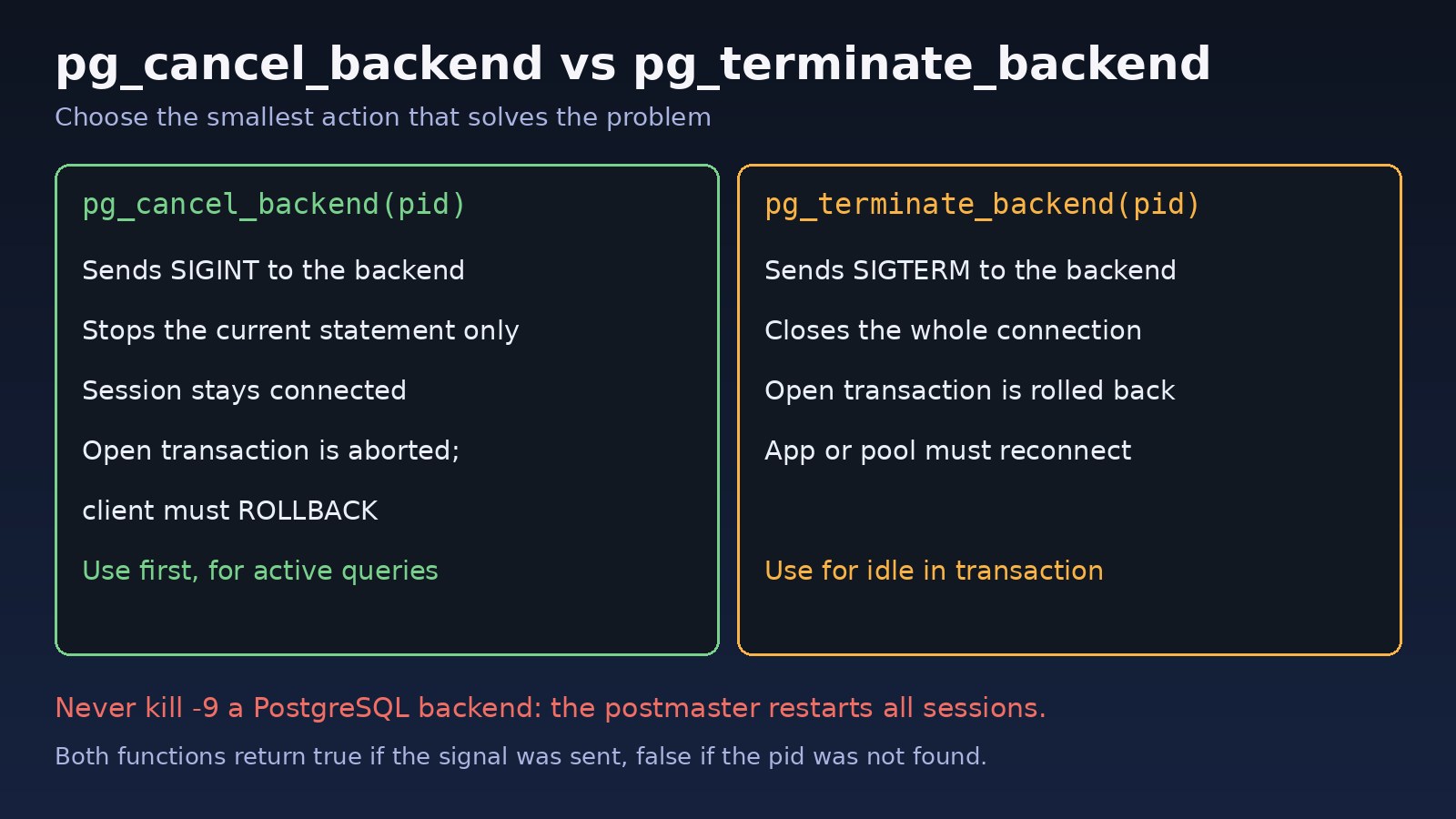
Always try the gentle option first. pg_cancel_backend(pid) stops the current statement but keeps the connection open:
SELECT pg_cancel_backend(48211);The function returns true if the signal was sent. The client that ran the query receives:
ERROR: canceling statement due to user requestIf that statement was inside a transaction, the transaction is now aborted and the client must run ROLLBACK before it can continue. A cancel does not always take effect instantly; the backend checks for interrupts at safe points, so give it a few seconds.
Step 4: Terminate the session with pg_terminate_backend
If the cancel does not work, or the session is idle in transaction (there is no running statement to cancel), close the connection:
SELECT pg_terminate_backend(48190);

-- PostgreSQL 14+: wait up to 5 seconds and return false if it is still alive
SELECT pg_terminate_backend(48190, 5000);
The server rolls back any open transaction, releases its locks, and the client sees:
FATAL:  terminating connection due to administrator command
server closed the connection unexpectedly
	This probably means the server terminated abnormally
	before or while processing the request.
Most connection pools reconnect automatically, but check your app logs afterwards. Never use kill -9 on a PostgreSQL backend from the shell. The postmaster treats that as a crash, terminates every other session and goes through crash recovery.
Step 5: Check permissions
A superuser can signal any backend. A normal role can signal backends of the same role, and members of the built-in pg_signal_backend role can signal other non-superuser backends. If you get ERROR: permission denied to cancel query or a similar message, grant it to your operations role:
GRANT pg_signal_backend TO ops_admin;Code/Commands Examples
Terminate old idle in transaction sessions in bulk
Review the list with a plain SELECT first, then run the same filter with the function call:
SELECT pid, usename, application_name,
       now() - state_change AS idle_for,
       pg_terminate_backend(pid) AS terminated
FROM pg_stat_activity
WHERE state = 'idle in transaction'
  AND backend_type = 'client backend'
  AND now() - state_change > interval '10 minutes'
  AND pid <> pg_backend_pid();
Cancel active queries from one application only
SELECT pid, pg_cancel_backend(pid)
FROM pg_stat_activity
WHERE state = 'active'
  AND application_name = 'reports-worker'
  AND now() - query_start > interval '5 minutes';
Set timeouts per role or database
-- Stop any statement from the web app after 30 seconds
ALTER ROLE app_user SET statement_timeout = '30s';

-- Close sessions that sit idle inside a transaction for 60 seconds
ALTER ROLE app_user SET idle_in_transaction_session_timeout = '60s';

-- Do not wait more than 5 seconds for a lock
ALTER ROLE app_user SET lock_timeout = '5s';

-- Log every statement slower than 1 second (server-wide)
ALTER SYSTEM SET log_min_duration_statement = '1s';
SELECT pg_reload_conf();
Role settings apply to new connections, so restart your app or let the pool recycle connections. When a timeout fires, you will see these messages, which makes them easy to spot in logs:
ERROR:  canceling statement due to statement timeout
ERROR:  canceling statement due to lock timeout
FATAL:  terminating connection due to idle-in-transaction timeout
Laravel and Node.js
For a single heavy report in Laravel, raise the limit only for that work instead of for the whole app:
DB::transaction(function () {
    DB::statement("SET LOCAL statement_timeout = '120s'");
    // heavy report query here
});
In Node.js with pg, the pool accepts the same settings as connection options:
const { Pool } = require('pg');

const pool = new Pool({
  connectionString: process.env.DATABASE_URL,
  statement_timeout: 30000,                     // ms
  idle_in_transaction_session_timeout: 60000,   // ms
});
Verification
- Run the Step 1 query again. The pid you stopped should be gone, and no other session should be older than your normal limits.
- Run the
pg_blocking_pidsquery and confirm it returns no rows. - Check that the timeouts are active for the app role: connect as that role and run
SHOW statement_timeout;andSHOW idle_in_transaction_session_timeout;. - Watch the PostgreSQL log for
duration:lines fromlog_min_duration_statementand for the timeout messages above. - Confirm the app's error rate and response times are back to normal.
Prevention
- Always set statement_timeout and idle_in_transaction_session_timeout for application roles. Give batch jobs and migrations their own role with higher limits.
- Use lock_timeout for migrations, so an
ALTER TABLEfails fast instead of blocking every query behind it. - Fix the slow query, not just the symptom. Run
EXPLAIN (ANALYZE, BUFFERS)on the queries you find and add the missing indexes. For Laravel apps, see Laravel Eloquent optimization for large databases. - Keep transactions short. Do not call external APIs or send emails while a database transaction is open.
- Monitor. Alert when the oldest active query or open transaction is older than a few minutes. Long open transactions also hold back cleanup, as covered in PostgreSQL WAL size increasing.
- Enable pg_stat_statements to find queries that are slow on average, not just the one running right now.
FAQs
What is the difference between pg_cancel_backend and pg_terminate_backend?
pg_cancel_backend stops only the current statement and leaves the connection open. pg_terminate_backend closes the whole connection and rolls back its open transaction. Try cancel first and terminate only when cancel does not work or the session is idle in a transaction.
Is it safe to use pg_terminate_backend in production?
Yes, for client sessions. PostgreSQL rolls back the transaction cleanly and releases its locks. The risk is on the application side: the work in that transaction is lost, so make sure it can be retried. Avoid terminating replication or system processes unless you know what they are.
Why does pg_cancel_backend return true but the query keeps running?
true only means the signal was sent. The backend stops at its next interrupt check, which is usually quick but can be delayed in some operations. If it is still running after a reasonable wait, use pg_terminate_backend.
How do I find postgresql long running queries automatically?
Set log_min_duration_statement to log slow statements, enable pg_stat_statements for averages, and run the pg_stat_activity query from Step 1 in your monitoring tool with an alert threshold.
Should I cancel autovacuum if it runs for a long time?
Usually not. Autovacuum is cleaning up dead rows, and it will simply start again later. Long autovacuum runs are a sign of table bloat or low autovacuum settings. Never stop a vacuum that is running to prevent transaction ID wraparound.
What does "canceling statement due to conflict with recovery" mean?
It appears on a read replica when a long query needs rows that replay from the primary wants to remove. It is a different problem from the ones above and is controlled by max_standby_streaming_delay and hot_standby_feedback.
Comments
Join the discussion. Replies load on demand, up to 5 levels.
0 threads
No comments yet
Be the first to start the conversation.