
Your query, migration or API call fails with ERROR: relation "users" does not exist, even though you are sure the table is there. The postgresql relation does not exist error (SQLSTATE 42P01) means PostgreSQL could not find a table, view, sequence or index with that exact name in the schemas it searched, in the database you are connected to. In almost every case the table exists somewhere else: a different schema, a different database, or under a name with different letter case. This guide walks through each cause, the commands that prove which one you have, and the fix for plain SQL, Laravel, Node.js and Prisma projects.
Problem: PostgreSQL Relation Does Not Exist
In PostgreSQL, "relation" is the internal word for anything stored in pg_class: tables, views, materialized views, sequences, indexes and foreign tables. When you write SELECT * FROM users, PostgreSQL folds the unquoted name to lower case, then looks for it in each schema listed in search_path, inside the current database only. If none of those lookups match, you get the error. PostgreSQL never searches other databases, and it never guesses at case.
Symptoms
The message looks slightly different depending on where it surfaces:
-- psql
ERROR:  relation "users" does not exist
LINE 1: SELECT * FROM users;
                      ^

-- Laravel / PHP PDO
SQLSTATE[42P01]: Undefined table: 7 ERROR:  relation "users" does not exist

-- Node.js (pg)
error: relation "orders" does not exist   code: '42P01'

-- Prisma (P2021)
The table `public.User` does not exist in the current database.

-- Sequences
ERROR:  relation "invoices_id_seq" does not exist
Common patterns around it:
- The query works in pgAdmin or DBeaver but fails from the application.
- It works locally and fails in Docker, CI or production right after deploy.
- The table was created with a tool that kept capital letters, such as
"Users"or"OrderItems". - The app uses a custom schema (for example
erpor a tenant schema) instead ofpublic.
Root Cause: Why PostgreSQL Says the Table Is Missing
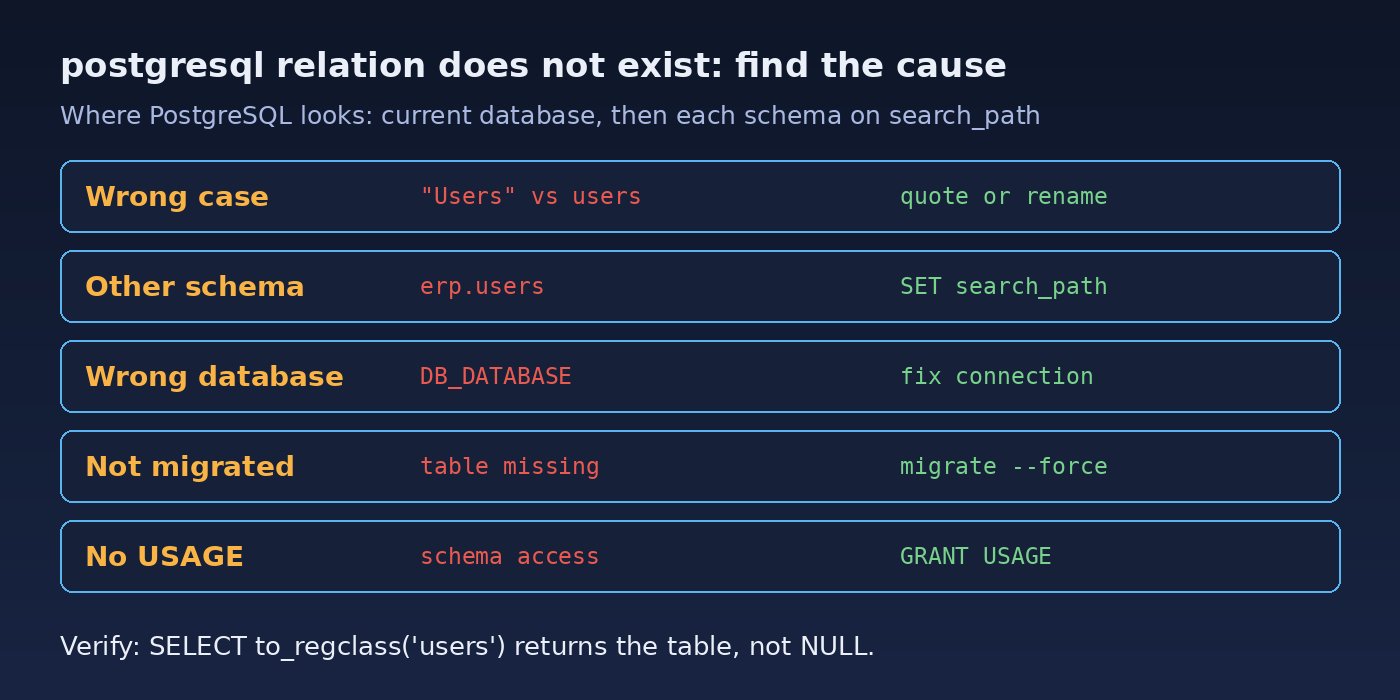
1. Case sensitivity and quoted identifiers
Unquoted identifiers are folded to lower case. If a table was created as CREATE TABLE "Users" (...), its real name is Users with a capital U, and SELECT * FROM Users looks for users. Many ORMs and GUI tools quote names, so mixed-case tables are a very common source of this error.
2. The table is in another schema (search_path)
By default search_path is "$user", public. A table in schema erp is invisible to SELECT * FROM invoices unless erp is on the path or you write erp.invoices.
3. You are connected to the wrong database
Each PostgreSQL database is separate. A wrong DB_DATABASE, DATABASE_URL, Docker service name or port can put the app in an empty database such as postgres while you inspect the right one by hand.
4. Migrations have not run (or failed half way)
A fresh environment, a new test database, or a migration that failed before creating the table leaves the schema incomplete. This is the usual PostgreSQL table missing case after a deploy.
5. Transactions, temp tables and permissions
A table created inside a transaction that was rolled back never existed for other sessions. Temporary tables exist only in the session that created them. And if your role lacks USAGE on a schema, names in that schema cannot be resolved from the search path, which can show up as this SQL schema error instead of a clear permission message.
Step-by-Step Solution
Step 1: Confirm where you are connected
Run this from the same connection the application uses (same user, host and database), not just from your GUI:
SELECT current_database(), current_user, current_schema();
SHOW search_path;
If current_database() is not the database you expected, the fix is in your connection settings, not in SQL.
Step 2: Find the table in every schema
Search the catalog case-insensitively so you see the real schema and the real spelling:
SELECT n.nspname AS schema, c.relname AS name, c.relkind
FROM pg_class c
JOIN pg_namespace n ON n.oid = c.relnamespace
WHERE c.relname ILIKE 'users'
ORDER BY 1;
In psql, \dt *.* lists every table in every schema and \dn lists schemas. No rows at all means the table really does not exist in this database. One row with a schema other than public means a search_path problem, and a name with capitals means a quoting problem.
Step 3: Fix a case-sensitivity problem
Either quote the name exactly every time, or rename the table to lower case once so it works unquoted:
-- quick fix: quote it exactly
SELECT * FROM "Users";

-- permanent fix: rename to lower case
ALTER TABLE "Users" RENAME TO users;
Renaming changes the name for every client, so update any code that still quotes the old name.
Step 4: Fix the schema or search_path
Qualify the table, or put the schema on the path for the role or the database:
-- qualify the name
SELECT * FROM erp.invoices;

-- set it for the current session
SET search_path TO erp, public;

-- make it permanent for the application role
ALTER ROLE app_user SET search_path = erp, public;

-- or for everyone connecting to this database
ALTER DATABASE erp_db SET search_path = erp, public;
ALTER ROLE and ALTER DATABASE settings apply to new connections, so restart the app or pooler afterwards. If the role cannot use the schema, grant it:
GRANT USAGE ON SCHEMA erp TO app_user;
GRANT SELECT, INSERT, UPDATE, DELETE ON ALL TABLES IN SCHEMA erp TO app_user;
Step 5: Run or repair migrations
If the table is truly missing, create it with your migration tool rather than by hand, so every environment matches. In Laravel:
php artisan config:clear
php artisan migrate:status
php artisan migrate --force
For PostgreSQL schemas other than public, set search_path in the pgsql connection in config/database.php (older Laravel versions call this key schema). If a migration fails part way, see how to fix Laravel migration failed errors before running it again.
In Node.js projects using Prisma, the schema comes from the connection string:
# .env
DATABASE_URL="postgresql://app_user:secret@db:5432/erp_db?schema=erp"

npx prisma migrate status
npx prisma migrate deploy
With the plain pg driver, check that PGDATABASE or the database option points to the right database, and use schema-qualified names or set options: '-c search_path=erp,public' in the client config.
Step 6: Fix sequence "relation does not exist" errors
Errors like relation "invoices_id_seq" does not exist usually come from a hard-coded sequence name after a table rename, or a dump restored without its sequences. Ask PostgreSQL for the real name instead of guessing:
SELECT pg_get_serial_sequence('erp.invoices', 'id');If sequences are out of sync rather than missing, follow how to fix PostgreSQL auto-increment sequence errors.
Code and Commands: Quick Diagnostic Script
Paste this into psql as the application user to answer all the key questions at once:
SELECT current_database() AS db, current_user AS usr;
SHOW search_path;
SELECT to_regclass('public.users')  AS in_public,
       to_regclass('users')         AS via_search_path;
SELECT table_schema, table_name
FROM information_schema.tables
WHERE lower(table_name) = 'users';
-- replace erp with your own schema name
SELECT has_schema_privilege('erp', 'USAGE') AS can_use_erp;
to_regclass returns NULL instead of raising an error, so it is safe to use in scripts and health checks. Note that information_schema.tables only shows tables your role has some privilege on, while pg_class shows everything. In Docker setups, also confirm the app container talks to the right service:
docker compose exec app env | grep -E 'DB_|DATABASE_URL'
docker compose exec db psql -U postgres -c '\l'
If psql itself refuses to connect, fix authentication first with how to fix PostgreSQL peer authentication failed.
Verification
SELECT to_regclass('users');run as the application user returns the table name, notNULL.- The original query runs without schema qualification (if you fixed
search_path) or with it (if you chose qualified names). php artisan migrate:statusornpx prisma migrate statusshows no pending migrations.- The application endpoint that failed now returns data, and logs show no new
42P01errors after a restart.
Prevention
- Use lower-case, unquoted, snake_case names for tables and columns so quoting never matters.
- Manage every schema change through migrations and run them automatically in deploy and CI pipelines.
- Set
search_pathonce at the role or database level for apps that use a custom schema, and document it. - Add a startup or health check that runs
to_regclasson a few critical tables and fails fast when they are missing. - Keep database names and connection strings in environment variables per environment, and print the connected database name in debug logs.
- For multi-tenant schemas, set the tenant's
search_pathat the start of each request or transaction, especially behind a connection pooler.
FAQs
What does relation does not exist mean in PostgreSQL?
PostgreSQL could not find a table, view, sequence or index with that name in the schemas on your search_path in the current database. "Relation" is PostgreSQL's general term for these objects.
Why is my PostgreSQL table missing when I can see it in pgAdmin?
pgAdmin is probably connected to a different database, a different schema, or as a different user. Compare current_database(), current_user and SHOW search_path in both places.
Why does SELECT * FROM Users fail when the table is called Users?
Unquoted names are folded to lower case, so PostgreSQL looks for users. Use SELECT * FROM "Users" or rename the table to lower case.
How do I fix this SQL schema error in Laravel?
Check DB_DATABASE in .env, set the correct search_path for the pgsql connection, run php artisan config:clear, then php artisan migrate.
Can missing permissions cause relation does not exist?
Yes. Without USAGE on a schema, the role cannot resolve names inside it. Grant USAGE on the schema and the needed privileges on its tables.
What is SQLSTATE 42P01?
It is the PostgreSQL error code for undefined_table, the code behind every "relation does not exist" message, which drivers such as PDO, pg and Prisma pass through.


Comments
Join the discussion. Replies load on demand, up to 5 levels.
0 threads
No comments yet
Be the first to start the conversation.