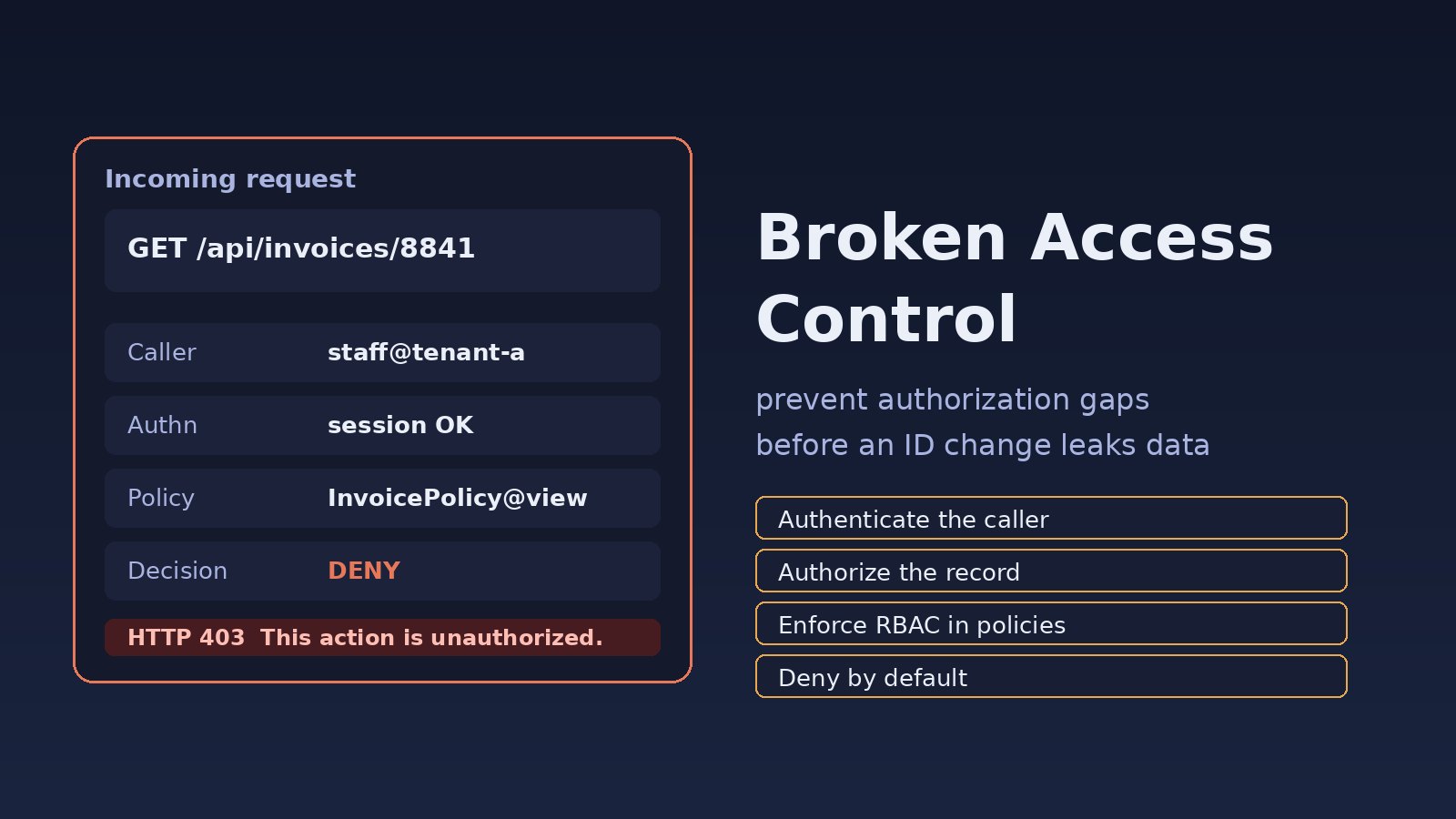
A staff user opens /api/invoices/8841 and sees another branch's invoice. They did not break encryption or steal a password. They changed one number in the URL, and the API said yes. That is broken access control: the application proved who the caller was, then handed over a record they should never see. This guide shows how to find those gaps in Laravel and Next.js apps and close them with server-side checks and RBAC security.
Problem: Authentication Is Not Authorization
Authentication answers "who are you?" Authorization answers "are you allowed to do this to this record?" Many APIs stop after the first question. A valid Sanctum token or session cookie gets the request through middleware, and the controller then loads whatever ID arrived in the route. The result is a class of authorization vulnerabilities that show up constantly in ERP screens: invoices, employee files, approval queues, exports and tenant-scoped reports.
OWASP lists broken access control as A01 in the OWASP Top 10:2021, because missing or inconsistent authorization is still one of the most common ways web apps leak data. If you are still wiring login itself, start with Laravel Sanctum authentication; the rest of this post assumes users can already sign in and focuses on what happens after that.
Symptoms
- Changing an invoice, order or user ID in a URL or JSON body returns someone else's record with HTTP 200 instead of 403.
- Admin-only paths such as
/api/admin/usersor/api/reports/exportwork for a regular staff account if someone knows the path. - The React or Next.js UI hides "Delete" and "Export" buttons, but
DELETE /api/orders/12still succeeds. - The client sends a
role,is_adminortenant_idfield and the server trusts it. - A user whose role was revoked can still perform the old actions until a token happens to expire.
- A search or CSV export returns rows from another team or another tenant.
PATCH /api/users/meaccepts{"role":"admin"}and upgrades the account.- Application logs show almost no 403 responses on object routes, only 200 and 404.
Root Cause: The Server Never Asked "May They?"
The underlying mistake is nearly always the same: the code identifies a record and returns it, without asking whether this user may see or change this record. Typical sources:
- Ownership skipped.
Invoice::findOrFail($id)with no policy. This is the classic IDOR-shaped bug; the deeper object-level fixes live in how to prevent IDOR vulnerabilities. - UI-only checks. A button is hidden with
{user.role === 'admin' && ...}, but the API has no matching rule. - Inconsistent checks.
showandupdatecall a policy;export, bulk actions, queued PDF jobs and WebSocket payloads do not. - Client-supplied identity. The handler uses
$request->input('user_id')or aX-User-Idheader instead ofauth()->id(). - Mass assignment of privileges.
role,is_adminortenant_idsit in$fillable, so any update endpoint can rewrite them. - No tenant boundary. Multi-tenant queries filter by ID but forget
tenant_id, so tenant A can read tenant B's row if the numeric ID exists.
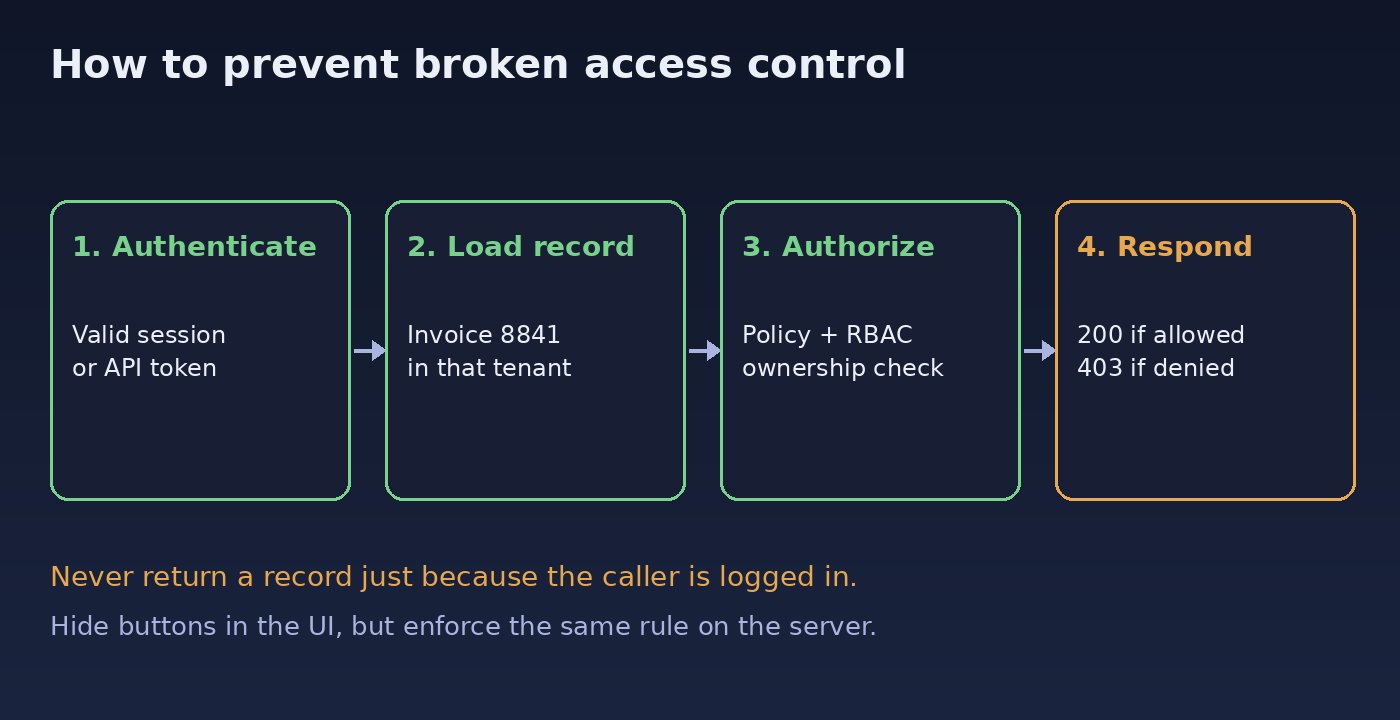
Step-by-Step: How to Prevent Broken Access Control
Step 1: Write down who may do what
Before touching code, list the actions that matter: view, update, delete, approve, export, impersonate, manage users. For each action, write the rule in plain language: "a staff user may view invoices they created in their own tenant; a manager may view all invoices in that tenant; nobody may view another tenant." That matrix becomes your policies and your tests. If you cannot state the rule, the code will not enforce it consistently.
Step 2: Deny by default on the server
Every privileged controller action should fail closed. In Laravel, that means authorizing before you return or mutate the model. Compare the two handlers:
// Unsafe: any authenticated user can load any invoice ID
public function show(int $id)
{
    return Invoice::findOrFail($id);
}

// Safe: the policy decides, and a missing rule denies access
public function show(Invoice $invoice)
{
    $this->authorize('view', $invoice);

    return $invoice;
}
If authorization fails, Laravel throws Illuminate\Auth\Access\AuthorizationException and the API responds with HTTP 403 and the message This action is unauthorized. Do not catch that exception just to return the record anyway. Route-model binding is fine here: a missing row still 404s, and a row the user must not see 403s.
Step 3: Put RBAC security in policies, not scattered if statements
Role checks copied across controllers drift. One action checks $user->role === 'admin', another checks a permission string, a third forgets the tenant. Centralize RBAC security in a policy (or a dedicated authorizer) so every entry point shares the same rule. The existing guide to Laravel role based permissions covers roles, permissions and feature flags in more depth; the policy below is the access-control piece you call from every action:
class InvoicePolicy
{
    public function view(User $user, Invoice $invoice): bool
    {
        if ($user->tenant_id !== $invoice->tenant_id) {
            return false;
        }

        if ($user->can('invoices.view_all')) {
            return true;
        }

        return $user->id === $invoice->user_id;
    }

    public function update(User $user, Invoice $invoice): bool
    {
        return $this->view($user, $invoice)
            && $user->can('invoices.update');
    }

    public function export(User $user): bool
    {
        return $user->can('invoices.export');
    }
}
Register the policy (Laravel 11+ discovers app/Policies/InvoicePolicy automatically when naming matches). Then call $this->authorize('export', Invoice::class) on collection endpoints that have no single model instance. The same method should run inside queued jobs that generate PDFs or send reports, because a job bypasses HTTP middleware.
Step 4: Never trust the client for identity or role
Take the user and tenant from the authenticated session, not from the request body. Keep privilege columns out of mass assignment:
class User extends Authenticatable
{
    protected $fillable = ['name', 'email', 'password'];
    // Do not put role, is_admin or tenant_id in $fillable.
}

public function updateProfile(Request $request)
{
    $data = $request->validate([
        'name' => ['required', 'string', 'max:120'],
        'email' => ['required', 'email'],
    ]);

    $request->user()->update($data);

    return $request->user();
}
In a Next.js route handler the same rule applies. Hiding a nav item is not authorization. The API route must compare the session to the record:
// app/api/invoices/[id]/route.ts
export async function GET(
  _req: Request,
  { params }: { params: Promise<{ id: string }> },
) {
  const session = await getSession();
  if (!session) {
    return Response.json({ message: "Unauthenticated." }, { status: 401 });
  }

  const { id } = await params;
  const invoice = await db.invoice.findUnique({ where: { id } });

  const allowed =
    invoice &&
    invoice.tenantId === session.tenantId &&
    (session.permissions.includes("invoices.view_all") ||
      invoice.userId === session.userId);

  if (!allowed) {
    return Response.json({ message: "This action is unauthorized." }, { status: 403 });
  }

  return Response.json(invoice);
}
Step 5: Cover the endpoints people forget
Access control bugs hide in the edges. Review exports, bulk updates, search endpoints that accept arbitrary filters, file downloads, signed URLs, webhook viewers, and real-time channels. A query such as Invoice::query()->whereIn('id', $ids)->get() must still constrain tenant_id and apply the same policy to each row (or use a scoped query that cannot return foreign rows). If a manager can view a record, that does not automatically mean they can export the whole table.
Global scopes help as a backstop, not as the only control:
// app/Models/Invoice.php
protected static function booted(): void
{
    static::addGlobalScope('tenant', function (Builder $query) {
        if ($tenantId = auth()->user()?->tenant_id) {
            $query->where('tenant_id', $tenantId);
        }
    });
}
A global tenant scope stops many cross-tenant leaks, but it does not replace object-level checks inside a tenant. Two staff users in the same company still should not read each other's private drafts unless a permission says they may.
Step 6: Lock the rule in with tests
Authorization regressions are silent: the page still works for the developer who owns the data. Write tests that act as the wrong user and expect a denial:
public function test_user_cannot_view_another_users_invoice(): void
{
    $owner = User::factory()->create();
    $stranger = User::factory()->create([
        'tenant_id' => $owner->tenant_id,
    ]);
    $invoice = Invoice::factory()->for($owner)->create();

    $this->actingAs($stranger)
        ->getJson("/api/invoices/{$invoice->id}")
        ->assertForbidden();
}

public function test_staff_cannot_run_the_admin_export(): void
{
    $staff = User::factory()->create();
    $staff->givePermissionTo('invoices.view_own');

    $this->actingAs($staff)
        ->getJson('/api/invoices/export')
        ->assertForbidden();
}

public function test_owner_can_view_their_invoice(): void
{
    $owner = User::factory()->create();
    $invoice = Invoice::factory()->for($owner)->create();

    $this->actingAs($owner)
        ->getJson("/api/invoices/{$invoice->id}")
        ->assertOk()
        ->assertJsonPath('id', $invoice->id);
}
Verification
- Run the authorization tests and confirm the negative cases return 403, not 404 or 200. A 404 can be appropriate when you do not want to reveal that a row exists, but pick one behaviour and test it.
- Confirm policies are actually registered: call
php artisan route:listand grep controllers forauthorize(orGate::. Actions with no call are suspects. - On staging, sign in as a least-privileged test account you created for this purpose and open the export, admin and "view other record" screens your testers already use. You should see 403 pages, not someone else's data.
- Search logs after a release for object routes that return only 200s. A healthy API produces 403s when test accounts touch records they do not own.
- Try updating a profile with an extra
rolefield in a local request and confirm the column does not change.
Prevention
- Default deny. A missing policy method should not fall through to allow.
- Call the same policy from HTTP controllers, jobs, artisan commands and broadcast channel callbacks.
- Keep
role,is_adminandtenant_idout of user-facing form requests. - Add a code-review check: every new
findOrFail($id)orwhere('id', $id)on a sensitive model needs an authorize call or a scoped query. - When a production incident slips through, add a failing test for that exact case before you patch it, so the same gap cannot return unnoticed.
- Re-check authorization whenever you add GraphQL resolvers, mobile endpoints or bulk tools. New doors need the same lock.
FAQs
What is broken access control?
Broken access control is when a user can perform an action or read a record outside the permissions you intended. That includes viewing another user's invoice, calling an admin export as staff, or raising their own role through a profile form.
How do authorization vulnerabilities differ from authentication bugs?
Authentication vulnerabilities are about proving identity: missing login, weak sessions, stolen tokens. Authorization vulnerabilities happen after a valid login, when the server does not enforce what that identity is allowed to do. A correct password does not grant access to every row in the table.
How does RBAC security help?
RBAC security maps users to roles and roles to permissions such as invoices.view_all or invoices.export. Combined with ownership and tenant checks inside policies, it gives you one place to change the rules instead of hunting through controllers.
Is hiding a button in React enough to prevent broken access control?
No. The UI can improve the experience, but anyone can call the API directly. Every mutation and every read of a sensitive record must be authorized on the server.
Is this the same thing as IDOR?
IDOR (insecure direct object reference) is one common shape of broken access control: the app exposes an internal ID and does not check ownership. Broken access control also covers missing function-level checks, trusted client-supplied roles and forgotten bulk endpoints.
How should I test access control without attacking production?
Use automated tests and dedicated staging accounts that already belong to you. Assert both the allowed case (the owner gets 200) and the denied case (another user gets 403). Do not probe live customer data.



Comments
Join the discussion. Replies load on demand, up to 5 levels.
0 threads
No comments yet
Be the first to start the conversation.