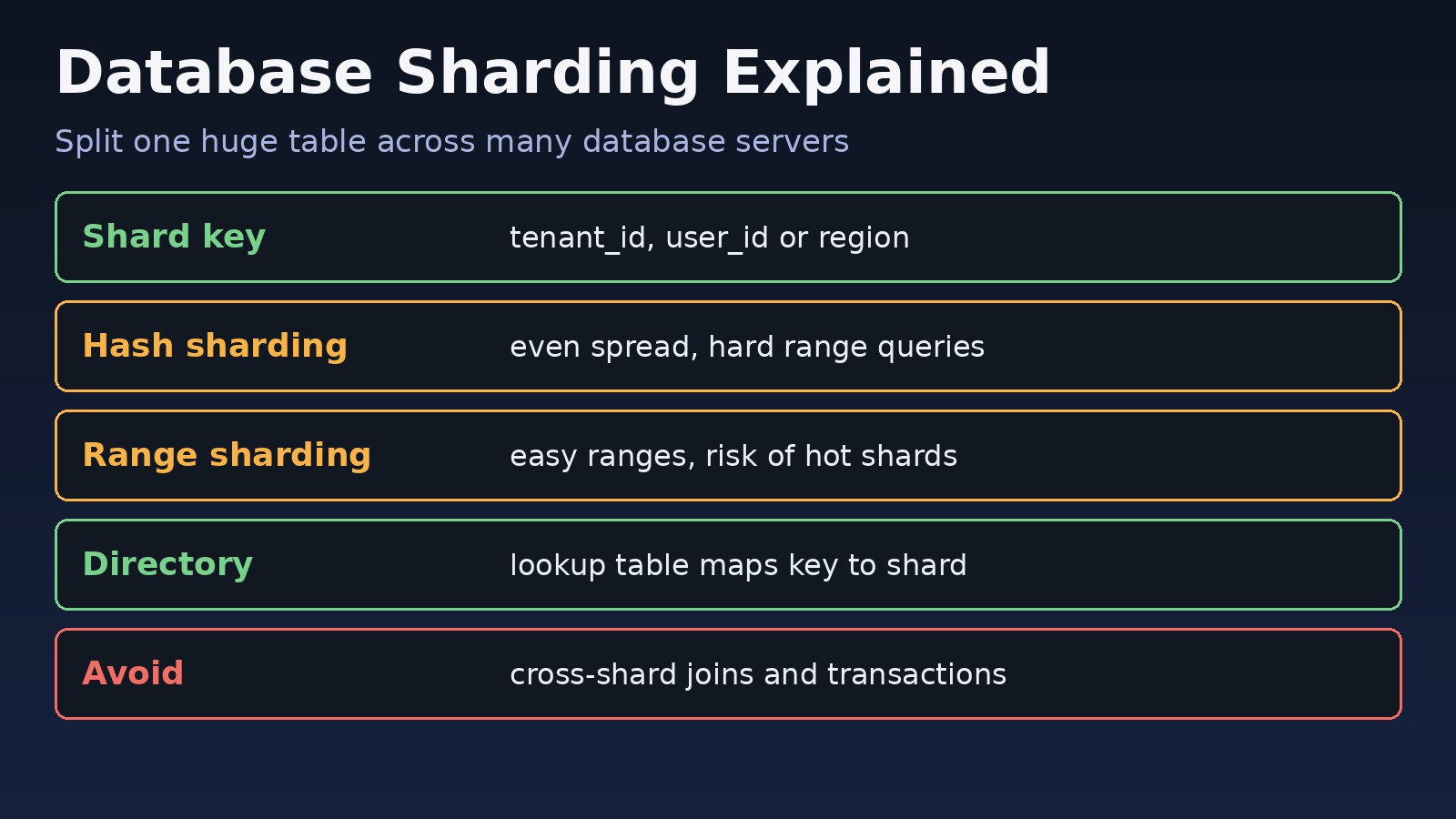
Your PostgreSQL or MySQL server has been upgraded twice, read replicas are already in place, and the biggest tables still keep growing. Writes queue up, vacuum or index maintenance takes hours, and a single disk holds everything. Database sharding solves this by splitting one logical dataset across several independent database servers, each holding a slice of the rows. This guide explains when sharding is the right move, how to pick a shard key, and how to implement it with practical examples in PostgreSQL, Laravel and Node.js.
The Problem: One Database Server Can No Longer Keep Up
Most applications start on one database, and that is the right call. Vertical scaling (a bigger machine) and read replicas carry you a long way; if you have not tried them yet, read horizontal vs vertical scaling and PostgreSQL read replicas vs sharding first. Replicas only scale reads, though. Every write still lands on one primary, and every row still lives on one disk. A multi-tenant ERP, an events table that grows by millions of rows a day, or a SaaS product with large customers can outgrow that single primary.
Symptoms That Point to Sharding
- Write latency rises even after query and index tuning.
- The primary's CPU or disk I/O stays near its limit during normal traffic.
- The largest server size your provider offers is already in use or close.
- Backups, restores,
VACUUMor schema migrations on big tables take too long to run safely. - One large tenant's workload slows down every other tenant.
Commands to confirm where the pressure is:
-- Largest tables in PostgreSQL
SELECT relname, pg_size_pretty(pg_total_relation_size(relid)) AS size
FROM pg_catalog.pg_statio_user_tables
ORDER BY pg_total_relation_size(relid) DESC LIMIT 10;

-- Tables with the most writes
SELECT relname, n_tup_ins, n_tup_upd, n_tup_del
FROM pg_stat_user_tables
ORDER BY n_tup_ins + n_tup_upd + n_tup_del DESC LIMIT 10;
Root Cause: All Writes and Data Live on a Single Node
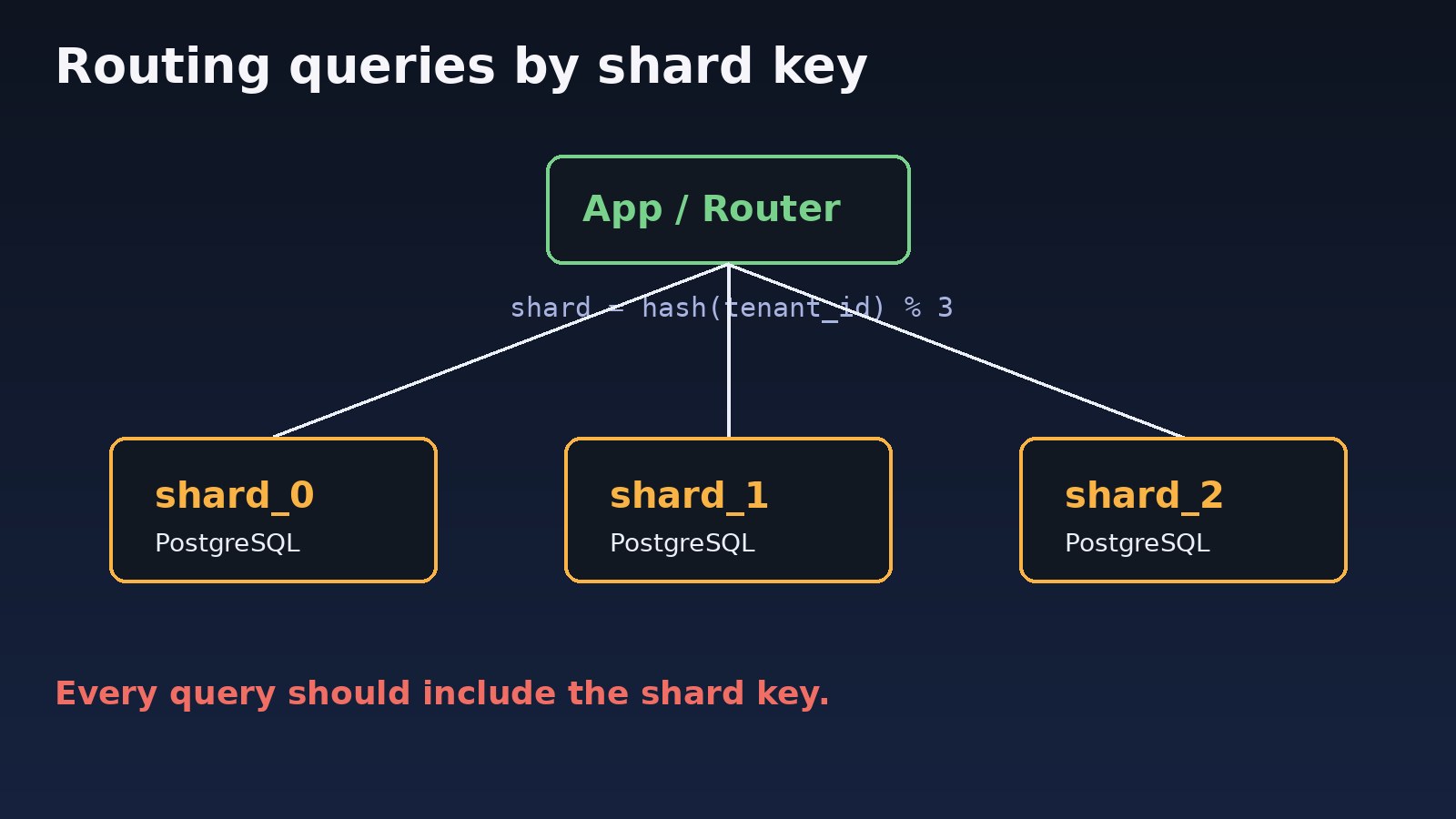
A single primary is a hard ceiling. CPU, memory, disk throughput and WAL generation all belong to one machine. Sharding, also called horizontal partitioning across servers, removes that ceiling by giving each server only part of the data. The router (your application, a proxy or an extension) uses a shard key to decide which server owns a row.
Do not confuse it with PostgreSQL's built-in declarative partitioning. Partitioning splits a table into pieces on the same server, which helps maintenance and pruning but not write capacity. Sharding puts the pieces on different servers.
Step-by-Step Solution: Database Sharding Strategies in Practice
Step 1: Exhaust cheaper options first
Sharding adds permanent complexity. Before you start, fix slow queries, add the right indexes, use connection pooling (PgBouncer), cache hot reads in Redis, archive old rows and move reads to replicas. If the write load or data size still exceeds one server, continue.
Step 2: Choose the shard key
The shard key is the most important decision, because changing it later means moving data. A good key:
- Appears in almost every query (for example
tenant_idin a multi-tenant ERP oruser_idin a consumer app). - Has high cardinality, so data can spread across many shards.
- Keeps related rows together, so joins and transactions stay on one shard.
- Does not concentrate traffic: a timestamp key sends all new writes to the newest shard.
Step 3: Pick a sharding strategy
- Hash sharding:
shard = hash(key) % N. Spreads data evenly, but range queries hit every shard and changing N moves many rows. Consistent hashing or a large fixed number of logical shards reduces that cost. - Range sharding: keys 1 to 1,000,000 on shard 0, the next range on shard 1. Simple and good for range scans, but prone to hot shards.
- Directory (lookup) sharding: a small table maps each tenant to a shard. Most flexible: you can move one big tenant to its own server. The directory must be cached and highly available.
- Geographic sharding: data stored by region, useful for latency and data residency rules.
Step 4: Route every query
Either the application chooses the connection, or a layer such as the Citus extension for PostgreSQL or Vitess for MySQL routes queries for you. Application-level routing is easy to start with; a routing layer is easier to operate at larger scale.
Step 5: Generate globally unique IDs
Auto-increment IDs collide across shards. Use UUIDs (UUIDv7 keeps them roughly time-ordered for better index locality) or an ID scheme that encodes the shard.
Step 6: Migrate gradually
Create the new shards, backfill data per tenant, dual-write or use logical replication to stay in sync, switch reads, then switch writes, one tenant group at a time. Keep a rollback path for each step.
Code/Commands: Sharding Examples
Directory-based sharding in Laravel
Define one connection per shard in config/database.php:
'pgsql_shard_0' => [
    'driver' => 'pgsql',
    'host' => env('SHARD0_HOST'),
    'database' => env('DB_DATABASE'),
    'username' => env('DB_USERNAME'),
    'password' => env('DB_PASSWORD'),
],
'pgsql_shard_1' => [
    'driver' => 'pgsql',
    'host' => env('SHARD1_HOST'),
    'database' => env('DB_DATABASE'),
    'username' => env('DB_USERNAME'),
    'password' => env('DB_PASSWORD'),
],
Store the tenant-to-shard map in the main database and cache it in Redis:
<?php

namespace App\Support;

use Illuminate\Support\Facades\Cache;
use Illuminate\Support\Facades\DB;

class ShardRouter
{
    public static function connectionFor(int $tenantId): string
    {
        $shard = Cache::remember("tenant_shard:{$tenantId}", 3600, fn () =>
            DB::connection('pgsql')->table('tenant_shards')
                ->where('tenant_id', $tenantId)->value('shard_no')
        );

        return "pgsql_shard_{$shard}";
    }
}

// Usage: every query for a tenant goes to its shard
$orders = DB::connection(ShardRouter::connectionFor($tenantId))
    ->table('orders')
    ->where('tenant_id', $tenantId)
    ->latest()
    ->limit(50)
    ->get();
For Eloquent models, call Order::on(ShardRouter::connectionFor($tenantId)) or set the connection in a middleware once the tenant is resolved.
Hash-based routing in Node.js
const { Pool } = require('pg');
const crypto = require('crypto');

const shards = [
  new Pool({ connectionString: process.env.SHARD0_URL }),
  new Pool({ connectionString: process.env.SHARD1_URL }),
  new Pool({ connectionString: process.env.SHARD2_URL }),
];

function shardFor(userId) {
  const h = crypto.createHash('md5').update(String(userId)).digest();
  return shards[h.readUInt32BE(0) % shards.length];
}

async function getUserOrders(userId) {
  const { rows } = await shardFor(userId).query(
    'SELECT * FROM orders WHERE user_id = $1 ORDER BY created_at DESC LIMIT 50',
    [userId]
  );
  return rows;
}
Distributed tables with Citus on PostgreSQL
Citus shards tables transparently and routes queries by the distribution column. A quick local test with Docker:
docker run -d --name citus -p 5432:5432 -e POSTGRES_PASSWORD=secret citusdata/citus
psql -h localhost -U postgresCREATE TABLE orders (
tenant_id bigint NOT NULL,
id uuid NOT NULL DEFAULT gen_random_uuid(),
total numeric(12,2),
created_at timestamptz DEFAULT now(),
PRIMARY KEY (tenant_id, id)
);
SELECT create_distributed_table('orders', 'tenant_id');
-- Small shared lookup tables are copied to every node
SELECT create_reference_table('currencies');Note that the primary key includes tenant_id; unique constraints on a distributed table must include the distribution column.
Verification: Check Data Distribution and Query Routing
-- Citus: rows and size per shard placement
SELECT nodename, count(*) AS shards, pg_size_pretty(sum(shard_size)) AS size
FROM citus_shards WHERE table_name = 'orders'::regclass
GROUP BY nodename;

-- A query with the shard key should hit a single shard
EXPLAIN SELECT * FROM orders WHERE tenant_id = 42;

-- Application-level sharding: compare counts on each shard
SELECT count(*) FROM orders;   -- run on every shard
Look for an even spread of rows and size, and confirm queries that include the shard key are routed to one shard (Citus shows Task Count: 1). Watch p95 write latency and CPU on each node under load; if one shard stays much busier than the others, you have a hot key.
Prevention: Avoiding Common Sharding Mistakes
- Include the shard key in every query, and add a test or lint check that flags queries without it.
- Avoid cross-shard joins and transactions; keep data that changes together on the same shard, and use reference tables for small shared data.
- Plan rebalancing from day one with many logical shards mapped to fewer physical servers.
- Back up and monitor each shard separately; a shard failure is a partial outage.
- Run schema migrations against all shards with the same tooling and version tracking.
- Reports that need all data are better served by a warehouse or analytics replica than by fan-out queries. For the bigger picture, see scalable system design for millions of users.
FAQs
What is database sharding in simple terms?
It is splitting one large dataset across multiple database servers so each server stores and serves only part of the rows, chosen by a shard key.
What is the difference between sharding and horizontal partitioning?
Horizontal partitioning splits a table's rows into pieces. When those pieces stay on one server it is usually called partitioning; when they live on separate servers it is called sharding.
Which database sharding strategies are most common?
Hash, range, directory (lookup) and geographic sharding. Multi-tenant SaaS and ERP systems often use directory sharding by tenant because it allows moving large tenants independently.
When should I not shard my database?
When indexing, caching, connection pooling, read replicas or a larger server can still handle the load. Sharding makes joins, transactions, migrations and reporting harder.
Does Laravel support database sharding?
Laravel has no built-in sharding, but multiple connections and DB::connection() or Model::on() make application-level routing straightforward. Packages for multi-tenancy can also switch connections per tenant.



Comments
Join the discussion. Replies load on demand, up to 5 levels.
0 threads
No comments yet
Be the first to start the conversation.