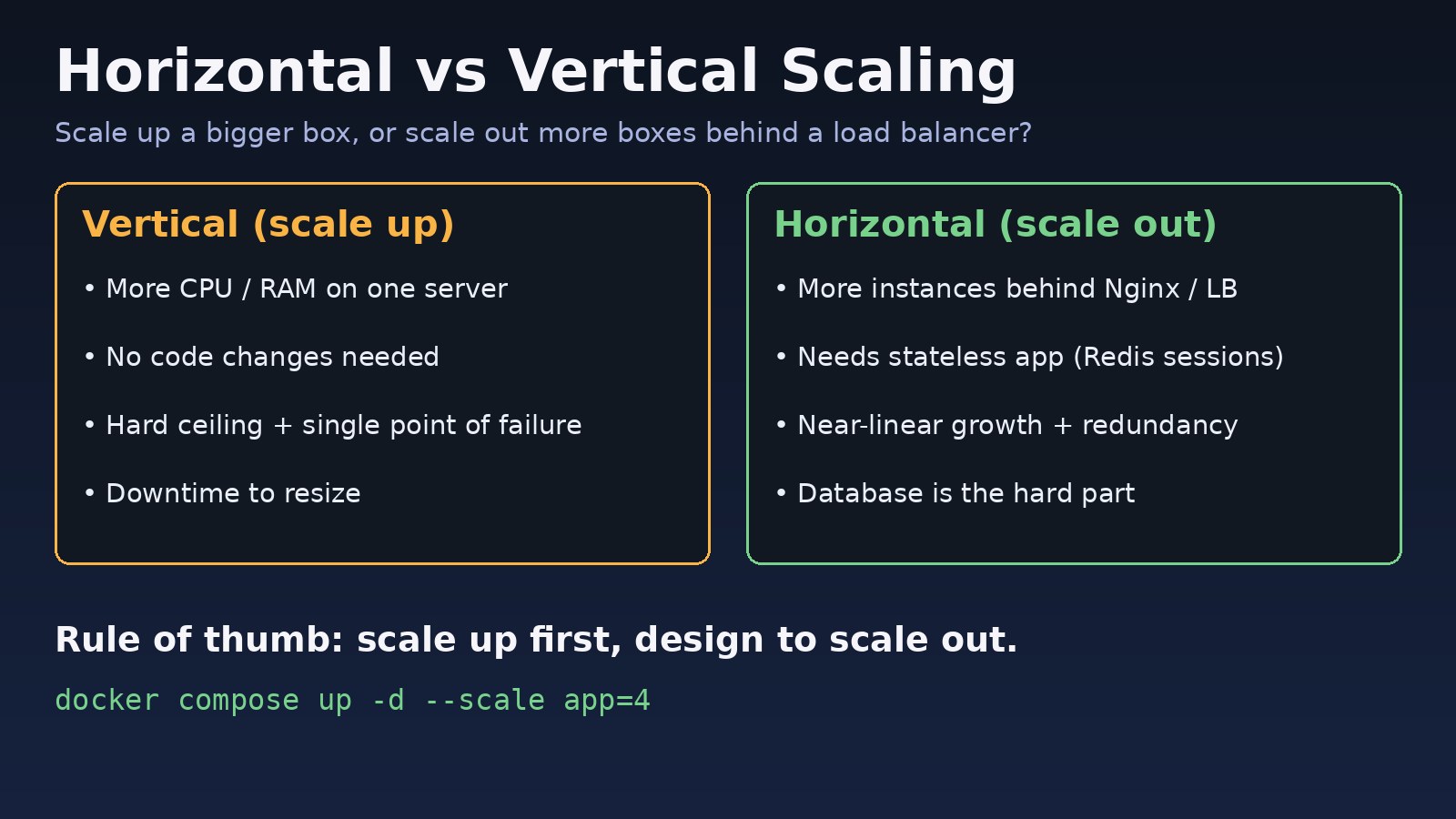
Your Laravel ERP or Next.js app is getting slow, CPU sits near 100% at peak hours, and someone asks: should we buy a bigger server or add more servers? That is the horizontal vs vertical scaling decision. Vertical scaling means giving one machine more CPU, RAM or faster disks. Horizontal scaling means running more instances behind a load balancer. Choosing wrong wastes money or leaves you with an outage you cannot fix by resizing. This guide shows how to measure the bottleneck, when each approach works, and the exact steps to scale out a stack built on Nginx, Docker, PostgreSQL and Redis.
The Problem: Your Server Can No Longer Keep Up
Every application eventually outgrows its first server. The trouble is that "add capacity" can mean two very different things, and the right one depends on which resource is exhausted and whether your application can run as more than one copy. Many teams resize the VM again and again until they hit the largest instance size, then discover the app stores sessions on local disk and cannot be split.
Symptoms That You Need a Server Scaling Strategy
# CPU saturated, load average above core count
$ uptime
 14:02:11 up 41 days,  load average: 11.84, 10.92, 9.70   # on a 4-core VM

# Memory pressure and OOM kills
$ dmesg | grep -i "killed process"
Out of memory: Killed process 23117 (php-fpm8.3)

# App workers exhausted
WARNING: [pool www] server reached pm.max_children setting (40), consider raising it

# Database limits
FATAL: sorry, too many clients already- p95 response time climbs during business hours and recovers at night.
- Nginx returns 502 or 504 when traffic spikes.
- A single server reboot or deploy takes the whole application offline.
- Background jobs (reports, imports, emails) fall hours behind.
Root Cause: Horizontal vs Vertical Scaling Explained
What vertical scaling (scale up) does
You resize the same machine: more vCPUs, more RAM, NVMe disks. It needs no code changes, and it is often the fastest fix. Its limits are a hard ceiling on instance size, cost that grows faster than capacity at the top end, usually a reboot to resize, and a single point of failure that remains.
What horizontal scaling (scale out) does
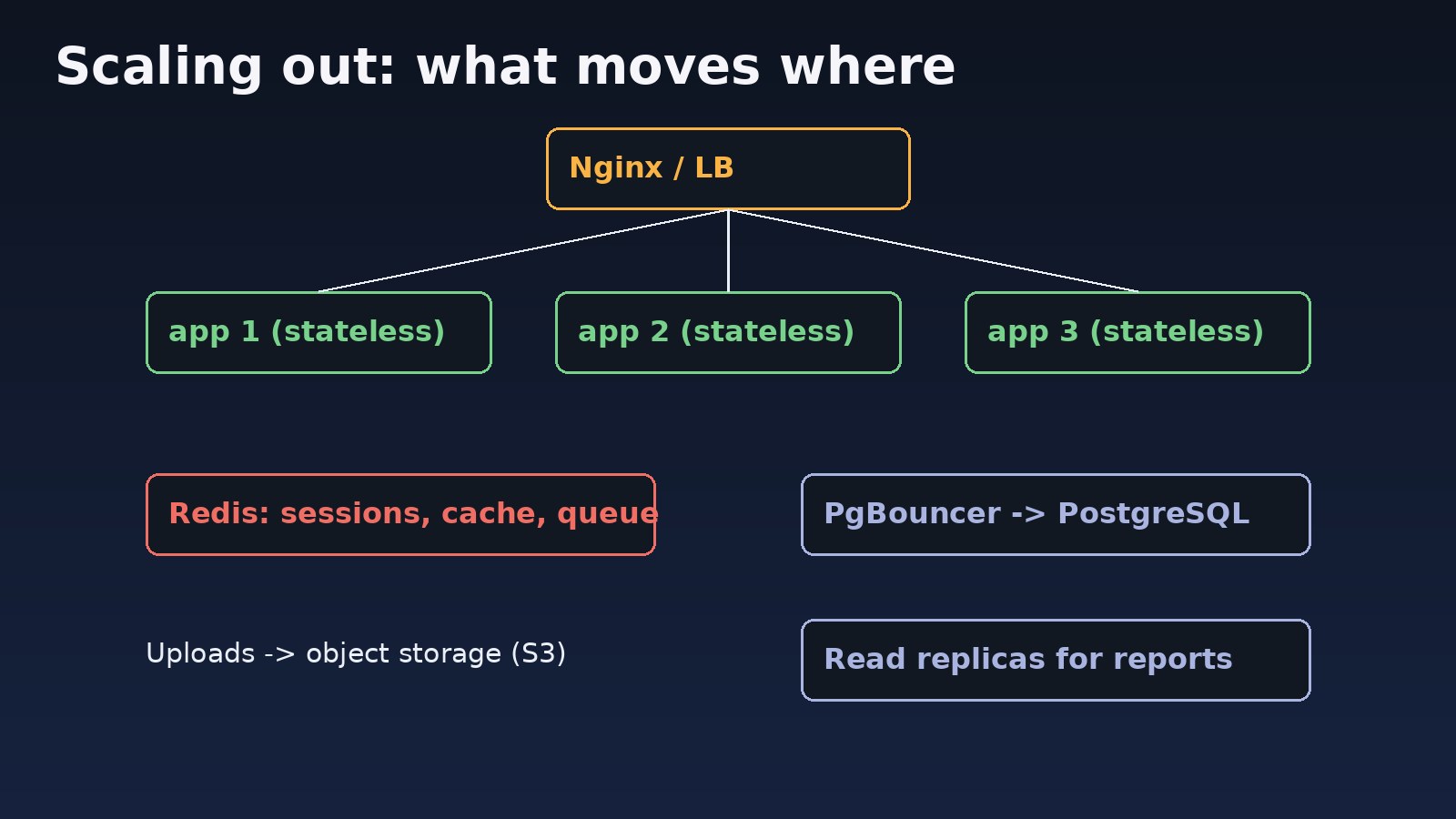
You run several identical app instances and spread traffic with Nginx, HAProxy or a cloud load balancer. Capacity grows by adding nodes and one failed node does not take the site down. The catch: the app must be stateless. Sessions, cache, uploads and scheduled jobs cannot live on one box.
Why the database is the hard part of database scaling
Stateless web servers scale out easily. PostgreSQL and MySQL do not: writes go to one primary. Database scaling usually means scaling the primary up, adding read replicas, pooling connections, and only later partitioning or sharding.
Step-by-Step Solution: Choosing and Applying a Scaling Strategy
Step 1: Measure which resource is the bottleneck
# CPU, memory, I/O wait on the app server
vmstat 1 10
iostat -xz 1 5
free -m

# per-container usage in Docker
docker stats --no-stream

# slowest queries in PostgreSQL (needs pg_stat_statements)
psql -c "SELECT calls, round(mean_exec_time) AS ms, left(query,80)
         FROM pg_stat_statements ORDER BY total_exec_time DESC LIMIT 10;"
If the slowest queries dominate, fix indexes first; neither kind of scaling fixes a missing index. If the app server CPU or RAM is saturated, continue. Run a load test (k6 or wrk) to confirm, as described in how to handle concurrent users.
Step 2: Scale up first when it is cheap
For a small team, doubling a 2-vCPU VM to 4 vCPUs is often the right first move. After resizing, retune the software or the extra hardware goes unused:
; /etc/php/8.3/fpm/pool.d/www.conf  (more RAM -> more workers)
pm.max_children = 80

# postgresql.conf  (on a 16 GB DB server)
shared_buffers = 4GB
effective_cache_size = 12GB
work_mem = 16MB

sudo systemctl restart php8.3-fpm postgresql
Step 3: Make the application stateless
Before you can scale out, move shared state off the web server:
# Laravel .env
SESSION_DRIVER=redis
CACHE_STORE=redis
QUEUE_CONNECTION=redis
FILESYSTEM_DISK=s3
REDIS_HOST=10.0.0.20

# run the scheduler on ONE node only
php artisan schedule:work            # or use ->onOneServer() on tasks
For Next.js, store sessions in Redis or signed cookies, and keep build output identical on each node (same BUILD_ID) to avoid chunk mismatch errors.
Step 4: Add instances behind a load balancer
# /etc/nginx/conf.d/app.conf
upstream app_backend {
    least_conn;
    server 10.0.0.11:8080 max_fails=3 fail_timeout=10s;
    server 10.0.0.12:8080 max_fails=3 fail_timeout=10s;
    server 10.0.0.13:8080 max_fails=3 fail_timeout=10s;
    keepalive 64;
}
server {
    listen 80;
    location / {
        proxy_pass http://app_backend;
        proxy_http_version 1.1;
        proxy_set_header Connection "";
        proxy_set_header Host $host;
        proxy_set_header X-Forwarded-For $proxy_add_x_forwarded_for;
    }
}# Docker Compose on one host (for testing scale-out)
docker compose up -d --scale app=3
# Kubernetes
kubectl scale deployment app --replicas=4
kubectl autoscale deployment app --cpu-percent=70 --min=2 --max=10Step 5: Scale the database carefully
More app instances mean more database connections. Put PgBouncer in front of PostgreSQL so instances share a small pool (see PostgreSQL connection pool exhausted). Send read-heavy reports to a replica:
// config/database.php (Laravel read/write split)
'pgsql' => [
    'read'  => ['host' => ['10.0.0.31', '10.0.0.32']],
    'write' => ['host' => ['10.0.0.30']],
    'sticky' => true,
    'driver' => 'pgsql',
    // ...
],
Keep the primary scaled vertically; it is usually the last component you split. For the bigger picture, read scalable system design for millions of users.
Code and Commands Quick Reference
nproc && free -h                       # current capacity
docker compose up -d --scale app=3     # scale out containers
kubectl get hpa                        # autoscaler status
psql -c "SELECT client_addr, state FROM pg_stat_replication;"   # replicas
redis-cli info clients                 # shared session store load
curl -sI http://localhost | grep -i x-upstream   # if you add_header $upstream_addr
Verification
- Re-run the same load test: p95 latency and error rate should improve at the same user count.
- Stop one app node (
docker stop app-2); requests should keep succeeding through the others. - Log in, then hit several requests: the session must persist across nodes, proving sessions live in Redis.
- Check that scheduled tasks run once, not once per node.
- Confirm database connections stay below
max_connectionswithSELECT count(*) FROM pg_stat_activity;.
Prevention
- Build new services stateless from day one, even on one server.
- Monitor CPU, memory, p95 latency and DB connections, with alerts before saturation.
- Run at least two app instances in production for redundancy.
- Load test before launches, campaigns and month-end ERP closing.
- Review slow queries regularly; indexing is cheaper than any hardware.
FAQs
Horizontal vs vertical scaling: which is better?
Neither always wins. Vertical scaling is simpler and fine for early stages; horizontal scaling gives redundancy and higher limits but needs a stateless design. Most systems use both.
What are common server scaling strategies?
Scale up the server, add app instances behind a load balancer, cache in Redis, offload work to queues, use a CDN for static files, and autoscale containers.
How does database scaling differ from app scaling?
App servers can be cloned freely; a database has one write primary. Use vertical scaling, connection pooling, read replicas, then partitioning or sharding.
Is vertical scaling cheaper?
At small sizes, often yes, because there is no extra infrastructure. At the largest instance sizes, prices rise steeply and you still have a single point of failure.
Can I scale a Laravel monolith horizontally?
Yes. Move sessions, cache and queues to Redis, files to object storage, run the scheduler on one node, and put Nginx or a load balancer in front.



Comments
Join the discussion. Replies load on demand, up to 5 levels.
0 threads
No comments yet
Be the first to start the conversation.