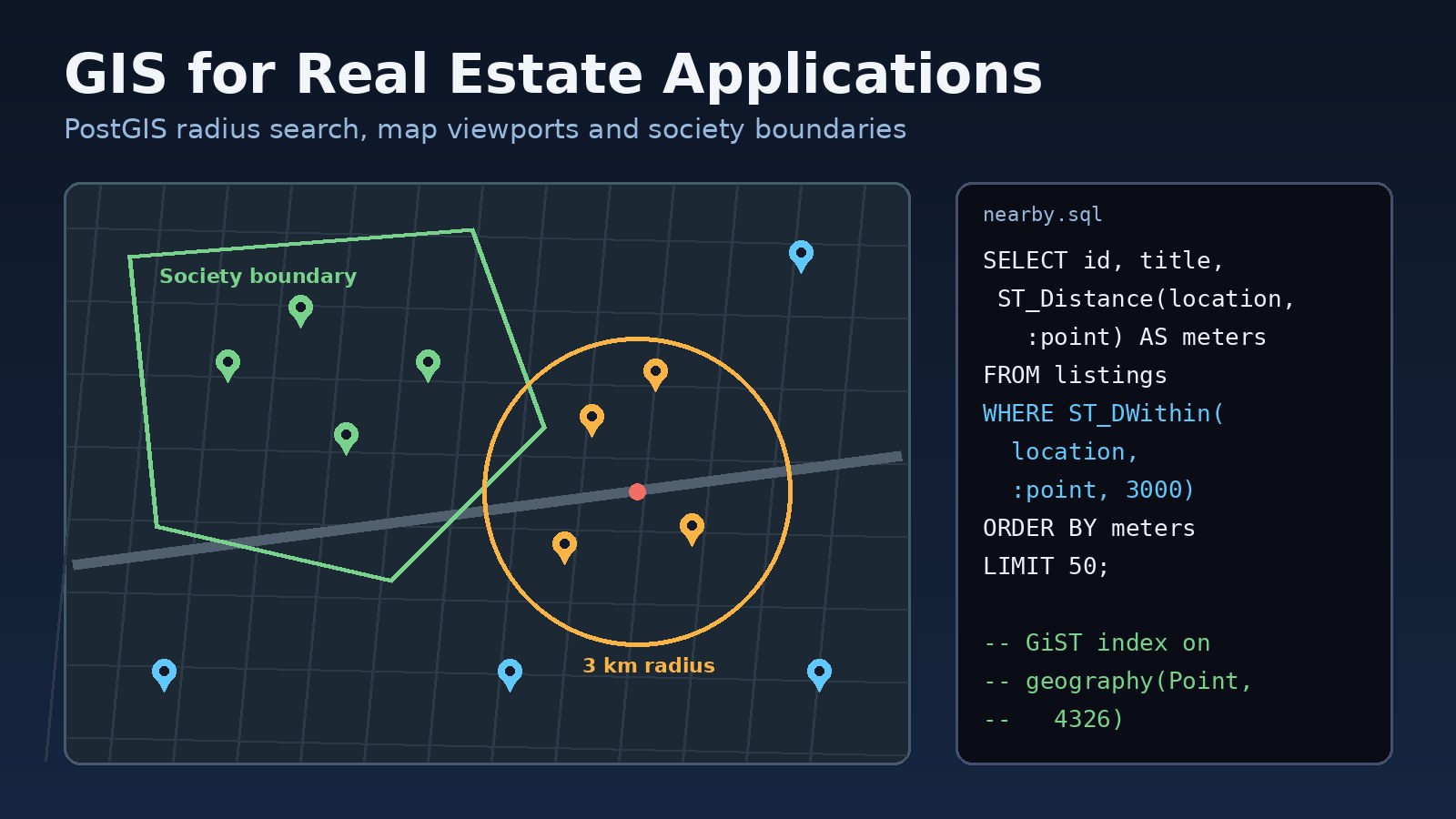
Most property portals start with two decimal columns, lat and lng, and a search box. That works until users ask for "houses within 3 km of my office", "everything visible on this map" or "only listings inside DHA Phase 6". Building gis real estate applications properly means storing locations as spatial data, indexing them, and letting the database answer distance and boundary questions. This guide walks through the problems you hit without GIS, why they happen, and how to fix them with PostgreSQL and PostGIS, a Laravel API and a React map.
Problem: Location Search That Is Slow and Wrong
A typical first version of a property search looks like this: the frontend sends a city or area name, the backend runs a LIKE query on an address field, and a map component drops pins from whatever comes back. Later someone adds "near me" search by loading every listing into PHP or Node and calculating distances in a loop.
That design breaks in three ways as the listing table grows:
- Speed: every distance search reads the whole table, because a normal B-tree index on
latandlngcan't answer "within N metres". - Accuracy: text addresses are inconsistent ("Bahria Phase 8", "BTL Ph-8", "Bahria Town Rawalpindi"), so area filters miss listings.
- Data quality: agents type coordinates by hand, so some pins land in the sea, at 0,0, or in the wrong city.
Symptoms You Need a Property Mapping System
- "Nearby" search gets slower every month and shows up at the top of your slow query log.
- The map freezes when a user zooms out, because the API returns thousands of points at once.
- Listings appear in the wrong society or city on the map, or several pins sit on the same spot at a city centre.
- Results change depending on spelling: searching "Gulberg" and "Gulberg III" returns different counts for the same area.
- Distances shown to users don't match what Google Maps shows for the same two points.
- PostgreSQL errors when someone tries to add spatial columns, such as
ERROR: type "geography" does not exist.
Root Cause: Coordinates Stored as Plain Numbers
The underlying issue is that the database doesn't know the numbers are a location. A few specific causes show up again and again:
No spatial type and no spatial index
Two numeric columns can be indexed, but only for range lookups on each column separately. Distance and "inside this shape" questions need a spatial index such as GiST, which PostGIS provides for geometry and geography columns.
Distance maths in application code
Calculating Haversine distance in PHP or JavaScript forces you to fetch every candidate row first. Even with a rough bounding-box filter, the logic ends up duplicated across services and is easy to get wrong.
Swapped latitude and longitude
GIS functions expect longitude first, then latitude (x, y). Many forms and APIs use "lat, lng" order. Mixing the two puts a Lahore listing (about 31.5 N, 74.3 E) somewhere in the Indian Ocean region, and nobody notices until it shows on a map.
Areas stored as text instead of boundaries
Societies, phases and blocks are real shapes on the ground. Storing them only as names means you can't check whether a pin actually falls inside them.
Missing or mixed SRIDs
Every spatial value has a spatial reference ID. GPS-style coordinates use SRID 4326 (WGS 84). If boundaries are imported with SRID 0 and points use 4326, PostGIS refuses to compare them and reports an error containing Operation on mixed SRID geometries.
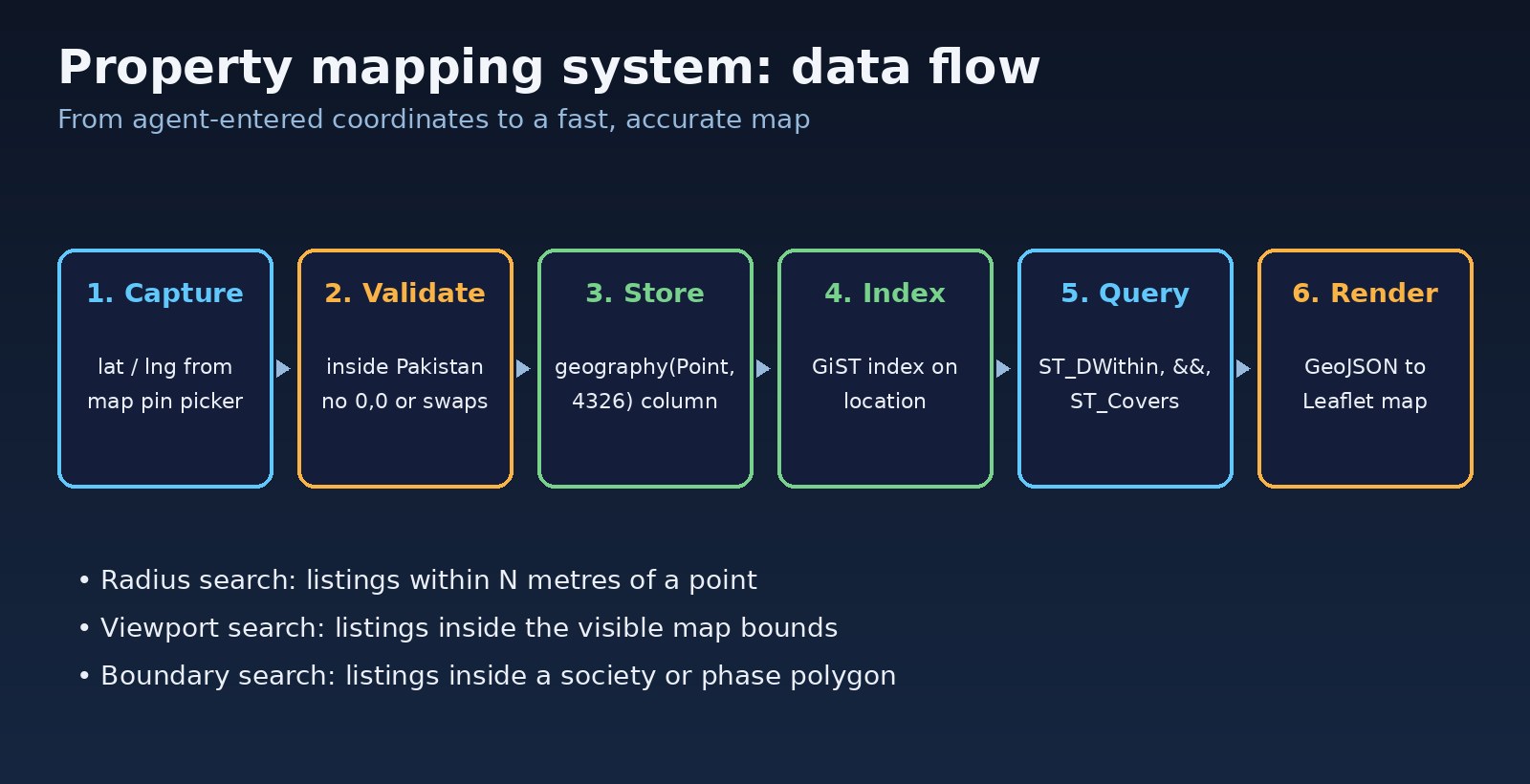
Step-by-Step: Add PostGIS to a Real Estate App
Step 1: Install and enable PostGIS
On Ubuntu with the PostgreSQL apt repository, install the package that matches your PostgreSQL major version, then enable the extension in your database. If the package is missing you will see ERROR: could not open extension control file ".../postgis.control": No such file or directory.
# Ubuntu / Debian (PostgreSQL 16 example)
sudo apt install postgresql-16-postgis-3

# Docker: use an image that already includes PostGIS
docker run -d --name pg-gis -e POSTGRES_PASSWORD=secret -p 5432:5432 postgis/postgis:16-3.4

-- inside psql, connected to your app database
CREATE EXTENSION IF NOT EXISTS postgis;
SELECT postgis_full_version();
On managed services such as Amazon RDS, Azure Database for PostgreSQL or Google Cloud SQL, PostGIS is usually available as an extension you enable with the same CREATE EXTENSION command, sometimes after allow-listing it in the server settings.
Step 2: Add a geography column for listing locations
Use geography(Point, 4326) for listing pins. Distances on geography are calculated on the earth's surface and returned in metres, which is what a property search needs. Keep the original lat/lng columns during the migration so nothing else breaks.
ALTER TABLE listings ADD COLUMN location geography(Point, 4326);

-- longitude first, then latitude
UPDATE listings
SET location = ST_SetSRID(ST_MakePoint(lng, lat), 4326)::geography
WHERE lat IS NOT NULL AND lng IS NOT NULL;

CREATE INDEX listings_location_gix ON listings USING GIST (location);
ANALYZE listings;
Step 3: Clean bad coordinates before you trust them
Find pins that can't be right. For a Pakistan-focused portal, a rough bounding box of latitude 23 to 37.5 and longitude 60.5 to 78 catches swapped values and empty defaults. Review these rows by hand rather than "fixing" them automatically.
-- 0,0 defaults and points outside the country's rough bounds
SELECT id, title, lat, lng
FROM listings
WHERE (lat = 0 AND lng = 0)
   OR lat NOT BETWEEN 23 AND 37.5
   OR lng NOT BETWEEN 60.5 AND 78;

-- likely swapped: the numbers fit if you exchange them
SELECT id, lat, lng FROM listings
WHERE lat BETWEEN 60.5 AND 78 AND lng BETWEEN 23 AND 37.5;
Step 4: Radius search with ST_DWithin
ST_DWithin uses the GiST index and takes the distance in metres for geography columns. Sorting with ST_Distance gives users the nearest listings first.
SELECT id, title, price,
       round(ST_Distance(location, ref.pt)) AS meters
FROM listings,
     (SELECT ST_SetSRID(ST_MakePoint(74.3587, 31.5204), 4326)::geography AS pt) AS ref
WHERE status = 'active'
  AND ST_DWithin(location, ref.pt, 3000)
ORDER BY meters
LIMIT 50;
Step 5: Map viewport search with a bounding box
When the user pans or zooms, the map knows its west, south, east and north edges. Query only what is visible and cap the number of rows so a zoomed-out view can't return the whole table.
-- :west, :south, :east, :north come from the map bounds
SELECT id, title, price, ST_Y(location::geometry) AS lat, ST_X(location::geometry) AS lng
FROM listings
WHERE status = 'active'
  AND location && ST_MakeEnvelope(:west, :south, :east, :north, 4326)::geography
LIMIT 500;
Step 6: Store society and phase boundaries as polygons
Create an areas table with a polygon column, then import boundaries you have the right to use, for example ones drawn by your own team in QGIS and exported as GeoJSON. ogr2ogr from GDAL loads GeoJSON or shapefiles straight into PostGIS.
CREATE TABLE areas (
  id serial PRIMARY KEY,
  name text NOT NULL,
  city text NOT NULL,
  boundary geometry(MultiPolygon, 4326) NOT NULL
);
CREATE INDEX areas_boundary_gix ON areas USING GIST (boundary);

# load a GeoJSON file into a staging table, reprojected to 4326
ogr2ogr -f PostgreSQL PG:"host=localhost dbname=app user=app" societies.geojson \
  -nln areas_import -nlt MULTIPOLYGON -lco GEOMETRY_NAME=boundary -t_srs EPSG:4326

-- fix invalid shapes (self-intersections) before using them
UPDATE areas
SET boundary = ST_Multi(ST_CollectionExtract(ST_MakeValid(boundary), 3))
WHERE NOT ST_IsValid(boundary);
Step 7: Find listings inside a society
ST_Covers returns true when the point is inside or on the edge of the polygon. Cast the geography point to geometry so both sides use the same type and SRID.
SELECT l.id, l.title, a.name AS area
FROM listings l
JOIN areas a ON ST_Covers(a.boundary, l.location::geometry)
WHERE a.name = 'DHA Phase 6' AND a.city = 'Lahore'
  AND l.status = 'active';
The same join can set an area_id on each listing when it's saved, so filters by society no longer depend on how the agent spelled the address. It also helps when you detect duplicate property listings, because two listings with the same price and size a few metres apart are strong duplicate candidates.
Code Examples: PostGIS Real Estate API and Map
Laravel endpoint for nearby listings
Keep the spatial SQL in the database and pass user input as bindings, never by string concatenation.
// routes/api.php
Route::get('/listings/nearby', [ListingMapController::class, 'nearby']);

// app/Http/Controllers/ListingMapController.php
public function nearby(Request $request)
{
    $data = $request->validate([
        'lat'    => 'required|numeric|between:23,37.5',
        'lng'    => 'required|numeric|between:60.5,78',
        'radius' => 'nullable|integer|min:100|max:20000',
    ]);
    $radius = $data['radius'] ?? 3000;

    return DB::table('listings')
        ->select('id', 'title', 'price')
        ->selectRaw('ST_Y(location::geometry) AS lat, ST_X(location::geometry) AS lng')
        ->selectRaw('round(ST_Distance(location, ST_SetSRID(ST_MakePoint(?, ?), 4326)::geography)) AS meters',
            [$data['lng'], $data['lat']])
        ->where('status', 'active')
        ->whereRaw('ST_DWithin(location, ST_SetSRID(ST_MakePoint(?, ?), 4326)::geography, ?)',
            [$data['lng'], $data['lat'], $radius])
        ->orderBy('meters')
        ->limit(50)
        ->get();
}
Return GeoJSON straight from PostgreSQL
Since PostGIS 3, ST_AsGeoJSON can turn a whole row into a GeoJSON Feature, which most map libraries read directly.
SELECT json_build_object(
  'type', 'FeatureCollection',
  'features', coalesce(json_agg(ST_AsGeoJSON(t.*)::json), '[]'::json)
)
FROM (
  SELECT id, title, price, location::geometry AS geom
  FROM listings
  WHERE status = 'active'
    AND location && ST_MakeEnvelope(74.25, 31.40, 74.45, 31.55, 4326)::geography
  LIMIT 500
) AS t;
React map that loads listings for the visible area
With react-leaflet, listen for moveend and request only the current bounds. In Next.js, load the map component with dynamic(() => import('./ListingMap'), { ssr: false }), because Leaflet uses window and fails during server rendering.
import 'leaflet/dist/leaflet.css';
import { useState } from 'react';
import { MapContainer, TileLayer, Marker, Popup, useMapEvents } from 'react-leaflet';
function BoundsLoader({ onLoad }) {
useMapEvents({
async moveend(e) {
const b = e.target.getBounds();
const qs = new URLSearchParams({
west: b.getWest(), south: b.getSouth(), east: b.getEast(), north: b.getNorth(),
});
const res = await fetch(`/api/listings/in-bounds?${qs}`);
if (res.ok) onLoad(await res.json());
},
});
return null;
}
export default function ListingMap() {
const [listings, setListings] = useState([]);
return (
<MapContainer center={[31.5204, 74.3587]} zoom={13} style={{ height: 500 }}>
<TileLayer
url="https://{s}.tile.openstreetmap.org/{z}/{x}/{y}.png"
attribution="© OpenStreetMap contributors"
/>
<BoundsLoader onLoad={setListings} />
{listings.map(l => (
<Marker key={l.id} position={[l.lat, l.lng]}>
<Popup>{l.title}</Popup>
</Marker>
))}
</MapContainer>
);
}Note that Leaflet takes [lat, lng] while PostGIS takes (lng, lat). Convert in one place, in the API, so the frontend never has to think about it. For production traffic, check the usage policy of whichever tile provider you use; the public OpenStreetMap tile servers are not meant for heavy commercial load.
Verification: Check the Spatial Queries Work
- Run
EXPLAIN ANALYZEon the radius query and confirm the plan useslistings_location_gix(an Index Scan or Bitmap Index Scan) rather than a Seq Scan on a large table. The guide on optimizing a slow PostgreSQL query explains how to read the plan. - Pick two places you know, measure the distance in a map app, and compare it with
SELECT ST_Distance(a::geography, b::geography). The numbers should be close. - Re-run the bad coordinate queries from Step 3 and confirm they return no new rows.
- Run
SELECT count(*) FROM areas WHERE NOT ST_IsValid(boundary);and expect 0. - Pan and zoom the map with the browser Network tab open. Each move should send one bounds request, and the response size should stay capped.
EXPLAIN ANALYZE
SELECT id FROM listings
WHERE ST_DWithin(location, ST_SetSRID(ST_MakePoint(74.3587, 31.5204), 4326)::geography, 3000);
Prevention: Keep Location Data Reliable
- Let agents drop a pin on a map instead of typing coordinates, and show the chosen address back to them before saving.
- Validate coordinates on the server with the same bounds the database checks use.
- Add a
CHECKconstraint or trigger so 0,0 can never be saved as a real location. - Always build points with
ST_MakePoint(lng, lat)through one helper or query scope, never ad hoc. - Store every spatial column with an explicit SRID (4326 for GPS data) and reject imports that don't have one.
- Assign
area_idfrom boundaries when a listing is saved, and re-run the assignment when boundaries change. - Cap result sizes on map endpoints and cluster markers on the frontend when zoomed out.
Spatial filters also combine well with other search features. If you already use embeddings, the article on semantic property search with PostgreSQL shows how to rank results by meaning, and a ST_DWithin filter can narrow those results to a commute radius.
FAQs About GIS Real Estate Applications
Should I use geometry or geography for listing locations?
For pins on a map that need distances in metres, geography(Point, 4326) is the simplest choice. For polygons like society boundaries, geometry(MultiPolygon, 4326) gives you the full set of PostGIS functions. You can mix them by casting with ::geometry as shown above.
Do I need PostGIS, or can I just use lat/lng columns?
For a small table, plain columns and a bounding-box filter can work. Once you need radius search, boundary checks or map viewports at scale, PostGIS gives you indexed spatial queries without writing the maths yourself.
How do I build a property mapping system with society boundaries?
Store boundaries as polygons in an areas table, index them with GiST, fix invalid shapes with ST_MakeValid, and assign each listing to an area with ST_Covers when it is saved.
Can I use PostGIS real estate queries from Laravel Eloquent?
Yes. Use selectRaw and whereRaw with bindings, or wrap the SQL in a local query scope such as scopeNearby. Community packages exist for spatial casts, but raw expressions keep you close to the documented PostGIS functions.
Why are my listings showing up in the wrong place on the map?
Usually latitude and longitude are swapped somewhere between the form, the API and the database. PostGIS expects longitude first; most map libraries such as Leaflet expect latitude first.
GIS real estate applications don't need a separate GIS server to start. Enable PostGIS, store locations as spatial points with a GiST index, keep society boundaries as polygons, and let the database answer radius, viewport and boundary questions. Your search gets faster, your area filters stop depending on spelling, and bad pins get caught before buyers see them.


Comments
Join the discussion. Replies load on demand, up to 5 levels.
0 threads
No comments yet
Be the first to start the conversation.