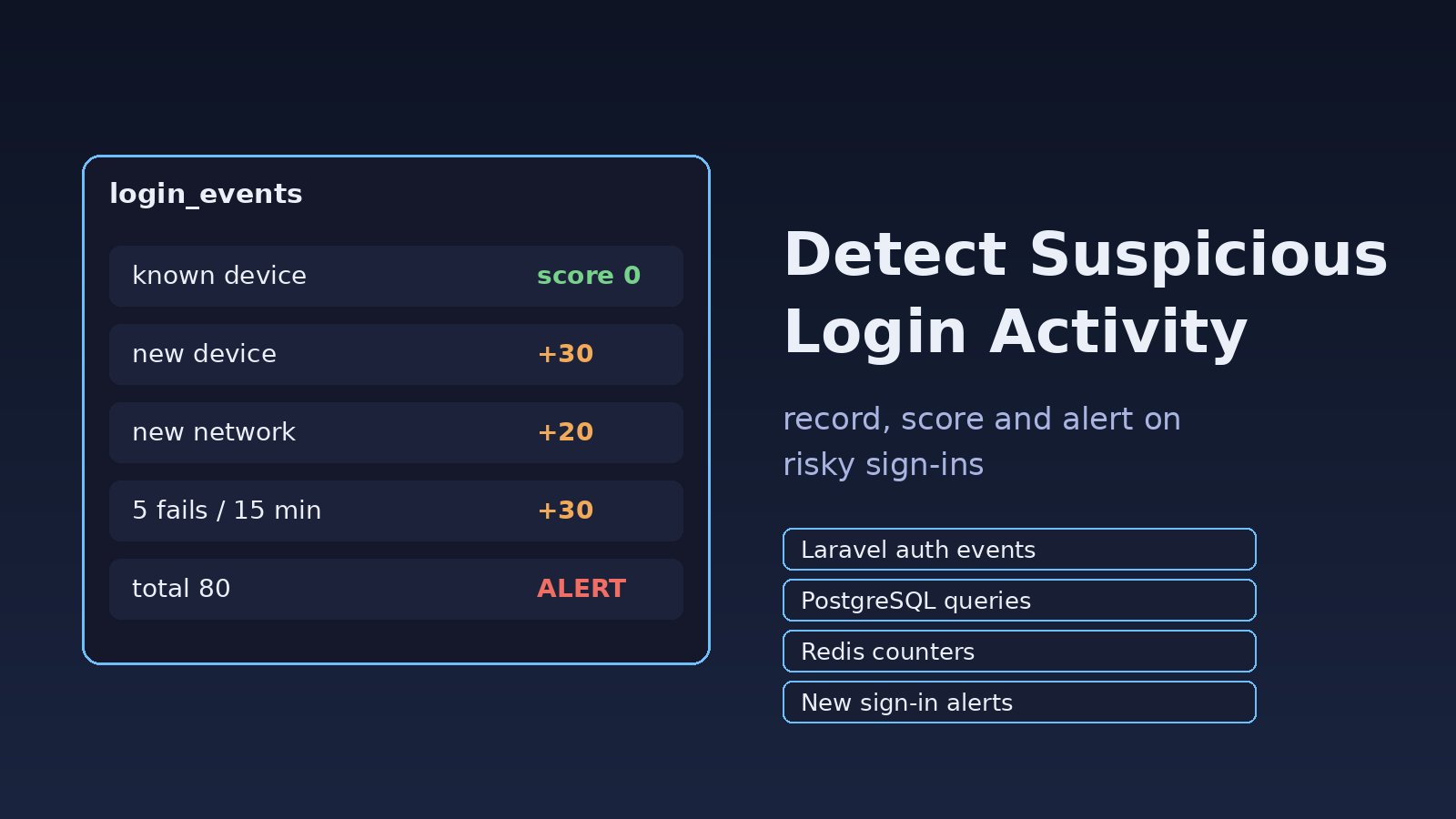
A user emails support saying they got a password reset they never requested, or a customer's account placed orders from a city they've never visited. By the time you hear about it, the attacker has already logged in. To detect suspicious login activity early, you need three things: a record of every login attempt, a few simple rules that flag unusual patterns, and alerts that reach a human or the account owner quickly. This guide shows how to build that in a Laravel or Node.js app backed by PostgreSQL and Redis, with real code and queries.
Problem: You Can't See Who Is Logging In
Most web applications log errors but not authentication. The login controller checks a password, returns a token or session, and moves on. When an account is taken over, there is no trail: no IP, no device, no history of the failed attempts that came before the successful one. Rate limiting helps stop guessing, as covered in API brute force protection, but it doesn't tell you when a correct password is used by the wrong person. That needs login monitoring.
Symptoms That Point to Suspicious Logins
- Users report password reset emails, one-time codes or "new sign-in" notices they didn't trigger.
- Many failed logins for one account, followed by a success from a new IP address.
- One IP address trying many different email addresses (a credential stuffing pattern).
- A successful login from a country or network the user has never used before.
- Several active sessions for the same user from different devices at the same time.
- Logins at unusual hours for staff accounts in an internal ERP or admin panel.
- Sudden changes right after login: email address, password, payout details or 2FA disabled.
Root Cause: No Login Events, No Baseline
Suspicious activity is only "suspicious" compared with something normal. Without stored login events you have no baseline for a user's usual IPs, devices and times, so nothing can stand out. The common gaps are:
- Failed attempts are never recorded, only returned as a 401 or a validation error.
- The app sits behind Nginx, a load balancer or Cloudflare and logs the proxy's IP instead of the visitor's.
- Sessions and API tokens are not tied to a device or user agent, so a new device looks identical to an old one.
- Security-relevant account changes don't trigger any notification to the owner.
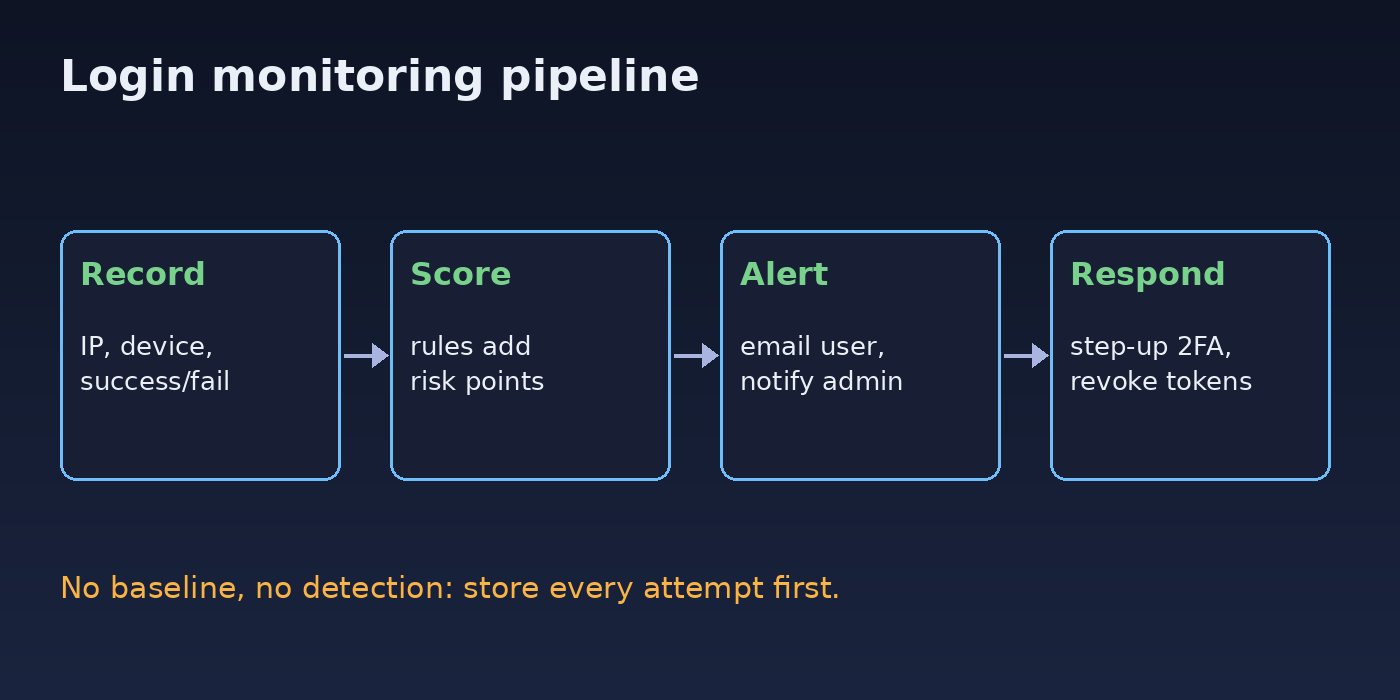
How to Detect Suspicious Login Activity: Step-by-Step Solution
Step 1: Get the real client IP behind your proxy
If every login shows 127.0.0.1 or your load balancer's address, every rule below breaks. In Nginx, pass the real address to the app:
location / {
    proxy_set_header Host              $host;
    proxy_set_header X-Real-IP         $remote_addr;
    proxy_set_header X-Forwarded-For   $proxy_add_x_forwarded_for;
    proxy_set_header X-Forwarded-Proto $scheme;
    proxy_pass http://127.0.0.1:8000;
}
Then tell Laravel which proxies to trust so $request->ip() returns the visitor's address. In Laravel 11 and later this lives in bootstrap/app.php:
->withMiddleware(function (Middleware $middleware) {
    $middleware->trustProxies(at: ['10.0.0.0/8', '127.0.0.1']);
})
Only trust the addresses of your own proxies. Trusting * on a server that is reachable directly lets anyone spoof X-Forwarded-For.
Step 2: Store every login attempt
Create a table for login events. Keep it separate from your application logs so you can query it.
CREATE TABLE login_events (
    id          BIGSERIAL PRIMARY KEY,
    user_id     BIGINT NULL REFERENCES users(id) ON DELETE SET NULL,
    email       VARCHAR(255) NOT NULL,
    ip          INET NOT NULL,
    user_agent  TEXT,
    device_hash CHAR(64),
    success     BOOLEAN NOT NULL,
    risk_score  SMALLINT NOT NULL DEFAULT 0,
    reasons     JSONB NOT NULL DEFAULT '[]',
    created_at  TIMESTAMPTZ NOT NULL DEFAULT now()
);
CREATE INDEX login_events_user_time  ON login_events (user_id, created_at DESC);
CREATE INDEX login_events_ip_time    ON login_events (ip, created_at DESC);
CREATE INDEX login_events_email_time ON login_events (email, created_at DESC);
Laravel already fires Illuminate\Auth\Events\Login on success and Illuminate\Auth\Events\Failed on a failed attempt when you use Auth::attempt(). Listen to both:
// app/Listeners/RecordLoginEvent.php
namespace App\Listeners;

use Illuminate\Auth\Events\Failed;
use Illuminate\Auth\Events\Login;
use App\Services\LoginRiskService;

class RecordLoginEvent
{
    public function __construct(private LoginRiskService $risk) {}

    public function handleLogin(Login $event): void
    {
        $this->risk->record($event->user->email, $event->user, true);
    }

    public function handleFailed(Failed $event): void
    {
        $email = $event->credentials['email'] ?? 'unknown';
        $this->risk->record($email, $event->user, false);
    }

    public function subscribe($events): array
    {
        return [
            Login::class  => 'handleLogin',
            Failed::class => 'handleFailed',
        ];
    }
}
Register the subscriber with Event::subscribe(RecordLoginEvent::class) in a service provider's boot() method. If you issue Sanctum tokens from a custom controller instead of Auth::attempt(), call the service directly there; see common Laravel Sanctum authentication problems for how token logins usually work.
Step 3: Score each login with simple rules
You don't need machine learning to catch most account takeovers. A handful of rules with points works well and is easy to explain to support staff:
- New device for this user: +30
- New IP network (first time this /24 is seen for the user): +20
- Recent failures: 5 or more failed attempts on the account in the last 15 minutes: +30
- Spray pattern: the IP tried 10 or more distinct emails in the last hour: +40
- Unusual hour for staff or admin accounts: +10
// app/Services/LoginRiskService.php
namespace App\Services;

use Illuminate\Support\Facades\DB;
use Illuminate\Support\Facades\Redis;

class LoginRiskService
{
    public function record(string $email, $user, bool $success): int
    {
        $req    = request();
        $ip     = $req->ip();
        $ua     = (string) $req->userAgent();
        $device = hash('sha256', $ua . '|' . $req->header('Accept-Language'));
        $email  = strtolower(trim($email));
        $score  = 0;
        $why    = [];

        // Distinct emails tried from this IP in the last hour (Redis set)
        $key = "login:ip:{$ip}:emails";
        Redis::sadd($key, $email);
        Redis::expire($key, 3600);
        if (Redis::scard($key) >= 10) { $score += 40; $why[] = 'many_emails_from_ip'; }

        if ($user) {
            $fails = DB::table('login_events')
                ->where('user_id', $user->id)->where('success', false)
                ->where('created_at', '>', now()->subMinutes(15))->count();
            if ($fails >= 5) { $score += 30; $why[] = 'recent_failures'; }

            $knownDevice = DB::table('login_events')
                ->where('user_id', $user->id)->where('success', true)
                ->where('device_hash', $device)->exists();
            if (! $knownDevice) { $score += 30; $why[] = 'new_device'; }

            $knownNet = DB::table('login_events')
                ->where('user_id', $user->id)->where('success', true)
                ->whereRaw('set_masklen(ip::cidr, 24) = set_masklen(?::cidr, 24)', [$ip])
                ->exists();
            if (! $knownNet) { $score += 20; $why[] = 'new_network'; }
        }

        DB::table('login_events')->insert([
            'user_id' => $user?->id, 'email' => $email, 'ip' => $ip,
            'user_agent' => $ua, 'device_hash' => $device,
            'success' => $success, 'risk_score' => $score,
            'reasons' => json_encode($why), 'created_at' => now(),
        ]);

        if ($success && $user && $score >= 50) {
            event(new \App\Events\SuspiciousLogin($user, $ip, $ua, $why));
        }
        return $score;
    }
}
The /24 network check uses IPv4 notation; for IPv6 addresses compare a /64 instead. A user agent hash is a weak device signal, so treat it as one input, not proof. A stronger option is a long-lived, random, signed cookie set on first login and stored per user.
Step 4: Alert the user and the admin
When the score crosses your threshold, send the account owner a "new sign-in" email with the time, approximate location if you have it, device and a link to secure the account. Queue it so the login request isn't slowed down:
// app/Listeners/NotifySuspiciousLogin.php
public function handle(SuspiciousLogin $event): void
{
    $event->user->notify(new NewSignInAlert($event->ip, $event->userAgent));

    Log::channel('security')->warning('suspicious_login', [
        'user_id' => $event->user->id,
        'ip'      => $event->ip,
        'reasons' => $event->reasons,
    ]);
}
Make the notification class implement ShouldQueue and run a queue worker. For staff accounts in an ERP, also send the warning to a Slack or email channel the admins actually read.
Step 5: Respond automatically to high-risk logins
- Step-up verification: for a high score, require an email code or 2FA before issuing the session or token.
- Block sensitive changes: for 24 hours after a risky login, require re-authentication to change email, password or payout details.
- Revoke sessions: give users a "sign out everywhere" button. With Sanctum,
$user->tokens()->delete()revokes all API tokens; with the database session driver, delete the user's rows fromsessions.
If you change session handling, test that normal users aren't logged out unexpectedly; Laravel session expired problems covers the common pitfalls.
Node.js / Express version of login monitoring
The same idea works in Node.js. Record the attempt after checking the password and use Redis for the per-IP counter:
// Express: app.set('trust proxy', 1) so req.ip is the client IP behind one proxy
async function recordLogin(req, email, user, success) {
  const key = `login:ip:${req.ip}:emails`;
  await redis.sAdd(key, email.toLowerCase());
  await redis.expire(key, 3600);
  const distinct = await redis.sCard(key);
  const reasons = [];
  let score = 0;
  if (distinct >= 10) { score += 40; reasons.push('many_emails_from_ip'); }
  await db.query(
    `INSERT INTO login_events (user_id, email, ip, user_agent, success, risk_score, reasons)
     VALUES ($1, $2, $3, $4, $5, $6, $7)`,
    [user?.id ?? null, email.toLowerCase(), req.ip, req.get('user-agent'),
     success, score, JSON.stringify(reasons)]
  );
  return score;
}
Useful Queries for Account Security Reviews
Once events are stored, PostgreSQL can answer the questions you'd otherwise guess at. IPs trying many accounts in the last hour:
SELECT ip, count(DISTINCT email) AS emails, count(*) AS attempts
FROM login_events
WHERE created_at > now() - interval '1 hour' AND success = false
GROUP BY ip
HAVING count(DISTINCT email) >= 10
ORDER BY emails DESC;
Accounts with a success right after a burst of failures:
SELECT s.user_id, s.ip, s.created_at
FROM login_events s
WHERE s.success = true
  AND s.created_at > now() - interval '24 hours'
  AND (SELECT count(*) FROM login_events f
       WHERE f.user_id = s.user_id AND f.success = false
         AND f.created_at BETWEEN s.created_at - interval '15 minutes' AND s.created_at) >= 5;
On the server itself, you can spot floods in the Nginx access log before they hit the database:
sudo awk '$7 ~ /\/login/ && $9 == 401 {print $1}' /var/log/nginx/access.log \
  | sort | uniq -c | sort -rn | head
Verification
- Log in normally from your usual browser twice. The second login should have a low
risk_score. - Log in from a private window or another device. Check that
reasonscontainsnew_device. - Fail the password five times, then log in correctly. You should see
recent_failuresand receive the alert email. - Run
SELECT ip FROM login_events ORDER BY id DESC LIMIT 5;and confirm the IPs are real client addresses, not127.0.0.1or your proxy. - Check the queue worker processed the notification:
php artisan queue:failedshould be empty.
Prevention: Keep Login Monitoring Useful
- Set a retention period for
login_events(for example 90 days) and delete older rows with a scheduled job, since IPs and user agents are personal data. - Never log passwords or tokens, even on failure. Log the email, IP and outcome only.
- Review thresholds monthly. If users get too many "new sign-in" emails, they start ignoring them.
- Offer two-factor authentication and require it for admin and finance roles.
- Combine monitoring with rate limiting and strong password rules; detection works best when guessing is already slow.
FAQs
What counts as suspicious login activity?
Many failed attempts on one account, one IP trying many accounts, a success from a new device or network, logins at unusual hours, and sensitive account changes right after login. Any one signal can be innocent; several together are worth an alert.
How do I detect suspicious login activity without a paid service?
Store login events in your own database, score them with rules like the ones above, and send alerts through your existing mail and queue setup. Paid fraud services add IP reputation and device fingerprinting, but the basics need nothing beyond PostgreSQL and Redis.
Should login monitoring block users automatically?
Prefer step-up verification over hard blocks. Asking for an email code or 2FA stops most attackers while letting a real user who switched phones continue.
How does login monitoring help account security for APIs?
API logins are where credential stuffing happens most, because there is no page to load. Record token issuance the same way as web logins and tie each token to a device so you can revoke one without logging the user out everywhere.
Is it legal to store IP addresses of users?
In many regions IP addresses count as personal data. Store them for a stated security purpose, keep them only as long as needed and mention it in your privacy policy. Check the rules that apply to your users.



Comments
Join the discussion. Replies load on demand, up to 5 levels.
0 threads
No comments yet
Be the first to start the conversation.