Every ERP starts with two roles: admin and user. Then the warehouse needs to see stock but not prices, branch managers should only see their own branch, and the accountant who creates a payment must not be the one who approves it. Patching that with if ($user->is_admin) checks quickly turns into a security hole. Good erp role based access control solves this with a clear model of roles, feature-level permissions and data scope that lives in one place. This guide walks through the problem, the root cause and a step-by-step design you can build in Laravel and PostgreSQL.
Problem: ERP Permissions Grew Out of Control
In most growing ERP systems, access rules are scattered. Some live in controllers, some in Blade or React components, some in SQL WHERE clauses and some only in people's heads. A typical example looks like this:
// PurchaseOrderController@approve
if (auth()->user()->role === 'admin' || auth()->user()->role === 'manager') {
    $po->update(['status' => 'approved']);
}
This works until the business asks for a manager who can approve orders up to a limit, only in one branch, and never orders they created themselves. A single role string cannot express that, so developers add more columns and more if statements until nobody can answer the question "who can do what?"
Symptoms of a Broken ERP Permission Model
- New ERP user roles are created by copying an existing role and then fixing problems as users complain.
- Menu items are hidden in the UI, but the API endpoint behind them still works when called directly.
- Users of one branch or company can open records of another by changing an ID in the URL.
- The same person can create a vendor, raise a purchase order, approve it and post the payment.
- Auditors ask for a list of who can approve payments, and the only answer is to read code.
- Permission checks are slow because each page runs many queries to load roles.
Root Cause: Roles, Features and Data Scope Are Mixed Together
An ERP access decision really has three separate questions:
- Feature: can this user perform this action at all, such as
purchase_order.approve? - Scope: on which records, such as only their own branch, warehouse or cost center?
- Conditions: under which business rules, such as an amount limit or not their own document?
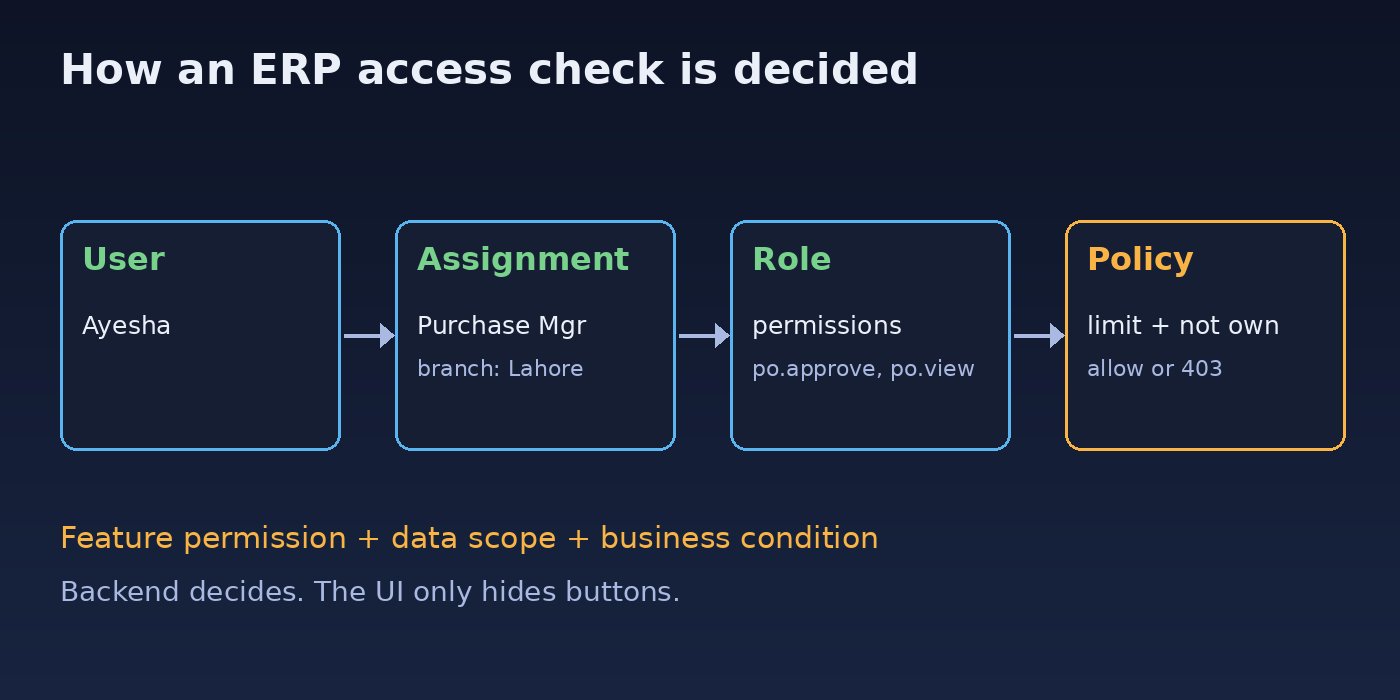
When all three are crammed into one role field, every new requirement needs a code change. The fix is to model them separately: permissions describe features, roles group permissions, assignments add scope, and policies apply conditions. It is the same idea behind fixing broken access control vulnerabilities, applied to the ERP's business modules.
Step-by-Step: Design ERP Role Based Access Control
Step 1: Define feature-level permissions per module
List every action in every module and give it a stable name in the format module.resource.action. Keep actions specific instead of a generic "edit".
sales.order.view
sales.order.create
sales.order.confirm
sales.order.view_margin
purchase.order.create
purchase.order.approve
inventory.stock.adjust
accounting.payment.create
accounting.payment.approve
accounting.journal.post
hr.salary.view
reports.financial.export
Feature-level permissions like sales.order.view_margin let you hide sensitive data (cost and margin) from roles that only need to sell. If your ERP is split into modules as described in ERP software architecture, each module owns and registers its own permission names.
Step 2: Create the role and permission tables
Store permissions, roles and assignments in the database so administrators can manage ERP user roles without a deploy. The key detail is that a role assignment carries a scope, such as a branch.
CREATE TABLE permissions (
    id   bigserial PRIMARY KEY,
    name varchar(150) NOT NULL UNIQUE          -- e.g. purchase.order.approve
);

CREATE TABLE roles (
    id         bigserial PRIMARY KEY,
    company_id bigint NOT NULL,
    name       varchar(100) NOT NULL,
    UNIQUE (company_id, name)
);

CREATE TABLE role_permissions (
    role_id       bigint REFERENCES roles(id) ON DELETE CASCADE,
    permission_id bigint REFERENCES permissions(id) ON DELETE CASCADE,
    PRIMARY KEY (role_id, permission_id)
);

CREATE TABLE user_roles (
    user_id   bigint NOT NULL,
    role_id   bigint NOT NULL REFERENCES roles(id) ON DELETE CASCADE,
    branch_id bigint NULL,                     -- NULL means all branches
    approval_limit numeric(14,2) NULL,
    PRIMARY KEY (user_id, role_id, branch_id)
);
With this design, the same person can be a Purchase Manager in Lahore with a limit of 500,000 and a plain Viewer in Karachi. Roles stay small and reusable, while the assignment holds the scope and limits.
Step 3: Build roles from job functions, not people
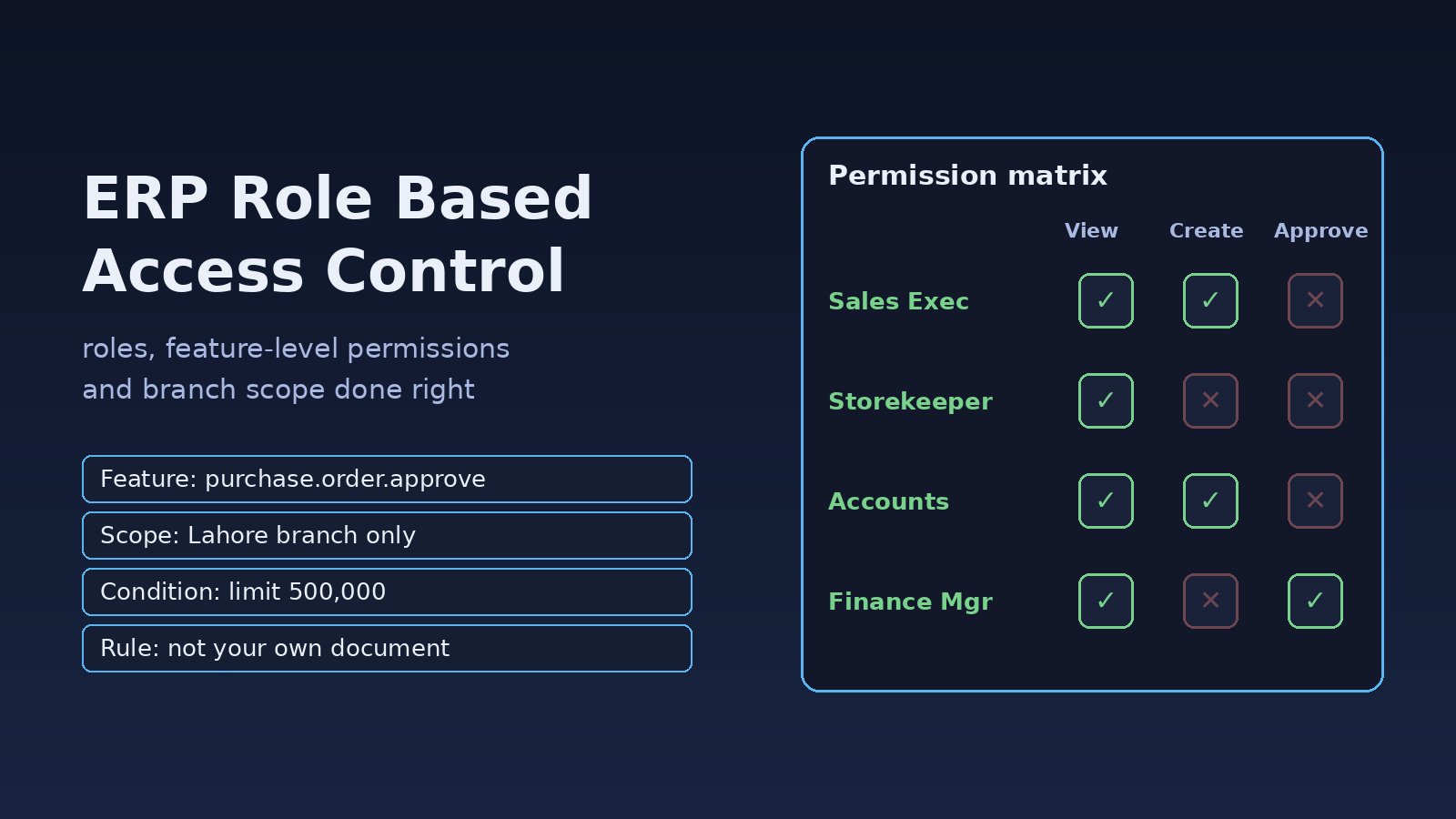
Design roles around real job functions and keep them additive. A user with two jobs gets two roles. A starting set for a small ERP might be:
- Sales Executive:
sales.order.view,sales.order.create. - Sales Manager: Sales Executive permissions plus
sales.order.confirmandsales.order.view_margin. - Storekeeper:
inventory.stock.view,inventory.stock.adjust, no prices. - Accounts Officer:
accounting.payment.create,accounting.journal.post. - Finance Manager:
accounting.payment.approve,reports.financial.export.
Avoid "deny" permissions at the start. Additive roles are much easier to reason about and audit.
Step 4: Check permissions in one place on the backend
In Laravel, register every permission as a Gate so all checks go through one resolver. Cache the user's permissions per request so you do not hit the database for every check.
// app/Providers/AuthServiceProvider.php
use Illuminate\Support\Facades\Gate;

public function boot(): void
{
    Gate::before(function ($user, string $ability, array $args = []) {
        if (! str_contains($ability, '.')) {
            return null; // let normal policies handle it
        }
        $branchId = $args[0]->branch_id ?? null;
        return $user->hasPermission($ability, $branchId) ?: null;
    });
}

// app/Models/User.php
public function hasPermission(string $name, ?int $branchId = null): bool
{
    $perms = once(fn () => DB::table('user_roles as ur')
        ->join('role_permissions as rp', 'rp.role_id', '=', 'ur.role_id')
        ->join('permissions as p', 'p.id', '=', 'rp.permission_id')
        ->where('ur.user_id', $this->id)
        ->get(['p.name', 'ur.branch_id']));

    return $perms->contains(fn ($p) => $p->name === $name
        && ($p->branch_id === null || $branchId === null || $p->branch_id === $branchId));
}
Then protect routes with middleware so a hidden button is never the only defence:
Route::post('/purchase-orders/{po}/approve', [PurchaseOrderController::class, 'approve'])
    ->middleware('can:purchase.order.approve,po');
If you prefer a package, spatie/laravel-permission supports roles, permissions and teams (which you can map to branches or companies). The Laravel-specific setup is covered in Laravel role based permissions.
Step 5: Enforce data scope on every query
A feature permission says what the user can do. Data scope says which rows they can touch. Apply it with a global scope so a developer cannot forget it:
// app/Models/Scopes/BranchScope.php
class BranchScope implements Scope
{
    public function apply(Builder $builder, Model $model): void
    {
        $user = auth()->user();
        if (! $user || $user->hasAllBranches()) {
            return;
        }
        $builder->whereIn($model->getTable() . '.branch_id', $user->branchIds());
    }
}
For extra safety in PostgreSQL, you can add row level security as a second layer, so even a raw query from a report script respects the branch:
ALTER TABLE purchase_orders ENABLE ROW LEVEL SECURITY;

CREATE POLICY branch_isolation ON purchase_orders
    USING (branch_id = ANY (string_to_array(current_setting('app.branch_ids', true), ',')::bigint[]));

-- set per request/connection by the app:
SET app.branch_ids = '3,7';
Step 6: Add business conditions with policies
Amount limits and segregation of duties belong in a policy, not in the role table:
// app/Policies/PurchaseOrderPolicy.php
public function approve(User $user, PurchaseOrder $po): Response
{
    if ($po->created_by === $user->id) {
        return Response::deny('You cannot approve your own purchase order.');
    }
    $limit = $user->approvalLimit('purchase.order.approve', $po->branch_id);
    if ($limit !== null && $po->total > $limit) {
        return Response::deny('Amount exceeds your approval limit.');
    }
    return Response::allow();
}
Call it from the controller with $this->authorize('approve', $po);. Laravel returns HTTP 403 with your message when the check fails.
Step 7: Send permissions to the frontend for display only
Return the user's permission names on login (for example from /api/me) and use them in React or Next.js to hide menus and buttons. Treat this as user experience only. The backend checks in Steps 4 to 6 are the real security.
Verification: Test Your ERP Access Rules
- Write feature tests for each sensitive action that assert a 403 for roles without the permission, for example
$this->actingAs($storekeeper)->post("/purchase-orders/{$po->id}/approve")->assertForbidden(); - Log in as a branch user and change record IDs in URLs and API calls to another branch's records. You should get 404 or 403, never data.
- Try approving your own document and an amount above your limit; both must fail.
- Run
php artisan route:listand confirm every write route in sensitive modules has acan:middleware or anauthorizecall. - Export a role and permission matrix with a SQL query on
roles,role_permissionsandpermissionsand review it with the business owners.
Prevention: Keep ERP Permissions Clean
- Deny by default: a new endpoint without a permission check should fail a test in CI.
- Register permissions in code with a seeder per module, so new features ship with their permission names.
- Review roles regularly: remove permissions nobody uses and access for people who changed jobs.
- Log permission changes: who granted which role, to whom, for which branch and when.
- Clear caches on change: if you cache permissions, clear the user's cache when their roles change, or run
php artisan permission:cache-resetwhen using spatie. - Keep segregation of duties rules visible: document which permission pairs one person should never hold together.
FAQs About ERP Role Based Access Control
What is role based access control in ERP?
It is a way of granting access by job function. Permissions describe actions, roles group permissions, and users get roles, often scoped to a company, branch or warehouse.
What are feature-level permissions?
They are fine-grained permissions for single actions or data, such as confirming an order or viewing margins, instead of broad access to a whole module.
How many ERP user roles should I create?
Start with one role per real job function and combine them for people with several jobs. If you have nearly as many roles as users, your roles are too specific.
Is RBAC enough, or do I need ABAC?
RBAC covers most features. Rules that depend on record data, such as amount limits or document ownership, are attribute based and fit best in policies on top of RBAC.
Should permissions be checked in the frontend or backend?
Always the backend. The frontend can hide buttons for a cleaner interface, but anyone can call the API directly.



Comments
Join the discussion. Replies load on demand, up to 5 levels.
0 threads
No comments yet
Be the first to start the conversation.