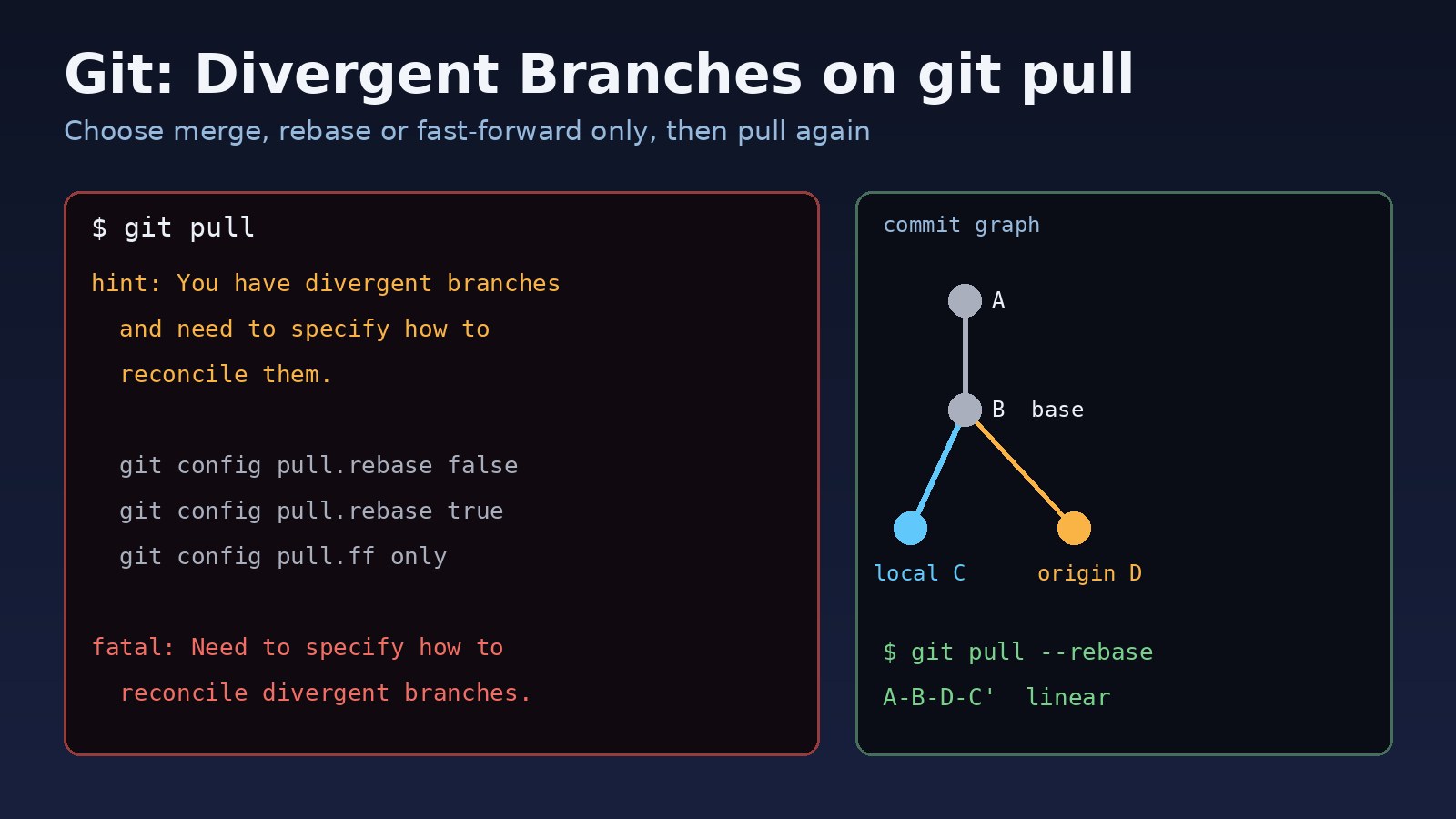
You run git pull and, instead of new commits, Git prints a block of hints and stops with fatal: Need to specify how to reconcile divergent branches. This git divergent branches error means your local branch and its remote branch each have commits the other doesn't have, and Git won't guess how to combine them. Nothing is broken and no work is lost. This guide explains what changed in Git, how to pick between merge, rebase and fast-forward only, how to set a default so the message stops, and how to undo a pull that went wrong.
Problem: Git Divergent Branches on git pull
git pull is two commands in one: git fetch downloads new commits from the remote, then Git integrates them into your current branch. If your branch has no local-only commits, Git simply moves it forward (a fast-forward). If both sides have new commits since they last matched, the histories have diverged and Git must either merge them or rebase your commits on top.
Older Git versions merged silently. Git 2.27 started printing a warning when no pull strategy was configured, and since Git 2.33.1 a pull on diverged branches with no strategy set stops with a fatal error. So the error often appears after upgrading Git, on a new laptop, or inside a fresh CI runner or Docker image where your old global config doesn't exist.
Symptoms: Need to Specify How to Reconcile Divergent Branches
The full output from a recent Git version looks like this:
$ git pull
hint: You have divergent branches and need to specify how to reconcile them.
hint: You can do so by running one of the following commands sometime before
hint: your next pull:
hint:
hint:   git config pull.rebase false  # merge
hint:   git config pull.rebase true   # rebase
hint:   git config pull.ff only       # fast-forward only
hint:
hint: You can replace "git config" with "git config --global" to set a default
hint: preference for all repositories. You can also pass --rebase, --no-rebase,
hint: or --ff-only on the command line to override the configured default per
hint: invocation.
fatal: Need to specify how to reconcile divergent branches.
Related signs of the same situation:
git statussaysYour branch and 'origin/main' have diverged, and have 1 and 1 different commits each, respectively.git pushis rejected with! [rejected] main -> main (non-fast-forward)andUpdates were rejected because the tip of your current branch is behind its remote counterpart.- With
pull.ff onlyset, the pull ends withfatal: Not possible to fast-forward, aborting. - A deploy script or CI job that runs
git pullon a server suddenly fails after a Git upgrade.
Root Cause: Why Git Branches Diverge
Both sides committed after the last sync
You committed locally while a teammate (or you, from another machine, or the GitHub web editor) pushed to the same branch. Now there is a common ancestor B, your commit C, and the remote commit D. A fast-forward is impossible because C is not in the remote history.
The remote history was rewritten
If someone force-pushed after a rebase or amend, the commits you have locally no longer exist upstream. Git sees this as divergence even if you made no new commits yourself.
No pull strategy is configured
The error itself only appears because pull.rebase and pull.ff are unset. The divergence is normal; the missing preference is what stops the command.
Step-by-Step Solution
Step 1: See what diverged
Fetch first, then compare your branch with its upstream. The left number is your local-only commits, the right number is remote-only commits:
git fetch origin
git status -sb
git rev-list --left-right --count HEAD...@{u}
# 1	1

# list the commits on each side
git log --oneline --left-right --graph HEAD...@{u}
Commits marked < are yours and > are from the remote. If you see commits you don't recognise on the remote side after a force-push, talk to the team before you rebase or reset anything.
Step 2: Commit or stash local changes
Uncommitted edits can block a rebase or merge. Commit them, or stash them for a moment:
git stash push -m "before pull"
# ... pull ...
git stash pop
Step 3: Option A, git pull rebase (linear history)
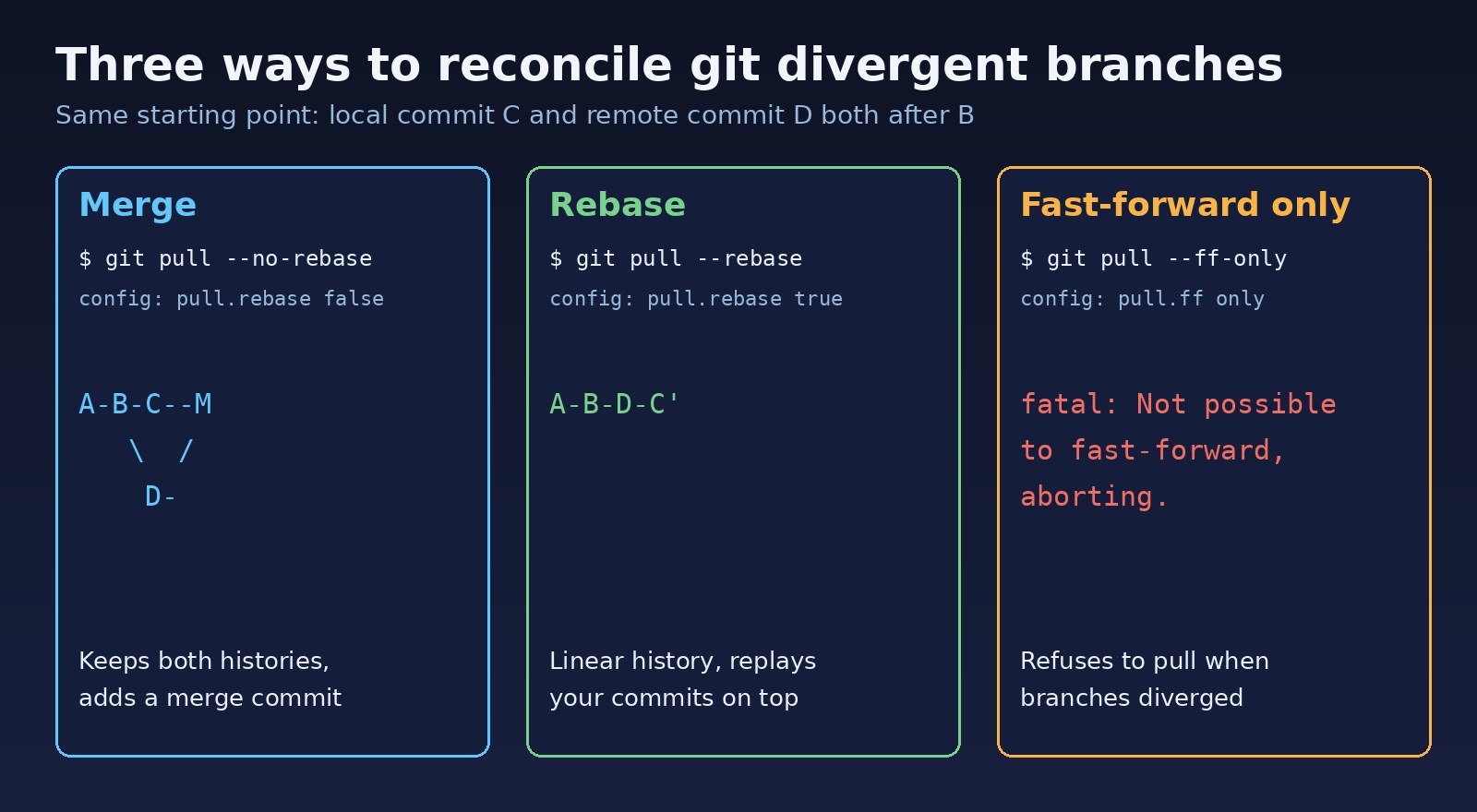
Rebase replays your local commits on top of the remote ones, so history stays in a straight line. This is the usual choice for a personal feature branch or a small change on main that you haven't pushed yet:
git pull --rebase
# with uncommitted changes, stash and restore automatically:
git pull --rebase --autostash
If a commit conflicts, Git pauses. Fix the files, then continue:
git status                 # shows conflicted files
# edit files, remove <<<<<<< ======= >>>>>>> markers
git add path/to/file
git rebase --continue
# give up and return to where you were:
git rebase --abort
Don't rebase commits you already pushed to a shared branch. Rebasing rewrites their hashes, and pushing them needs a force-push that can overwrite your teammates' work.
Step 4: Option B, merge (keep both histories)
A merge pull keeps every commit as it is and adds a merge commit that joins the two lines. It's the safest option when your commits are already shared:
git pull --no-rebase
# conflicts: fix files, then
git add path/to/file
git commit
# or cancel the merge:
git merge --abort
Step 5: Option C, fast-forward only
git pull --ff-only updates your branch only when no merge or rebase is needed, and otherwise fails with fatal: Not possible to fast-forward, aborting. It's a good default for servers and deploy folders that should never create commits. When it fails on your own machine, choose rebase or merge for that pull.
Step 6: Set a default so the error stops
Pick one strategy and save it, for this repository or globally:
# rebase by default (common for feature-branch workflows)
git config --global pull.rebase true
git config --global rebase.autoStash true

# or merge by default (matches old Git behaviour)
git config --global pull.rebase false

# or refuse anything except fast-forwards
git config --global pull.ff only

# check what is set and where it comes from
git config --show-origin --get-all pull.rebase
git config --show-origin --get-all pull.ff
Flags on the command line, such as --rebase or --no-rebase, always override the saved default for that one pull.
Code and Commands Examples
Undo a pull that went wrong
After a merge or rebase, Git stores the previous tip in ORIG_HEAD, and the reflog keeps every position your branch has had:
git reflog -10
# a1b2c3d HEAD@{0}: pull --rebase (finish): returning to refs/heads/main
# 9f8e7d6 HEAD@{3}: commit: add login validation

git reset --hard ORIG_HEAD      # right after the pull
# or pick an exact entry:
git reset --hard HEAD@{3}
reset --hard throws away uncommitted changes, so stash or commit them first.
Make local match the remote exactly
If your local commits are throwaway (for example on a server checkout), keep a backup branch and then reset to the remote:
git branch backup-before-reset
git fetch origin
git reset --hard origin/main
Deploy scripts and CI
Servers should not create merge commits during a deploy. Use a fast-forward only pull so a diverged checkout fails loudly instead of silently merging:
#!/usr/bin/env bash
set -euo pipefail
cd /var/www/app
git fetch --prune origin
git pull --ff-only origin main
If a pipeline fails here only some of the time, the flaky CI pipelines checklist helps separate runner problems from real repository issues. If the fetch itself fails with a key error, see SSH permission denied (publickey). When a rebase leaves conflicts in package-lock.json, regenerate it and check the guide to npm ERESOLVE unable to resolve dependency tree if the install then fails.
Verification
git status -sb
## main...origin/main [ahead 1]

git rev-list --left-right --count HEAD...@{u}
# 1	0

git push
git status -sb
## main...origin/main
After the pull, the right-hand count should be 0, meaning you have every remote commit. After pushing, both counts are 0 and git status shows no ahead or behind marker. Run your tests too, because a clean merge can still combine two changes that don't work together.
Prevention
- Set
pull.rebaseorpull.ffglobally on every machine, and add it to your dotfiles and dev container setup. - Run
git pullbefore you start work, not only before you push. - Work on short-lived feature branches and merge through pull requests instead of committing directly to
main. - Protect
mainon GitHub or GitLab so force-pushes are blocked. - Use
git push --force-with-lease, never plain--force, after rebasing your own branch. - Agree on one team strategy (rebase or merge) and write it in the README.
FAQs
What does "need to specify how to reconcile divergent branches" mean?
Your branch and its upstream both have new commits, and Git doesn't know whether you want to merge or rebase because pull.rebase and pull.ff aren't set. Choose one with a flag or a config setting.
Should I use git pull rebase or merge?
Use rebase for local commits that nobody else has, to keep history linear. Use merge when the commits are already pushed and shared, or when your team prefers to see merge points.
Is git config pull.rebase false safe?
Yes. It restores the old default: Git merges the remote changes and creates a merge commit when needed. It doesn't rewrite any commits.
Why did this git pull error start after upgrading Git?
Git 2.27 added the warning and Git 2.33.1 made it a fatal error when branches have diverged and no strategy is set. Your repository didn't change; Git's default behaviour did.
How do I fix "Not possible to fast-forward, aborting"?
You set pull.ff only and the branches have diverged. Run git pull --rebase or git pull --no-rebase for this pull.
Can I lose work when fixing divergent branches?
Not with merge or rebase alone. Work is lost only with reset --hard or a force-push. Even then, git reflog usually lets you recover local commits.



Comments
Join the discussion. Replies load on demand, up to 5 levels.
0 threads
No comments yet
Be the first to start the conversation.