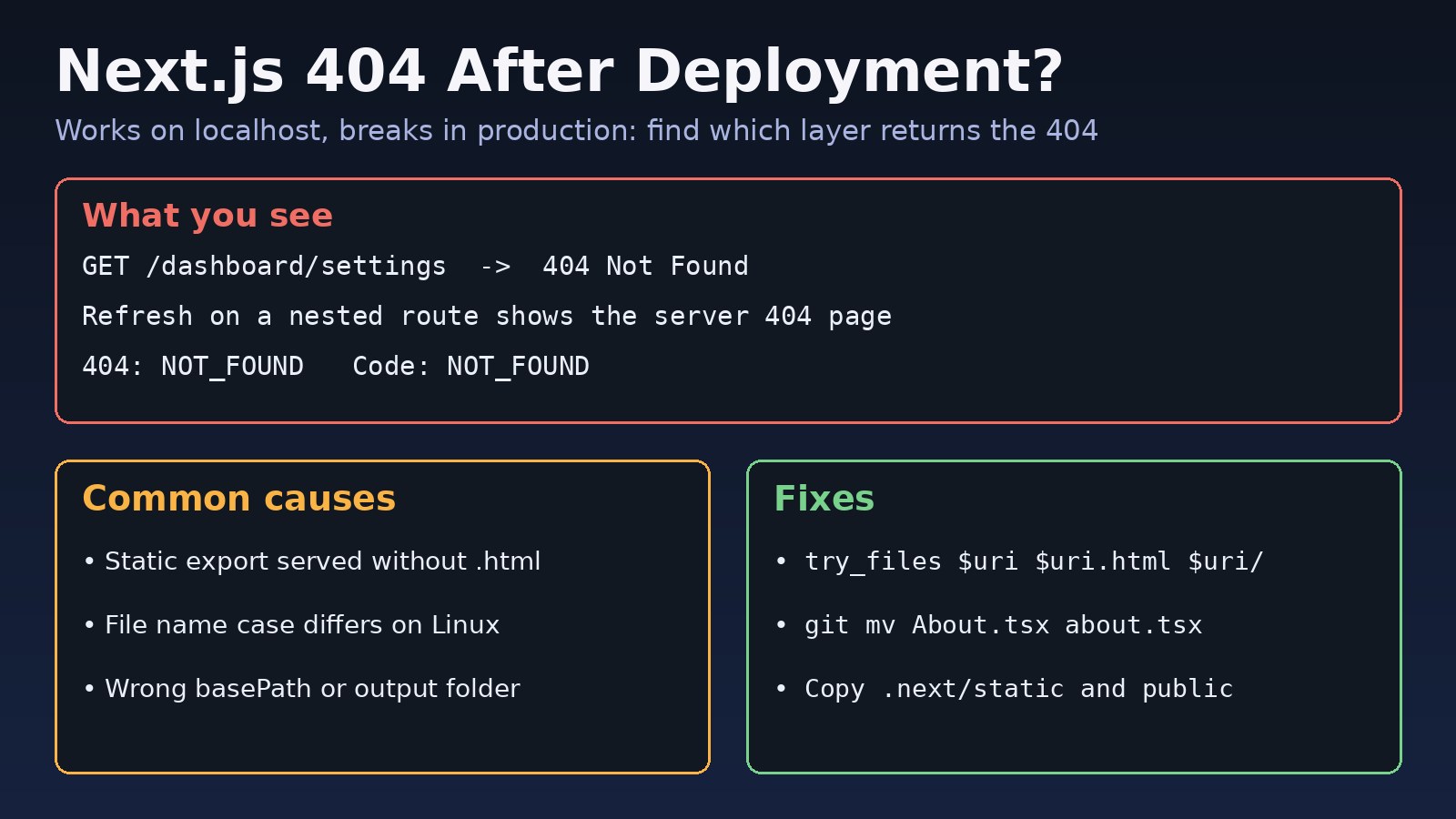
Everything works with npm run dev and even with next start on your laptop, but once the app is live, some pages return Not Found. Clicking a link inside the app works, yet refreshing the same page or opening it from a bookmark fails. This guide walks through the real causes of a nextjs 404 after deployment, how to find which layer is returning the 404, and the exact fix for static exports, Nginx, Docker, Vercel and subpath deployments.
The Problem: Next.js 404 After Deployment
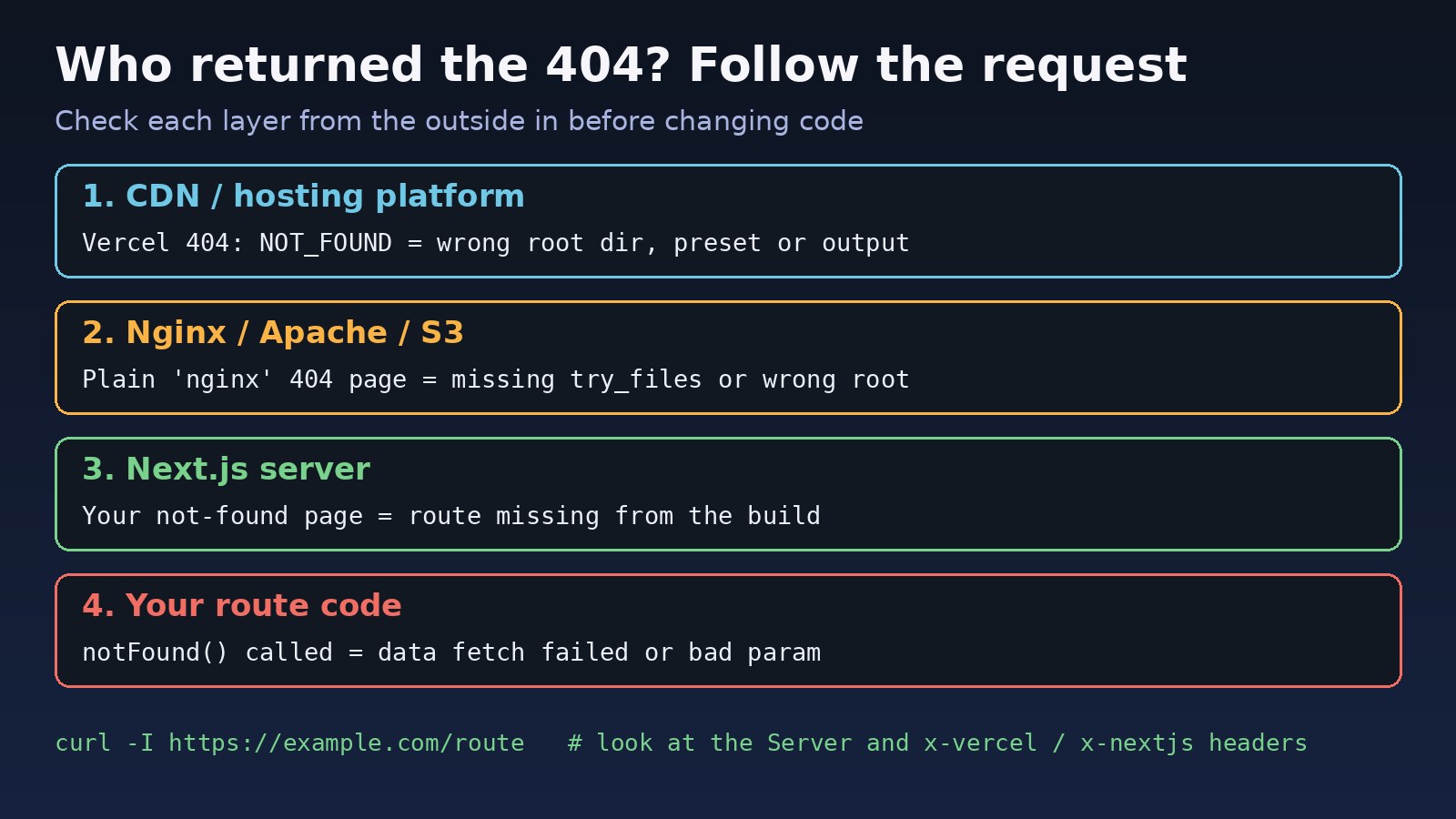
A 404 in production is not always produced by Next.js. It can come from the hosting platform, from a web server like Nginx sitting in front of the app, from the Next.js server because the route was never built, or from your own code calling notFound(). Each one needs a different fix, so the first job is to find out who answered.
Symptoms
- The home page loads, but
/aboutor/dashboard/settingsreturns 404 when opened directly or refreshed. - Navigation through
<Link>works because the router loads the page on the client, but a full page load fails. - The 404 page looks like a plain server page (for example, it says
nginxat the bottom) instead of your app's design. - On Vercel you see a platform error rather than your app:
404: NOT_FOUND
Code: NOT_FOUND
ID: bom1::xxxxx-1730000000000-xxxxxxxxxxxx- A page that works locally on macOS or Windows returns 404 on a Linux server or in a Docker image.
- Pages load but have no styling, and the browser console shows 404 errors for
/_next/static/...files. - Dynamic routes such as
/blog/[slug]return 404 for every slug in production.
Root Cause: Why Next.js Routes Are Not Working in Production
The common thread is that production serves your app differently from the dev server. The dev server compiles any route on demand. In production, only what the build produced exists, and whatever sits in front of the app decides how URLs map to files.
1. Static export served without HTML fallbacks
With output: 'export', Next.js writes plain files to the out folder. A route like /about becomes out/about.html. Nginx, Apache or an S3 bucket asked for /about looks for a file or folder literally named about, finds nothing and returns 404.
2. File name case differs on Linux
macOS and Windows file systems are usually case-insensitive, Linux is not. If the file is app/About/page.tsx and your links point to /about, it works locally and fails on the server. Git can hide this, because with core.ignorecase=true a rename that only changes case is often not recorded.
3. Wrong project root, output folder or basePath
In a monorepo the hosting platform may build the wrong folder. When the app is served under a subpath like /app, a missing or mismatched basePath makes every route and asset miss.
4. Missing build files in Docker standalone output
With output: 'standalone', the .next/standalone folder does not include public or .next/static. If the Dockerfile does not copy them, images and JavaScript chunks return 404.
5. Routes that were never generated
Dynamic routes with dynamicParams = false only serve the params returned by generateStaticParams. If the build could not reach your API or database (often because an environment variable was missing at build time), the list comes back empty and every slug 404s. Code that calls notFound() when a fetch fails has the same effect.
Step-by-Step Solution
Step 1: Find which layer returned the 404
Request the failing URL with headers only and look at who answered:
curl -I https://example.com/dashboard/settings

# Things to look for in the response headers:
#   server: nginx            -> Nginx answered, check try_files and root
#   x-vercel-error: NOT_FOUND -> Vercel project settings, not your code
#   x-powered-by: Next.js     -> Next.js answered, the route is missing or notFound() ran
Then compare with the app directly on the server, bypassing the proxy:
curl -I http://127.0.0.1:3000/dashboard/settingsIf the direct request returns 200 and the public URL returns 404, the problem is in the proxy or hosting layer. If both return 404, it is in the build or the route code.
Step 2: Check what the build actually produced
Run a production build and read the route list it prints. Every route you expect must be there:
npm run build

# Route (app)                    Size     First Load JS
# ┌ ○ /                          5.2 kB   92 kB
# ├ ○ /about                     1.1 kB   88 kB
# └ ● /blog/[slug]               2.3 kB   90 kB
#     ├ /blog/first-post
#     └ /blog/second-post
#
# ○  (Static)  prerendered as static content
# ●  (SSG)     prerendered as static HTML (uses generateStaticParams)
# ƒ  (Dynamic) server-rendered on demand
A route missing from that table was never built. For a static export, check the files directly:
ls out/
ls out/blog/
find app pages src -name "page.*" 2>/dev/null
Also note that if both app and src/app exist, Next.js uses the root folder and ignores src, so pages added under src/app silently disappear.
Step 3: Fix static export routing on Nginx
For output: 'export', tell Nginx to try the .html file and the folder index before giving up:
server {
    listen 80;
    server_name example.com;
    root /var/www/my-next-app/out;

    location / {
        try_files $uri $uri.html $uri/ =404;
    }

    error_page 404 /404.html;
}
Alternatively set trailingSlash: true so each route is exported as about/index.html, which most static hosts serve without extra rules. Reload Nginx after editing with sudo nginx -t && sudo systemctl reload nginx. If Nginx answers with errors instead of 404 after this, the 502 Bad Gateway Nginx guide covers the proxy side.
Step 4: Fix the reverse proxy for next start
When Next.js runs as a server, Nginx should pass every path to it, not just the root:
location / {
    proxy_pass http://127.0.0.1:3000;
    proxy_http_version 1.1;
    proxy_set_header Host $host;
    proxy_set_header X-Forwarded-Proto $scheme;
    proxy_set_header Upgrade $http_upgrade;
    proxy_set_header Connection "upgrade";
}
Avoid adding a path to proxy_pass (such as http://127.0.0.1:3000/ inside location /app/) unless you mean to strip the prefix, because it rewrites the path Next.js receives.
Step 5: Fix case-sensitive file names
# Find route folders with uppercase letters
find app pages -path "*node_modules*" -prune -o -name "*[A-Z]*" -print

# Rename so Git records the change on case-insensitive systems
git mv app/About app/about-tmp
git mv app/about-tmp app/about
git commit -m "Fix route folder case"

# Make Git notice case-only changes in the future
git config core.ignorecase false
Step 6: Set basePath for subpath deployments
// next.config.js
/** @type {import('next').NextConfig} */
const nextConfig = {
  basePath: '/app',          // the app lives at https://example.com/app
  // output: 'export',       // only for static hosting
  // trailingSlash: true,    // helps static hosts find folder/index.html
};

module.exports = nextConfig;
Use <Link href="/about"> as usual; Next.js adds the base path for you. Plain <a> tags and hard-coded asset URLs do not get it automatically.
Step 7: Copy static files in a standalone Docker build
FROM node:20-alpine AS build
WORKDIR /app
COPY package*.json ./
RUN npm ci
COPY . .
RUN npm run build

FROM node:20-alpine AS run
WORKDIR /app
ENV NODE_ENV=production
COPY --from=build /app/.next/standalone ./
COPY --from=build /app/.next/static ./.next/static
COPY --from=build /app/public ./public
EXPOSE 3000
CMD ["node", "server.js"]
Step 8: Make sure dynamic routes can be generated
// app/blog/[slug]/page.tsx
import { notFound } from 'next/navigation';

export const dynamicParams = true; // allow slugs that were not prebuilt

export async function generateStaticParams() {
  const res = await fetch(`${process.env.API_URL}/posts`);
  if (!res.ok) throw new Error(`Failed to load posts: ${res.status}`);
  const posts = await res.json();
  return posts.map((p) => ({ slug: p.slug }));
}

export default async function Page({ params }) {
  const { slug } = await params;
  const res = await fetch(`${process.env.API_URL}/posts/${slug}`);
  if (res.status === 404) notFound();
  if (!res.ok) throw new Error(`API error ${res.status}`);
  const post = await res.json();
  return <article><h1>{post.title}</h1></article>;
}
Throwing on a failed fetch makes the build fail loudly instead of quietly producing an empty list. If API_URL is undefined at build time, the Next.js environment variables guide explains why build-time and runtime variables differ.
Step 9: Check Vercel project settings
For a 404: NOT_FOUND from Vercel, open the project settings and check that the Framework Preset is Next.js, the Root Directory points to the folder containing package.json and next.config.js, and the Output Directory is left empty unless you really changed it. Then redeploy.
Code/Commands Examples for Production 404 Debugging
# Reproduce production locally
npm run build && npm run start
curl -I http://localhost:3000/about

# Serve a static export the way a basic static host would
npx serve out

# Check Nginx config and recent 404s
sudo nginx -t
sudo tail -n 50 /var/log/nginx/access.log | grep " 404 "

# Confirm files exist inside the running container
docker exec -it my-next-app ls -la .next/static public
Verification
- Open each important route directly in a new browser tab and refresh it, not just by clicking links.
curl -IreturnsHTTP/1.1 200(orHTTP/2 200) for each route through the public domain.- The browser Network tab shows no 404s for
/_next/staticfiles or images. - A deliberately wrong URL shows your own
not-foundpage, which proves Next.js is handling unknown routes.
Prevention
- Keep route folders lowercase and set
core.ignorecase falsein the repository. - Run
npm run buildin CI on Linux, so case and build errors appear before deployment. - Add a small smoke test after each deploy that requests your key routes and fails on any non-200 status.
- Keep the Nginx config and Dockerfile in the repository so routing rules change with the code.
- Make data fetches in
generateStaticParamsthrow on failure instead of returning an empty list.
If the page loads but its JavaScript files fail after a new release, that is a different problem; see the Next.js ChunkLoadError guide.
FAQs
Why does my Next.js page work when I click a link but 404 on refresh?
Client navigation loads the page through the Next.js router, so the server never sees the URL. A refresh asks the web server for that path directly. With a static export behind Nginx or S3, the server needs a rule like try_files $uri $uri.html $uri/ to find the exported file.
Why are Next.js routes not working only on Linux?
Linux file names are case-sensitive. A folder named About serves /About, not /about. Rename it with git mv so the change is committed.
How do I fix a production 404 for /_next/static files?
Make sure the .next/static and public folders are deployed. In standalone Docker builds, copy both into the final image, and check that any CDN or assetPrefix points to where those files actually live.
Does dynamicParams = false cause 404 errors?
Yes, by design. Any param not returned by generateStaticParams at build time returns 404. Set it to true if new content should be rendered on demand.
What does 404: NOT_FOUND on Vercel mean?
Vercel could not find a deployment output for that URL. It is usually a project setting such as the root directory or framework preset, not a missing page in your code.



Comments
Join the discussion. Replies load on demand, up to 5 levels.
0 threads
No comments yet
Be the first to start the conversation.