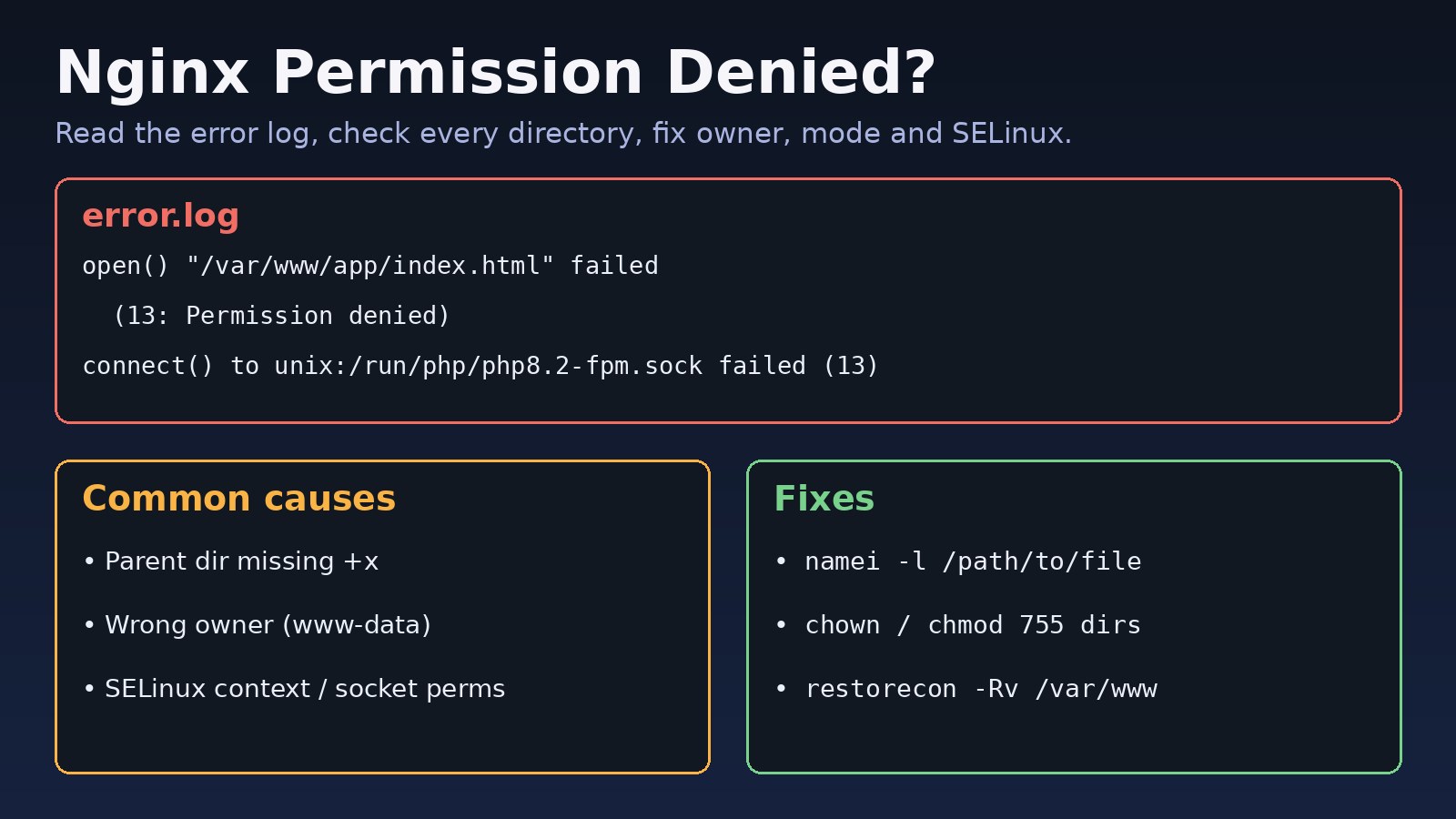
Your site returns 403 Forbidden or 502 Bad Gateway, and the Nginx error log says (13: Permission denied). An nginx permission denied error means the Nginx worker process, running as www-data or nginx, is not allowed to open a file, list a directory or connect to a socket. The fix is rarely chmod 777. This guide shows how to find exactly which path is blocked and fix ownership, directory modes, PHP-FPM sockets and SELinux safely.
The Problem: Nginx Permission Denied
Nginx starts as root, but its worker processes drop to an unprivileged user defined by the user directive in /etc/nginx/nginx.conf. Every file Nginx serves, every directory on the way to that file, every upstream socket and every log or cache directory must be accessible to that user. If any single piece is not, the request fails with error 13.
Symptoms of Nginx 403 and File Access Denied Errors
The browser usually shows 403 Forbidden for static files or 502 Bad Gateway for PHP or proxied apps. The useful details are in /var/log/nginx/error.log:
2026/11/03 09:12:41 [crit] 1234#1234: *7 open() "/home/deploy/app/public/index.html" failed (13: Permission denied), client: 203.0.113.5, server: example.com, request: "GET / HTTP/1.1"

2026/11/03 09:13:02 [error] 1234#1234: *9 "/var/www/site/index.html" is forbidden (13: Permission denied)

2026/11/03 09:14:10 [crit] 1234#1234: *12 connect() to unix:/run/php/php8.2-fpm.sock failed (13: Permission denied) while connecting to upstream

2026/11/03 09:15:33 [crit] 1234#1234: *15 open() "/var/lib/nginx/body/0000000001" failed (13: Permission denied)

nginx: [emerg] open() "/var/log/nginx/access.log" failed (13: Permission denied)- Files exist and
lsshows them, but Nginx still returns 403. - It works after
chmod -R 777, which is a sign of a real permission problem, not a solution. - Large uploads fail while small requests work (temp body directory).
- Everything looks correct with
ls -l, but the server runs CentOS, RHEL, Rocky or Fedora (SELinux).
Root Cause: Why Nginx Gets Permission Denied
1. A parent directory is missing execute permission
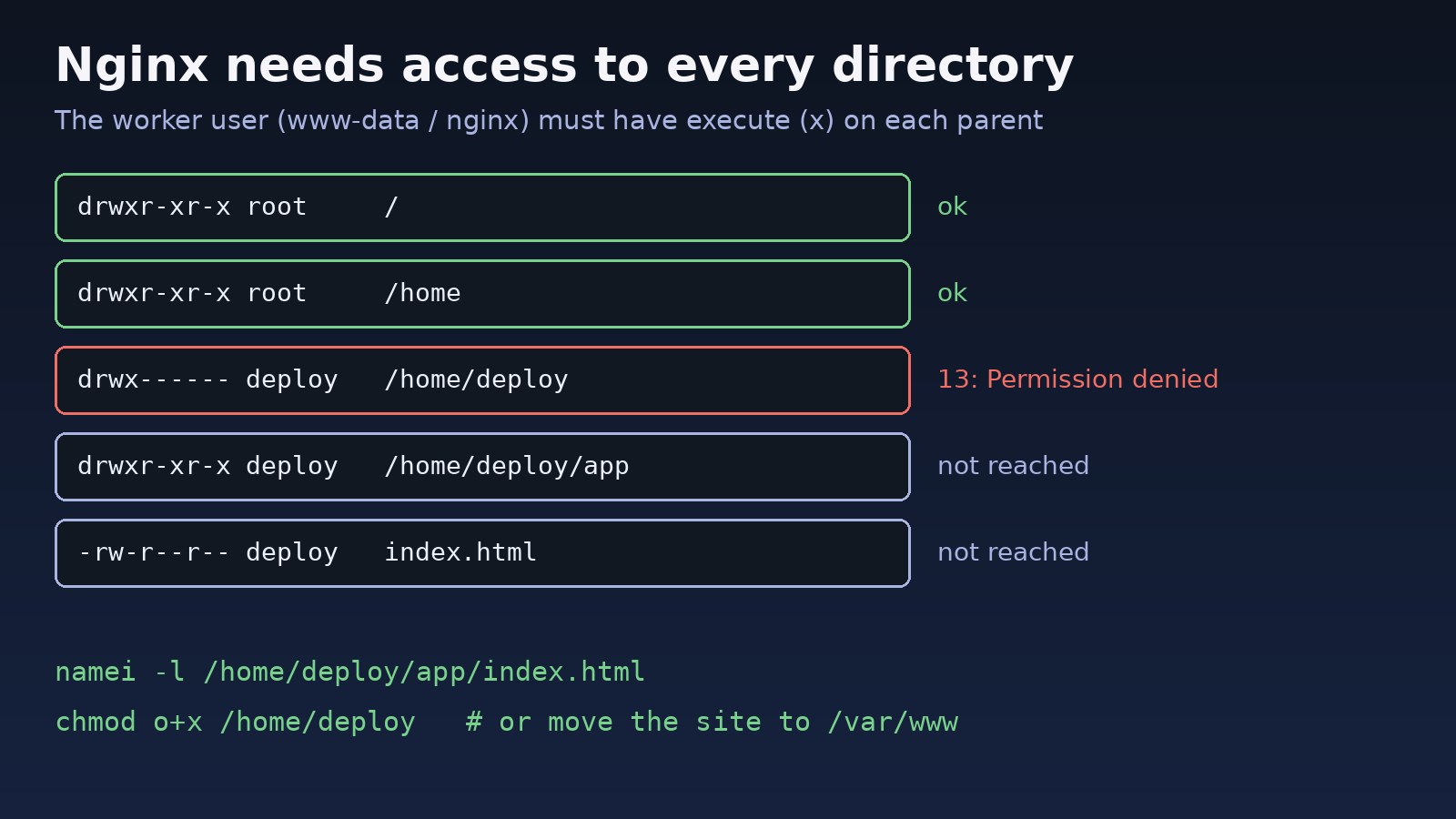
To open /home/deploy/app/index.html, the worker needs execute (x) on /, /home, /home/deploy and /home/deploy/app. Home directories are often 700 or 750, so serving a site from inside one is the most common cause.
2. Wrong owner or file mode
Files copied as root, extracted from an archive or created by a deploy user with a strict umask may be 600 and unreadable by www-data.
3. PHP-FPM socket permissions
The FPM pool's listen.owner, listen.group and listen.mode decide who can connect to the socket. If they do not match the Nginx user, every PHP request fails with 502. The 502 Bad Gateway Nginx guide covers other upstream causes.
4. SELinux or AppArmor
On SELinux systems, normal Unix permissions can be perfect and access is still denied because the files do not have the httpd_sys_content_t label, or Nginx is not allowed to make network connections to an upstream.
5. Directory listing is disabled
A request for a directory with no index file gives directory index of "/var/www/site/" is forbidden. That is a 403 from configuration, not from the filesystem.
Step-by-Step Solution
Step 1: Confirm which user Nginx runs as
grep -E '^\s*user' /etc/nginx/nginx.conf
ps -o user,pid,cmd -C nginx
Debian and Ubuntu use www-data; RHEL-based systems and the official nginx.org packages use nginx. Use that name in every command below.
Step 2: Test access as the Nginx user
sudo -u www-data stat /home/deploy/app/public/index.html
sudo -u www-data cat /home/deploy/app/public/index.html > /dev/null && echo OK
If this fails with Permission denied, the problem is filesystem permissions. If it works but Nginx still fails, look at SELinux (Step 6).
Step 3: Find the blocked directory with namei
namei -l /home/deploy/app/public/index.html

f: /home/deploy/app/public/index.html
drwxr-xr-x root   root   /
drwxr-xr-x root   root   home
drwx------ deploy deploy deploy
drwxr-xr-x deploy deploy app
drwxr-xr-x deploy deploy public
-rw-r--r-- deploy deploy index.html
The line with no x for others, here /home/deploy, is where Nginx stops. Either give it execute only, or move the site to /var/www:
# option A: allow traversal only (no listing)
sudo chmod o+x /home/deploy

# option B (cleaner): serve from /var/www
sudo mkdir -p /var/www/app
sudo rsync -a /home/deploy/app/ /var/www/app/
Step 4: Fix ownership and modes for the web root
Use 755 for directories and 644 for files. Keep the deploy user as owner and give the web server group read access:
sudo chown -R deploy:www-data /var/www/app
sudo find /var/www/app -type d -exec chmod 755 {} \;
sudo find /var/www/app -type f -exec chmod 644 {} \;

# only folders the app must write to (Laravel example)
sudo chmod -R 775 /var/www/app/storage /var/www/app/bootstrap/cache
For Laravel-specific write errors in storage, see the Laravel storage permission denied guide.
Step 5: Fix the PHP-FPM socket
Edit the pool file, for example /etc/php/8.2/fpm/pool.d/www.conf:
listen = /run/php/php8.2-fpm.sock
listen.owner = www-data
listen.group = www-data
listen.mode = 0660sudo systemctl restart php8.2-fpm
ls -l /run/php/php8.2-fpm.sock
# srw-rw---- 1 www-data www-data 0 ... /run/php/php8.2-fpm.sockMake sure the fastcgi_pass path in your Nginx server block matches this socket exactly.
Step 6: Fix SELinux denials
getenforce
sudo ausearch -m avc -ts recent | grep nginx

# label a custom web root as web content
sudo semanage fcontext -a -t httpd_sys_content_t "/srv/app(/.*)?"
sudo restorecon -Rv /srv/app

# writable folders
sudo semanage fcontext -a -t httpd_sys_rw_content_t "/srv/app/storage(/.*)?"
sudo restorecon -Rv /srv/app/storage

# allow Nginx to proxy to an app on a TCP port
sudo setsebool -P httpd_can_network_connect 1
Do not disable SELinux to make the error go away. Labelling the files correctly fixes the cause and keeps the protection. On Ubuntu, check sudo dmesg | grep apparmor for AppArmor denials instead.
Step 7: Fix log, cache and temp directories
sudo chown -R www-data:adm /var/log/nginx
sudo chown -R www-data:www-data /var/lib/nginx
sudo nginx -t && sudo systemctl reload nginx
Code/Commands: A Safe Nginx Server Block
server {
    listen 80;
    server_name example.com;
    root /var/www/app/public;
    index index.php index.html;

    location / {
        try_files $uri $uri/ /index.php?$query_string;
    }

    location ~ \.php$ {
        include snippets/fastcgi-php.conf;
        fastcgi_pass unix:/run/php/php8.2-fpm.sock;
    }

    location ~ /\.(?!well-known) {
        deny all;
    }
}
The index line prevents directory-listing 403 errors, and the last block intentionally denies hidden files such as .env, so a 403 there is expected.
Verification
sudo nginx -treportssyntax is okandtest is successful.sudo -u www-data cat /var/www/app/public/index.htmlworks without errors.curl -I http://example.com/returns200 OKinstead of 403 or 502.sudo tail -f /var/log/nginx/error.logshows no new(13: Permission denied)lines while you browse the site.- On SELinux hosts,
ls -Z /srv/appshowshttpd_sys_content_t.
Prevention
- Serve sites from
/var/wwwor/srv, not from home directories. - Run a permission reset (the
find ... chmodcommands) as the last step of every deploy script. - Never use
chmod 777; give write access only to the folders the app writes to. - Keep the FPM
listen.ownerand the Nginxuserin sync after PHP upgrades. - On RHEL-based servers, add
semanage fcontextrules once sorestoreconkeeps labels correct after new deploys. - Monitor the error log for
13: Permission denied; timeouts are a different problem, covered in the Nginx 504 Gateway Timeout guide.
FAQs
Why does Nginx 403 Forbidden show when file permissions look correct?
Check every parent directory with namei -l, not just the file. One directory without execute permission blocks the whole path. On CentOS or RHEL, also check the SELinux label with ls -Z.
What does "(13: Permission denied)" mean in the Nginx error log?
Error 13 is the Linux EACCES code. The Nginx worker user tried to open a file, directory or socket and the kernel refused it because of permissions or a security policy.
How do I fix nginx file access denied for a PHP-FPM socket?
Set listen.owner and listen.group in the FPM pool to the Nginx user, set listen.mode = 0660, then restart PHP-FPM and reload Nginx.
Is chmod 777 a valid fix for nginx permission denied?
No. It hides the real cause and lets any user or compromised process modify your site. Use 755 for directories, 644 for files and group write only where needed.
Should I disable SELinux to fix Nginx permission errors?
No. Use semanage fcontext and restorecon to label files, and setsebool for network access. That fixes the denial and keeps the server protected.



Comments
Join the discussion. Replies load on demand, up to 5 levels.
0 threads
No comments yet
Be the first to start the conversation.