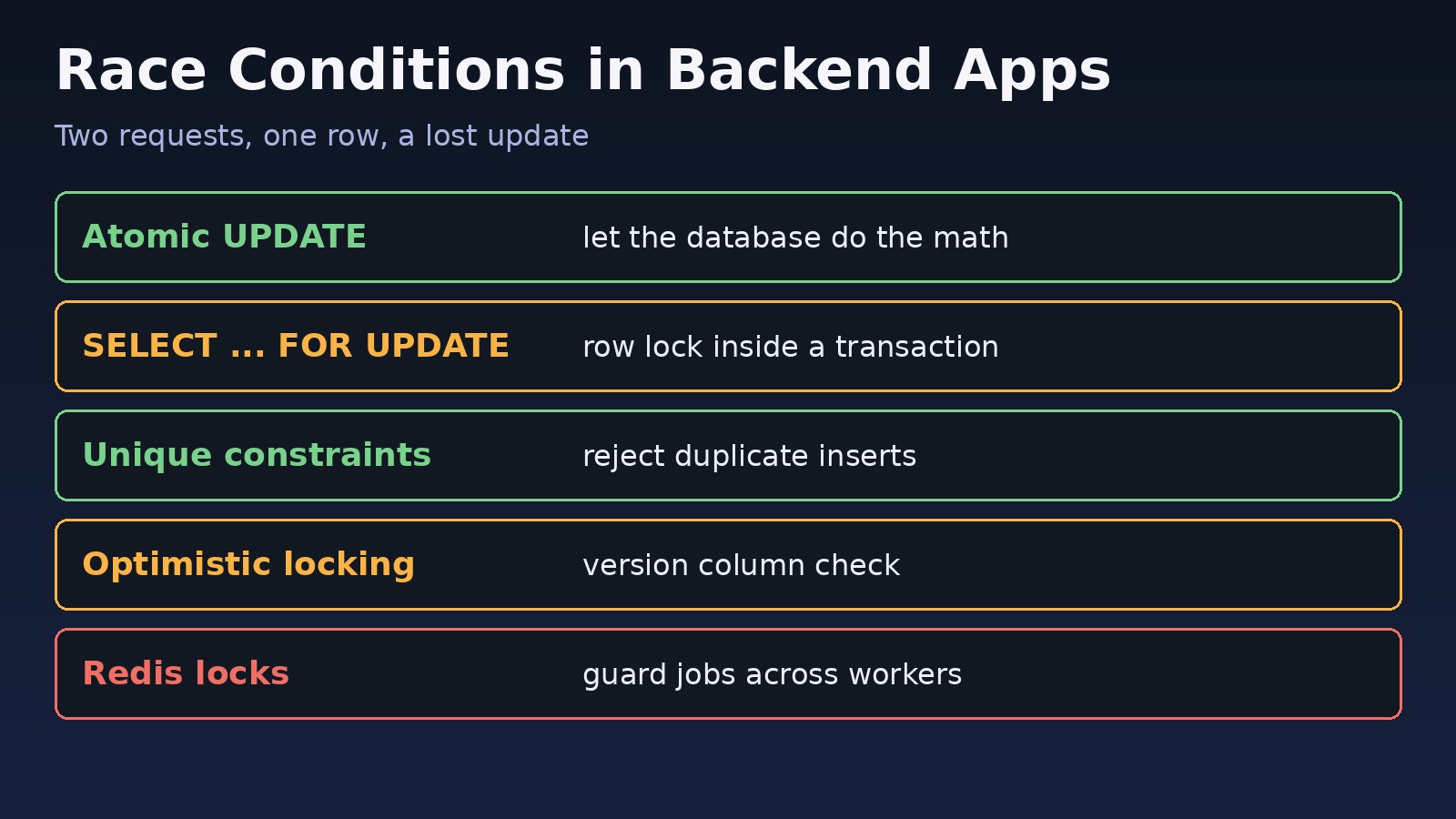
Two customers click "Buy" on the last item at the same moment, both orders succeed, and your stock goes to -1. Or a user double-clicks "Pay" and gets charged twice. These are classic examples of a race condition in programming: the result depends on the timing of two operations that touch the same data. Race conditions rarely appear on a developer laptop, but they show up fast in production under real traffic. This guide shows how to find these concurrency bugs and fix them in Laravel, Node.js, PostgreSQL and Redis with atomic updates, row locks, unique constraints, optimistic locking and distributed locks.
The Problem: Concurrent Requests Corrupt Shared Data
A typical backend handles many requests in parallel: several PHP-FPM workers, multiple Node.js instances, queue workers and cron jobs. When two of them read the same row, make a decision in application code, and then write back, one of the writes can silently overwrite the other. Nothing crashes, so the bug often goes unnoticed until the numbers stop adding up.
Symptoms of Race Conditions in Backend Applications
- Inventory, wallet balances or counters drift from what the transaction history says.
- Duplicate orders, payments, invoices or emails for a single user action.
- Bugs that only happen under load and cannot be reproduced locally.
- The same queued job or scheduled task runs twice on different servers.
- Intermittent database errors like these:
SQLSTATE[23505]: Unique violation: 7 ERROR:  duplicate key value violates unique constraint "orders_reference_unique"
SQLSTATE[40P01]: Deadlock detected: 7 ERROR:  deadlock detected
SQLSTATE[40001]: Serialization failure: 7 ERROR:  could not serialize access due to concurrent update
Root Cause: The Read-Modify-Write Gap
Most race conditions follow the same pattern, often called check-then-act or read-modify-write:
// Laravel: looks fine, is not safe under concurrency
$product = Product::find($id);
if ($product->stock > 0) {
    $product->stock = $product->stock - 1;   // both requests computed 0
    $product->save();
    Order::create([...]);
}
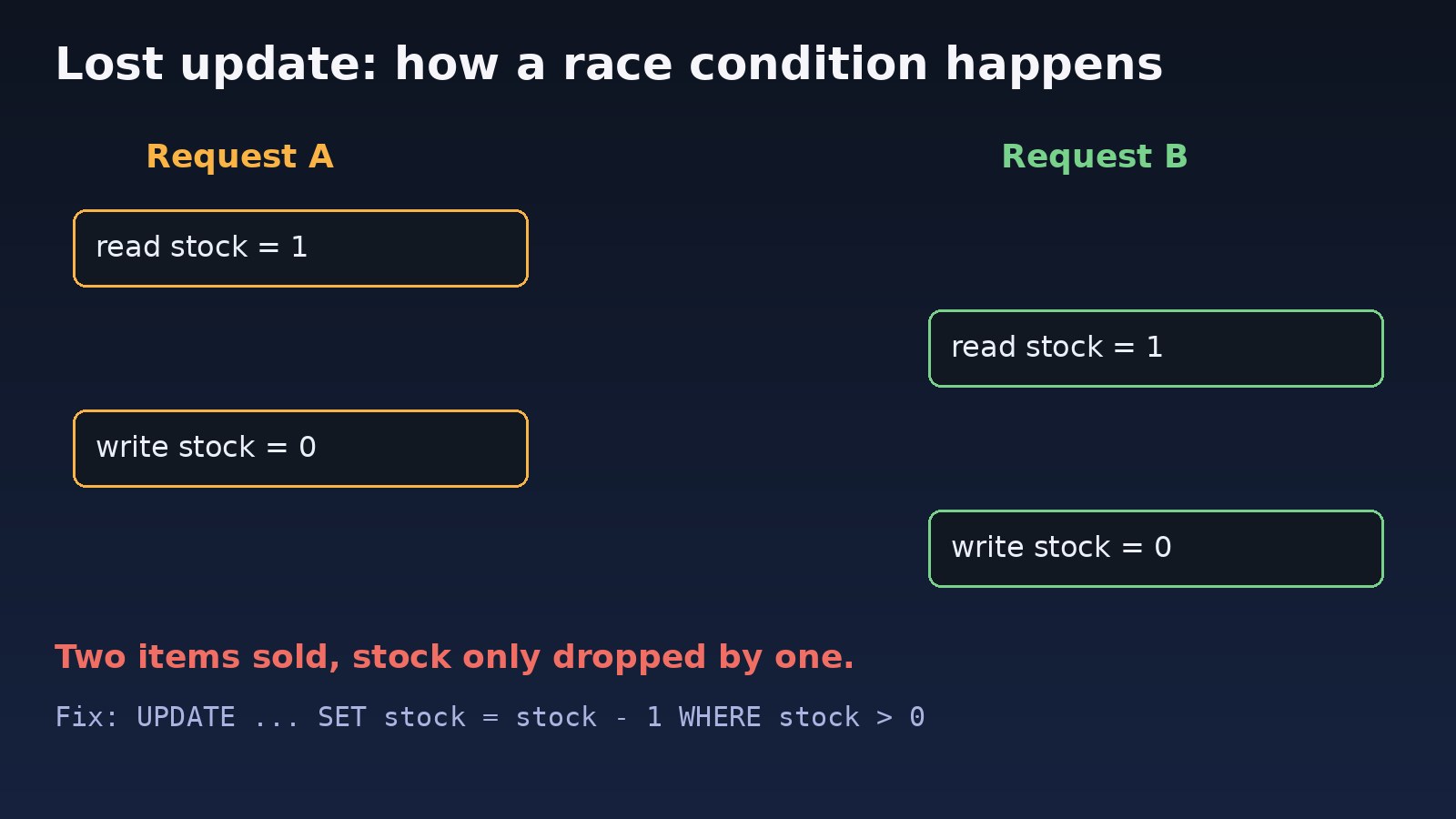
Between the read and the write there is a gap. If request B reads the row inside that gap, both requests see stock = 1, both pass the check and both write 0. Two items are sold, but stock only drops by one. This is a lost update.
Why it gets worse with scale
Adding more workers, servers or async jobs widens the window. Ordinary database transactions do not prevent this on their own: PostgreSQL's default isolation level, READ COMMITTED, lets both transactions read the same committed value before either writes. If you are already scaling out, read how to handle concurrent users in a web application.
Step-by-Step Solution: Race Condition Prevention
Step 1: Use atomic updates instead of read-then-write
The simplest fix is to let the database do the check and the change in one statement. The row is locked for the duration of the UPDATE, so concurrent requests are serialized.
-- PostgreSQL / MySQL
UPDATE products SET stock = stock - 1
WHERE id = 42 AND stock > 0;
-- 1 row affected = success, 0 rows = sold out// Laravel
$affected = Product::where('id', $id)
->where('stock', '>', 0)
->decrement('stock');
if ($affected === 0) {
abort(409, 'Out of stock');
}Step 2: Lock the row with SELECT ... FOR UPDATE
When the logic is too complex for a single UPDATE, take a row lock inside a transaction. Other transactions that try to lock the same row wait until yours commits.
// Laravel pessimistic locking
DB::transaction(function () use ($id, $qty) {
    $product = Product::whereKey($id)->lockForUpdate()->firstOrFail();

    if ($product->stock < $qty) {
        throw new RuntimeException('Insufficient stock');
    }

    $product->decrement('stock', $qty);
    Order::create(['product_id' => $id, 'qty' => $qty]);
});// Node.js with node-postgres
const client = await pool.connect();
try {
await client.query('BEGIN');
const { rows } = await client.query(
'SELECT balance FROM wallets WHERE user_id = $1 FOR UPDATE', [userId]);
if (rows[0].balance < amount) throw new Error('Insufficient balance');
await client.query(
'UPDATE wallets SET balance = balance - $1 WHERE user_id = $2', [amount, userId]);
await client.query('COMMIT');
} catch (e) {
await client.query('ROLLBACK');
throw e;
} finally {
client.release();
}Keep locked transactions short and always lock rows in the same order (for example by ascending id) to avoid deadlocks. Long transactions also hold connections; see PostgreSQL idle in transaction if locks pile up.
Step 3: Enforce uniqueness in the database
Application checks like "does this order reference exist?" race just like stock checks. A unique constraint is the only reliable guard against duplicate inserts.
ALTER TABLE payments ADD CONSTRAINT payments_idempotency_key_unique UNIQUE (idempotency_key);

INSERT INTO payments (idempotency_key, user_id, amount)
VALUES ('chk_9f2a', 7, 2500)
ON CONFLICT (idempotency_key) DO NOTHING;// Laravel: insert once, safely
$created = DB::table('payments')->insertOrIgnore([
'idempotency_key' => $request->header('Idempotency-Key'),
'user_id' => $user->id,
'amount' => $amount,
]);
if ($created === 0) {
return response()->json(['status' => 'already processed']);
}Step 4: Use optimistic locking for low-contention edits
For records edited in forms (customer profiles, ERP documents), add a version column. The update succeeds only if nobody changed the row since you read it.
ALTER TABLE invoices ADD COLUMN version integer NOT NULL DEFAULT 1;

UPDATE invoices
SET total = 1500, version = version + 1
WHERE id = 88 AND version = 3;
-- 0 rows affected: someone else saved first, reload and retry
Step 5: Use Redis locks for jobs and cross-server work
When the critical section is not a single database row, such as calling an external API or running a scheduled import, use an atomic lock. Laravel's cache locks use Redis SET NX with an expiry.
// Laravel atomic lock
$lock = Cache::lock("sync-order-{$orderId}", 30);

if ($lock->get()) {
    try {
        $this->syncOrder($orderId);
    } finally {
        $lock->release();
    }
}

// Scheduled task: only one server runs it
$schedule->command('reports:generate')->hourly()->onOneServer()->withoutOverlapping();

// Queued job: no two jobs for the same order at once
public function middleware(): array
{
    return [(new WithoutOverlapping($this->orderId))->expireAfter(60)];
}# Raw Redis equivalent
SET lock:order:42 "worker-3" NX PX 30000
# OK = lock acquired, (nil) = someone else holds itAlways set an expiry so a crashed worker cannot hold the lock forever, and only release a lock you own. More on worker setup in Laravel queues with Redis.
Step 6: Avoid shared in-memory state in Node.js
Node.js is single-threaded, but await creates gaps where other requests run. In-memory counters or caches also break when you run more than one instance. Keep shared state in PostgreSQL or Redis and use atomic operations such as INCR.
// Unsafe: another request can run between get and set
const count = await redis.get('views');
await redis.set('views', Number(count) + 1);

// Safe: single atomic command
await redis.incr('views');
Code and Commands to Find Concurrency Bugs
# Fire 50 concurrent requests at an endpoint (ApacheBench)
ab -n 50 -c 50 -p order.json -T application/json https://staging.example.com/api/orders

# Or with curl and xargs
seq 50 | xargs -P 50 -I{} curl -s -o /dev/null -w "%{http_code}\n" -X POST https://staging.example.com/api/orders

# See who is waiting on locks in PostgreSQL
psql -c "SELECT pid, wait_event_type, wait_event, state, query FROM pg_stat_activity WHERE wait_event_type = 'Lock';"

# Log deadlocks and long lock waits (postgresql.conf)
log_lock_waits = on
deadlock_timeout = 1s
Verification
- Seed a product with stock 1 and send 50 concurrent purchase requests; exactly one should succeed.
- Replay the same request with the same idempotency key; only one payment row should exist.
- Run two queue workers against the same job type and confirm a locked job is not processed twice.
- Compare balances and stock against the sum of transaction rows after a load test.
- Check PostgreSQL logs for deadlocks after the test.
Prevention
- Treat every read-then-write on shared data as a possible race in code review.
- Put invariants in the database: unique constraints, CHECK constraints such as
stock >= 0, and foreign keys. - Prefer atomic SQL and Redis commands over application-side arithmetic.
- Require idempotency keys on payment and order endpoints, and disable the submit button on the frontend as a usability extra, not a guard.
- Add a concurrent test to CI for critical flows like checkout and wallet top-ups.
FAQs
What is a race condition in programming?
It is a bug where the outcome depends on the timing of concurrent operations on shared data, such as two requests updating the same row at once.
Do database transactions prevent race conditions?
Not by themselves. Under READ COMMITTED, two transactions can read the same value. You need atomic updates, row locks, constraints, or a stricter isolation level with retries.
Pessimistic or optimistic locking: which should I use?
Use pessimistic locking (FOR UPDATE) for hot rows like stock and balances. Use optimistic locking with a version column when conflicts are rare, such as form edits.
Can Node.js have race conditions if it is single-threaded?
Yes. Every await lets other requests run, and multiple instances share the same database, so read-modify-write logic still races.
What is the best race condition prevention for duplicate submissions?
An idempotency key stored in a column with a unique constraint, combined with ON CONFLICT DO NOTHING or insertOrIgnore.



Comments
Join the discussion. Replies load on demand, up to 5 levels.
0 threads
No comments yet
Be the first to start the conversation.