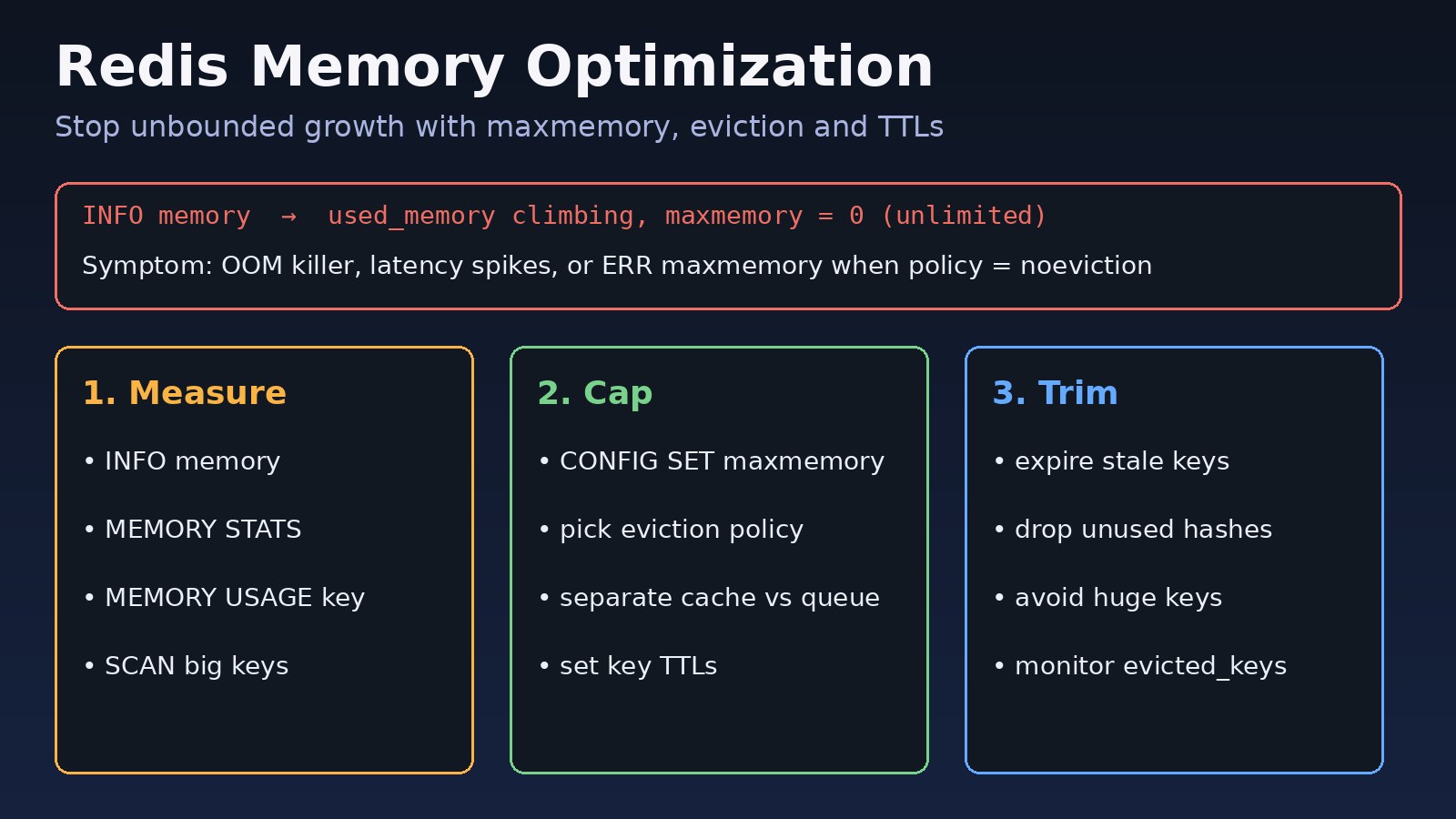
Unchecked Redis growth is a common production failure in Laravel, Node and Docker stacks. Without deliberate redis memory optimization, keys accumulate, used_memory climbs, and the process either gets OOM-killed or starts returning write errors. This guide shows how to measure memory, set Redis maxmemory, choose Redis eviction policies, trim wasteful keys, and verify the fix with real redis-cli commands.
The Problem: Redis Memory Keeps Growing
Redis stores data in RAM. That is the point of an in-memory store next to PostgreSQL, but RAM is finite. Many teams run Redis with no maxmemory limit, no TTLs on cache keys, and no separation between cache data and durable-ish queues or locks. Over days or weeks the working set expands until the host swaps, Kubernetes restarts the pod, or clients see timeouts.
This is not a Redis bug. It is missing operational guardrails: a memory ceiling, an eviction policy that matches the workload, and key design that does not retain forever what can be rebuilt.
Symptoms of Unbounded Redis Memory Usage
redis-cli INFO memoryshowsused_memory_humanrising over time whilemaxmemoryis0(unlimited).- Host metrics show Redis RSS near the container or VM limit; the OOM killer restarts the process.
- Clients receive
OOM command not allowed when used memory > 'maxmemory'when the policy isnoeviction. - Latency spikes on
GET/SETas the instance pages or fights eviction under pressure. evicted_keysstays at zero on a cache instance that should be recycling cold keys.- Laravel or Node workers slow down because session, cache or queue Redis shares one overloaded instance.
Related failure modes: a Redis connection refused after a crash loop, and a cache stampede when everything expires at once after a flush.
Root Cause: No Cap, Wrong Policy, or Key Design
Three root causes show up repeatedly:
- Unlimited memory. Default Redis allows growth until the OS stops it. Production cache and session instances need an explicit Redis maxmemory value.
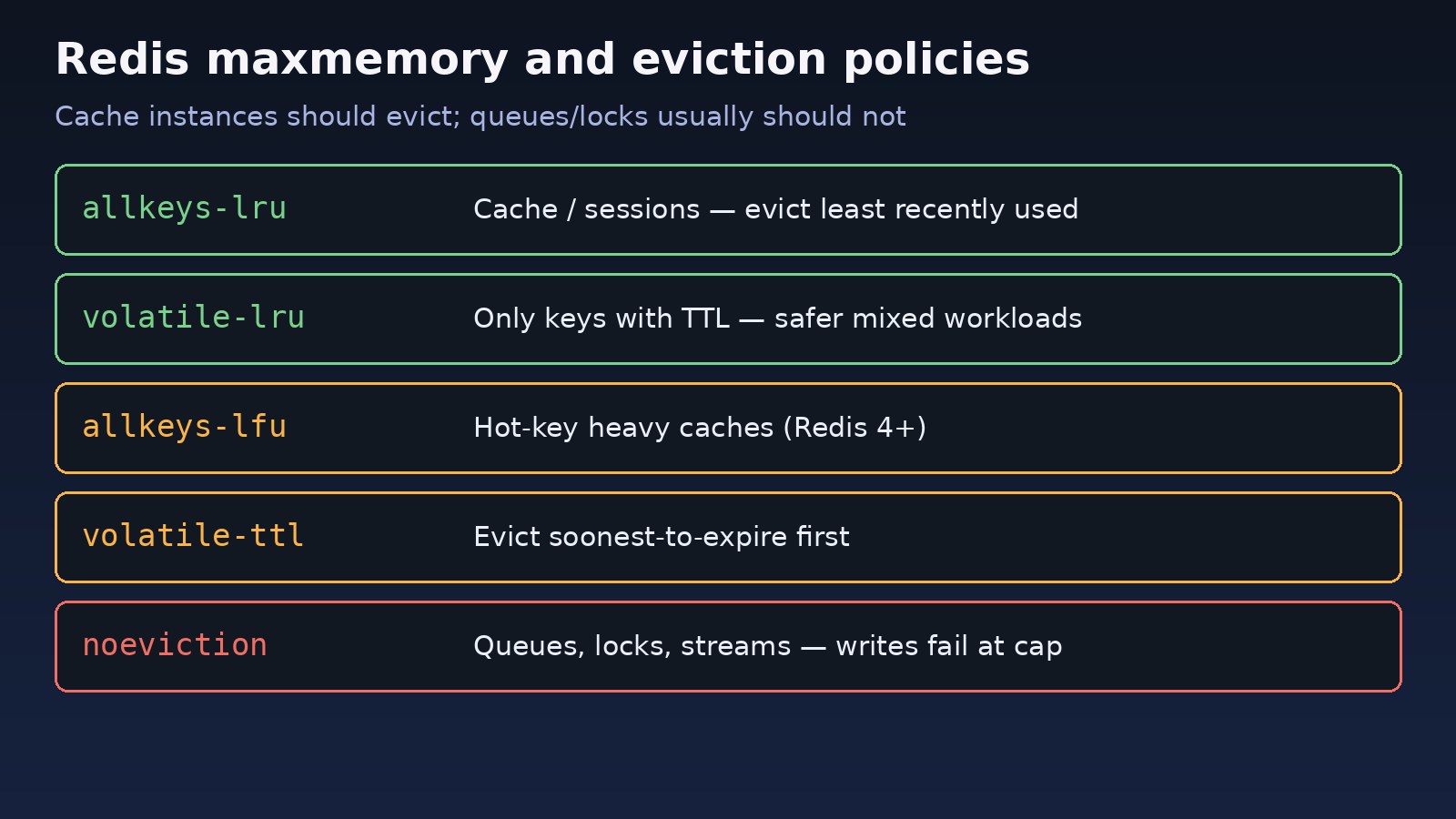
- Wrong Redis eviction policies.
noevictionis correct for many queues and locks (writes must fail rather than drop jobs), but fatal for a pure cache that should shed cold keys. Cache instances usually wantallkeys-lru,volatile-lru, orallkeys-lfu. - Keys without TTL or huge values. Cache entries written without
EX/PX, session keys that never expire, large hashes that keep growing fields, and keys that store whole API responses forever.
Mixing cache and queue on one Redis with a single eviction policy is another frequent mistake: eviction can drop queue items, or noeviction can block cache writes.
Step-by-Step Solution for Redis Memory Optimization
Step 1: Measure what Redis is using
Connect with redis-cli (or redis-cli -u "$REDIS_URL") and capture a baseline:
redis-cli INFO memory
redis-cli INFO memory | egrep 'used_memory_human|used_memory_peak_human|maxmemory_human|maxmemory_policy|mem_fragmentation_ratio'
redis-cli MEMORY STATS
redis-cli INFO keyspace
redis-cli DBSIZE
Note used_memory_human, whether maxmemory_human is empty/zero, and the current maxmemory_policy. Check fragmentation: a high mem_fragmentation_ratio can mean RSS is larger than the logical dataset.
Step 2: Find large or suspicious keys
Avoid KEYS * in production. Use SCAN and sample MEMORY USAGE:
redis-cli --bigkeys
# or sample manually
redis-cli --scan --pattern 'cache:*' | head
redis-cli MEMORY USAGE some:key
redis-cli TYPE some:key
redis-cli TTL some:key
redis-cli OBJECT ENCODING some:key
redis-cli HLEN some:hash
redis-cli STRLEN some:string
Look for keys with TTL -1 in cache namespaces, hashes with huge field counts, and strings that hold multi-megabyte JSON blobs.
Step 3: Set Redis maxmemory
Pick a ceiling below the container/VM limit so the OS never has to OOM-kill Redis. Example for a 4 GiB cache pod leaving headroom:
redis-cli CONFIG GET maxmemory
redis-cli CONFIG SET maxmemory 3gb
# persist across restart (redis.conf or CONFIG REWRITE if allowed)
# maxmemory 3gb
In Docker Compose you might also set command: redis-server --maxmemory 3gb --maxmemory-policy allkeys-lru and a matching mem_limit higher than 3 GiB.
Step 4: Choose Redis eviction policies
Match policy to role:
- Cache / page fragments / query results:
allkeys-lruorallkeys-lfu. - Mixed keys where only TTL'd keys may go:
volatile-lruorvolatile-ttl(every cache key must have a TTL). - Queues, streams, locks, rate-limit counters you must not drop:
noevictionon a dedicated instance, with alerting when memory approaches the cap.
redis-cli CONFIG GET maxmemory-policy
redis-cli CONFIG SET maxmemory-policy allkeys-lru
Step 5: Put TTLs on cache writes
Application code must set expiry. Laravel example with the Redis cache store:
Cache::store('redis')->put('product:'.$id, $payload, now()->addMinutes(10));
// or
Redis::setex('product:'.$id, 600, json_encode($payload));
Node with ioredis:
await redis.set('product:'+id, JSON.stringify(payload), 'EX', 600);For bulk cleanup of an old namespace without TTLs, scan and expire or delete in batches during a maintenance window — never block the event loop with a full flush in production.
Step 6: Separate cache Redis from queue Redis when possible
Laravel often uses Redis for both cache and queues. Prefer two connections (or two instances): cache with maxmemory + LRU; queue with enough memory and noeviction. See Laravel queue Redis for queue wiring, and when Redis caching helps or hurts.
Code/Commands: Ops Checklist
# Baseline
redis-cli INFO memory | egrep 'used_memory_human|maxmemory_human|maxmemory_policy|evicted_keys'
redis-cli INFO stats | egrep 'keyspace_hits|keyspace_misses|evicted_keys|expired_keys'

# Cap + policy (cache instance)
redis-cli CONFIG SET maxmemory 3gb
redis-cli CONFIG SET maxmemory-policy allkeys-lru

# Inspect a hot key
redis-cli MEMORY USAGE cache:home:v2
redis-cli TTL cache:home:v2

# Safe scan for keys missing TTL in a cache prefix (run carefully)
redis-cli --scan --pattern 'cache:*' | while read k; do
  t=$(redis-cli TTL "$k")
  if [ "$t" = "-1" ]; then echo "NO_TTL $k"; fi
done | head -50

# Docker example
# command: ["redis-server","--maxmemory","3gb","--maxmemory-policy","allkeys-lru"]
Verification
CONFIG GET maxmemoryreturns a non-zero byte value;maxmemory_humanis populated inINFO memory.CONFIG GET maxmemory-policymatches the intended role (LRU/LFU for cache,noevictionfor queue-only).- Under a load test that fills the cache,
evicted_keysincreases on a cache instance instead of write errors (unless you chosenoeviction). - New cache keys show a positive
TTL. - After a deploy,
used_memory_humanstabilizes near the working set instead of trending upward without bound. - Hit ratio from
keyspace_hits/ (hits+misses) remains acceptable; if misses spike after tightening memory, raise maxmemory or shorten expensive keys.
Prevention
- Always set Redis maxmemory on production instances; size it under the cgroup/VM limit.
- Document Redis eviction policies per instance role in your runbook.
- Require TTL (or explicit persist) in code review for every cache write.
- Keep queues/locks off the cache Redis when eviction is enabled.
- Alert on
used_memoryvsmaxmemory, risingevicted_keys(unexpected on queue), and fragmentation ratio. - Prefer small keys and compressed or trimmed payloads over caching entire HTML pages forever.
- After incidents, treat a flush as last resort — it can trigger stampedes; prefer targeted deletes and warmer rebuilds.
FAQs
What is redis memory optimization in practice?
It means measuring used_memory, capping growth with maxmemory, picking an eviction policy that fits the workload, expiring cache keys, and removing oversized or orphaned data so Redis stays within a known RAM budget.
How should I set Redis maxmemory?
Choose a value below the host or container memory limit (leave headroom for fragmentation and the OS). Set it in redis.conf, via CONFIG SET, or as Redis server flags in Docker. Recheck after resizing the pod.
Which Redis eviction policies should a Laravel cache use?
For a dedicated cache connection, allkeys-lru or allkeys-lfu is typical. If some keys must never be evicted, put them on another instance with noeviction, or use volatile-* policies and ensure every cache key has a TTL.
Why do I see OOM errors after setting maxmemory?
With noeviction, Redis refuses writes once the cap is hit. Either free keys, raise maxmemory, or switch a cache instance to an LRU/LFU policy. Check INFO memory and the exact error string from the client.
Does MEMORY USAGE tell me the full cost of a key?
MEMORY USAGE key estimates bytes for that key and its value. Use it with --bigkeys, INFO memory, and application metrics — it is a sampling tool, not a full allocator audit.



Comments
Join the discussion. Replies load on demand, up to 5 levels.
0 threads
No comments yet
Be the first to start the conversation.