Choosing redis vs postgresql is one of the most common architecture decisions in Laravel, Node.js and ERP-style backends. Teams often treat Redis as a second database or ask PostgreSQL to absorb every cache and session write. The result is either lost data after a restart or a database that cannot keep up with hot keys. This Redis database comparison shows when each tool wins, how caching vs database layers should split, and the exact commands and code to wire them correctly.
The Problem: Using Redis Like a Database (or PostgreSQL Like a Cache)
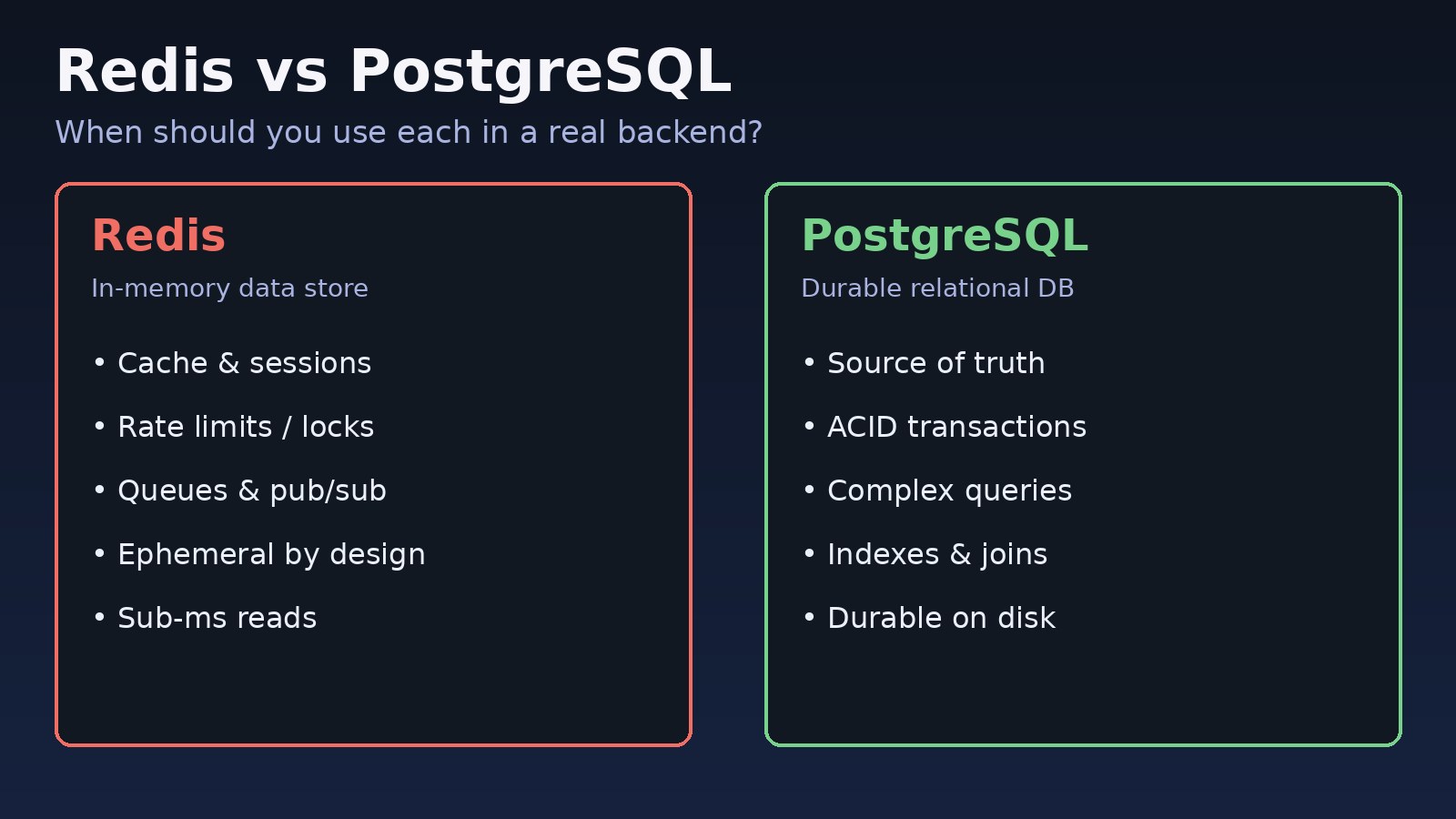
Redis is an in-memory data store that shines at sub-millisecond reads, ephemeral state and coordination primitives. PostgreSQL is a durable relational database with ACID transactions, rich indexes and complex queries. Mixing those roles creates real outages: a Redis flush that deletes customer carts treated as durable, or a PostgreSQL table used as a rate-limit counter that burns CPU and WAL.
Related reading on cache correctness: Redis cache stampede prevention.
Symptoms That You Picked the Wrong Store
- Data disappears after a Redis restart or failover because keys were never persisted and had no PostgreSQL source of truth.
- PostgreSQL CPU spikes on hot paths that only need a counter, lock or session lookup.
- Cache stampedes: every worker hits the database when a popular key expires.
- Session or cart state is inconsistent across app servers because it lives only in local memory.
- Reports and joins are attempted against Redis lists or hashes that cannot express relationships safely.
redis-cli INFO memoryshowsused_memoryclimbing while eviction is disabled, or PostgreSQLpg_stat_statementsshows the same SELECT hammered thousands of times per minute.
Root Cause: Caching vs Database Responsibilities Were Never Separated
The root cause is usually unclear ownership of durability, consistency and query shape:
- Redis keeps data in RAM. Persistence (RDB/AOF) is optional and still not a substitute for a transactional system of record. Eviction policies can drop keys under memory pressure.
- PostgreSQL writes durable pages, supports multi-row transactions, foreign keys, JSONB, full-text search and complex joins. Latency is higher than Redis for single-key gets, but correctness is the point.
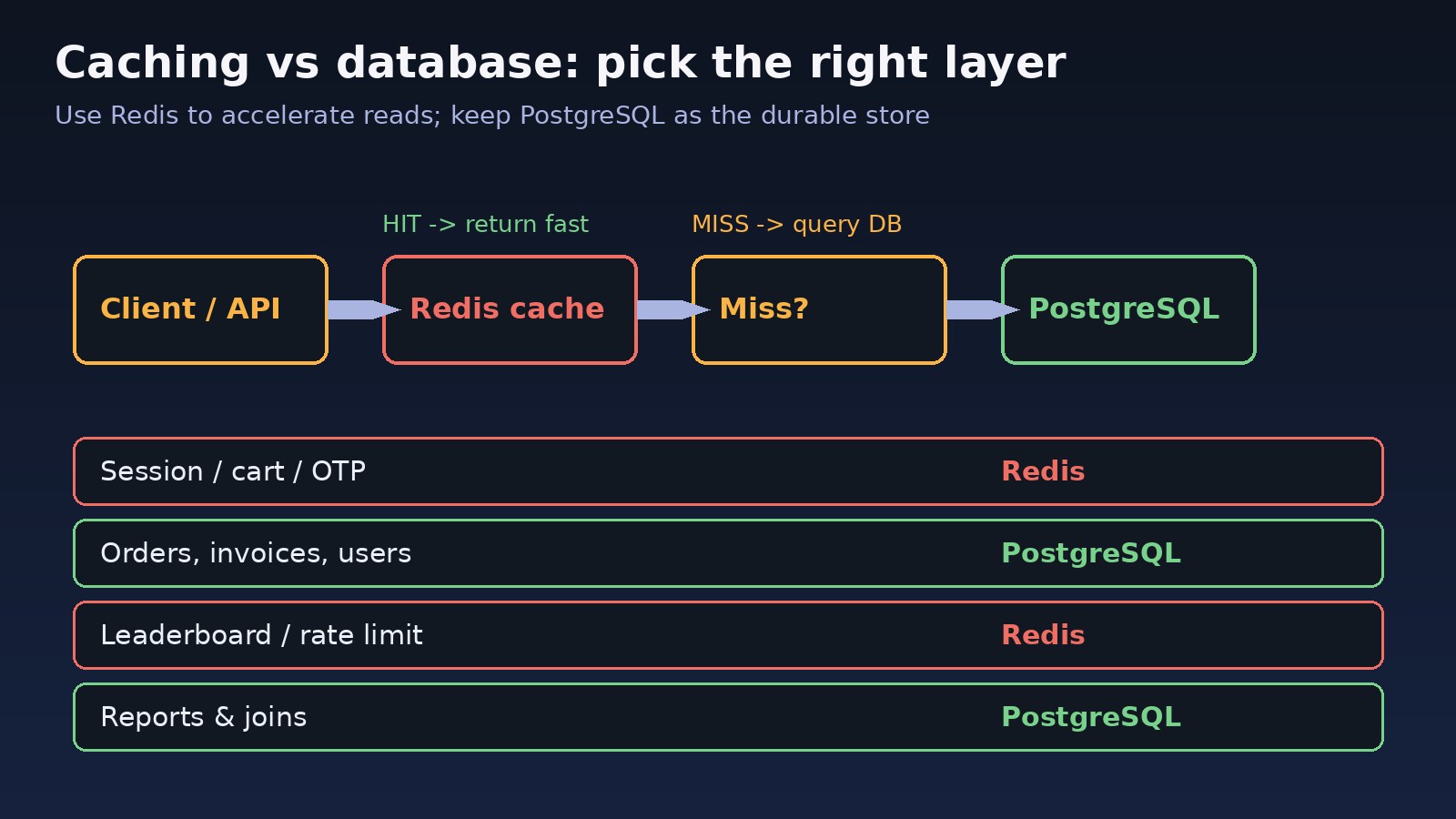
A healthy stack uses PostgreSQL as the source of truth and Redis as a cache, session store, queue backend or lock service in front of it. For scaling the durable side further, see PostgreSQL read replicas vs sharding and database sharding explained.
Step-by-Step Solution: Decide Redis vs PostgreSQL Per Workload
Step 1: Classify each piece of state
For every key or table ask: Can we lose this on restart? Do we need multi-row transactions? Do we need joins or ad-hoc filters? Do we need sub-millisecond latency at high QPS?
- Orders, invoices, users, permissions, audit logs → PostgreSQL
- Page fragments, query results, feature flags with a TTL → Redis cache (backed by PostgreSQL)
- Sessions, OTP codes, rate limits, distributed locks → Redis
- Job queues → Redis (or another broker) with durable job payloads pointing at PostgreSQL ids — see Laravel queue Redis and message queue architecture
Step 2: Put a TTL and maxmemory policy on Redis
Never run production Redis without maxmemory and an eviction policy for cache workloads. Prefer allkeys-lru or volatile-lru for caches; use noeviction only for queues/locks where dropping keys is unsafe.
Step 3: Keep writes flowing through PostgreSQL first
On a write, update PostgreSQL inside a transaction, then invalidate or update the Redis key. Do not treat Redis as the only write target for business data. For multi-tenant systems, prefix Redis keys with the tenant id as described in multi-tenant database design.
Step 4: Use the right Redis data structure
Strings for cached JSON blobs, hashes for small objects, sorted sets for leaderboards and delayed scores, lists or streams for queues, and SET NX EX for locks. Do not invent a relational schema inside Redis hashes.
Step 5: Monitor both sides
Watch Redis memory, hit rate and evicted keys. Watch PostgreSQL connection count, slow queries and cache-miss load. A sudden miss-rate drop after a deploy often means a key namespace change.
Code/Commands: Wiring Redis and PostgreSQL Correctly
Inspect Redis memory and eviction
redis-cli INFO memory | egrep 'used_memory_human|maxmemory_human|maxmemory_policy|evicted_keys'
redis-cli CONFIG GET maxmemory
redis-cli CONFIG GET maxmemory-policy
redis-cli CONFIG SET maxmemory 2gb
redis-cli CONFIG SET maxmemory-policy allkeys-lru
redis-cli INFO stats | egrep 'keyspace_hits|keyspace_misses|evicted_keys'
Confirm PostgreSQL is the durable store
psql -d app -c "SELECT pg_size_pretty(pg_database_size(current_database()));"
psql -d app -c "SELECT query, calls, mean_exec_time FROM pg_stat_statements ORDER BY calls DESC LIMIT 10;"
# Example system-of-record table
psql -d app <<'SQL'
CREATE TABLE products (
  id         bigserial PRIMARY KEY,
  sku        text NOT NULL UNIQUE,
  name       text NOT NULL,
  price_cents integer NOT NULL,
  updated_at timestamptz NOT NULL DEFAULT now()
);
SQL
Laravel: cache through Redis, persist in PostgreSQL
<?php
// config/database.php uses pgsql; config/cache.php uses redis
use App\Models\Product;
use Illuminate\Support\Facades\Cache;
use Illuminate\Support\Facades\DB;
use Illuminate\Support\Facades\Redis;

function productPayload(int $id): array
{
    return Cache::store('redis')->remember("product:{$id}", 300, function () use ($id) {
        $p = Product::query()->findOrFail($id);
        return ['id' => $p->id, 'sku' => $p->sku, 'name' => $p->name, 'price_cents' => $p->price_cents];
    });
}

function updateProductPrice(int $id, int $priceCents): void
{
    DB::transaction(function () use ($id, $priceCents) {
        $p = Product::query()->lockForUpdate()->findOrFail($id);
        $p->price_cents = $priceCents;
        $p->save();
    });
    // Invalidate after commit so readers never see stale durable state
    Cache::store('redis')->forget("product:{$id}");
}

// Distributed lock with Redis (short critical section only)
$lock = Cache::lock('import:products', 30);
if ($lock->get()) {
    try {
        // import work...
    } finally {
        $lock->release();
    }
}

// Session driver = redis in .env; QUEUE_CONNECTION=redis for jobs
Redis::connection()->setex('otp:user:42', 300, '183294');
Node.js: ioredis in front of pg
const Redis = require('ioredis');
const { Pool } = require('pg');
const redis = new Redis(process.env.REDIS_URL);
const pool = new Pool({ connectionString: process.env.DATABASE_URL });

async function getProduct(id) {
  const key = `product:${id}`;
  const cached = await redis.get(key);
  if (cached) return JSON.parse(cached);

  const { rows } = await pool.query(
    'SELECT id, sku, name, price_cents FROM products WHERE id = $1',
    [id]
  );
  if (!rows[0]) return null;
  await redis.set(key, JSON.stringify(rows[0]), 'EX', 300);
  return rows[0];
}

async function updatePrice(id, priceCents) {
  const client = await pool.connect();
  try {
    await client.query('BEGIN');
    await client.query(
      'UPDATE products SET price_cents = $2, updated_at = now() WHERE id = $1',
      [id, priceCents]
    );
    await client.query('COMMIT');
  } catch (e) {
    await client.query('ROLLBACK');
    throw e;
  } finally {
    client.release();
  }
  await redis.del(`product:${id}`);
}

// Rate limit: 100 requests / minute
async function allow(ip) {
  const key = `rl:${ip}:${Math.floor(Date.now() / 60000)}`;
  const n = await redis.incr(key);
  if (n === 1) await redis.expire(key, 60);
  return n <= 100;
}
Verification: Prove the Split Works
# 1) Cache miss then hit
redis-cli DEL product:1
# hit your API once, then:
redis-cli GET product:1
redis-cli TTL product:1   # should be > 0 and <= 300

# 2) After a price update, key must be gone or refreshed
redis-cli EXISTS product:1

# 3) Hit ratio
redis-cli INFO stats | egrep 'keyspace_hits|keyspace_misses'

# 4) PostgreSQL still holds the truth after Redis FLUSHDB (never run flush in prod)
psql -d app -c "SELECT id, price_cents FROM products WHERE id = 1;"

# 5) Eviction is configured for cache instances
redis-cli CONFIG GET maxmemory-policy
Also load-test a hot endpoint with and without Redis to confirm latency drops on cache hits, and confirm that killing Redis does not lose order or invoice data — only cache warmth.
Prevention: Keep Redis and PostgreSQL in Their Lanes
- Document every Redis key prefix: purpose, TTL, whether it is reconstructible from PostgreSQL.
- Never store money, inventory counts or legal records only in Redis.
- Set
maxmemoryand an eviction policy on every cache Redis; separate Redis instances for cache vs queues/locks when possible. - Invalidate or version cache keys on every durable write.
- Prefix keys by environment and tenant to avoid collisions.
- Alert on rising
evicted_keys, falling hit ratio and PostgreSQL query storms that mirror cache misses. - If Redis connection errors appear in production, follow Redis connection refused before widening timeouts blindly.
FAQs
When should I choose Redis vs PostgreSQL?
Choose PostgreSQL for durable business data, transactions and complex queries. Choose Redis for caching, sessions, rate limits, locks and short-lived coordination. Most apps need both.
Is Redis a database replacement in a Redis database comparison?
No. Redis can persist to disk, but it is not a relational system of record. Use it beside PostgreSQL, not instead of it, for ERP and SaaS data.
What does caching vs database mean in practice?
The database owns correctness; the cache owns speed for repeated reads. Always be able to rebuild a cache key from PostgreSQL after a flush or eviction.
Can I store sessions only in Redis?
Yes, sessions and OTP codes are classic Redis workloads because they are ephemeral and keyed by id. Keep the user account itself in PostgreSQL.
Should Laravel queues use Redis or the database driver?
Redis is usually better for throughput and blocking pops. Keep the durable domain data those jobs mutate in PostgreSQL, and make jobs idempotent.



Comments
Join the discussion. Replies load on demand, up to 5 levels.
0 threads
No comments yet
Be the first to start the conversation.