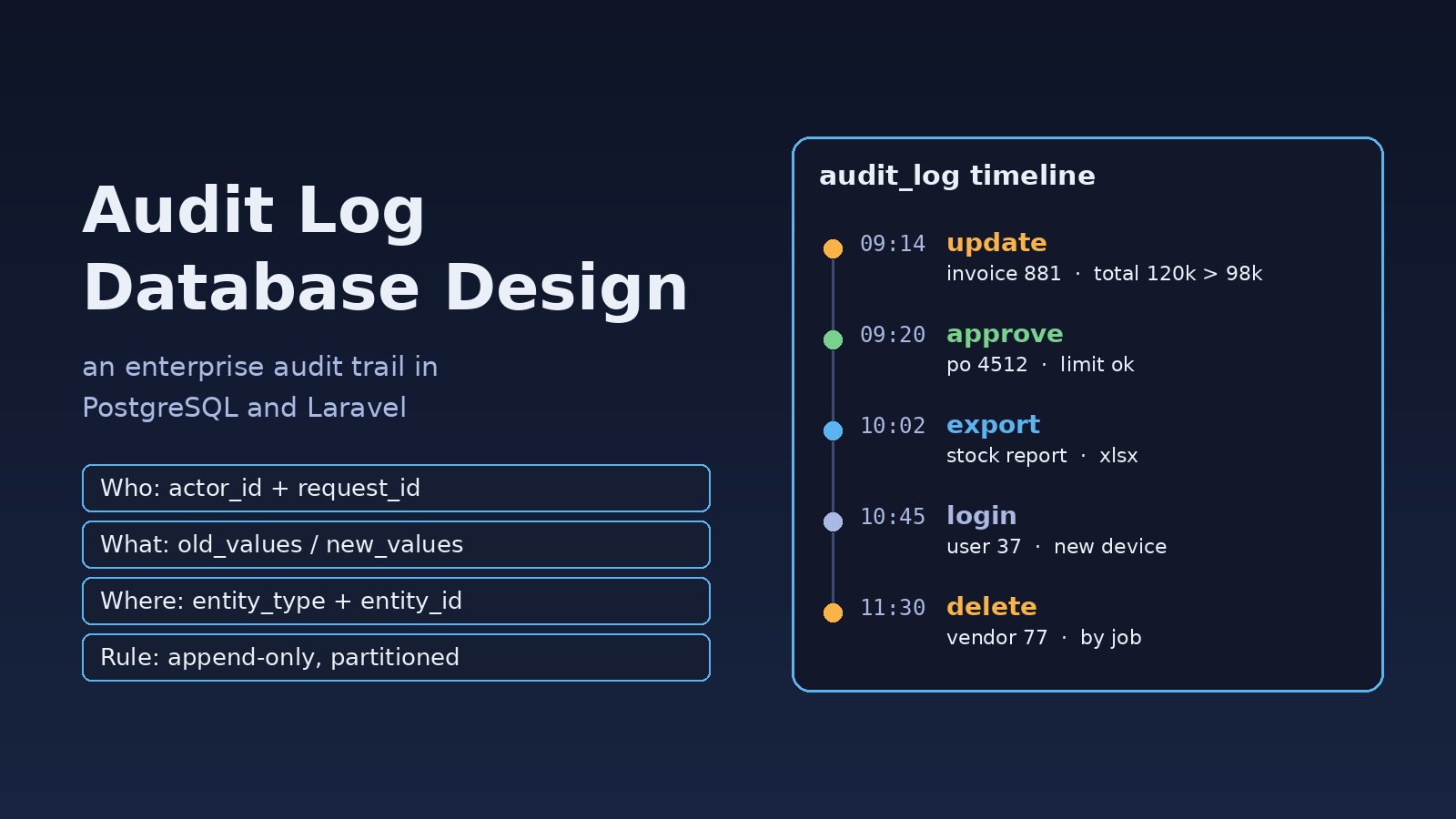
Sooner or later someone asks a question your ERP cannot answer: who changed this invoice amount, when, and what was it before? If the only record is an updated_at column and a few lines in a log file, you are stuck. Good audit log database design gives you a reliable, queryable history of every important change and action, without slowing the application down or letting anyone quietly edit the trail. This guide covers the problem, the symptoms, the root cause and a step-by-step design for an enterprise audit log in PostgreSQL and Laravel.
Problem: Nobody Can Prove Who Changed What
Most systems start with logging that was built for debugging, not for accountability. Application logs rotate after a few days, they are plain text, and they rarely include the old and new values. Meanwhile finance, HR and inventory modules need a proper audit trail for internal controls, customer disputes and security investigations.
Typical requests that expose the gap:
- "Show me every change to purchase order 4512, with the user who made it."
- "Which records did this employee view or export last week?"
- "Was this payment approved before or after the amount was edited?"
Symptoms of a Weak Audit Trail
- Changes are only visible through
updated_atandupdated_by, which show the last change and nothing before it. - User activity logging is spread across
laravel.log, Nginx access logs and ad-hoc tables with different formats. - Audit rows are written from controllers, so changes made by queue jobs, seeders, imports or direct SQL are missing.
- The audit table is one huge table with no partitioning, and queries on it get slower every month.
- The application database user can
UPDATEorDELETEaudit rows, so the history cannot be trusted. - Sensitive fields such as passwords or tokens end up stored in plain text inside the log.
Root Cause: Audit Logging Was Never Designed as Its Own System
An audit trail has different requirements from normal business tables. It is append-only, it grows forever, it must capture changes from every code path, and it needs context (who, from where, in which request) that the data layer does not know by default. When teams bolt it on later, they usually miss one of these points.
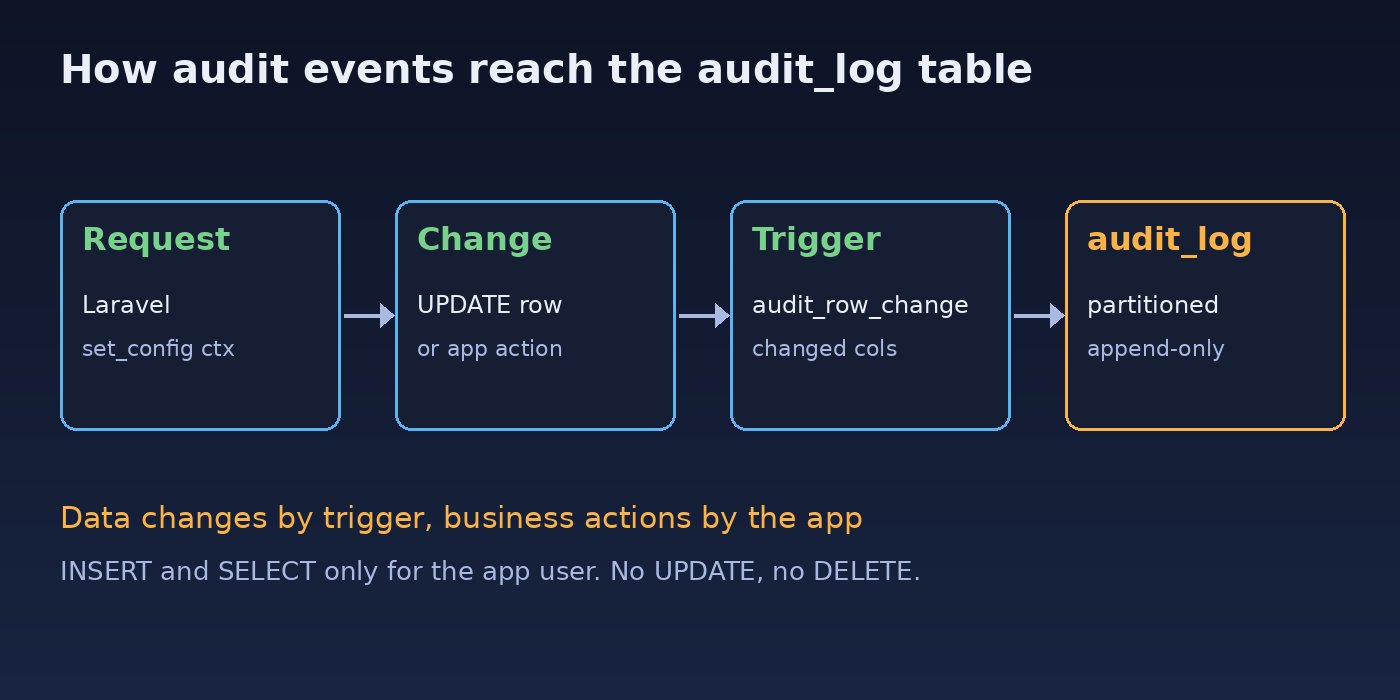
A sound audit trail architecture separates two kinds of events:
- Data changes: row-level inserts, updates and deletes on important tables, ideally captured by the database itself.
- Business and user actions: logins, approvals, exports, permission changes and record views, recorded by the application because only it knows the intent.
Both go into one well-structured table so you can build a single timeline per record or per user. This fits naturally with a modular ERP software architecture, where each module emits its own audit events through a shared service.
Step-by-Step: Audit Log Database Design in PostgreSQL
Step 1: Define the audit log table schema
Store who did it, what they did, which record it affected, the before and after values, and request context. Use jsonb for values so one table can hold changes from any entity. Partition by time from day one.
CREATE TABLE audit_log (
    id           bigserial,
    occurred_at  timestamptz NOT NULL DEFAULT now(),
    actor_id     bigint,                        -- users.id, NULL for system jobs
    actor_type   text        NOT NULL DEFAULT 'user',  -- user, job, api_client
    tenant_id    bigint,                        -- company or branch for multi-tenant ERPs
    action       text        NOT NULL,          -- insert, update, delete, login, approve, export
    entity_type  text        NOT NULL,          -- purchase_orders, invoices, users
    entity_id    text        NOT NULL,
    old_values   jsonb,
    new_values   jsonb,
    ip_address   inet,
    user_agent   text,
    request_id   uuid,
    PRIMARY KEY (id, occurred_at)
) PARTITION BY RANGE (occurred_at);
On a partitioned table the primary key must include the partition column, which is why it is (id, occurred_at). Keep entity_id as text so it works for integer IDs, UUIDs and composite keys.
Step 2: Create monthly partitions and indexes
CREATE TABLE audit_log_2026_11 PARTITION OF audit_log
    FOR VALUES FROM ('2026-11-01') TO ('2026-12-01');
CREATE TABLE audit_log_2026_12 PARTITION OF audit_log
    FOR VALUES FROM ('2026-12-01') TO ('2027-01-01');

-- Indexes created on the parent are created on every partition
CREATE INDEX audit_log_entity_idx ON audit_log (entity_type, entity_id, occurred_at DESC);
CREATE INDEX audit_log_actor_idx  ON audit_log (actor_id, occurred_at DESC);
CREATE INDEX audit_log_time_brin  ON audit_log USING brin (occurred_at);
The entity index answers "history of this record", the actor index answers "what did this user do", and the small BRIN index helps time-range scans. Create next month's partition ahead of time with a scheduled job, otherwise inserts fail with ERROR: no partition of relation "audit_log" found for row.
Step 3: Capture data changes with a PostgreSQL trigger
A trigger catches every change regardless of whether it came from a controller, a queue job, an import script or a manual SQL fix. The function below stores the full old row, and for updates only the columns that changed.
CREATE OR REPLACE FUNCTION audit_row_change() RETURNS trigger
LANGUAGE plpgsql AS $$
DECLARE
    v_old jsonb;
    v_new jsonb;
BEGIN
    IF TG_OP IN ('UPDATE', 'DELETE') THEN
        v_old := to_jsonb(OLD) - 'password' - 'remember_token';
    END IF;
    IF TG_OP IN ('INSERT', 'UPDATE') THEN
        v_new := to_jsonb(NEW) - 'password' - 'remember_token';
    END IF;

    IF TG_OP = 'UPDATE' THEN
        -- keep only changed columns in new_values
        SELECT jsonb_object_agg(n.key, n.value) INTO v_new
        FROM jsonb_each(v_new) AS n
        WHERE v_old -> n.key IS DISTINCT FROM n.value;
        IF v_new IS NULL THEN
            RETURN NULL;  -- nothing really changed
        END IF;
    END IF;

    INSERT INTO audit_log (actor_id, tenant_id, action, entity_type, entity_id,
                           old_values, new_values, request_id)
    VALUES (
        nullif(current_setting('app.user_id', true), '')::bigint,
        nullif(current_setting('app.tenant_id', true), '')::bigint,
        lower(TG_OP),
        TG_TABLE_NAME,
        CASE WHEN TG_OP = 'DELETE' THEN OLD.id::text ELSE NEW.id::text END,
        v_old,
        v_new,
        nullif(current_setting('app.request_id', true), '')::uuid
    );
    RETURN NULL;  -- return value is ignored for AFTER triggers
END;
$$;

CREATE TRIGGER purchase_orders_audit
AFTER INSERT OR UPDATE OR DELETE ON purchase_orders
FOR EACH ROW EXECUTE FUNCTION audit_row_change();
Attach the same trigger to every table that matters: invoices, payments, vendors, stock adjustments, users and role assignments. Skip high-volume technical tables such as sessions, cache and job queues.
Step 4: Pass user and request context from Laravel
The database does not know which ERP user is logged in, so the application sets it per transaction with set_config. Using true as the third argument makes the value local to the current transaction, which is important when you use connection pooling.
// app/Support/AuditContext.php
namespace App\Support;

use Illuminate\Support\Facades\DB;
use Illuminate\Support\Str;

class AuditContext
{
    public static function apply(): void
    {
        $user = auth()->user();

        DB::select("SELECT set_config('app.user_id', ?, true),
                           set_config('app.tenant_id', ?, true),
                           set_config('app.request_id', ?, true)", [
            (string) ($user?->id ?? ''),
            (string) ($user?->branch_id ?? ''),
            (string) (request()->header('X-Request-Id') ?? Str::uuid()),
        ]);
    }
}

// Inside a service
DB::transaction(function () use ($po, $data) {
    AuditContext::apply();
    $po->update($data);
});
Step 5: Record business actions and user activity logging in the app
Some events never change a row in a business table: logins, failed logins, report exports, record views and approvals that should be named explicitly. Write these through one small service so every module uses the same format.
// app/Services/AuditLogger.php
namespace App\Services;

use Illuminate\Support\Facades\DB;

class AuditLogger
{
    public function record(string $action, string $entityType, string|int $entityId, array $meta = []): void
    {
        DB::table('audit_log')->insert([
            'actor_id'    => auth()->id(),
            'tenant_id'   => auth()->user()?->branch_id,
            'action'      => $action,
            'entity_type' => $entityType,
            'entity_id'   => (string) $entityId,
            'new_values'  => json_encode($meta),
            'ip_address'  => request()->ip(),
            'user_agent'  => substr((string) request()->userAgent(), 0, 500),
            'request_id'  => request()->header('X-Request-Id'),
        ]);
    }
}

// Usage
app(AuditLogger::class)->record('purchase_order.approved', 'purchase_orders', $po->id, [
    'amount' => $po->total,
]);
app(AuditLogger::class)->record('report.exported', 'reports', 'stock-valuation', [
    'format' => 'xlsx',
]);
For approvals and payments, write the audit row inside the same database transaction as the change. If you push audit writes to a queue, a failed job means a missing record, which defeats the purpose. Login events pair well with detecting suspicious login activity.
Step 6: Make the audit table append-only
The application user should be able to insert and read audit rows, never change or remove them.
REVOKE ALL ON audit_log FROM erp_app;
GRANT INSERT, SELECT ON audit_log TO erp_app;
GRANT USAGE ON SEQUENCE audit_log_id_seq TO erp_app;

-- retention is handled by a separate maintenance role
ALTER TABLE audit_log DETACH PARTITION audit_log_2025_11;
Archive detached partitions with pg_dump -t audit_log_2025_11 erp > audit_log_2025_11.sql to cheaper storage before dropping them, and only after your retention policy allows it. These grants follow the same least-privilege idea as the PostgreSQL security best practices guide.
Audit Trail Architecture: Querying the History
With one consistent table, common audit questions become simple SQL:
-- Full history of one purchase order
SELECT occurred_at, actor_id, action, old_values, new_values
FROM audit_log
WHERE entity_type = 'purchase_orders' AND entity_id = '4512'
ORDER BY occurred_at;

-- What one user did in the last 7 days
SELECT occurred_at, action, entity_type, entity_id
FROM audit_log
WHERE actor_id = 37 AND occurred_at >= now() - interval '7 days'
ORDER BY occurred_at DESC;

-- Who changed an invoice total
SELECT occurred_at, actor_id, old_values->>'total' AS old_total, new_values->>'total' AS new_total
FROM audit_log
WHERE entity_type = 'invoices' AND new_values ? 'total';
Verification
- Update a test purchase order through the UI and confirm a row appears with the correct
actor_id,request_idand only the changed columns innew_values. - Change a row from a queue job or
php artisan tinkerand confirm it is captured too, withactor_idNULL or your system user. - Try to edit history as the application user. You should see
ERROR: permission denied for table audit_log. - Run
EXPLAINon a query with anoccurred_atrange and check that only the matching partitions are scanned. - Search
old_valuesandnew_valuesfor password or token fields to make sure they are excluded.
psql -U erp_app -d erp -c "UPDATE audit_log SET action = 'x' WHERE id = 1;"
ERROR:  permission denied for table audit_log

psql -d erp -c "EXPLAIN SELECT * FROM audit_log WHERE occurred_at >= '2026-11-01' AND occurred_at < '2026-11-08';"
Prevention: Keep the Audit Log Healthy
- Create future partitions automatically, for example with a Laravel scheduled command that runs monthly and creates the next two months.
- Add the trigger in the same migration that creates any new business table, so new modules are audited from the start.
- Exclude secrets, and mask personal data you do not need, before it reaches the log.
- Always use transaction-local
set_config(..., true)so context never leaks between requests through PgBouncer or persistent connections. - Agree on a retention period with the business and automate archiving instead of deleting rows by hand.
- Restrict who can read the audit log; it often contains more sensitive data than the screens themselves. Tie that access to your ERP role based access control model.
FAQs
Should I use one audit table or one per entity?
One shared, partitioned table with entity_type and entity_id is easier to query, index and secure. Separate history tables per entity make sense only when one entity needs very different retention or volume handling.
Database triggers or application-level user activity logging?
Use both. Triggers guarantee every data change is captured from every code path. The application records intent, such as approvals, logins and exports, that a trigger cannot see.
Will an audit trigger slow down my ERP?
It adds one insert per changed row, which is usually small compared to the business write itself. Avoid auditing high-churn technical tables, keep indexes on the audit table few, and measure with your real workload before and after.
How long should audit logs be kept?
That depends on your legal, tax and contractual requirements, so confirm it with your finance or compliance team. Monthly partitions make any retention period easy to enforce by detaching and archiving old partitions.
Can I use a Laravel package instead?
Packages that log Eloquent model events are a quick start, but they miss changes made through query builder updates, raw SQL and bulk operations. If you need a complete audit trail architecture, combine the database trigger approach with an application logger for business actions.
How do I make the audit log tamper-evident?
Append-only grants stop normal users from editing it. For extra assurance, store a hash of each row together with the previous row's hash, or ship audit rows to a separate write-once storage system that database administrators cannot alter.



Comments
Join the discussion. Replies load on demand, up to 5 levels.
0 threads
No comments yet
Be the first to start the conversation.