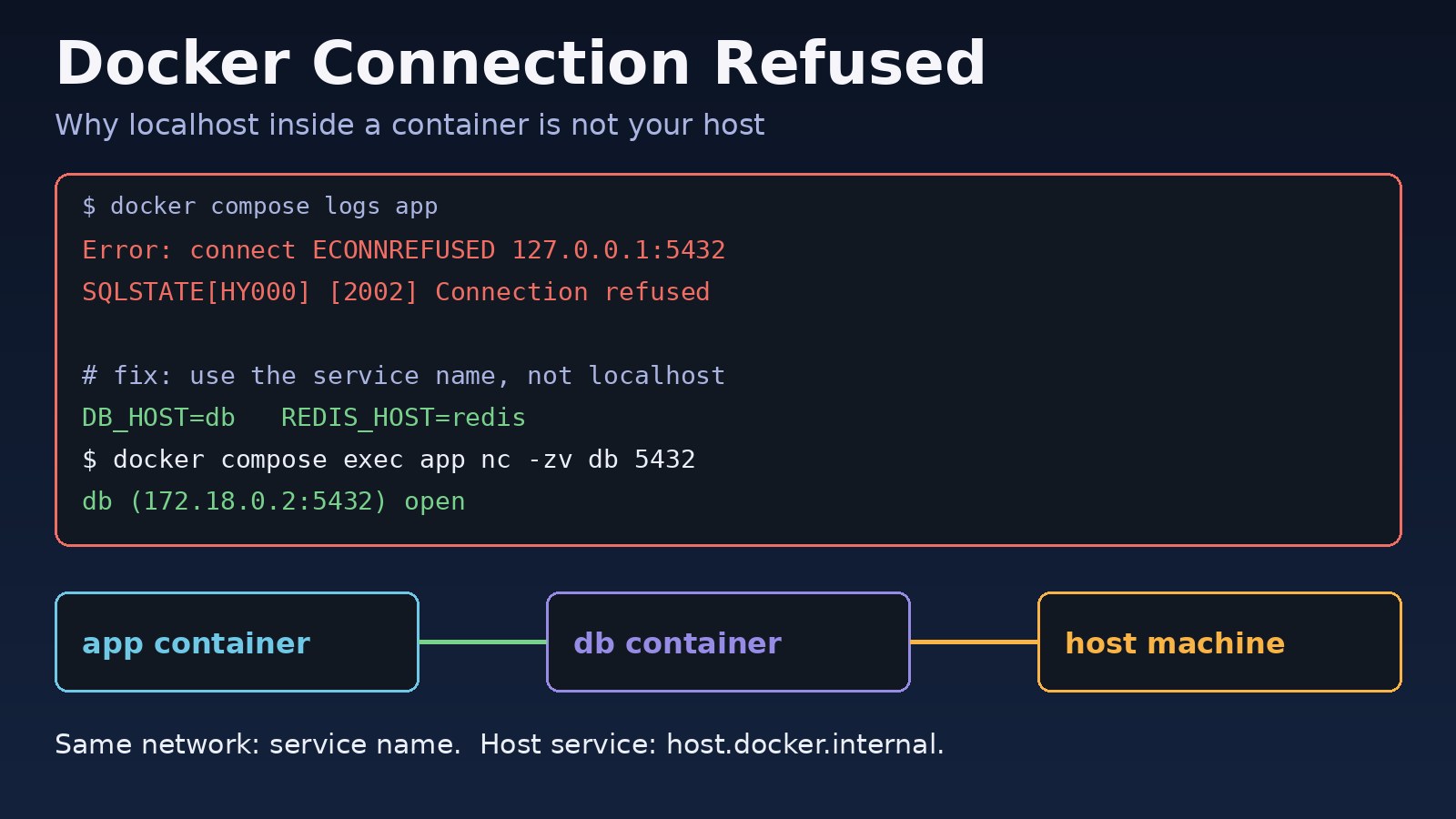
Your app works on your laptop, but the moment it runs in a container the logs fill with ECONNREFUSED 127.0.0.1:5432 or SQLSTATE[HY000] [2002] Connection refused. A docker connection refused error almost never means Docker is broken. It means the client tried an address where nothing was listening, usually because localhost inside a container points at the container itself, the port is not published, or the server only listens on 127.0.0.1. This guide walks through each cause with the commands to prove which one you have and the exact fix for Laravel, Node.js, Next.js, PostgreSQL, Redis and Nginx setups.
Problem: Docker Connection Refused
"Connection refused" is the TCP stack answering with a reset because no process is accepting connections on that IP and port. The packet arrived, so routing works, but there is no listener there. That is different from a timeout, which usually points to a firewall dropping packets, and from a DNS error such as getaddrinfo ENOTFOUND db, which means the host name does not resolve at all.
With Docker you have at least three network places that can be "localhost": your host machine, the app container and the database container. Each has its own loopback interface. Most docker connection refused errors come from mixing them up.
Symptoms
- Node.js or Next.js:
Error: connect ECONNREFUSED 127.0.0.1:5432orconnect ECONNREFUSED ::1:6379 - Laravel or PHP:
SQLSTATE[HY000] [2002] Connection refusedwhen running migrations inside the container - Redis clients:
Could not connect to Redis at 127.0.0.1:6379: Connection refused - From the host:
curl: (7) Failed to connect to localhost port 8080 after 0 ms: Connection refused - From the host, with the port published:
curl: (56) Recv failure: Connection reset by peerorcurl: (52) Empty reply from server - Nginx in a container:
connect() failed (111: Connection refused) while connecting to upstreamand a 502 page
Root Cause: Why Containers Refuse Connections
Container localhost error: localhost is the container itself
Inside a container, localhost and 127.0.0.1 refer to that container's own loopback, not your host and not other containers. If your .env says DB_HOST=127.0.0.1 and PostgreSQL runs in a separate db container, the app is knocking on an empty door.
The server listens on 127.0.0.1 inside its container
Many dev servers bind to loopback by default: php artisan serve, Vite, Flask and some Next.js setups. Docker forwards published ports to the container's network interface, not its loopback, so a server bound to 127.0.0.1 is unreachable from outside the container. This is the usual cause of "connection reset by peer" or "empty reply" from the host.
The port is not published or is mapped wrong
EXPOSE in a Dockerfile only documents a port; it does not publish it. You need -p 8080:3000 or a ports: entry, and the format is HOST:CONTAINER. Swapping them, or publishing the wrong container port, gives a docker port mapping that points at nothing.
Docker network connection problems
Containers can reach each other by service or container name only when they share a user-defined network. Containers started with plain docker run land on the default bridge network, where name resolution between containers does not work. Two separate Compose projects also get separate networks by default.
The target is not ready yet
depends_on only waits for a container to start, not for PostgreSQL or Redis inside it to accept connections. An app that connects once at boot can hit connection refused during the few seconds the database needs to initialise.
The host service only listens on loopback
When the database runs on the host and the app in a container, the host service must listen on an address the container can reach. PostgreSQL with listen_addresses = 'localhost' or Redis with bind 127.0.0.1 refuses connections coming from the Docker bridge.
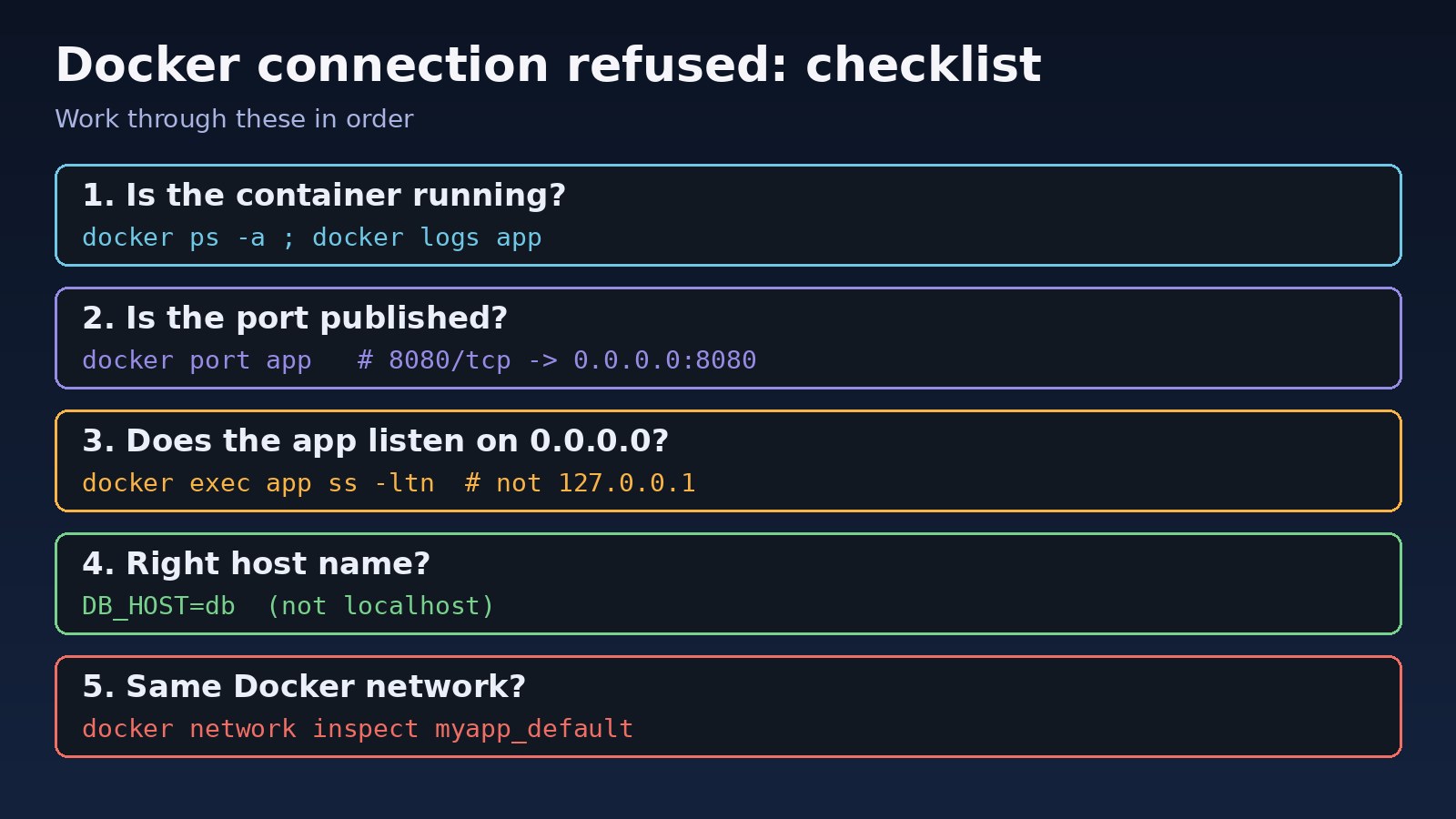
Step-by-Step Solution
Step 1: Confirm the target container is running
A container that crashed or is stuck restarting cannot accept connections. Check its status and the last log lines first. If it is looping, fix that first; see why Docker containers keep restarting.
Step 2: Check the published ports
Use docker ps or docker port to see exactly which host port maps to which container port. Make sure the host side is free; if another process already owns it, find which process is using the port before changing anything.
Step 3: Make the server listen on 0.0.0.0
Inside the container, check what address the server is bound to. If it shows 127.0.0.1:3000, start it with a host flag such as --host=0.0.0.0 or -H 0.0.0.0.
Step 4: Use the right host name
Container to container on the same Compose project: use the service name, for example DB_HOST=db and REDIS_HOST=redis, and the container port (5432, 6379), not the published host port. Container to host: use host.docker.internal. Host to container: use localhost and the published host port.
Step 5: Put the containers on the same network
Inspect the network and confirm both containers are attached. If not, create a user-defined network or declare a shared one in Compose.
Step 6: Wait for dependencies to be healthy
Add a healthcheck to the database service and make the app wait for service_healthy, or add retry logic to the app's startup connection.
Code/Commands Examples
Inspect the containers and port mapping
docker ps -a --format 'table {{.Names}}\t{{.Status}}\t{{.Ports}}'
# NAMES     STATUS          PORTS
# app       Up 2 minutes    0.0.0.0:8080->3000/tcp
# db        Up 2 minutes    5432/tcp

docker port app
# 3000/tcp -> 0.0.0.0:8080

docker logs --tail 50 app
Check what the app listens on inside the container
docker exec app ss -ltn          # if iproute2 is installed
# LISTEN 0 511 127.0.0.1:3000 0.0.0.0:*   <- only loopback: unreachable from outside

# Minimal images often lack ss; use a debug container sharing the network namespace
docker run --rm --network container:app nicolaka/netshoot ss -ltn
Bind dev servers to 0.0.0.0
php artisan serve --host=0.0.0.0 --port=8000     # Laravel
npx next dev -H 0.0.0.0 -p 3000                  # Next.js dev
npx next start -H 0.0.0.0 -p 3000                # Next.js production
npx vite --host 0.0.0.0                          # Vite / React
flask run --host=0.0.0.0                         # Flask
Docker Compose with service names, healthcheck and a shared network
services:
  app:
    build: .
    ports:
      - "8080:3000"            # HOST:CONTAINER
    environment:
      DB_HOST: db              # service name, not localhost
      DB_PORT: 5432            # container port, not the published one
      REDIS_HOST: redis
    depends_on:
      db:
        condition: service_healthy
  db:
    image: postgres:16
    environment:
      POSTGRES_PASSWORD: secret
    healthcheck:
      test: ["CMD-SHELL", "pg_isready -U postgres"]
      interval: 5s
      retries: 10
  redis:
    image: redis:7
Test the connection from inside the app container
docker compose exec app getent hosts db
# 172.18.0.2      db

docker compose exec app nc -zv db 5432
# db (172.18.0.2:5432) open

docker network ls
docker network inspect myapp_default --format '{{range .Containers}}{{.Name}} {{end}}'
Fix containers on the default bridge network
docker network create appnet
docker network connect appnet app
docker network connect appnet db
# now the name db resolves from inside app
Reach a service on the host with host.docker.internal
Docker Desktop on macOS and Windows provides host.docker.internal automatically. On Linux, map it to the host gateway yourself (Docker 20.10 or newer):
# docker run
docker run --add-host=host.docker.internal:host-gateway myapp

# docker-compose.yml
services:
  app:
    extra_hosts:
      - "host.docker.internal:host-gateway"
    environment:
      DB_HOST: host.docker.internal
Then make the host service accept connections from the Docker bridge. For PostgreSQL, set listen_addresses = '*' (or the bridge IP, often 172.17.0.1) in postgresql.conf and allow the Docker subnet in pg_hba.conf. For Redis, add the bridge IP to bind and keep a password set. Restart the service and allow the subnet in UFW if it is enabled. The same rules apply to the Redis connection refused fixes on a plain server.
Nginx container proxying to an app container
location / {
    proxy_pass http://app:3000;   # service name and container port
}
Verification
Test each path you care about, from the side that was failing:
# Host to container
curl -I http://localhost:8080
# HTTP/1.1 200 OK

# Container to container
docker compose exec app nc -zv db 5432

# App-level check (Laravel)
docker compose exec app php artisan migrate:status
Then restart the stack with docker compose down && docker compose up -d and watch docker compose logs -f app. The connection errors should not return on a cold start, which proves the healthcheck and startup order work too.
Prevention
- Never hard-code
localhostor127.0.0.1for databases and caches in containerised apps; read the host from environment variables. - Bind servers inside containers to
0.0.0.0, and limit exposure on the host side instead, for example"127.0.0.1:5432:5432". - Use Compose or user-defined networks so containers find each other by name.
- Add healthchecks to databases and queues, and give apps connection retries with backoff.
- Do not publish database ports at all unless a tool on the host really needs them.
- Keep a small debug image such as
nicolaka/netshoothandy for network checks in minimal containers.
FAQs
Why does localhost not work inside a Docker container?
Each container has its own network namespace, so localhost means the container itself. Use the other container's service name, or host.docker.internal to reach the host.
How do I fix docker connection refused between two containers?
Put both on the same user-defined network (Compose does this per project), connect with the service name and the container port, and make sure the target listens on 0.0.0.0 and is healthy.
Why do I get connection reset by peer from the host even though the port is published?
Docker accepted the connection on the host port but nothing answered inside the container, usually because the app is bound to 127.0.0.1. Restart it with a 0.0.0.0 host flag.
Does EXPOSE in a Dockerfile publish the port?
No. EXPOSE is documentation and a hint for -P. You still need -p HOST:CONTAINER or a ports: entry to reach it from the host.
Is host.docker.internal available on Linux?
Not by default. Add --add-host=host.docker.internal:host-gateway or the matching extra_hosts entry in Compose.
Should I use the published port or the container port between containers?
The container port. Published ports are for traffic coming from the host or outside; containers on the same network talk to each other directly.



Comments
Join the discussion. Replies load on demand, up to 5 levels.
0 threads
No comments yet
Be the first to start the conversation.