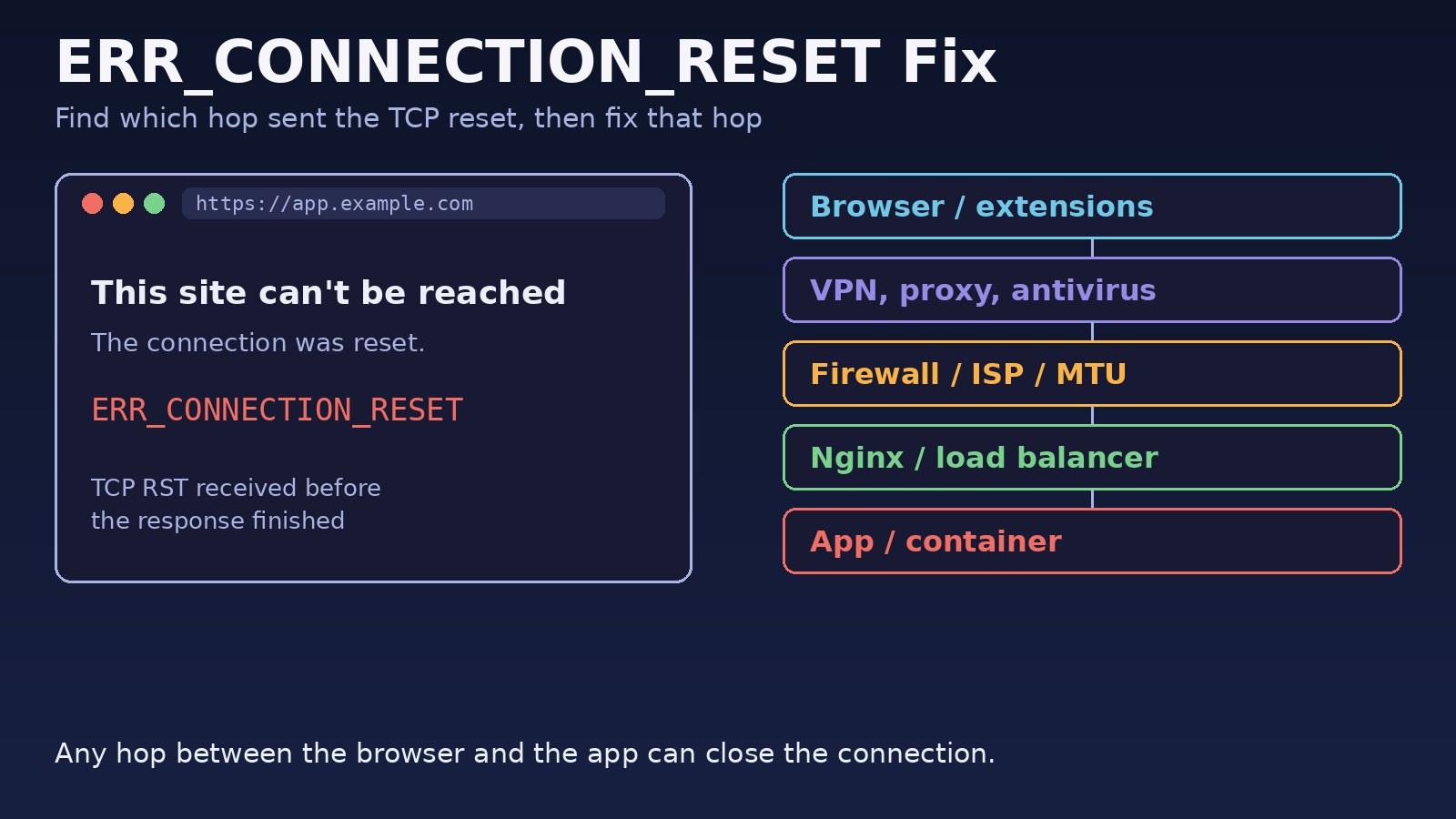
Chrome shows ERR_CONNECTION_RESET when the TCP connection to a website is closed abruptly with a reset (RST) packet before the page finishes loading. The page says "This site can't be reached. The connection was reset." This guide is a practical err_connection_reset fix for both sides of the problem: what to check on your own computer and network, and what to check on the server when your users report it on a site you run behind Nginx, Docker, Node.js or Laravel.
Problem: The Connection Was Reset
A reset is different from a timeout or an HTTP error. With ERR_CONNECTION_TIMED_OUT nothing answers. With a 502 or 500 the server answers with an error page. With ERR_CONNECTION_RESET something between the browser and the application actively killed the connection. That "something" can be a browser extension, a VPN, antivirus HTTPS scanning, a firewall, your ISP, a load balancer, Nginx, or the application process itself. The fix depends entirely on which hop sent the reset, so the work is mostly narrowing that down.
Symptoms
- Chrome shows
This site can't be reached,The connection was reset,ERR_CONNECTION_RESET. - Firefox shows "The connection was reset" for the same URL; Edge shows the same Chromium error code.
curlfails withcurl: (56) Recv failure: Connection reset by peeror, during the TLS handshake,curl: (35) ... Connection reset by peer.- The error only happens on one Wi-Fi network, only with a VPN on, or only on one computer.
- Small pages load but a large file upload fails halfway with a connection reset.
- A Docker container is running and the port is published, yet every request to it is reset.
- Requests fail intermittently after a period of inactivity behind a load balancer.
Root Cause: Who Sent the TCP Reset?
Common causes of a chrome connection reset, grouped by where they happen:
Client side
- Browser extensions (ad blockers, security or privacy extensions) or a stale socket pool in Chrome.
- A VPN, proxy setting or antivirus/firewall software that inspects HTTPS traffic.
- A corrupted network stack (Winsock on Windows) or an MTU problem on the link, where large packets are dropped and the connection breaks.
- A school, office or ISP filter that resets connections to blocked sites.
Server side (website connection reset)
- The app inside a container listens on
127.0.0.1, so Docker's published port has nothing to forward to and connections are reset. - An upload exceeds Nginx
client_max_body_size; Nginx answers 413 and closes the connection while the browser is still sending, which Chrome often reports as a reset. - A firewall rule or fail2ban ban rejects the client with
--reject-with tcp-reset. - Keep-alive mismatch: the backend closes idle connections before the load balancer does, so the load balancer reuses a dead connection.
- The application process crashes or is killed (for example by the OOM killer) in the middle of a response.
- TLS problems, such as a server that only offers protocols or ciphers the client refuses.
If the server returns an error page instead of a reset, you are dealing with a different problem; see 502 Bad Gateway in Nginx.
Step-by-Step Solution: ERR_CONNECTION_RESET Fix
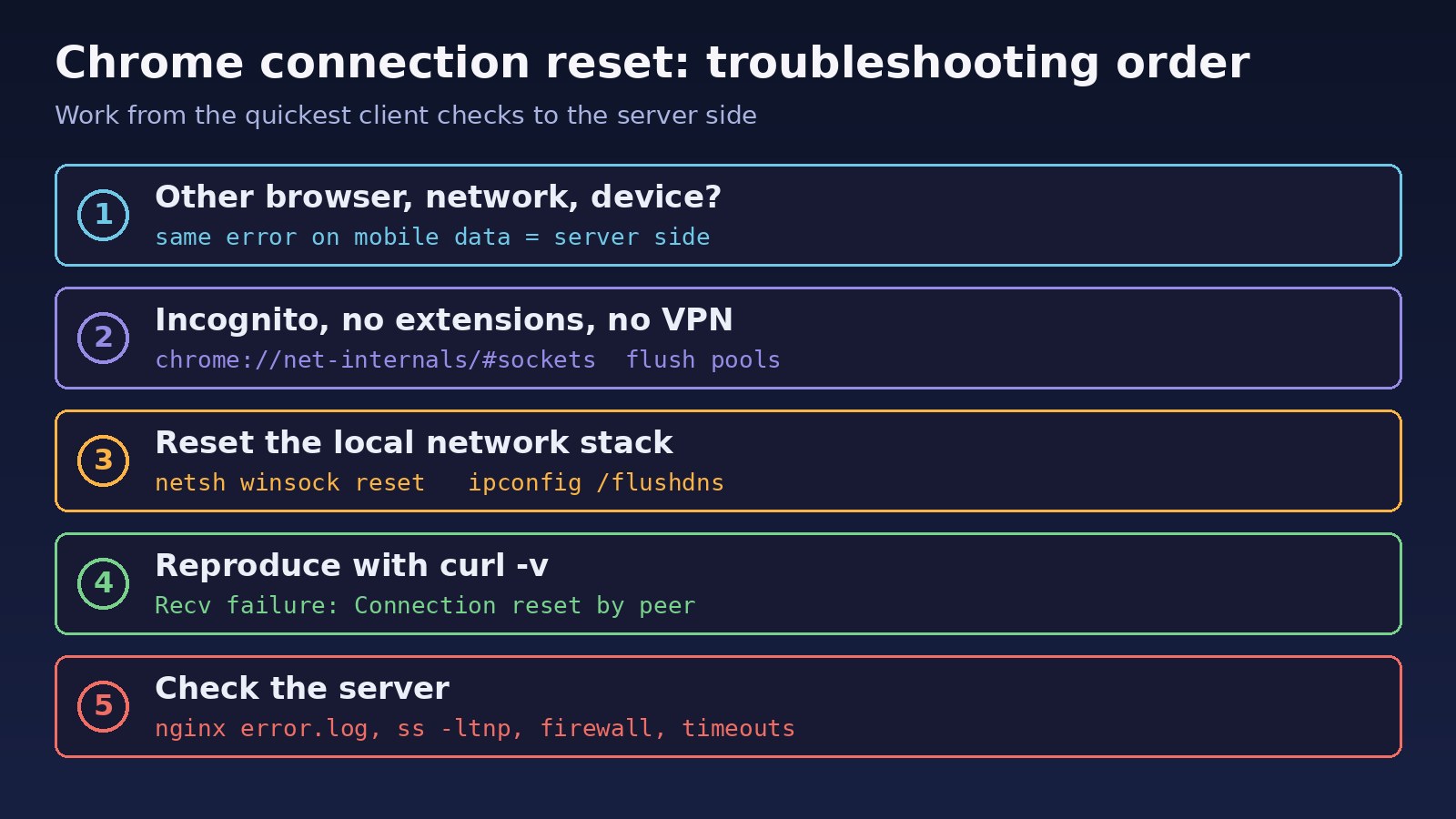
Step 1: Decide whether it is you or the site
Open the same URL on another device and on another network, for example a phone on mobile data. If it works there, the cause is on your computer or network. If it fails everywhere, the cause is on the server, and steps 6 to 8 apply.
Step 2: Rule out Chrome itself
Open an Incognito window (extensions are disabled there by default). If the site loads, disable extensions one by one at chrome://extensions. Then flush Chrome's internal caches: go to chrome://net-internals/#dns and click "Clear host cache", and to chrome://net-internals/#sockets and click "Flush socket pools". Also check chrome://settings/clearBrowserData for cached data and cookies for that site.
Step 3: Turn off VPN, proxy and HTTPS scanning
Disconnect any VPN and check the system proxy settings (Windows: Settings, Network and Internet, Proxy; macOS: System Settings, Network, Details, Proxies). If you use antivirus software with "HTTPS scanning" or "web shield", disable that feature temporarily and retry.
Step 4: Reset the network stack and DNS cache
On Windows, run the commands below in an elevated Command Prompt and restart the computer. On macOS and Linux, flush the DNS cache. Restarting the router is also worth doing at this point.
Step 5: Check MTU
If small requests work but larger pages or uploads reset, especially on a VPN or PPPoE connection, test the path MTU with ping and lower the interface MTU if needed.
Step 6: Reproduce from the command line
For a website you run, curl -v and openssl s_client show whether the reset happens during the TCP connect, during the TLS handshake, or after the request is sent. Run them from the server itself and from outside to see which layer is responsible.
Step 7: Check what is listening and what is blocking
Confirm the process listens on the expected address and port, check firewall rules and fail2ban jails, and read the Nginx error log at the moment the reset happens.
Step 8: Fix the server configuration
Bind the app to 0.0.0.0 inside containers, raise client_max_body_size to match your upload limit, align keep-alive timeouts, and check dmesg for processes killed by the OOM killer.
Code/Commands Examples
Windows: reset Winsock, TCP/IP and DNS
netsh winsock reset
netsh int ip reset
ipconfig /release
ipconfig /renew
ipconfig /flushdns
:: restart Windows after these commands
macOS and Linux: flush DNS
# macOS
sudo dscacheutil -flushcache; sudo killall -HUP mDNSResponder

# Linux with systemd-resolved
sudo resolvectl flush-caches
Test the path MTU
# Windows: 1472 bytes + 28 header bytes = 1500. Lower the size until it succeeds.
ping -f -l 1472 example.com

# Linux
ping -M do -s 1472 example.com

# macOS
ping -D -s 1472 example.com
If 1472 fails with "Packet needs to be fragmented" or "Message too long" but a smaller size works, the path MTU is lower than 1500. Lower the MTU on your VPN or network interface to match.
Reproduce the reset with curl and OpenSSL
curl -v https://app.example.com/
# *   Trying 203.0.113.10:443...
# * Connected to app.example.com (203.0.113.10) port 443
# * Recv failure: Connection reset by peer
# curl: (56) Recv failure: Connection reset by peer

openssl s_client -connect app.example.com:443 -servername app.example.com
# a reset here, before the certificate is printed, points at TLS or a filter
See who sends the RST packet
# on the server: show packets with the RST flag on port 443
sudo tcpdump -ni any 'tcp port 443 and (tcp[tcpflags] & tcp-rst != 0)'
If the server never sends an RST but the client receives one, something in between (a firewall, proxy or ISP filter) is resetting the connection.
Docker: app bound to localhost inside the container
docker ps --format '{{.Names}}\t{{.Ports}}'
docker exec -it web ss -ltnp
# LISTEN 0 511 127.0.0.1:3000 ...   <- only reachable inside the container

# fix: listen on all interfaces inside the container
# Next.js:  next start -H 0.0.0.0 -p 3000
# Vite:     vite --host 0.0.0.0
# Laravel:  php artisan serve --host=0.0.0.0 --port=8000
Nginx: uploads and keep-alive
http {
    client_max_body_size 50M;      # default is 1M
    keepalive_timeout 65s;
}

server {
    location / {
        proxy_pass http://app_upstream;
        proxy_http_version 1.1;
        proxy_set_header Connection "";
        proxy_read_timeout 120s;
    }
}sudo nginx -t && sudo systemctl reload nginx
sudo tail -f /var/log/nginx/error.log
# look for: client intended to send too large body
# upstream prematurely closed connection
# recv() failed (104: Connection reset by peer)For PHP apps, raise upload_max_filesize and post_max_size in php.ini to the same limit and restart PHP-FPM.
Node.js behind a load balancer
// The backend must keep idle connections open longer than the load balancer.
// AWS ALB idle timeout defaults to 60 seconds.
const server = app.listen(3000, '0.0.0.0');
server.keepAliveTimeout = 65_000;
server.headersTimeout = 66_000;
Firewall, fail2ban and crashed processes
sudo iptables -L -n -v | grep -i reset
sudo fail2ban-client status
sudo fail2ban-client status nginx-limit-req
sudo fail2ban-client set nginx-limit-req unbanip 198.51.100.24
sudo dmesg -T | grep -i -E 'killed process|out of memory'
Real-time apps hit similar issues with long-lived connections; WebSocket connection failed covers proxy settings for that case.
Verification
- The page loads in a normal Chrome window, not only in Incognito, with your usual extensions enabled.
curl -sv -o /dev/null https://app.example.com/finishes with an HTTP status line instead of "Connection reset by peer".- A test upload larger than 1 MB completes and returns your app's response.
- The tcpdump filter above shows no unexpected RST packets while you browse the site.
- The Nginx error log stays free of
recv() failed (104: Connection reset by peer)andupstream prematurely closed connectionduring normal traffic. - Requests after a few minutes of idle time behind the load balancer no longer fail.
Prevention
- Keep Chrome, the OS and network drivers updated, and keep the number of extensions small.
- Always bind containerized apps to
0.0.0.0and add a health check that calls the published port. - Set upload limits consistently across Nginx, PHP and your app, and show a clear error to users before the limit is hit.
- Keep backend keep-alive timeouts longer than the load balancer or proxy idle timeout.
- Monitor memory so the OOM killer does not stop your app mid-request.
- Review fail2ban and rate-limit rules so normal users and office IPs are not banned. Cross-origin requests that fail for other reasons are explained in CORS error in React and Laravel.
FAQs
What does ERR_CONNECTION_RESET mean in Chrome?
It means the TCP connection was closed with a reset packet before the response finished. Chrome did not get a valid HTTP response, so it shows its own error page.
Is a chrome connection reset caused by my computer or the website?
Test the same URL on another network and device. If it works elsewhere, the cause is local (extension, VPN, antivirus, network). If it fails everywhere, the website connection reset is coming from the server or its hosting provider.
Does clearing the cache fix ERR_CONNECTION_RESET?
Sometimes. Clearing cached data, the host cache and socket pools helps when Chrome reuses stale state, but it does not fix server-side resets or network filtering.
Why does ERR_CONNECTION_RESET happen only on file uploads?
Usually the upload is larger than Nginx client_max_body_size (1 MB by default) or a proxy limit. Raise the limit on Nginx and PHP, or check MTU if large requests fail on one network only.
Can a VPN cause ERR_CONNECTION_RESET?
Yes. VPNs can lower the effective MTU, route traffic through filtering servers, or be blocked by the site. Disconnect it and retry to confirm.
How is this different from ERR_CONNECTION_REFUSED?
Refused means nothing accepted the connection on that port. Reset means a connection was started and then forcibly closed.



Comments
Join the discussion. Replies load on demand, up to 5 levels.
0 threads
No comments yet
Be the first to start the conversation.